
Autofac通过配置的方式
autofac是比较简单易用的IOC容器。下面我们展示如何通过json配置文件,来进行控制反转。
需要用到以下程序集。可以通过nugget分别安装
Microsoft.Extensions.Configuration.dll
Microsoft.Extensions.Configuration.Json
Autofac.Configuration.dll
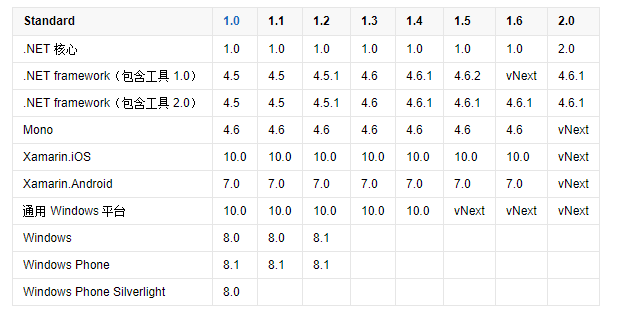
注意,项目目标框架最好设置为.NET Framework 4.6.1及以上。因为Microsoft.Extensions.Configuration.dll,依赖.NETStandard2.0
下表列出了 .NET Standard 的所有版本及其支持的平台
AutofacExt帮助类

using Autofac;

using Autofac.Configuration;

using Microsoft.Extensions.Configuration;

namespace autofacConsole

{

    public static class AutofacExt

    {

        private static IContainer _container;

        public static void InitAutofac()

        {

            // Add the configuration to the ConfigurationBuilder.

            var config = new ConfigurationBuilder();

            config.AddJsonFile("autofac.json");

            // Register the ConfigurationModule with Autofac.

            var module = new ConfigurationModule(config.Build());

            var builder = new ContainerBuilder();

            builder.RegisterModule(module);

            // Set the dependency resolver to be Autofac.

            _container = builder.Build();

        }

        /// <summary>

        /// 从容器中获取对象

        /// </summary>

        /// <typeparam name="T"></typeparam>

        public static T GetFromFac<T>()

        {

            return _container.Resolve<T>();

            //   return (T)DependencyResolver.Current.GetService(typeof(T));

        }

        public static T GetFromFac<T>(string name)

        {

            return _container.ResolveNamed<T>(name);

        }

    }

}
客户端调用
public interface IOutput

    {

        void Write(string content);

    }

public class ConsoleOutput : IOutput

    {

        public void Write(string content)

        {

            Console.WriteLine(content);

        }

    }

class Program

    {

        static void Main(string[] args)

        {

           AutofacExt.InitAutofac();

            var writer =AutofacExt.GetFromFac<IOutput>();

            writer.WriteDate();

            Console.ReadKey();

        }

    }
json配置文件配置
Autofac.json
{

  "defaultAssembly": "autofacConsole",

  "components": [

    {

      "type": "autofacConsole.ConsoleOutput, autofacConsole",

      "services": [

        {

          "type": "autofacConsole.IOutput,autofacConsole"

        }

      ],

      "instanceScope": "single-instance",

      "injectProperties": true

    }

  ]

}
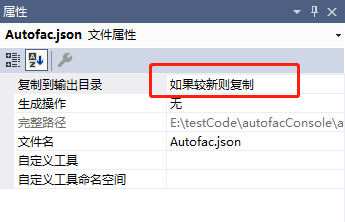
设置为如果较新则复制
参考资料:
https://github.com/autofac/Autofac
https://autofac.readthedocs.io/en/latest/getting-started/index.html
https://autofac.readthedocs.io/en/latest/configuration/xml.html
Autofac通过配置的方式的更多相关文章
- 通过配置的方式Autofac 《第三篇》
一.基本配置 1.通过配置的方式使用Autofac <?xml version="1.0"?> <configuration> <configSect ...
- Spring声明式事务(xml配置事务方式)
Spring声明式事务(xml配置事务方式) >>>>>>>>>>>>>>>>>>>& ...
- STM8S---IO复用配置(STVP方式)
1 说明 STM8S的IO复用用程序代码配置起来比較麻烦.通常是操作flash来操作option byte字节.配置寄存器更加麻烦,能够使用STM 标准外设驱动库来设置. 本文使用一种界面配置的方式来 ...
- net 中web.config单一解决方法 (其他配置引入方式)
近期一个项目需要写许多的配置项,发现在单个web.config里面写的话会很乱也难于查找 所以搜了一下解决了,记录下来 一. webconfig提供了引入其他config的方式 <conne ...
- JAVA配置&注解方式搭建简单的SpringMVC前后台交互系统
前面两篇文章介绍了 基于XML方式搭建SpringMVC前后台交互系统的方法,博文链接如下: http://www.cnblogs.com/hunterCecil/p/8252060.html htt ...
- virtualbox下centos虚拟机安装,并网卡配置桥接方式上网,使得和host可以互Ping通。
见:http://www.cnblogs.com/taoshiqian/p/7615993.html 注意: 1.host 主机什么都不要处理 2.将virtualbox 的对应虚拟机网络设置桥接 3 ...
- Spring实现Ioc的多种方式--控制反转、依赖注入、xml配置的方式实现IoC、对象作用域
Spring实现Ioc的多种方式 一.IoC基础 1.1.概念: 1.IoC 控制反转(Inversion of Control) IoC是一种设计思想. 2.DI 依赖注入 依赖注入是实现IoC的一 ...
- Spring中,使用Java配置的方式进行依赖注入
之前用spring的时候,只知道使用xml的方式,和使用注解的方式,却一直不知道在spring中,还可以使用Java类的方式进行配置.使用Java类的方式,就可以取代xml和注解.使用Java配置是S ...
- tomcat下配置https方式
[本地HTTPS]①.<Connector SSLEnabled="true" clientAuth="false" keystoreFile=" ...
随机推荐
- Leetcode题目56.合并区间(中等)
题目描述: 给出一个区间的集合,请合并所有重叠的区间. 示例 1: 输入: [[1,3],[2,6],[8,10],[15,18]] 输出: [[1,6],[8,10],[15,18]] 解释: 区间 ...
- Spring Boot ERROR StatusLogger No Log4j 2 configuration file found
1. 问题描述 项目之前的 log4j2 配置没问题,把 pom 文件中的 spring-boot-starter-web 依赖删除后,然后启动项目就报错找不到 log4j2.yml 文件. 之前引用 ...
- MongDB的DateZone
先理解:Date本身是没有格式的,只是一个毫秒数,要显示成某种格式就一定是字符串 https://github.com/ewcmsfree/ewcms/wiki/Help-mongo-java-dri ...
- [学习]sentinel中的DatatSource(一) ReadableDataSource
sentinel是今年阿里开源的高可用防护的流量管理框架. git地址:https://github.com/alibaba/Sentinel wiki:https://github.com/alib ...
- vsftpd 配置用户及根目录及其参数详解
vsftpd 常用功能参数配置及参数详解 Table of Contents 1. 配置超级服务 2. 配置匿名用户 3. 配置本地用户登录 4. 配置虚拟用户登录 5. 使用SSL登入 6. 日志文 ...
- AJAX异步对象,即XMLHttpRequest
//创建AJAX异步对象,即XMLHttpRequest function createAJAX(){ var ajax = null; try{ ajax = new ActiveXObject(& ...
- Spring对象依赖关系
Spring中,如何给对象的属性赋值? [DI, 依赖注入] 1) 通过构造函数 2) 通过set方法给属性注入值 3) p名称空间 4)自动装配(了解) 5) 注解 package loade ...
- 如何在 CentOS 里下载 RPM 包及其所有依赖包
方法一.利用 Downloadonly 插件下载 RPM 软件包及其所有依赖包 默认情况下,这个命令将会下载并把软件包保存到 /var/cache/yum/ 的 rhel-{arch}-channel ...
- element-ui分页当前在哪一页,刷新页面保留当前分页
- 关于Content-Type中application/x-www-form-urlencoded 和 multipart/form-data的区别及用法
http://blog.csdn.net/soonfly/article/details/52082547 Form的enctype属性表示页面表单数据向服务器传输时的编码方式, 常用有两种:appl ...