
JavaWeb-SpringSecurity实现需求-判断请求是否以html结尾
系列博文
项目已上传至guthub 传送门
JavaWeb-SpringSecurity初认识 传送门
JavaWeb-SpringSecurity在数据库中查询登陆用户 传送门
JavaWeb-SpringSecurity自定义登陆页面 传送门
JavaWeb-SpringSecurity实现需求-判断请求是否以html结尾 传送门
JavaWeb-SpringSecurity自定义登陆配置 传送门
JavaWeb-SpringSecurity图片验证ImageCode 传送门
JavaWeb-SpringSecurity记住我功能 传送门
JavaWeb-SpringSecurity使用短信验证码登陆 传送门
需求
请求来了,判断请求是否以html结尾,是以html结尾则重定向到登陆页面,不是以html结尾就需要进行身份认证
首先我们在SecurityConfig.java中configure()方法中修改自定义登陆页面访问路径为/require,打开SpringSecurity对/require请求的身份认证
protected void configure(HttpSecurity http) throws Exception{

        //表单验证(身份认证)

        http.formLogin()

            //自定义登陆页面

            .loginPage("/require")

            //如果URL为loginPage,则用SpringSecurity中自带的过滤器去处理该请求

            .loginProcessingUrl("/loginPage")

            .and()

            //请求授权

            .authorizeRequests()

            //在访问我们的URL时,我们是不需要省份认证,可以立即访问

            .antMatchers("/login.html","/require").permitAll()

            //所有请求都被拦截,跳转到(/login请求中)

            .anyRequest()

            //都需要我们身份认证

            .authenticated()

            //SpringSecurity保护机制

            .and().csrf().disable();

    }
在controller层下创建SecurityController.java作为用户发起的请求
    @RequestMapping("/require")

    public String require()

    {

        //判断之前的请求是否以html结尾

        //如果是,重定向到登陆页面

        //如果不是,我们就让他身份认证

        return null;

    }
package com.Gary.GaryRESTful.config;

import org.springframework.context.annotation.Bean;

import org.springframework.context.annotation.Configuration;

import org.springframework.security.config.annotation.web.builders.HttpSecurity;

import org.springframework.security.config.annotation.web.configuration.WebSecurityConfigurerAdapter;

import org.springframework.security.crypto.bcrypt.BCryptPasswordEncoder;

import org.springframework.security.crypto.password.PasswordEncoder;

//Web应用安全适配器

@Configuration

public class SecurityConfig extends WebSecurityConfigurerAdapter{

    //告诉SpringSecurity密码用什么加密的

    @Bean

    public PasswordEncoder passwordEncoder()

    {

        return new BCryptPasswordEncoder();

    }

    protected void configure(HttpSecurity http) throws Exception{

        //表单验证(身份认证)

        http.formLogin()

            //自定义登陆页面

            .loginPage("/require")

            //如果URL为loginPage,则用SpringSecurity中自带的过滤器去处理该请求

            .loginProcessingUrl("/loginPage")

            .and()

            //请求授权

            .authorizeRequests()

            //在访问我们的URL时,我们是不需要省份认证,可以立即访问

            .antMatchers("/login.html","/require").permitAll()

            //所有请求都被拦截,跳转到(/login请求中)

            .anyRequest()

            //都需要我们身份认证

            .authenticated()

            //SpringSecurity保护机制

            .and().csrf().disable();

    }

}
SecurityConfig.java
package com.Gary.GaryRESTful.controller;

import org.springframework.web.bind.annotation.RequestMapping;

public class SecurityController {

    @RequestMapping("require")

    public String require()

    {

        //判断之前的请求是否以html结尾

        //如果是,重定向到登陆页面

        //如果不是,我们就让他身份认证

        return null;

    }

}
SecurityController.java
完成需求编码阶段SecurityController.java
  //拿到转发跳转到之前的请求

    private RequestCache requestCache = new HttpSessionRequestCache();

    private RedirectStrategy redirectStrategy = new DefaultRedirectStrategy();

    @RequestMapping("/require")

    //返回的状态码(401)

    @ResponseStatus(code=HttpStatus.UNAUTHORIZED)

    public String require(HttpServletRequest request , HttpServletResponse response) throws IOException

    {

        //拿到了之前的请求

        SavedRequest savedRequest = requestCache.getRequest(request, response);

        if(savedRequest != null)

        {

            //url就是引发跳转之前我们的请求

            String url = savedRequest.getRedirectUrl();

            //判断之前的请求是否以html结尾

            if(StringUtils.endsWithIgnoreCase(url, ".html"))

            {

                //如果是,重定向到登陆页面

                redirectStrategy.sendRedirect(request, response, "/login.html");

            }

        }

        //如果不是,我们就让他身份认证

        return new String("需要身份认证");

    }
package com.Gary.GaryRESTful.controller;

import java.io.IOException;

import javax.servlet.http.HttpServletRequest;

import javax.servlet.http.HttpServletResponse;

import org.springframework.http.HttpStatus;

import org.springframework.security.web.DefaultRedirectStrategy;

import org.springframework.security.web.RedirectStrategy;

import org.springframework.security.web.savedrequest.HttpSessionRequestCache;

import org.springframework.security.web.savedrequest.RequestCache;

import org.springframework.security.web.savedrequest.SavedRequest;

import org.springframework.util.StringUtils;

import org.springframework.web.bind.annotation.RequestMapping;

import org.springframework.web.bind.annotation.ResponseStatus;

import org.springframework.web.bind.annotation.RestController;

@RestController

public class SecurityController {

    //拿到转发跳转到之前的请求

    private RequestCache requestCache = new HttpSessionRequestCache();

    //可以用来做重定向

    private RedirectStrategy redirectStrategy = new DefaultRedirectStrategy();

    @RequestMapping("/require")

    //返回的状态码(401)

    @ResponseStatus(code=HttpStatus.UNAUTHORIZED)

    public String require(HttpServletRequest request , HttpServletResponse response) throws IOException

    {

        //拿到了之前的请求

        SavedRequest savedRequest = requestCache.getRequest(request, response);

        if(savedRequest != null)

        {

            //url就是引发跳转之前我们的请求

            String url = savedRequest.getRedirectUrl();

            //判断之前的请求是否以html结尾

            if(StringUtils.endsWithIgnoreCase(url, ".html"))

            {

                //如果是,重定向到登陆页面

                redirectStrategy.sendRedirect(request, response, "/login.html");

            }

        }

        //如果不是,我们就让他身份认证

        return new String("需要身份认证");

    }

}
SecurityController.java
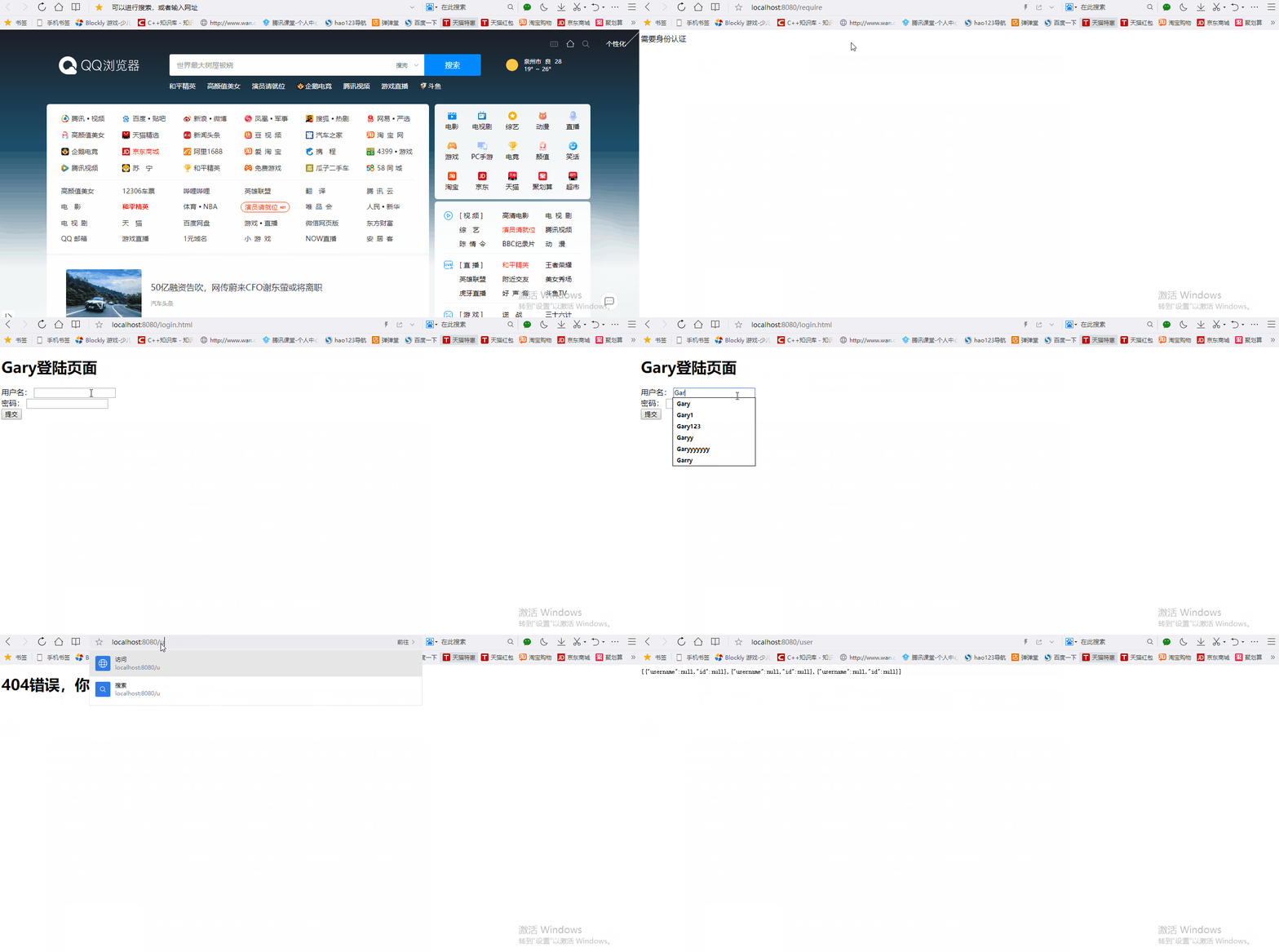
测试阶段
<!DOCTYPE html>

<html>

<head>

<meta charset="UTF-8">

<title>Insert title here</title>

</head>

<body>

<h1>Gary登陆页面</h1>

    <form action="/loginPage" method="post">

        用户名:

        <input type="text" name="username">

        <br>

        密码:

        <input type="password" name="password">

        <br>

        <input type="submit">

    </form>

</body>

</html>
login.html
package com.Gary.GaryRESTful.config;

import org.springframework.context.annotation.Bean;

import org.springframework.context.annotation.Configuration;

import org.springframework.security.config.annotation.web.builders.HttpSecurity;

import org.springframework.security.config.annotation.web.configuration.WebSecurityConfigurerAdapter;

import org.springframework.security.crypto.bcrypt.BCryptPasswordEncoder;

import org.springframework.security.crypto.password.PasswordEncoder;

//Web应用安全适配器

@Configuration

public class SecurityConfig extends WebSecurityConfigurerAdapter{

    //告诉SpringSecurity密码用什么加密的

    @Bean

    public PasswordEncoder passwordEncoder()

    {

        return new BCryptPasswordEncoder();

    }

    protected void configure(HttpSecurity http) throws Exception{

        //表单验证(身份认证)

        http.formLogin()

            //自定义登陆页面

            .loginPage("/require")

            //如果URL为loginPage,则用SpringSecurity中自带的过滤器去处理该请求

            .loginProcessingUrl("/loginPage")

            .and()

            //请求授权

            .authorizeRequests()

            //在访问我们的URL时,我们是不需要省份认证,可以立即访问

            .antMatchers("/login.html","/require").permitAll()

            //所有请求都被拦截,跳转到(/login请求中)

            .anyRequest()

            //都需要我们身份认证

            .authenticated()

            //SpringSecurity保护机制

            .and().csrf().disable();

    }

}
SecurityConfig.java
package com.Gary.GaryRESTful.controller;

import java.io.IOException;

import javax.servlet.http.HttpServletRequest;

import javax.servlet.http.HttpServletResponse;

import org.springframework.http.HttpStatus;

import org.springframework.security.web.DefaultRedirectStrategy;

import org.springframework.security.web.RedirectStrategy;

import org.springframework.security.web.savedrequest.HttpSessionRequestCache;

import org.springframework.security.web.savedrequest.RequestCache;

import org.springframework.security.web.savedrequest.SavedRequest;

import org.springframework.util.StringUtils;

import org.springframework.web.bind.annotation.RequestMapping;

import org.springframework.web.bind.annotation.ResponseStatus;

import org.springframework.web.bind.annotation.RestController;

@RestController

public class SecurityController {

    //拿到转发跳转到之前的请求

    private RequestCache requestCache = new HttpSessionRequestCache();

    //可以用来做重定向

    private RedirectStrategy redirectStrategy = new DefaultRedirectStrategy();

    @RequestMapping("/require")

    //返回的状态码(401)

    @ResponseStatus(code=HttpStatus.UNAUTHORIZED)

    public String require(HttpServletRequest request , HttpServletResponse response) throws IOException

    {

        //拿到了之前的请求

        SavedRequest savedRequest = requestCache.getRequest(request, response);

        if(savedRequest != null)

        {

            //url就是引发跳转之前我们的请求

            String url = savedRequest.getRedirectUrl();

            //判断之前的请求是否以html结尾

            if(StringUtils.endsWithIgnoreCase(url, ".html"))

            {

                //如果是,重定向到登陆页面

                redirectStrategy.sendRedirect(request, response, "/login.html");

            }

        }

        //如果不是,我们就让他身份认证

        return new String("需要身份认证");

    }

}
SecurityController.java
JavaWeb-SpringSecurity实现需求-判断请求是否以html结尾的更多相关文章
- JavaWeb之Servlet:请求 与 响应
1 引入 浏览器和服务器的种类都有很多,要在它们之间通讯,必定要遵循一定的准则,而http协议就是这样的一个"准则". Http协议:规定了 浏览器 和 服务器 数据传输的一种格式 ...
- javaweb利用filter拦截请求
项目上有个小需求,要限制访问者的IP,屏蔽未授权的登录请求.该场景使用过滤器来做再合适不过了. SecurityFilter.java: package com.lichmama.webdemo.fi ...
- Java过滤器处理Ajax请求,Java拦截器处理Ajax请求,java 判断请求是不是ajax请求
Java过滤器处理Ajax请求,Java拦截器处理Ajax请求,java 判断请求是不是ajax请求 Java过滤器处理Ajax请求,Java拦截器处理Ajax请求,拦截器Ajax请求 java ...
- 判断请求是否为ajax
判断请求是否为ajax 转载:http://www.cnblogs.com/tony-jingzhou/archive/2012/07/30/2615612.html x-requested-with ...
- java判断请求是否ajax异步请求
java判断请求是否ajax异步请求 解决方法: if (request.getHeader("x-requested-with") != null && re ...
- thinkphp 判断请求类型
判断请求类型 在很多情况下面,我们需要判断当前操作的请求类型是GET .POST .PUT或 DELETE,一方面可以针对请求类型作出不同的逻辑处理,另外一方面有些情况下面需要验证安全性,过滤不安全的 ...
- php判断请求类型(ajax|get|post|cli)
php判断请求类型,可以通过 $_SERVER 相关的参数来实现, 这个很在对某些请求代码复用里面很常用.具体代码如下: /** *@todo: 判断是否为post */ if(!function_e ...
- JavaWeb之如何把请求数据转成实体类
JavaWeb之如何把请求数据转成实体类 自己写个工具类加入下面两个静态方法 自定一个注解类DateTimeFormatting 调用方式User user = util.ObjectFromMap( ...
- PHP判断请求是否是ajax请求
首先看一下框架里面是怎样判断的.ThinkPHP:define('IS_AJAX', ((isset($_SERVER['HTTP_X_REQUESTED_WITH']) && str ...
随机推荐
- SNI功能在NetScaler上的实现
SNI功能在NetScaler上的实现 来源 https://raynorli.com/2018/09/11/sni-on-netscaler/ 现网中经常是一台主机上运行多个Web站点,如果启用了 ...
- A Pythonic Card Deck: __len__ & __getitem__ & for 循环的嵌套
1. 列表生成式的嵌套 for 循环: 示例如下: li1 = range(1,6) li2 = list("ABC") # list("ABC") 的结果为 ...
- rabbitmq 连接报错 An unexpected connection driver error occured
转自:https://blog.csdn.net/zht741322694/article/details/82801873 在服务器上安装了一个RabbitMq,并新创建了一个用户授予了管理员角色, ...
- SSM框架中的Mapper.xml文件中的增、删、改、查等操作
<?xml version="1.0" encoding="UTF-8" ?> <!DOCTYPE mapper PUBLIC "- ...
- fastadmin html数字验证
<input id="c" name="row[q]" data-rule="required;range(0~)" class=&q ...
- 《设计模式之美》 <01>为什么需要学习掌握设计模式?
1. 应对面试中的设计模式相关问 题学习设计模式和算法一样,最功利.最直接的目的,可能就是应对面试了.不管你是前端工程师.后端工程师,还是全栈工程师,在求职面试中,设计模式问题是被问得频率比较高的一类 ...
- 解决Chrome无法安装CRX离线插件
解释说明: 谷歌浏览器Chrome,版本号67.0.3396.99,自这个版本后的Chrome,手动拖放插件文件crx到谷歌浏览器,这种安装插件的方式,一定会失败,它会提示“无法从该网站添加应用,扩展 ...
- kubernetes之NFS动态提供Kubernetes后端存储卷
StorageClass作为对存储资源的抽象定义, 对用户设置的NFS申请屏蔽后端存储的细节, 一方面减少了用户对于存储资源细节的关注, 另一方面减轻了管理员手工管理pv的工作, 由系统自动完成pv的 ...
- C++实例 分解质因数
分解质因数: 每个合数都可以写成几个质数相乘的形式.其中每个质数都是这个合数的因数,叫做这个合数的分解质因数.分解质因数只针对合数. 分解质因数的算式叫短除法.求一个数分解质因数,要从最小的质数除起, ...
- BZOJ 1006 完美消除序列&最大势算法&弦图
K国是一个热衷三角形的国度,连人的交往也只喜欢三角原则.他们认为三角关系:即AB相互认识,BC相互认识,CA相互认识,是简洁高效的.为了巩固三角关系,K国禁止四边关系,五边关系等等的存在.所谓N边关系 ...