
Oracle Linux(64位)安装64位Oracle10g遇到ins_ctx.mk问题
在Oracle Linux Server Release 5.7上安装64位Oracle 10g 时,遇到如下问题:
Error in invoking target 'install' of makefile '/u01/app/oracle/product/dbhome_1/ctx/lib/ins_ctx.mk'.
See '/u01/app/oracle/oraInventory/logs/installActions2014-01-11_12-44-52PM.log' for details;
截图如下
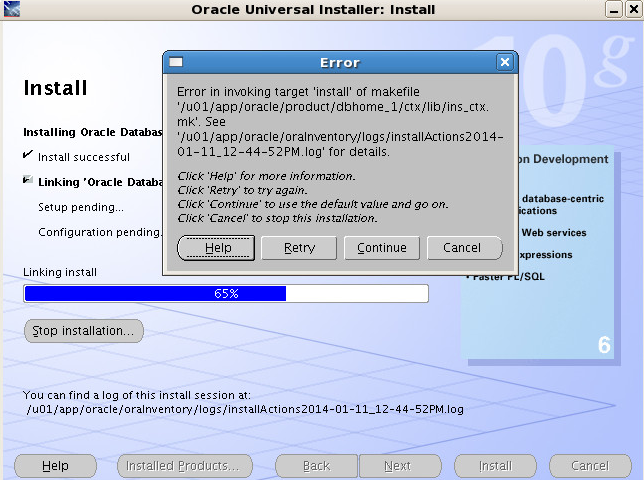
使用tail命令查看/u01/app/oracle/oraInventory/logs/installActions2014-01-11_12-44-52PM.log文件,发现如下信息:
1: INFO: mv -f /u01/app/oracle/product/dbhome_1/bin/ctxlc /u01/app/oracle/product/dbhome_1/bin/ctxlcO
2:
3: INFO: mv ctxlc /u01/app/oracle/product/dbhome_1/bin/ctxlc
4:
5: INFO: chmod 751 /u01/app/oracle/product/dbhome_1/bin/ctxlc
6:
7: INFO: gcc -m32 -o ctxhx -L/u01/app/oracle/product/dbhome_1/ctx//lib32/ -L/u01/app/oracle/product/dbhome_1/lib32/ -L/u01/app/oracle/product/dbhome_1/lib32/stubs/ /u01/app/oracle/product/dbhome_1/ctx/lib/ctxhx.o -L/u01/app/oracle/product/dbhome_1/ctx/lib/ -ldl -lm -lctxhx -Wl,-rpath,/u01/app/oracle/product/dbhome_1/ctx/lib -lsnls10 -lnls10 -lcore10 -lsnls10 -lnls10 -lcore10 -lsnls10 -lnls10 -lxml10 -lcore10 -lunls10 -lsnls10 -lnls10 -lcore10 -lnls10 `cat /u01/app/oracle/product/dbhome_1/lib/sysliblist`
8:
9: INFO: /usr/bin/ld: crt1.o: No such file: No such file or directory
10:
11: INFO: collect2: ld returned 1 exit status
12:
13: INFO: make: *** [ctxhx] Error 1
14:
15: INFO: End output from spawned process.
16:
17: INFO: ----------------------------------
18:
19: INFO: Exception thrown from action: make
20:
21: Exception Name: MakefileException
22:
23: Exception String: Error in invoking target 'install' of makefile '/u01/app/oracle/product/dbhome_1/ctx/lib/ins_ctx.mk'. See '/u01/app/oracle/oraInventory/logs/installActions2014-01-11_01-24-04PM.log' for details.
24:
25: Exception Severity: 1
26:
在杨廷琨博客"安装LINUX X86-64的10201出现链接ins_ctx.mk错误"中刚好找到了问题的原因所在:Linux没有安装32位的glibc-devel包。于是检查一下是否没有安装32位的glibc-devel包。如下所示,确实只安装了64位的glibc-devel包。
1: [root@CEG-eSCM ~]# rpm --all --query --queryformat "%{NAME}-%{VERSION}-%{RELEASE}-(%{ARCH})\n" | grep glibc
2:
3: glibc-devel-2.5-65-(x86_64)
4:
5: glibc-2.5-65-(x86_64)
6:
7: glibc-headers-2.5-65-(x86_64)
8:
9: glibc-common-2.5-65-(x86_64)
10:
11: glibc-2.5-65-(i686)
12:
接下来安装位的glibc-devel包
1: [root@CEG-eSCM cdrom]# yum install glibc-devel.i386
2:
3: Loaded plugins: rhnplugin, security
4:
5: This system is not registered with ULN.
6:
7: ULN support will be disabled.
8:
9: rhel-debuginfo | 1.1 kB 00:00
10:
11: Setting up Install Process
12:
13: Resolving Dependencies
14:
15: --> Running transaction check
16:
17: ---> Package glibc-devel.i386 0:2.5-65 set to be updated
18:
19: --> Finished Dependency Resolution
20:
21: Dependencies Resolved
22:
23: ====================================================================================================================================
24:
25: Package Arch Version Repository Size
26:
27: ====================================================================================================================================
28:
29: Installing:
30:
31: glibc-devel i386 2.5-65 rhel-debuginfo 2.0 M
32:
33: Transaction Summary
34:
35: ====================================================================================================================================
36:
37: Install 1 Package(s)
38:
39: Upgrade 0 Package(s)
40:
41: Total download size: 2.0 M
42:
43: Is this ok [y/N]: y
44:
45: Downloading Packages:
46:
47: Running rpm_check_debug
48:
49: Running Transaction Test
50:
51: Finished Transaction Test
52:
53: Transaction Test Succeeded
54:
55: Running Transaction
56:
57: Installing : glibc-devel 1/1
58:
59: Installed:
60:
61: glibc-devel.i386 0:2.5-65
62:
63: Complete!
64:
按照他博客的提示,安装这个包后,要退出安装界面,而不要点CONTINUE,否则即使ins_ctx.mk编译成功,任然会提示该错误。我按照提示安装成功后,退出Oracle安装,然后重新安装,问题解决。
参考资料:
http://blog.itpub.net/4227/viewspace-675357
Oracle Linux(64位)安装64位Oracle10g遇到ins_ctx.mk问题的更多相关文章
- oracle 11g 64位安装32位客户端和PL/SQL
转自:http://www.360doc.com/content/14/0602/10/4903283_382949382.shtml 这个你需要安装一个32位的oracle客户端才能使用plsq ...
- Linux 配置只安装 64 位软件包
Centos.RHEL等系统,yum 安装的时候有时候会安装32的,然而我们只需要安装64位的软件! 解决方法: yum只安装 64 位的包,只需在 /etc/yum.conf 中加入 "e ...
- wamp安装xdebug特殊情况win7 64位安装32位wamp
在wamp上安装xdebug网上很多文章都介绍了方法,但是我这里遇到了一个很特殊的情况,在网上很少有人提及: 我机器是win7 64位的,安装的wamp1.7.4是32位的,这是后来导致出现奇怪现象的 ...
- Ubuntu 64位安装32位运行库
sudo apt-get install ia32-libs 32-64sudo apt-get install libc6:i386sudo apt-get install librt:i386su ...
- ubuntu 13.04 64位安装32位兼容包
未安装32位兼容包,编译出现未找到指定目录下gcc命令,则安装兼容包:sudo apt-get install ia32-libs 若提示:不能安装,与相关软件冲突,则按如下安装: 在网上找到更新源, ...
- Oracle linux 6.3 安装11g R2 RAC on vbox
1 安装系统 Virtual box 4.3 Oracle linux 6.3 Oracle 11g r2 Make sure "Adapter 1" is enabled, se ...
- Oracle Linux 5.7安装VMware Tools的问题
案例环境介绍: 虚拟机的版本:VMware® Workstation 8.0.3 build-703057 操作系统版本:Oracle Linux Server release 5.7 ...
- RAC分解步骤之一,在oracle linux 4u4上安装oracle 10.2.0.1.0操作日志
练习oracle的rac组建过程,第一步,先练习4u4上安装oracle 10.2.0.1.0.直接安装rac,有些难度.从简单的做起.总RAC步骤,参照小布老师的RAC组建. 1. 启动vc,登陆v ...
- oracle linux 6.8 安装
' 测试环境vm虚拟机 硬盘大小50G 内存2G CPU 4 选择install or upgrade an existing system 选择skip跳过内存检查 Next 选择语言,Next 选 ...
随机推荐
- andriod 手机按键检测事件 onKeyDown() 简述
函数原型: public boolean onKeyDown(int keyCode, KeyEvent event); 第一个参数是用户按下键时,当前所接收到的按键代号: 第二个参数是按键事件的对象 ...
- 如何用 ajax 连接mysql数据库,并且获取从中返回的数据。ajax获取从mysql返回的数据。responseXML分别输出不同数据的方法。
开讲前,先说下网上,大部分的关于这方面的博文或者其他什么的,就我自己的感觉,第一说得不详细,第二语言不能很好的被初学者了解. 我这篇博文的标题之所以用了三句,是为了方便其他人好查找: 这里介绍的方法有 ...
- 【jQuery小实例】---2自定义动画
---本系列文章所用使用js均可在本博客文件中找到 本节用jQuery完一个简易的动画效果,一个小驴跑跑的效果.和一个类似qq面板效果.大致也分为三步:添加jquery-1.8.3.js文件.这个是不 ...
- PHP数组及简单函数
PHP函数: 1.简单函数 四要素:返回类型,函数名,参数列表,函数体 function Show() { echo "hello"; } Show(); 运行结果:hellow ...
- 使用OAuth打造webapi认证服务供自己的客户端使用
一.什么是OAuth OAuth是一个关于授权(Authorization)的开放网络标准,目前的版本是2.0版.注意是Authorization(授权),而不是Authentication(认证). ...
- WebSocket 介绍(一)
WebSocket 发起单个请求,服务端不需要等待客服端,客户端在任何时候也能发消息到服务端,减少了轮询时候的延迟.经历一次连接后,服务器能给客户端发多次.下图是轮询与WebSocket的区别. 基于 ...
- 会务准备期间材料准备工作具体实施总结 ----(vim技巧应用, python信息提取与整合, microsoft word格式调整批量化)
会务准备期间材料准备工作具体实施总结(vim, python, microsoft word) span.kw { color: #007020; font-weight: bold; } code ...
- block,inline和inline-block概念和区别
总体概念 block和inline这两个概念是简略的说法,完整确切的说应该是 block-level elements (块级元素) 和 inline elements (内联元素).block元素通 ...
- .NET 内存基础(通过内存体验类型、传参、及装箱拆箱)
该随笔受启发于<CLR Via C#(第三版)>第四章4.4运行时的相互联系 一.内存分配的几个区域 1.线程栈 局部变量的值类型 和 局部变量中引用类型的指针(或称引用)会被分配到该区域 ...
- 基于C#的MongoDB数据库开发应用(4)--Redis的安装及使用
在前面介绍了三篇关于MongoDB数据库的开发使用文章,严格来讲这个不能归类于MongoDB数据库开发,不过Redis又有着和MongoDB数据库非常密切的关系,它们两者很接近,Redis主要是内存中 ...