
bash: express: command not found及vue连接数据库调接口
今天在使用express -e . 的命令时,cmd给我报了一段不识别的错误:
bash: express: command not found
,在网上查了一下,有人指出是express4的版本将命令工具分家了,所以需要我们安装以命令工具:
命令如下:npm install -g express-generator
之后再次安装:npm install -g express
好了,没问题了。
vue连接数据库调接口:
1.在code中安装:express server -e
2.进入server: cd server
3.安装依赖:cnpm i
4.vuex->code->server->app.js添加:
//监听端口
app.listen(777,()=>{
  console.log('服务器已经启动...')
});
5.启动 nodemon app
如果显示bash:nodemon:command not found
执行以下命令:
cnpm install -g nodemon
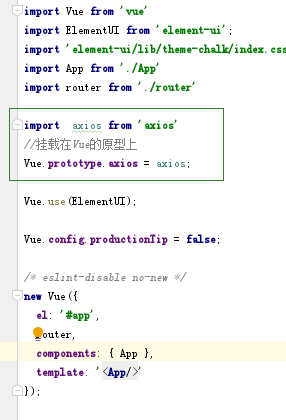
6.引入axios并挂载在vue的原型上
npm install axios --save

在main.js中引入
import axios from 'axios'
Vue.prototype.axios = axios;
在相应页面测试:
this.axios.get('/api/voteindex')
  .then(response => {
    if(response.data.length){
      console.log('接收后端响应登录请求的数据',response.data[0]);
    }else{
      _this.$message.error('请检查用户名和密码');
    }
  })
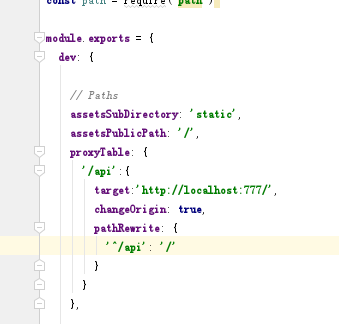
7.vuex->code-vuexms->config->index.js中的dev里配置proxyTable:
proxyTable: {
  '/api':{
    target: 'http://localhost:777/', // 测试
    changeOrigin: true, // 改变源(是否跨域)
    pathRewrite: {
      '^/api': '/'
    }
  }
  }
8.引入请求
在vuex->code-server->routes->index.js引入:
router.get('/voteindex',(req,res) =>{
  res.send("111")
});
9.用node.js连接数据库,启动phpStudy
在server中安装mysql
cnpm install mysql --save
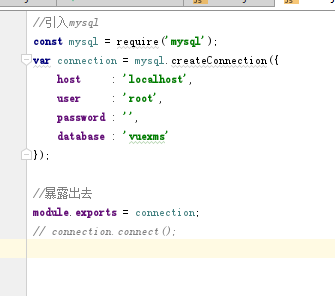
vuex->code-server->routes中新建conn.js
//引入mysql
const mysql = require('mysql');
var connection = mysql.createConnection({
    host     : 'localhost',
    user     : 'root',
    password : '',
    database : 'vuexms'
});

//暴露出去
module.exports = connection;
// connection.connect();
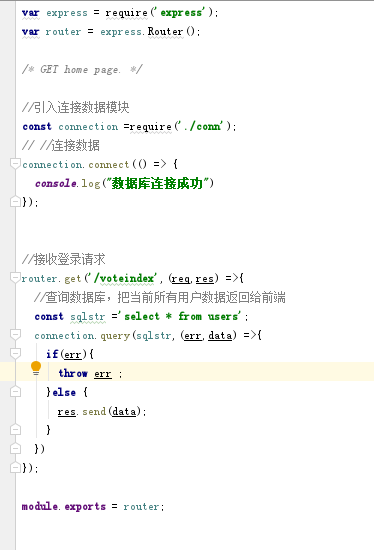
10.在vuex->code-server->routes->index.js连接数据库
//引入连接数据模块
const connection =require('./conn');
// //连接数据
connection.connect(() => {
  console.log("数据库连接成功")
});
bash: express: command not found及vue连接数据库调接口的更多相关文章
- bash:express:command not found
重新设置了node_global和node_cache目录后,总是显示command not found 找了几篇博文后,终于解决了这个问题 步骤如下: 1.新建node_global和node_ ...
- scp报错 -bash: scp: command not found
环境:RHEL6.5 使用scp命令报错: [root@oradb23 media]# scp /etc/hosts oradb24:/etc/ -bash: scp: command not fou ...
- source /etc/profile报错-bash: id:command is not found
由于误操作导致 source /etc/profile 报错 -bash: id:command is not found 此时,linux下很多命令到不能能用,包括vi ls 等... 可以使用 e ...
- -bash: .bash_profile: command not found
今天有一同事安装了ORACLE后,在切换账号时遇到错误提示"-bash: .bash_profile: command not found".如下所示 [root@GLETestL ...
- Linux下提示 bash: xxx command not found
今天在虚拟机上安装了CentOS5.5,发现运行一些很正常的诸如:init,shutdown,fdisk 等命令时,悍然提示: bash: xxx command not found. 那么,首先就要 ...
- [原创]-bash: iostat: command not found解决办法
[root@testhost ~]# iostat-bash: iostat: command not found IOSTAT 命令不可用,首先确认sysstat包是否安装,sysstat包中包括i ...
- # mysql -u root -p -bash: mysql: command not found
[root@jboss ~]# mysql -u root -p-bash: mysql: command not found 需要安装mysql # yum install mysql之后就行 了
- bash:fdisk:command not found
bash:fdisk:command not found [lansir@Red-Hat ~]$ fdisk -l-bash: fdisk: command not found 原因是fdisk不在P ...
- Centos提示-bash: make: command not found的解决办法
一般出现这个-bash: make: command not found提示,是因为安装系统的时候使用的是最小化mini安装,系统没有安装make.vim等常用命令,直接yum安装下即可: yum - ...
随机推荐
- JLOI 2013 卡牌游戏 bzoj3191
题目描述 N个人坐成一圈玩游戏.一开始我们把所有玩家按顺时针从1到N编号.首先第一回合是玩家1作为庄家.每个回合庄家都会随机(即按相等的概率)从卡牌堆里选择一张卡片,假设卡片上的数字为X,则庄家首先把 ...
- dart中extends、 implements、with的用法与区别
一.概述 继承(关键字 extends) 混入 mixins (关键字 with) 接口实现(关键字 implements) 这三种关系可以同时存在,但是有前后顺序: extends -> m ...
- error C2712: Cannot use __try in functions that require object unwinding
转自VC错误:http://www.vcerror.com/?p=52 问题描述: error C2712: Cannot use __try in functions that require ob ...
- SpringCloud学习笔记(九):SpringCloud Config 分布式配置中心
概述 分布式系统面临的-配置问题 微服务意味着要将单体应用中的业务拆分成一个个子服务,每个服务的粒度相对较小,因此系统中会出现大量的服务.由于每个服务都需要必要的配置信息才能运行,所以一套集中式的.动 ...
- appium + python 自动化调试手机时 UiAutomator exited unexpectedly with code 0, signal null
放上appium报错图,appium在手机里安装了appium setting 和unlock 软件,输入法也被变成了appium input ,但是就是点不到目标软件,手机也可以被cmd adb ...
- <scrapy爬虫>基本操作
scrapy选择器的用法 //selector可以加可以不加 response.selector.xpath("//title/text()").extract_first() r ...
- ORM下实现继承的三种方式(TPH TPC TPT)
TPH(Table Per Hierarchy):所有的数据都放在同一个表格内,但是使用辨别标志(Discriminator)的方式来区分 TPC(Table Per Concrete-Type):由 ...
- 分析Hive表和分区的统计信息(Statistics)
类似于Oracle的分析表,Hive中也提供了分析表和分区的功能,通过自动和手动分析Hive表,将Hive表的一些统计信息存储到元数据中. 表和分区的统计信息主要包括:行数.文件数.原始数据大小.所占 ...
- sqlite获取表字段
sqlite下能通过sqlite_master获取指定数据库的表信息和表结构 但是通过sqlite_master不能获取表字段的信息 如果需要获取指定表字段的所有信息 可以使用如下语法: PRAGMA ...
- Docker配置JDK1.8
1.安装Docker(菜鸟教程有) https://www.runoob.com/docker/centos-docker-install.html 2.docker下载centos镜像(用作配置jd ...