
elasticsearch 中文API river
river-jdbc
安装
./bin/plugin --install jdbc --url http://xbib.org/repository/org/xbib/elasticsearch/plugin/elasticsearch-river-jdbc/1.4.0.8/elasticsearch-river-jdbc-1.4.0.8-plugin.zip
文档
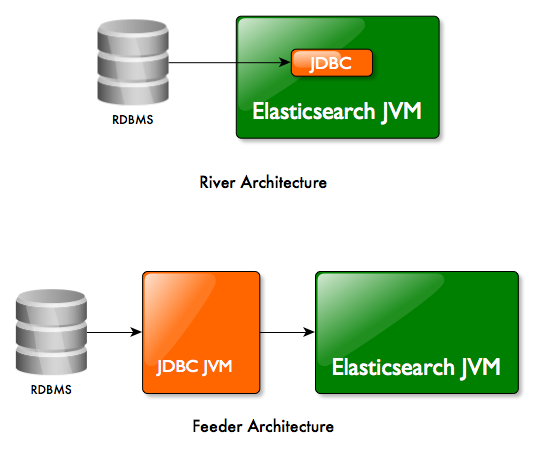
两种方式:river或者feeder
该插件能够以“pull模式”执行river和以“push模式”执行feeder。在feeder模式下插件运行在不同的JVM中,可以连接到远程的Elasticsearch集群。
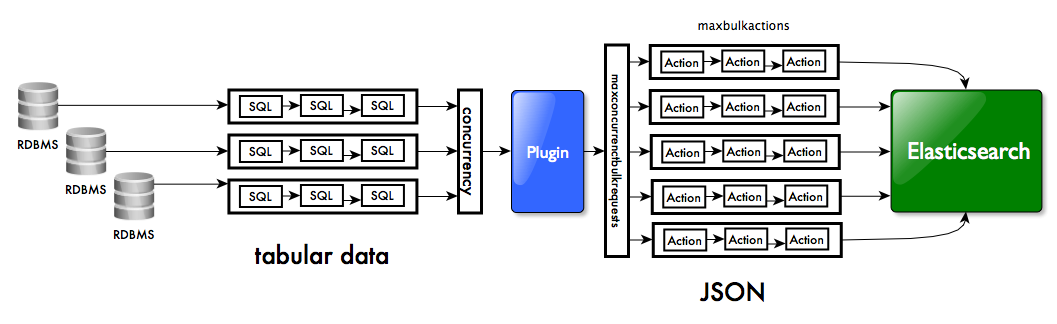
该插件可以从不同的关系数据库源并行的获取数据。当索引到elasticsearch中时,多线程bulk模式确保了高吞吐。
安装运行river
#安装elasticsearch

curl -OL https://download.elasticsearch.org/elasticsearch/elasticsearch/elasticsearch-1.4.2.zip

cd $ES_HOME

unzip path/to/elasticsearch-1.4.2.zip

#安装JDBC插件

./bin/plugin --install jdbc --url http://xbib.org/repository/org/xbib/elasticsearch/plugin/elasticsearch-river-jdbc/1.4.0.6/elasticsearch-river-jdbc-1.4.0.6-plugin.zip

#下载mysql driver

curl -o mysql-connector-java-5.1.33.zip -L 'http://dev.mysql.com/get/Downloads/Connector-J/mysql-connector-java-5.1.33.zip/from/http://cdn.mysql.com/'

cp mysql-connector-java-5.1.33-bin.jar $ES_HOME/plugins/jdbc/ chmod 644 $ES_HOME/plugins/jdbc/*

#启动elasticsearch

./bin/elasticsearch

#停止river

curl -XDELETE 'localhost:9200/_river/my_jdbc_river/'
JDBC插件参数
JDBC插件一般的格式如下:
curl -XPUT 'localhost:9200/_river/<rivername>/_meta' -d '{

    <river parameters>

    "type" : "jdbc",

    "jdbc" : {

         <river definition>

    }

}'
例如
curl -XPUT 'localhost:9200/_river/my_jdbc_river/_meta' -d '{

    "type" : "jdbc",

    "jdbc" : {

        "url" : "jdbc:mysql://localhost:3306/test",

        "user" : "",

        "password" : "",

        "sql" : "select * from orders",

        "index" : "myindex",

        "type" : "mytype",

        ...

    }

}'
如果一个数组传递给jdbc字段,多个river源也是可以的。
curl -XPUT 'localhost:9200/_river/my_jdbc_river/_meta' -d '{

     <river parameters>

    "type" : "jdbc",

    "jdbc" : [ {

         <river definition 1>

    }, {

         <river definition 2>

    } ]

}'
可以通过concurrency参数并行控制多个river源
curl -XPUT 'localhost:9200/_river/my_jdbc_river/_meta' -d '{

     <river parameters>

    "concurrency" : 2,

    "type" : "jdbc",

    "jdbc" : [ {

         <river definition 1>

    }, {

         <river definition 2>

    } ]

}'
jdbc块外部的参数
strategy - JDBC插件的策略。当前的实现有simple和column。
schedule - a single or a list of cron expressions for scheduled execution
threadpoolsize -scheduled executions的线程池大小
interval - 两个river启动的延迟时间
max_bulk_actions - 每个bulk索引请求提交的长度(默认是1000)
max_concurrrent_bulk_requests - bulk请求的并行数量(默认是2*cpu core)
max_bulk_volume - 一个bulk请求的最大容量(默认是10m)
max_request_wait - 一个bulk请求最大的等待时间(默认是60s)
flush_interval - flushing索引文档到bulk action的间隔时间
jdbc块内部的参数
url - the JDBC driver URL
user - the JDBC database user
password - the JDBC database password
sql - SQL语句。既可以是一个字符串也可以是一个列表。
"sql" : [

    {

        "statement" : "select ... from ... where a = ?, b = ?, c = ?",

        "parameter" : [ "value for a", "value for b", "value for c" ]

    },

    {

        "statement" : "insert into  ... where a = ?, b = ?, c = ?",

        "parameter" : [ "value for a", "value for b", "value for c" ],

        "write" : "true"

    },

    {

        "statement" : ...

    }

]
sql.statement - the SQL statement
sql.write - 如果为true,SQL语句解释为一个insert/update语句,这个语句写权限。默认为false
sql.callable - 如果为true,SQL语句解释为一个CallableStatement用于保存存储过程。默认为false
sql.parameter - 绑定参数到SQL语句。可以用到一些指定的值
- $now - the current timestamp
- $job - a job counter
- $count - last number of rows merged
- $river.name - the river name
- $last.sql.start - a timestamp value for the time when the last SQL statement started
- $last.sql.end - a timestamp value for the time when the last SQL statement ended
- $last.sql.sequence.start - a timestamp value for the time when the last SQL sequence started
- $last.sql.sequence.end - a timestamp value for the time when the last SQL sequence ended
- $river.state.started - the timestamp of river start (from river state)
- $river.state.timestamp - last timestamp of river activity (from river state)
- $river.state.counter - counter from river state, counts the numbers of runs
locale - the default locale (used for parsing numerical values, floating point character. Recommended values is "en_US")
timezone - the timezone for JDBC setTimestamp() calls when binding parameters with timestamp values
rounding - rounding mode for parsing numeric values. Possible values "ceiling", "down", "floor", "halfdown", "halfeven", "halfup", "unnecessary", "up"
scale - the precision of parsing numeric values
autocommit - true if each statement should be automatically executed. Default is false
fetchsize - the fetchsize for large result sets, most drivers use this to control the amount of rows in the buffer while iterating through the result set
max_rows - limit the number of rows fetches by a statement, the rest of the rows is ignored
max_retries - the number of retries to (re)connect to a database
max_retries_wait - a time value for the time that should be waited between retries. Default is "30s"
resultset_type - the JDBC result set type, can be TYPE_FORWARD_ONLY, TYPE_SCROLL_SENSITIVE, TYPE_SCROLL_INSENSITIVE. Default is TYPE_FORWARD_ONLY
resultset_concurrency - the JDBC result set concurrency, can be CONCUR_READ_ONLY, CONCUR_UPDATABLE. Default is CONCUR_UPDATABLE
ignore_null_values - if NULL values should be ignored when constructing JSON documents. Default is false
prepare_database_metadata - if the driver metadata should be prepared as parameters for acccess by the river. Default is false
prepare_resultset_metadata - if the result set metadata should be prepared as parameters for acccess by the river. Default is false
column_name_map - a map of aliases that should be used as a replacement for column names of the database. Useful for Oracle 30 char column name limit. Default is null
query_timeout - a second value for how long an SQL statement is allowed to be executed before it is considered as lost. Default is 1800
connection_properties - a map for the connection properties for driver connection creation. Default is null
index - the Elasticsearch index used for indexing
type - the Elasticsearch type of the index used for indexing
index_settings - optional settings for the Elasticsearch index
type_mapping - optional mapping for the Elasticsearch index type
默认的参数设置
{

    "strategy" : "simple",

    "schedule" : null,

    "interval" : 0L,

    "threadpoolsize" : 4,

    "max_bulk_actions" : 10000,

    "max_concurrent_bulk_requests" : 2 * available CPU cores,

    "max_bulk_volume" : "10m",

    "max_request_wait" : "60s",

    "flush_interval" : "5s",

    "jdbc" : {

        "url" : null,

        "user" : null,

        "password" : null,

        "sql" : null,

        "locale" : Locale.getDefault().toLanguageTag(),

        "timezone" : TimeZone.getDefault(),

        "rounding" : null,

        "scale" : 2,

        "autocommit" : false,

        "fetchsize" : 10, /* MySQL: Integer.MIN */

        "max_rows" : 0,

        "max_retries" : 3,

        "max_retries_wait" : "30s",

        "resultset_type" : "TYPE_FORWARD_ONLY",

        "resultset_concurreny" : "CONCUR_UPDATABLE",

        "ignore_null_values" : false,

        "prepare_database_metadata" : false,

        "prepare_resultset_metadata" : false,

        "column_name_map" : null,

        "query_timeout" : 1800,

        "connection_properties" : null,

        "index" : "jdbc",

        "type" : "jdbc",

        "index_settings" : null,

        "type_mapping" : null,

    }

}
结构化对象
SQL查询的一个优势是连接操作。从许多表获得数据形成新的元组。
curl -XPUT 'localhost:9200/_river/my_jdbc_river/_meta' -d '{

    "type" : "jdbc",

    "jdbc" : {

        "url" : "jdbc:mysql://localhost:3306/test",

        "user" : "",

        "password" : "",

        "sql" : "select \"relations\" as \"_index\", orders.customer as \"_id\", orders.customer as \"contact.customer\", employees.name as \"contact.employee\" from orders left join employees on employees.department = orders.department"

    }

}'
sql结构是
mysql> select "relations" as "_index", orders.customer as "_id", orders.customer as "contact.customer", employees.name as "contact.employee"  from orders left join employees on employees.department = orders.department;

+-----------+-------+------------------+------------------+

| _index    | _id   | contact.customer | contact.employee |

+-----------+-------+------------------+------------------+

| relations | Big   | Big              | Smith            |

| relations | Large | Large            | Müller           |

| relations | Large | Large            | Meier            |

| relations | Large | Large            | Schulze          |

| relations | Huge  | Huge             | Müller           |

| relations | Huge  | Huge             | Meier            |

| relations | Huge  | Huge             | Schulze          |

| relations | Good  | Good             | Müller           |

| relations | Good  | Good             | Meier            |

| relations | Good  | Good             | Schulze          |

| relations | Bad   | Bad              | Jones            |

+-----------+-------+------------------+------------------+

11 rows in set (0.00 sec)
得到的JSON对象为
index=relations id=Big {"contact":{"employee":"Smith","customer":"Big"}}

index=relations id=Large {"contact":{"employee":["Müller","Meier","Schulze"],"customer":"Large"}}

index=relations id=Huge {"contact":{"employee":["Müller","Meier","Schulze"],"customer":"Huge"}}

index=relations id=Good {"contact":{"employee":["Müller","Meier","Schulze"],"customer":"Good"}}

index=relations id=Bad {"contact":{"employee":"Jones","customer":"Bad"}}
怎样获取一个表
它dump一个表到Elasticsearch中。如果没有给定_id列,IDs将会自动生成。
curl -XPUT 'localhost:9200/_river/my_jdbc_river/_meta' -d '{

    "type" : "jdbc",

    "jdbc" : {

        "url" : "jdbc:mysql://localhost:3306/test",

        "user" : "",

        "password" : "",

        "sql" : "select * from orders"

    }

}'
结果是:
id=<random> {"product":"Apples","created":null,"department":"American Fruits","quantity":1,"customer":"Big"}

id=<random> {"product":"Bananas","created":null,"department":"German Fruits","quantity":1,"customer":"Large"}

id=<random> {"product":"Oranges","created":null,"department":"German Fruits","quantity":2,"customer":"Huge"}

id=<random> {"product":"Apples","created":1338501600000,"department":"German Fruits","quantity":2,"customer":"Good"}

id=<random> {"product":"Oranges","created":1338501600000,"department":"English Fruits","quantity":3,"customer":"Bad"}
怎样获得增量的数据
推荐使用时间戳来同步。下面的例子获取最后一次river运行之后添加的所有产品行。
{

    "type" : "jdbc",

    "jdbc" : {

        "url" : "jdbc:mysql://localhost:3306/test",

        "user" : "",

        "password" : "",

        "sql" : [

            {

                "statement" : "select * from \"products\" where \"mytimestamp\" > ?",

                "parameter" : [ "$river.state.last_active_begin" ]

            }

        ],

        "index" : "my_jdbc_river_index",

        "type" : "my_jdbc_river_type"

    }

}
elasticsearch 中文API river的更多相关文章
- elasticsearch 中文API facets(⑩)
facets Elasticsearch提供完整的java API用来支持facets.在查询的过程中,将需要计数的facets添加到FacetBuilders中.然后将该FacetBuilders条 ...
- elasticsearch 中文API 基于查询的删除(九)
基于查询的删除API 基于查询的删除API允许开发者基于查询删除一个或者多个索引.一个或者多个类型.下面是一个例子. import static org.elasticsearch.index.que ...
- elasticsearch 中文API 记数(八)
计数API 计数API允许开发者简单的执行一个查询,返回和查询条件相匹配的文档的总数.它可以跨多个索引以及跨多个类型执行. import static org.elasticsearch.index. ...
- elasticsearch 中文API bulk(六)
bulk API bulk API允许开发者在一个请求中索引和删除多个文档.下面是使用实例. import static org.elasticsearch.common.xcontent.XCont ...
- elasticsearch 中文API 索引(三)
索引API 索引API允许开发者索引类型化的JSON文档到一个特定的索引,使其可以被搜索. 生成JSON文档 有几种不同的方式生成JSON文档 利用byte[]或者作为一个String手动生成 利用一 ...
- elasticsearch 中文API(一)
Java API 这节会介绍elasticsearch支持的Java API.所有的elasticsearch操作都使用Client对象执行.本质上,所有的操作都是并行执行的. 另外,Client中的 ...
- elasticsearch 中文API 更新(五)
更新API 你能够创建一个UpdateRequest,然后将其发送给client. UpdateRequest updateRequest = new UpdateRequest(); updateR ...
- elasticsearch 中文API 删除(四)
删除API 删除api允许你通过id,从特定的索引中删除类型化的JSON文档.如下例: DeleteResponse response = client.prepareDelete("twi ...
- elasticsearch 中文API 获得(三)
获取API 获取API允许你通过id从索引中获取类型化的JSON文档,如下例: GetResponse response = client.prepareGet("twitter" ...
随机推荐
- VBA文件对话框的应用(VBA打开文件、VBA选择文件、VBA选择文件夹)
在VBA中经常要用到文件对话框来进行打开文件.选择文件或选择文件夹的操作.用Microsoft Office提供的文件对话框比较方便.用法如下Application.FileDialog(fileDi ...
- 安装keepalived 出现configure: error: Popt libraries is required
keepalived执行./configure --prefix=/usr/local/keepalived时报错:configure: error: Popt libraries is requir ...
- fiddler设置抓取HTTPS协议数据包
1.打开工具里的选项 2.选择弹窗中的HTTPS选项,如下图进行勾选 3.若浏览器显示不安全链接则需要添加证书 提示如下点击确定证书安装成功,可以查看安装的证书,点击Action 下图即可查看fidd ...
- VS2010-MFC(对话框:消息对话框)
转自:http://www.jizhuomi.com/software/171.html 前面几节讲了属性页对话框,我们可以根据所讲内容方便的建立自己的属性页对话框.本节讲解Windows系统中最常用 ...
- UVA 12412 A Typical Homework (a.k.a Shi Xiong Bang Bang Mang)
题目链接:https://vjudge.net/problem/UVA-12412 题目大意 略. 分析 比较大规模的模拟,注意输入输出,浮点数精度,还有排名相同的输出顺序,还有一些边界情况处理. 代 ...
- java web项目部署到云服务器
第一步把java web项目打包 成war包 第二步:在Build选里选择build Artfacts->water:war->Build war包建立完毕. 第三步:在官网下载winsc ...
- 第九篇:Spring的applicationContext.xml配置总结
在前面的一篇日志中,记录了web.xml配置启动的顺序,web启动到监听器ContextLoaderListener时,开始加载spring的配置文件applicationContext.xml(通常 ...
- 猥琐发育,3月份Java干货已到达战场!
时间真的过得很快,又是月底了,又到了我们总结这个月干货的时候了.3月份这个月我们都带来了哪些干货呢?我们一起回顾一下. 坑爹,手机端链接点不开,请切换到电脑端或者关注我们的微信公众号进行阅读. 扫描关 ...
- 08_springboot2.x自定义starter
概述 starter:启动器 1.这个场景需要使用到的依赖是什么? 2.如何编写自动配置 规则: @Configuration //指定这个类是一个配置类 @ConditionalOnXXX //在指 ...
- MVC中DropDownListFor的使用注意事项
1.在MVC的View页面中使用DropDownListFor时当DropDownListFor是列表是通过后台ViewBag传过来时,当ViewBag中的Key与DropDownListFor一致时 ...