
javaConfig&springBoot入门
javaConfig&springBoot入门
1. javaConfig基础
1.1 为什么要学习javaConfig
因为:Springboot原理基于它的!!!(为学习springBoot打下基础)
1.2 Java 的 bean 配置(JavaConfig)出现历史
spring1.x:xml配置
spring2.x:注解配置(打注解,扫描注解)
spring3.x-4.x javaconfig&springboot
Spring5.x
2. JavaConfig操作
2.1 spring测试方式
方式一:new ClassPathXmlApplicationContext
/**

 * 方式一:直接new

 * @throws Exception

 */

@Test

public void test1() throws Exception {

    ApplicationContext context = new ClassPathXmlApplicationContext("applicationContext-xml.xml");

    String[] beanDefinitionNames = context.getBeanDefinitionNames();

    for (String beanDefinitionName : beanDefinitionNames) {

        System.out.println(beanDefinitionName);

    }

}
直接new
方式二:注入:Runwith ContextConfigration
/**

 * 方式二:注解方式 springtest注入

 * @author Lenovo

 */

@RunWith(SpringJUnit4ClassRunner.class)

@ContextConfiguration("classpath:applicationContext-xml.xml")

public class SpringTestTest {

    @Autowired

    private ApplicationContext applicationContext;

    @Test

    public void test2() throws Exception {

        for (String beanDefinitionName : applicationContext.getBeanDefinitionNames()) {

            System.out.println(beanDefinitionName);

        }

    }

}
注解方式
2.2 xml配置
<bean id="myDate" class="java.util.Date">
2.3 注解配置
1. 打注解
2. 扫描包
<context:component-scan base-package=”包的全限定名”/>
2.4 javaconfig配置
基本:
配置类:@Configration 代替了xml配置文件
@Bean 代替了<bean>
/**

 * @Configuration 加上此注解就相当于一个spring配置文件(applicationContext.xml)

 * @author Lenovo

 */

@Configuration

public class IocConfig {

    /**

     * @Bean 就相当于创建了一个bean

     * 等同于 <bean id="myBean" class="....MyBean"/>

     * @return

     */

    @Bean

    public MyBean myBean() {

        return new MyBean();

    }

}
基本的配置类
扫描包:
bean扫描(@ComponentScan/ComponentScans)
/**

 * 注解方式配置bean

 * 1.打注解

 * 2.扫描包

 *

 * @author Lenovo

 */

@Configuration

/**扫描父类包

    @ComponentScan("cn.itsource._05componentScan")

*/

/**扫描多个包的方式

@ComponentScans(value = {

        @ComponentScan("cn.itsource._05componentScan.controller"),

        @ComponentScan("cn.itsource._05componentScan.service")

})*/

//排除指定注解或者包含指定注解的bean

@ComponentScans(value = {

        /*@ComponentScan(value = "cn.itsource._05componentScan", excludeFilters = {

                //排除指定的注解

                @ComponentScan.Filter(type = FilterType.ANNOTATION, classes = {Controller.class})

        })*/

        //包含指定的注解

        @ComponentScan(value = "cn.itsource._05componentScan", includeFilters = {

                @ComponentScan.Filter(type = FilterType.ANNOTATION, classes = {Service.class})

        }, useDefaultFilters = false )//关闭默认全部扫描includeFilters才生效)

})

public class IocConfig {

}
ComponentScan扫描包
Bean详情:
//给value给bean取名如果没有设置默认就是方法名

@Bean(value = "myBean")

//singleton:单例  prototype:多例

@Scope(value = "singleton")

//懒加载(只对单例模式有用) 你用的时候才给你加载

@Lazy
bean详情
@Condition按条件注入:
1.条件类创建(实现Condition接口)
/**

 * windows操作系统才能获取bean

 * @author Lenovo

 */

public class WindowsCondition implements Condition {

    @Override

    public boolean matches(ConditionContext conditionContext, AnnotatedTypeMetadata annotatedTypeMetadata) {

        //获取类加载器

        ClassLoader classLoader = conditionContext.getClassLoader();

        //获取spring容器

        ConfigurableListableBeanFactory beanFactory = conditionContext.getBeanFactory();

        //获取注册器

        BeanDefinitionRegistry registry = conditionContext.getRegistry();

        //获取本机环境

        Environment environment = conditionContext.getEnvironment();

        String osName = environment.getProperty("os.name");

        System.out.println("Windows:" + osName);

        return osName.contains("Windows");

    }

}
2.@Condition添加到类或者方法上面
@Bean

@Conditional(value = WindowsCondition.class)

public MyBean myBeanWindows() {

    return new MyBean();

}
@Import导入bean:
创建bean的方式
方式1:@ComponentScan+注解(@Controller+@Service+@Repository+@Compont)-自己创建的bean
方式2:@Bean 别人的bean
方式3:@Import(快速向容器中注册一个bean)
1)@Import(要导入的组件),名称就是累的全限定名
2)ImportSelector:导入选择器,返回需要导入组件类的全限定名数组-springboot底层用的多
/**

 * 选择器,

 * @author Lenovo

 */

public class MyImportSelector implements ImportSelector {

    /**

     * 你要注册类全限定名数组

     * @param annotationMetadata

     * @return

     */

    @Override

    public String[] selectImports(AnnotationMetadata annotationMetadata) {

        //可以做逻辑判断

        return new String[]{"cn.itsource._08import_.PurpleColor", "cn.itsource._08import_.GrayColor"};

    }

}
importSelector选择器
3)ImportBeanDefinitionRegistrar:通过bean定义注册器手动项目spring中容器中注册
/**

 * 通过bean定义注册器手动项目spring中容器中注册

 * @author Lenovo

 */

public class MyImportBeanDefinitionRegistrar implements ImportBeanDefinitionRegistrar {

    @Override

    public void registerBeanDefinitions(AnnotationMetadata annotationMetadata,

                                        BeanDefinitionRegistry beanDefinitionRegistry) {

        beanDefinitionRegistry.registerBeanDefinition("redColor", new RootBeanDefinition(RedColor.class));

    }

}
ImportBeanDefinitionRegistar注册bean
@Import(value = {GreenColor.class, YellowColor.class, MyImportSelector.class, MyImportBeanDefinitionRegistrar.class})
方式4:FactoryBean的方式,返回的是getObject的类实例-和其他框架集成是用的多
public class PersonFactoryBean implements FactoryBean<Person> {

    @Override

    public Person getObject() throws Exception {

        return new Person();

    }

    @Override

    public Class<?> getObjectType() {

        return Person.class;

    }

    @Override

    public boolean isSingleton() {

        return true;

    }

}
factoryBean创建bean
3. springBoot入门
3.1 步骤
一 创建项目
parent
dependency
<parent>

    <groupId>org.springframework.boot</groupId>

    <artifactId>spring-boot-starter-parent</artifactId>

    <version>2.0.5.RELEASE</version>

  </parent>

<dependencies>

        <dependency>

            <groupId>org.springframework.boot</groupId>

            <artifactId>spring-boot-starter-web</artifactId>

        </dependency>

</dependencies>
二 创建springboot项目并且启动
1)任意类加上@SpringBootApplication
2)Main函数启动springboot的应用
@SpringBootApplication

public class App {

    public static void main(String[] args) {

        SpringApplication.run(App.class, args);

    }

}
三 写一个Contorller来测试
HelloConroller
@Controller

public class HelloController {

    @RequestMapping("/hello")

    @ResponseBody

    public String hello() {

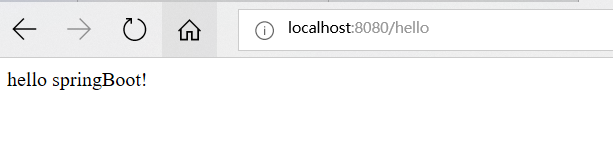
        return "hello springBoot!";

    }

}
四 访问页面
3.2 打包
1.导入插件
 <build>

        <plugins>

            <plugin>

                <groupId>org.springframework.boot</groupId>

                <artifactId>spring-boot-maven-plugin</artifactId>

                <configuration>

                    <mainClass>配置类全限定名</mainClass>

                </configuration>

                <executions>

                    <execution>

                        <goals>

                            <goal>repackage</goal>

                        </goals>

                    </execution>

                </executions>

            </plugin>

        </plugins>

</build>
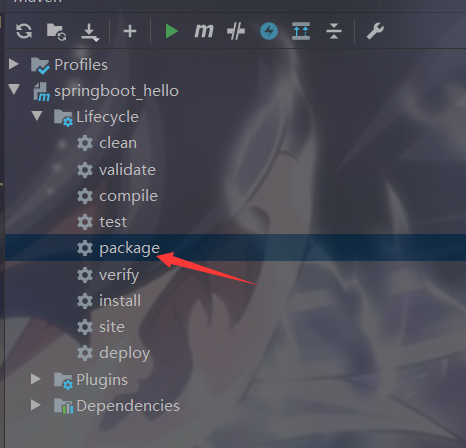
2.打包
3. 运行
窗口运行:java -jar xxx.jar
后台运行: nohup java -jar XXX.jar & 只linux
javaConfig&springBoot入门的更多相关文章
- SpringBoot入门(三)——入口类解析
本文来自网易云社区 上一篇介绍了起步依赖,这篇我们先来看下SpringBoot项目是如何启动的. 入口类 再次观察工程的Maven配置文件,可以看到工程的默认打包方式是jar格式的. <pack ...
- SpringBoot入门教程(二)CentOS部署SpringBoot项目从0到1
在之前的博文<详解intellij idea搭建SpringBoot>介绍了idea搭建SpringBoot的详细过程, 并在<CentOS安装Tomcat>中介绍了Tomca ...
- SpringBoot入门基础
目录 SpringBoot入门 (一) HelloWorld. 2 一 什么是springboot 1 二 入门实例... 1 SpringBoot入门 (二) 属性文件读取... 16 一 自定义属 ...
- SpringBoot入门示例
SpringBoot入门Demo SpringBoot可以说是Spring的简化版.配置简单.使用方便.主要有以下几种特点: 创建独立的Spring应用程序 嵌入的Tomcat,无需部署WAR文件 简 ...
- Spring全家桶系列–[SpringBoot入门到跑路]
//本文作者:cuifuan Spring全家桶————[SpringBoot入门到跑路] 对于之前的Spring框架的使用,各种配置文件XML.properties一旦出错之后错误难寻,这也是为什么 ...
- springboot入门之一:环境搭建(续)
在上篇博客中从springboot的入门到运行一个springboot项目进行了简单讲述,详情请查看“springboot入门之一”.下面继续对springboot做讲述. 开发springboot测 ...
- 【Java】SpringBoot入门学习及基本使用
SpringBoot入门及基本使用 SpringBoot的介绍我就不多说了,核心的就是"约定大于配置",接下来直接上干货吧! 本文的实例: github-LPCloud,欢迎sta ...
- SpringBoot入门(五)——自定义配置
本文来自网易云社区 大部分比萨店也提供某种形式的自动配置.你可以点荤比萨.素比萨.香辣意大利比萨,或者是自动配置比萨中的极品--至尊比萨.在下单时,你并没有指定具体的辅料,你所点的比萨种类决定了所用的 ...
- SpringBoot入门(四)——自动配置
本文来自网易云社区 SpringBoot之所以能够快速构建项目,得益于它的2个新特性,一个是起步依赖前面已经介绍过,另外一个则是自动配置.起步依赖用于降低项目依赖的复杂度,自动配置负责减少人工配置的工 ...
随机推荐
- Ninja构建系统入门
1. 介绍 开篇先介绍.先甩资料给大家看,之后再自己演示一下基本使用.Ninja 是Google的一名程序员推出的注重速度的构建工具,一般在Unix/Linux上的程序通过make/makefile来 ...
- Java容器解析系列(14) IdentityHashMap详解
IdentityHashMap,使用什么的跟HashMap相同,主要不同点在于: 数据结构:使用一个数组table来存储 key:value,table[2k] 为key, table[2k + 1] ...
- java反射机制梳理
java反射机制梳理 Java反射简介 反射简介 编译和运行 编译时刻加载类是静态加载类.运行时刻加载类是动态加载类 要让Java程序能够运行,那么就得让Java类要被Java虚拟机加载.Java类如 ...
- Java后端开发工程师是否该转大数据开发?
撰写我对java后端开发工程师选择方向的想法,写给在java后端选择转方向的人 背景 看到一些java开发工程师,对java后端薪酬太悲观了.认为换去大数据领域就会高工资.觉得java后端没有前途.我 ...
- Java properties文件集
log4j: log4j.rootLogger=info, console, log, error ###Console ### log4j.appender.console = org.apache ...
- Codeforces_801
A.直接暴力就行了,先把能组合的按线性组合掉,再枚举剩下相邻没用过的. #include<bits/stdc++.h> using namespace std; string s; ] = ...
- Java7循环结构综合练习
import java.util.Scanner; public class jh_01_学员操作_选择游戏 { public static void main(String[] args) { Sc ...
- SSH: ssh隧道
简介 Secure Shell(安全外壳协议,简称SSH)是一种加密的网络传输协议,可在不安全的网络中为网络服务提供安全的传输环境.SSH通过在网络中创建安全隧道来实现SSH客户端与服务器之间的连接. ...
- 微信小程序开发技巧总结 (一)-- 数据传递和存储
结合自己在平时的开发中遇到的各种问题,和浏览各种问题的解决方案总结出一些自己在日常开发中常用的技巧和知点,希望各位不吝斧正. 1.短生命周期数据存储 以小程序启动到彻底关闭为周期的的数据建议存储在ap ...
- 【Java并发工具类】ReadWriteLock
前言 前面介绍过ReentrantLock,它实现的是一种标准的互斥锁:每次最多只有一个线程能持有ReentrantLock.这是一种强硬的加锁规则,在某些场景下会限制并发性导致不必要的抑制性能.互斥 ...