
搜索下拉 select美化
<!DOCTYPE html>

<html lang="en">

<head>

    <meta charset="UTF-8">

    <title>Document</title>

    <style type="text/css">

        *{ margin: 0; padding:0; }

        /*搜索框*/

        input,button{border:0;}

        ul{ list-style: none }

        .fl{ float: left; }

        .search{width: 843px;height: 45px;border: 2px solid #a1cb30;margin: 38px auto; }

        .sel_wrapper{width:118px;height: 43px;border: 1px solid #dddddd;background-color: #f7f7f7;position: relative;z-index: 10;cursor:pointer;}

        .sel_wrapper a{display: block;}

        .sel_wrapper span{display: inline-block;}

        .game{width: 65px; line-height: 43px;font-size: 16px;padding-left: 19px;text-overflow: ellipsis;white-space: nowrap;overflow: hidden;}

        .sel_wrapper .sel em{ display: inline-block; width: 14px;height: 7px;margin-bottom: 18px; background: url(arrow_down.png) no-repeat right center;margin-left: 10px;}

        .sel_wrapper .sel em.arrow_up{ width:14px; height: 7px; background:url(arrow_top.png) no-repeat right center;  }

        .input{width: 633px;height: 43px;line-height: 43px; border: 0;padding-left: 10px;font-size: 16px;}

        .btn{width: 80px;*width: 79px;width: 79px\9;_width: 70px;height: 45px;background-color: #a1cb30;color: #fff;font-size: 18px; }

        /*下拉框*/

        .select_block {background-color: #f7f7f7;border-left: 2px solid #a1cb30;border-right: 1px solid #dedede;border-bottom: 2px solid #a1cb30;left: -3px;line-height: 20px;position: absolute;top: 43px;width: 119px;display: none;}

        .select_block li{ height: 35px; line-height: 35px;text-align: center; border-bottom:1px solid #ddd; font-size: 14px; }

        .select_block li:hover{ background: #617559; color: #fff; }

    </style>

</head>

<body>

<div class="search">

    <form>

        <div class="sel_wrapper fl">

            <div class="sel" id="sel">

                <span class="game" id="game">安卓游戏</span>

                <em></em>

            </div>

            <div class="select_block" id="show_sel">

                <ul>

                    <li date-vale="1">首页</li>

                    <li date-vale="2">安卓软件</li>

                    <li date-vale="3">破解游戏</li>

                    <li date-vale="4">电脑软件</li>

                </ul>

            </div>

        </div>

        <input type="hidden" value="1" id="hide_val" />

        <input type="text" value="" placeholder="部落冲突" class="input fl w402">

        <input type="submit" value="搜索" class="btn fr">

    </form>

</div>

<script src="http://apps.bdimg.com/libs/jquery/1.9.1/jquery.min.js" type="text/javascript"></script>

<script type="text/javascript">

    $(function() {

        $("#sel").click(function() { //点击事件

            if ($('#show_sel').is(':hidden')) {

                $("#show_sel").show();

                $(this).find("em").addClass("arrow_up"); //发现它子级em添加class命名“arrow_up”

            }else{

                $("#show_sel").hide(); //显示

                $("#sel").find("em").removeClass("arrow_up"); //移除class命名"arrow_up"

            }

        });

        $("#show_sel li").click(function() { //li点击事件

            $("#show_sel").hide(); //隐藏

            var txt = $(this).text(); //定义一个变量txt给本身的文本赋值

            $("#game").text(txt); //#game的文本就是txt的文本

            $("#sel").find("em").removeClass("arrow_up"); //移除class命名"arrow_up"

            var value = $(this).attr("date-vale"); //定义一个变量给本身的属性值赋值

            $("#hide_val").val(value); //隐藏的值就是属性值

        });

    });

</script>

</body>

</html>
效果图:


如何去除ie的select下拉框箭头图标
<style>

        select {

            /*将默认的select选择框样式清除*/

            appearance: none;

            -moz-appearance: none;

            -webkit-appearance: none;

            background: url("/assets/img/caret.png") no-repeat scroll right center transparent;

        }

        /*清除ie的默认选择框样式清除,隐藏下拉箭头*/

        select::-ms-expand {

            display: none;

        }

    </style>
二、有间隙,原来是input大小不包括边框,当selet和input同事存在同事有设置边框,如select的高度设置30px,则input[type='text'](注:input[type='submit']设置30px也没影响,不会有缝隙,自测)高度设置28px就可以
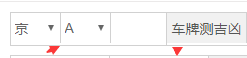
解决后:

select的css width样式,包含边框和内边距,即:真实的width=CSS width。
而input的css width样式,则不包含边框和内间距,真实的width=CSS width border padding。
代码:
<div class="public_form_right">

                <div class="public_fr_list">

                    <select name="sheng" class="public_che_sel fl">

                        <option value="京">京</option>

                    </select>

                    <select name="frist" class="public_che_sel fl">

                        <option value="A">A</option>

                    </select>

                    <input type="text" class="public_che_input fl">

                    <input type="submit" class="btn fl" value="车牌测吉凶">

                </div>

            </div>
样式:
.public_form_right{ overflow: hidden; background-color: #fff; padding-bottom: 10px;}

.public_form_title{ height: 37px;line-height: 37px; color: #774889; font-size: 20px; border-bottom: 1px solid #eae8e9; padding: 0 10px; display: block;}

.public_fr_list{ overflow: hidden; margin:10px 10px 0;border: 1px solid #d1d1d1; border-right:;}

.public_fr_list select{ float: left; height: 30px; line-height: 30px;}

.public_fr_list input[type='text']{ padding-left: 5px; float: left; height: 28px; line-height: 28px;}

.public_fr_list .btn{ width: 80px;text-align: center; background-color: #f0f0f0; color: #575757; height: 30px; line-height: 30px; font-family: "Microsoft Yahei";font-size: 14px;border-right: 1px solid #d1d1d1; cursor: pointer; box-sizing: border-box}

.public_fr_list .btn:hover{ color: #fff; background-color: #b0afaf;}

/* 车牌测吉凶 */

.public_che_sel{ width: 54px; border:; border-right: 1px solid #d1d1d1;}

.public_che_input{ width: 85px; border:; border-right: 1px solid #d1d1d1;}
三、注意:按钮同个命名,a标签宽度设置80不会有缝隙,用input[type="submit"]同样宽度设置80px,但是会有1像素的缝隙,加个样式就不会了,宽度设置为81px;box-sizing: border-box;如图:
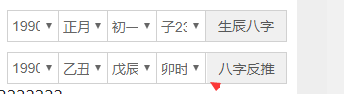
样式设置:
box-sizing: border-box;
.public_form_right{ overflow: hidden; background-color: #fff; padding-bottom: 10px;}

.public_form_title{ height: 37px;line-height: 37px; color: #774889; font-size: 20px; border-bottom: 1px solid #eae8e9; padding: 0 10px; display: block;}

.public_fr_list{ overflow: hidden; margin:10px 10px 0;border: 1px solid #d1d1d1; border-right:;}

.public_fr_list select{ float: left; height: 30px; line-height: 30px;}

.public_fr_list input[type='text']{ padding-left: 5px; float: left; height: 28px; line-height: 28px;}

.public_fr_list .btn{ width: 80px;text-align: center; background-color: #f0f0f0; color: #575757; height: 30px; line-height: 30px; font-family: "Microsoft Yahei";font-size: 14px;border-right: 1px solid #d1d1d1; cursor: pointer; box-sizing: border-box}

.public_fr_list .btn:hover{ color: #fff; background-color: #b0afaf;}

/* 车牌测吉凶 */

.public_che_sel{ width: 54px; border:; border-right: 1px solid #d1d1d1;}

.public_che_input{ width: 85px; border:; border-right: 1px solid #d1d1d1;}
取消input聚焦时的边框,去除ios点击时,自动添加的底色效果
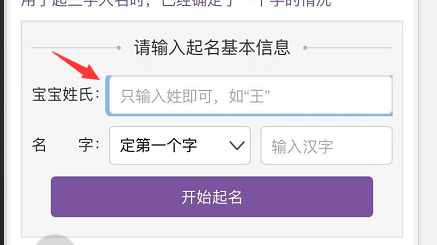
解决方案:
input[type="text"], input[type="button"], input[type="submit"], input[type="reset"], select, textarea,button {

    /*去除ios点击时,自动添加的底色效果*/

    -webkit-tap-highlight-color: rgba(255, 255, 255, 0);

    /*去除焦点框*/

    outline:none;

}
搜索下拉 select美化的更多相关文章
- 基于jQuery select下拉框美化插件
分享一款基于jQuery select下拉框美化插件.该插件适用浏览器:IE8.360.FireFox.Chrome.Safari.Opera.傲游.搜狗.世界之窗.效果图如下: 在线预览 源码下 ...
- layui-table-column-select(layui数据表格可搜索下拉框select)
layuiTableColumnSelect 在layui table的基础上对表格列进行扩展:点击单元格显示可搜索下拉列表. 码云地址:https://gitee.com/yangqianlong9 ...
- ComboBox可搜索下拉框的使用注意事项,简单记录以及我遇到的一些奇怪的bug
前几天做一个react的项目的时候需要用一个可搜索的下拉框ComboBox,上代码: <ComboBox // className={comboxClassName} items={storeA ...
- 【Select2】带搜索框的下拉框美化插件
1 引入js css 文件 <script src="js/jquery-1.11.1.min.js"></script> <script src= ...
- select下拉框美化
其实用下列CSS就可以解决,原理是将浏览器默认的下拉框样式清除,然后应用上自己的,再附一张向右对齐小箭头的图片即可. select { /*Chrome和Firefox里面的边框是不一样的,所以复 ...
- Combo Select – jQuery可搜索下拉框插件
今天用到另一款jq插件..插件就是无脑,,引入相关文件,开始撸吧 引入相关文件: <link href="~/Scripts/combo-select/combo.select.css ...
- element-ui select可搜索下拉框无法在IOS或Ipad调起小键盘输入法
参考:https://segmentfault.com/q/1010000021748033 原因:常规select是可以调起小键盘的.但是element-ui的select其实是input.并且这个 ...
- jquery 仿百度搜索下拉框的插件
转载地址:http://www.open-open.com/lib/view/open1420624048437.html 今天写了个下拉插件分享出来 效果: , 可以搜素,也可以使用上下键选择匹配出 ...
- 关于bootstrap--表单(下拉<select>、输入框<input>、文本域<textare>复选框<checkbox>和单选按钮<radio>)
html 里面的 role 本质上是增强语义性,当现有的HTML标签不能充分表达语义性的时候,就可以借助role来说明.通常这种情况出现在一些自定义的组件上,这样可增强组件的可访问性.可用性和可交互性 ...
随机推荐
- 推荐十几款Firefox web开发插件(转载)
开发工具 Web Developer 1.1.8 https://addons.mozilla.org/en-US/firefox/addon/60by chrispederick The Web ...
- kubernetes configmap
ConfigMaps允许您将配置工件与image内容分离,以保持容器化应用程序的便携性. 本页面提供了一系列使用示例,演示如何使用ConfigMaps中存储的数据创建ConfigMaps和配置Pod. ...
- 【SPOJ - LCS2】Longest Common Substring II【SAM】
题意 求出多个串的最长公共子串. 分析 刚学SAM想做这个题的话最好先去做一下那道codevs3160.求两个串的LCS应该怎么求?把一个串s1建自动机,然后跑另一个串s2,然后找出s2每个前缀的最长 ...
- TP3.1 一对多模型关联
TP3.1.3 的一对多的模型关联 老需求 --- 一个用户多个文章,查看这些文章 HasMany 首先定义Model 模型名字叫UserMode.class.php class UserMode ...
- 554. Brick Wall最少的穿墙个数
[抄题]: There is a brick wall in front of you. The wall is rectangular and has several rows of bricks. ...
- shiro 集成spring 使用 redis作为缓存 学习记录(六)
1.在applicationContext-redis.xml配置文件中增加如下: 申明一个cacheManager对象 用来注入到 shiro的 securityManager 属性 cac ...
- Docker for mac安装
Mac安装Docker docker下载地址: https://hub.docker.com/editions/community/docker-ce-desktop-mac docker for m ...
- Python 2.6 安装wxPython后提示"64.....32"错误解决办法
ImportError: /usr/local/lib/wxPython-unicode-2.8.10.1/lib/python2.6/site-packages/wx-2.8-mac-unicode ...
- Dubbo服务启动依赖检查
dubbo 官方文档地址:http://dubbo.io/User+Guide-zh.htm 项目中存在服务之间存在循环依赖,启动时总是报错,通过修改启动检查check=false解决,下面是dubb ...
- java TimeZone类
TimeZone类主要是对时区的操作 下面是一个简单的例子 public static void main(String[] args) { // TODO Auto-generated method ...