
Tsung压力测试:Openfire
环境准备
安装Tsung、安装openfire、安装Spark
要对openfire进行压力测试,因此我们主要讲解如何利用jabber_register.xml在openfire上面注册用户,以及利用jabber.xml模拟用户登录openfire上线、离开、会话操作的压力测试
一、注册用户
1、执行以下命令进入到安装目录下的examples目录:
[root@localhost ~]# cd /usr/local/tsung/share/doc/tsung/examples/

[root@localhost examples]# ll

total 64

-rw-r--r--. 1 root root 3834 Mar  7 03:09 fs-nfs.xml

-rw-r--r--. 1 root root 6391 Mar  7 03:09 http_distributed.xml

-rw-r--r--. 1 root root 2609 Mar  7 03:09 http_setdynvars.xml

-rw-r--r--. 1 root root 2215 Mar  7 03:09 http_simple.xml

-rw-r--r--. 1 root root 3140 Mar  7 03:09 jabber_muc.xml

-rw-r--r--. 1 root root 1727 Mar  7 03:09 jabber_privacy.xml

-rw-r--r--. 1 root root 1332 Mar  7 03:09 jabber_register.xml

-rw-r--r--. 1 root root 2762 Mar  7 03:09 jabber_roster.xml

-rw-r--r--. 1 root root 4225 Mar  7 03:09 jabber.xml

-rw-r--r--. 1 root root 2506 Mar  7 03:09 ldap.xml

-rw-r--r--. 1 root root 1148 Mar  7 03:09 mysql.xml

-rw-r--r--. 1 root root 1833 Mar  7 03:09 pgsql.xml

-rw-r--r--. 1 root root 1211 Mar  7 03:09 thinks2.xml

-rw-r--r--. 1 root root 1221 Mar  7 03:09 thinks.xml
2、修改jabber_register.xml文件

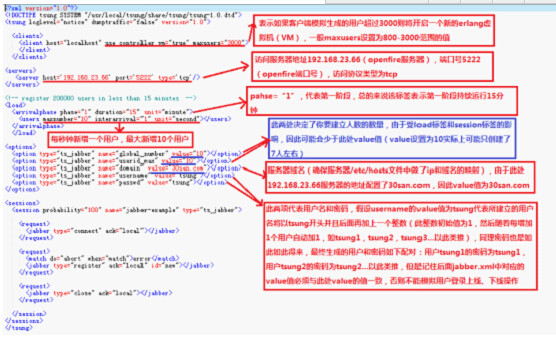
3、将修改后的jabber_register.xml放到/usr/local/tsung目录下
再进入tsung的bin目录下,找到tsung执行的shell脚本文件
[root@localhost examples]# cp jabber_register.xml /usr/local/tsung

[root@localhost examples]# cd /usr/local/tsung/bin

[root@localhost bin]#
4、执行tsung脚本以驱动执行我们修改好的jabber_register.xml脚本,实现向openfire添加用户
[root@localhost bin]#  ./tsung -f   /usr/local/tsung/jabber_register.xml start

Starting Tsung

"Log directory is: /root/.tsung/log/20150311-2253"
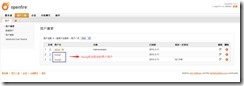
5、查看openfire
二、登陆用户模拟发送消息
利用jabber.xml模拟用户登录openfire后执行上线、离开、忙碌、下线、发送消息等操作
1、修改jabber.xml文件(存储路径/usr/local/tsung/share/doc/tsung/examples/)
a. 模拟用户上线、下线、发送消息的操作时jabber.xml配置如下:
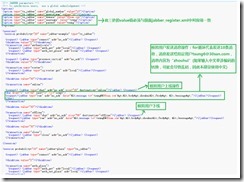
- 模拟上线与发消息脚本:
<transaction name="online"><request><jabber type="chat" ack="no_ack" size="16" destination="online"></jabber></request><request><jabber type="raw" ack="no_ack" data="<message to='admin@myopenfire'><body>zhouhui</body> </message>"></jabber></request></transaction>
- 模拟下线脚本:
<thinktime value="30"></thinktime><transaction name="offline"><request><jabber type="chat" ack="no_ack" size="56" destination="offline"></jabber></request><request><jabber type="raw" ack="no_ack" data="<message to='admin@myopenfire'><body>zhouhui</body> </message>"></jabber></request></transaction>
b.模拟用户含有可聊天、离开、忙碌状态时jabber.xml配置如下:
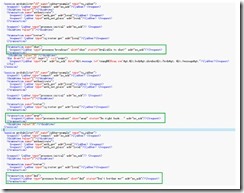
- 模拟空闲,可聊天状态脚本:
<transaction name="chat"><request><jabber type="presence:broadcast" show="chat" status="Avaliable to chat!" ack="no_ack"/></request></transaction>
- 模拟离开状态脚本:
<transaction name="away"><request><jabber type="presence:broadcast" show="away" status="Be right back ..." ack="no_ack"/></request></transaction>
- 模拟请勿打扰状态脚本:
<transaction name="dnd"><request><jabber type="presence:broadcast" show="dnd" status="Don't bother me!" ack="no_ack"/></request></transaction>
2、将修改后的jabber.xml放到/usr/local/tsung目录下
[root@localhost examples]# cp jabber.xml /usr/local/tsung

[root@localhost examples]# cd /usr/local/tsung/bin

[root@localhost bin]#
3、 执行jabber.xml模拟用户上线、下线、发送消息等操作
[root@localhost bin]#  ./tsung -f   /usr/local/tsung/jabber.xml start

Starting Tsung

"Log directory is: /root/.tsung/log/20150311-2331"
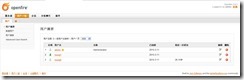
4、查看用户状态(登录openfire查看或者登录spark查看)
若要查看是否成功发送消息则要使用spark聊天工具(可以去openfire官网下载)
1)登录openfire查看:
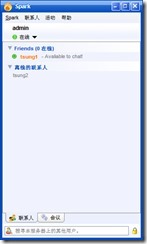
2)登录spark聊天工具查看
若使用spark查看其他人员状态时,必须人员双方相互注册为好友才能看到对方的状态变化,若仅验证消息接收,则无需注册好友
如:查看好友状态
三、生成报表
启动Tsung后,Tsung会输出log的存放路径
Starting Tsung

"Log directory is: /root/.tsung/log/20150311-2256"
1、等待测试完毕,进入log目录(只有输出了log日志才会自动log目录,默认路径:/root/.tsung/log)
生成统计图表
[root@localhost bin]# cd /root/.tsung/log/-

[root@localhost -]#  /usr/local/tsung/lib/tsung/bin/tsung_stats.pl

creating subdirectory data

creating subdirectory gnuplot_scripts

creating subdirectory images

warn, last interval () not equal to the first, use the first one ()

No data for Event

No data for Async

No data for Errors
注意:一定要先进入log目录,才能生成统计图表。
2、查看统计图表
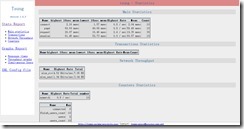
使用xftp工具,将/root/.tsung/log/20150311-2256目录下的统计图表文件report.html下载到本地的Windows操作系统上进行查看。
用IE或firefox等浏览器打开产生的html文件,就能查看本次测试的结果(参数含义见后面说明):
四、遇到的问题
1、 配置文件如果有问题或者运行中间强行关闭的情况下,有时会出现进程未关闭的情况,下次运行会出错,使用下面的命令看是否有未杀死的进程。
[root@localhost bin]# ps aux | grep erlang

root       0.0  0.0      ?        S    Mar10   : /usr/local/erlang/lib/erlang/erts-5.8./bin/epmd -daemon

root       0.0  0.0     pts/    S+   :   : grep erlang
http://172.16.34.11:9090/index.jsp
域名:Testopenfire.cn
http://172.16.34.15:9090/index.jsp
域名:testopenfire.cn
openfire:登录名:admin 密码:123456
数据库url jdbc:mysql://127.0.0.1:3306/openfire?
数据库登录名 root 密码123456
Tsung压力测试:Openfire的更多相关文章
- tsung -- 压力测试利器
Tsung 是一个压力测试工具,可以测试包括HTTP, WebDAV, PostgreSQL, MySQL, LDAP, and XMPP/Jabber等服务器.针对 HTTP 测试,Tsung 支持 ...
- tsung压力测试——tcp测试tsung.xml配置模版说明
<?xml version="1.0"?> <!DOCTYPE tsung SYSTEM "/usr/local/share/tsung/tsung-1 ...
- tsung压力测试——安装
在安装之前确保安装了以下工具: erlang 必须要有安装java环境,要不然不成功 yum install gcc yum install gcc-c++ yum install libtool y ...
- Tsung压力测试工具安装使用
工具安装 1)unixODBC ./configure; make; make install 或者yum安装 2)ncurses-devel ./configure; make; make inst ...
- tsung压力测试——Tsung测试统计报告说明【转】
1.主要统计信息 Tsung统计数据是平均每十秒重置一次,所以这里的响应时间(连接.请求.页面.会话)是指每十秒的平均响应时间: connect: 表示 每个连接持续时间: Hightest 10se ...
- tsung压力测试环境部署详细步骤(内附安装包)
操作系统: Redhat 6.3.Redhat6.5 .centos7.4(这些版本已验证过) tsung版本: tsung-1.6.0 下载地址: 链接: https://pan.baidu.com ...
- tsung 对 openfire 压力测试
tsung 对 openfire 压力测试 1. 参考 http://blog.csdn.net/foxisme2/article/details/7521139 http://blog.csdn ...
- LINUX 安装tsung 对OPENFIRE 进行压力测试
参考资料: http://www.centoscn.com/image-text/install/2014/0818/3503.html http://my.oschina.net/jieluck ...
- Tsung测试openfire服务器
环境准备 安装Tsung.安装openfire.安装Spark Tsung使用 要对openfire进行压力测试,因此我们主要讲解如何利用jabber_register.xml在openfire上面注 ...
随机推荐
- 西南大学网络实现路由器WIFI共享方案(一号多用户共享)
背景: 学校更换网页认证,限制多台设备的登录,后台记录发现会将账号封30min禁止登陆,于是想办法冲破这个限制.看到马丁大神的博客知道了学校的检测机制,只需要定时对账号进行认证下线即可实现,不被学校检 ...
- dubbox实现REST服务
一.dubbox的由来 dubbox是当当网基于dubbo的基础上开发的扩展版,也可以认为是dubbo的升级版,根据当前互联网的应用需求,增加了很多扩展的功能. dubbox并没有发布到maven中央 ...
- 读jQuery之二十(Deferred对象)--(转)
原博文地址:http://www.cnblogs.com/snandy/archive/2012/12/19/2812935.html Deferred对象是由.Deferred构造的,.Deferr ...
- java代码-----String数组进行排序。是英文的字符串
总结:主要是方法不同了.是compareTo()方法比较字符串大小 package com.s.x; import java.util.Arrays; public class Jay { publi ...
- Eclipse中设置JDK、${user}变量
为eclipse设置jdk方法: 两个方法: 1.设置PATH路径-eclipse自动会查找! 2.在快捷方式中加上参数:-VM java虚拟机路径 Eclipse中设置${user}变量 在Ecli ...
- HBase之八--(2):HBase二级索引之Phoenix
1. 介绍 Phoenix 是 Salesforce.com 开源的一个 Java 中间件,可以让开发者在Apache HBase 上执行 SQL 查询.Phoenix完全使用Java编写,代码位于 ...
- 杂项: Redis
ylbtech-杂项: Redis Redis是一个开源的使用ANSI C语言编写.支持网络.可基于内存亦可持久化的日志型.Key-Value数据库,并提供多种语言的API. 1. 定义返回顶部 re ...
- [转]加密经验集 => C#
下载地址 代码摘自 C#高级编程(第7版) 第579页 不对称加密
- Python GUI编程(Tkinter) windows界面开发
Python实现GUI简单的来说可以调用Tkinter库,这样一般的需求都可以实现,显示简单的windows窗口代码如下: python_gui.py 1 #!C:\Python27\python.e ...
- pyc是什么
python是解释型语言,需要解释器对程序逐行做出解释,然后直接运行. C语言是编译型语言,PC不需要翻译,直接执行就可以了. java也是解释型语言,不过速度可以跟编译型媲美. 用java举例,ja ...