
jenkins插件使用小结
jenkins官网:https://wiki.jenkins-ci.org/display/JENKINS/Building+a+software+project
jenkins插件:
1.AnsiColor : This plugin adds support for ANSI escape sequences, including color, to Console Output.
2.Ant Plugin :This plugin adds Apache Ant support to Jenkins.
3.Copy Artifact Plugin :Adds a build step to copy artifacts from another project.
4.Custom View Tabs Plugin : This plugin allows custom labels and colours on view tabs to show job status information.
5.External Monitor Job Type Plugin : Adds the ability to monitor the result of externally executed jobs.
6.Gerrit Trigger : This plugin integrates with Gerrit code review.
7.Git Client Plugin : Shared library plugin for other Git related Jenkins plugins.
8.Git Plugin : This plugin integrates GIT with Jenkins.
9.LDAP Email Plugin : This plugin resolves user email addresses from an LDAP directory. It is not needed if Jenkins uses LDAP as its authentication source and user records have a standard "mail" attribute.
10.LDAP Plugin : Adds LDAP authentication to Jenkins.
11.Matrix Authorization Strategy Plugin : Offers matrix-based security authorization strategies (global and per-project).
12.Matrix Project Plugin : Multi-configuration (matrix) project type.
13.Multiple SCMs Plugin : This plugin enables the selection of multiple source code management systems for a build. For example, it enables checking out the source code from one SCM while checking out legacy or third-party code from another.
14.Nested View Plugin : View type to allow grouping job views into multiple levels instead of one big list of tabs.
15.Parameterized Remote Trigger Plugin : This plugin triggers a job on a remote Jenkins host
16.Parameterized Trigger plugin : This plugin lets you trigger new builds when your build has completed, with various ways of specifying parameters for the new build.
17.Promoted Builds Plugin : This plugin implements a "promoted build" feature where a build of one job can be marked as "promoted" when it passes certain criteria.
18.SCM API Plugin : This plugin provides a new enhanced API for interacting with SCM systems.
19.Translation Assistance Plugin : This plugin adds an additional dialog box in every page, which enables people to contribute localizations for the messages they are seeing in the current page.
20.Subversion Plugin : This plugin adds the Subversion support (via SVNKit) to Jenkins.
21.JaCoCo plugin : This plugin allows you to capture code coverage report from JaCoCo. Jenkins will generate the trend report of coverage. This plugin is fork of the [Emma Plugin]. Big part of the code structure comes from it, however, it is completely refactored. It also includes functionality similar to the [Emma Coverage Column] which allows to include a column in Dashboards which displays the latest overall coverage numbers and links to the coverage report.(生成测试报告)
22.JUnit Plugin : Allows JUnit-format test results to be published.(生成测试报告)
23.Post-Build Script Plug-in : PostBuildScript makes it possible to execute a set of scripts at the end of the build. 在build结束后执行脚本。
24.Hudson Post build task : This plugin allows to execute a batch/shell task depending on the build log output. 在build结束后根据build的log输出执行脚本。
jenkins环境变量:
Jenkins Set Environment Variables
| Environment Variable | Description |
| BUILD_NUMBER | The current build number, such as "153" |
| BUILD_ID | The current build id, such as "2005-08-22_23-59-59" (YYYY-MM-DD_hh-mm-ss) |
| BUILD_URL & T/ z: D: Z/ Z0 G w | The URL where the results of this build can be found (e.g. http://buildserver/jenkins/job/MyJobName/666/) |
| NODE_NAME | The name of the node the current build is running on. Equals 'master' for master node. |
| JOB_NAME | Name of the project of this build. This is the name you gave your job when you first set it up. It's the third column of the Jenkins Dashboard main page. |
| BUILD_TAG | String of jenkins-${JOB_NAME}-${BUILD_NUMBER}. Convenient to put into a resource file, a jar file, etc for easier identification. |
| JENKINS_URL | Set to the URL of the Jenkins master that's running the build. This value is used by Jenkins CLIfor example |
| EXECUTOR_NUMBER | The unique number that identifies the current executor (among executors of the same machine) that's carrying out this build. This is the number you see in the "build executor status", except that the number starts from 0, not 1. |
| JAVA_HOME | If your job is configured to use a specific JDK, this variable is set to the JAVA_HOME of the specified JDK. When this variable is set, PATH is also updated to have $JAVA_HOME/bin. |
| WORKSPACE | The absolute path of the workspace. |
| SVN_REVISION | For Subversion-based projects, this variable contains the revision number of the module. If you have more than one module specified, this won't be set. |
| CVS_BRANCH | For CVS-based projects, this variable contains the branch of the module. If CVS is configured to check out the trunk, this environment variable will not be set. |
| GIT_COMMIT | For Git-based projects, this variable contains the Gitish of the commit checked out for the build3 ^: F6 x* y5 ~+ ?+ S5 O |
| GIT_BRANCH | For Git-based projects, this variable contains the Git branch that was checked out for the build (normally master) ; k. N; D; |- _( _- z( e( W |
Promoted Build Plugin Environment Variables
| Environment Variable | Replaces | Description |
| PROMOTED_URL | BUILD_URL | The URL of the original Jenkins job that is involved with the promotion. BUILD_URL now refers to the Promotion's URL |
| PROMOTED_JOB_NAME | JOB_NAME | The name of the original Jenkins job that is involved with the promotion. JOB_NAME now refers to the Promotion's job's name |
| PROMOTED_NUMBER | BUILD_NUMBER | The Build Number of the job being promoted. BUILD_NUMBER now refer's the the Promotion Number |
| PROMOTED_ID | BUILD_ID | The Build ID (ex. "2005-08-22_23-59-59" (YYYY-MM-DD_hh-mm-ss) ) of the original Jenkins job. BUILD_ID now refer's to the Promotion's build ID. |
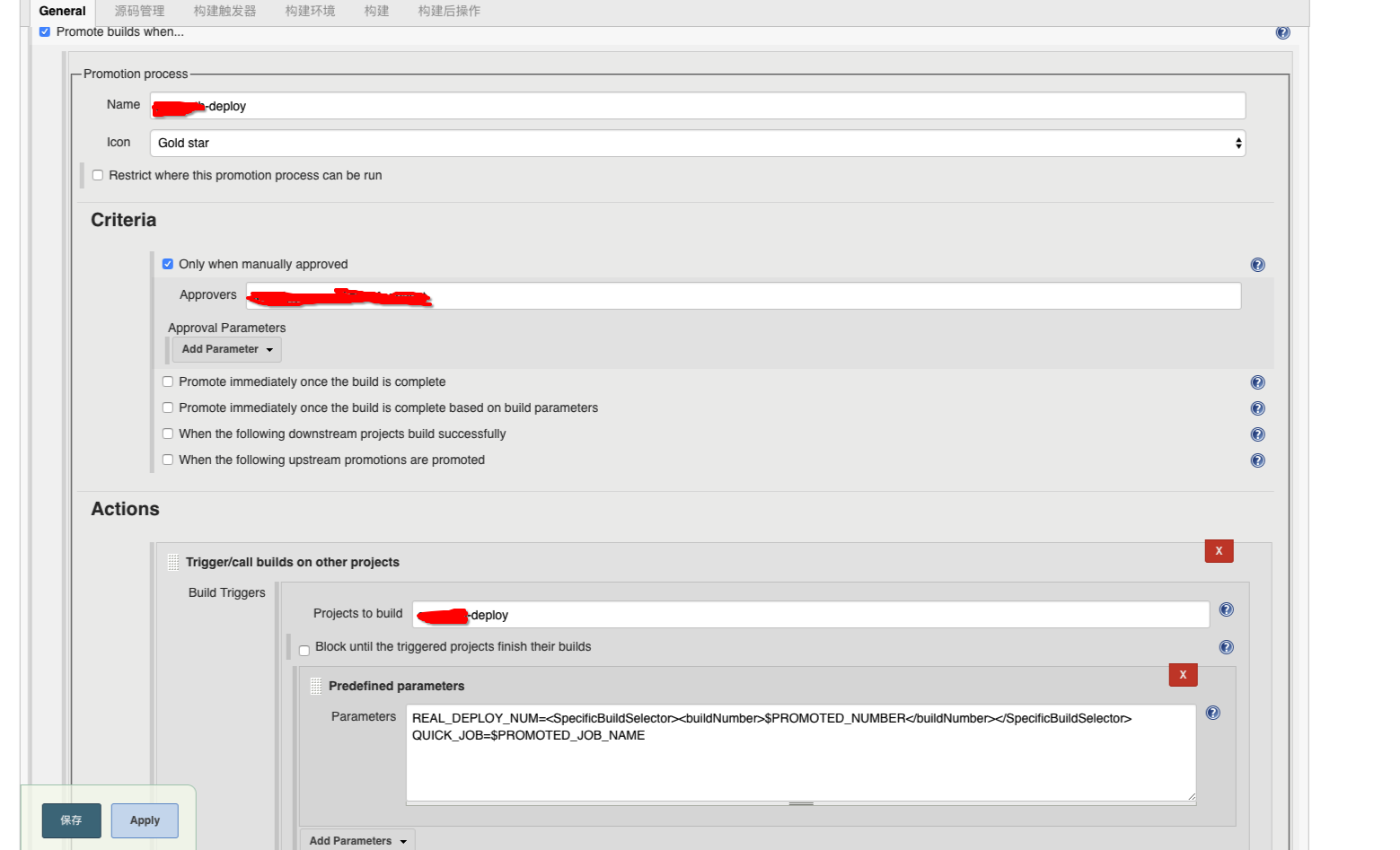
向其他project传递参数方式:
当前project的build_num:
REAL_DEPLOY_NUM=<SpecificBuildSelector><buildNumber>$PROMOTED_NUMBER</buildNumber></SpecificBuildSelector>
当前project的project_name
QUICK_JOB=$PROMOTED_JOB_NAME
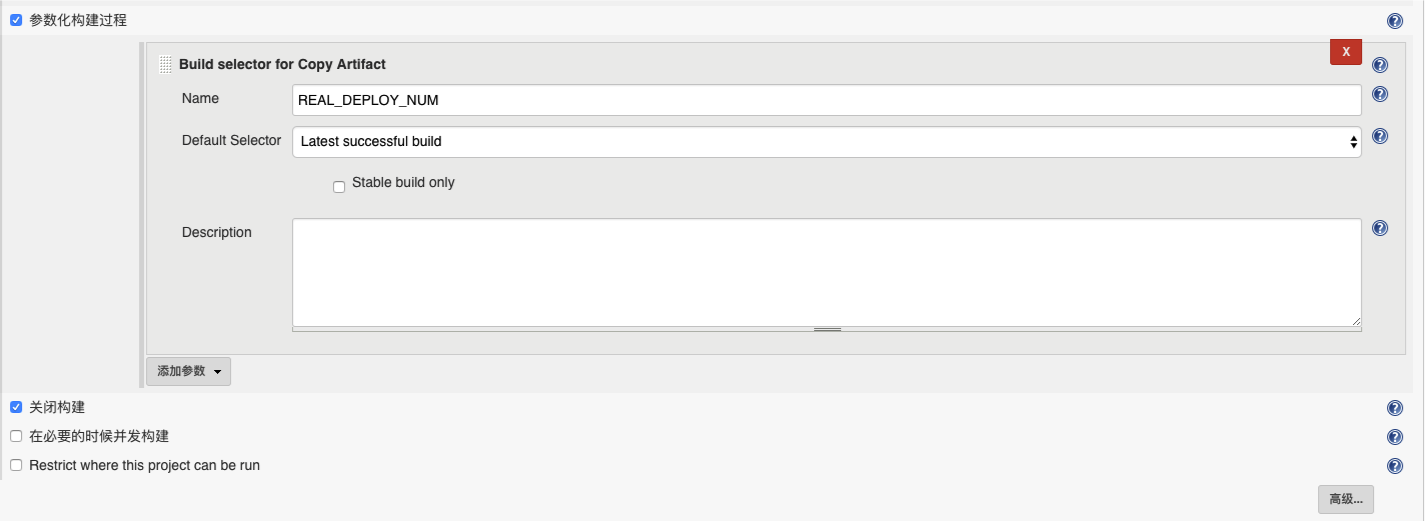
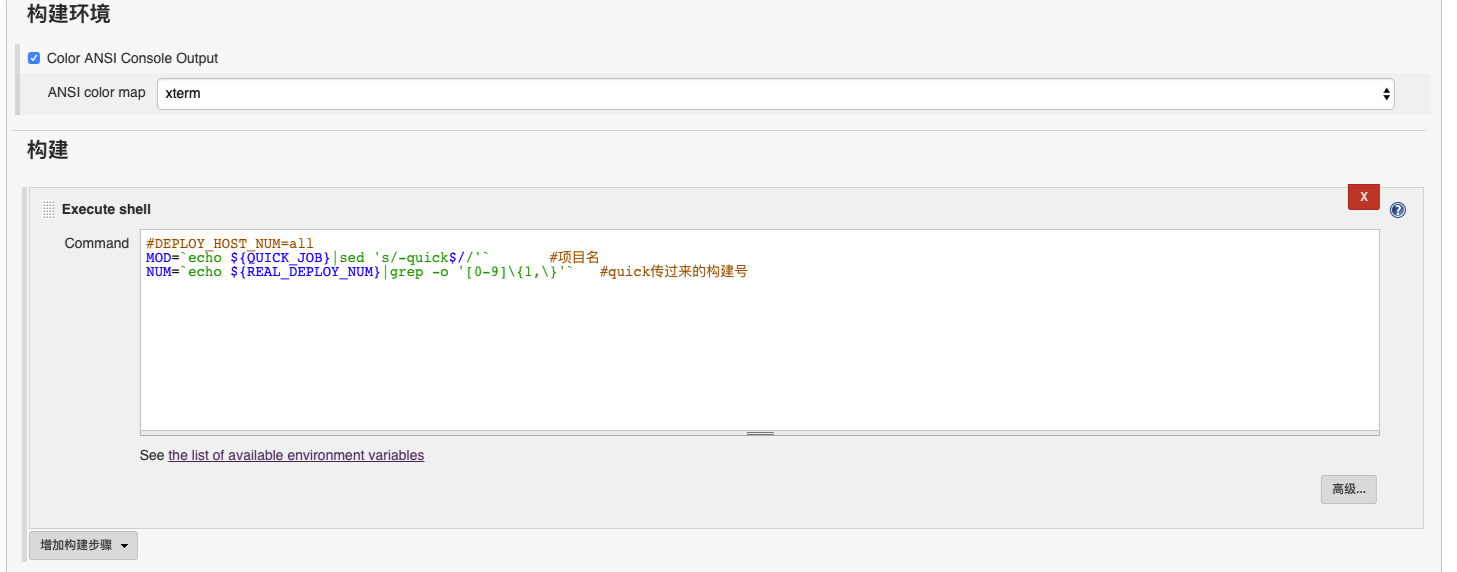
比如quick完成以后自动进行deploy,但是deploy需要quick任务的项目名及构建号,配置截图如下:
quick任务传递参数:
deploy任务接收参数并使用:
注:若果jenkins首页“添加说明”中不支持html语法,需要在jenkins->系统管理->Configure Global Security->Markup Formatter中选择非"escaped HTML"的选项,然后就可以支持html了。
换logo的话,在war/images下保存logo(默认使用headshot.png),在META-INF/JENKINS.SF和META-INF/MANIFEST.MF配置使用的logo;可以修改配置(没有试验),也可以替换war/images/headshot.png(试验成功)。
[ci]容器ci索引 http://www.cnblogs.com/iiiiher/p/8026689.html
[ci]jenkins安装&插件管理&java-helloworld之旅 http://www.cnblogs.com/iiiiher/p/7159309.html
[ci]jenkins-slave的添加(vm模式,通过ssh和jnlp) http://www.cnblogs.com/iiiiher/p/7930251.html
[ci]jenkins-slave-ssh docker容器化-自动注入key http://www.cnblogs.com/iiiiher/p/7978552.html
[ci]jenkins-slave-ssh docker容器化-用户名密码 http://www.cnblogs.com/iiiiher/p/7978212.html
[ci]jenkins server启动,通过jnlp的方式启动slave(容器模式) http://www.cnblogs.com/iiiiher/p/7978831.html
[svc]tomcat配置文件详解-最简单的基于mvn的war包 http://www.cnblogs.com/iiiiher/p/7943097.html
[ci]jenkins构建容器项目java-helloworld-非docker plugin模式,脚本实现参数化构建 http://www.cnblogs.com/iiiiher/p/7943718.html
[ci] jenkins kubernetes插件配置(容器模式)-通过jnlp http://www.cnblogs.com/iiiiher/p/7979336.html
[ci][k8s]jenkins配合kubernetes插件实现k8s集群构建的持续集成 http://www.cnblogs.com/iiiiher/p/8026555.html
jenkins插件使用小结的更多相关文章
- 持续集成之Jenkins插件使用(一)- 多个job之间的串并联
转载自:http://qa.blog.163.com/blog/static/190147002201391661510655/ Jenkins除了开源和免费,还有一个最吸引人的功能之一就是支持插件. ...
- jenkins插件 查看job下次运行时间
文章来自:http://www.ciandcd.com 文中的代码来自可以从github下载: https://github.com/ciandcd jenkins插件next executions( ...
- Jenkins插件及 测试源码
Jenkins 插件: https://updates.jenkins-ci.org/download/plugins/ 小米的一份android源码,测试工具,用于抢红包: https://gith ...
- 微软开放技术发布开源 Jenkins 插件以将 Windows Azure Blob 服务用的开作存储库
发布于 2014-02-10 作者 陈 忠岳 持续集成 (CI) 的历史源远流长, 其宗旨在于软件团队在敏捷环境中不断将他们的工作整合为持续构建.管理 CI 进程的工具已存在一段时间.过去几年中 ...
- JQuery插件使用小结
JQuery插件使用小结
- jenkins(4): jenkins 插件
1. jenkins插件下载镜像加速 jenkins插件清华大学镜像地址 https://mirrors.tuna.tsinghua.edu.cn/jenkins/updates/update-ce ...
- Jenkins插件安装实战篇
Jenkins插件安装实战篇 作者:尹正杰 版权声明:原创作品,谢绝转载!否则将追究法律责任. 上篇博客我介绍了Jenkins是啥,以及持续集成,持续交付,持续部署的概念,那么问题来了:你知道CI和C ...
- [原]Jenkins(十五)---jenkins插件之deploy
/** * lihaibo * 文章内容都是根据自己工作情况实践得出. *如有错误,请指正 * 版权声明:本博客欢迎转发,但请保留原作者信息! http://www.cnblogs.com/horiz ...
- Jenkins插件管理
1.配置jenkins需要的maven.jdk路径 [root@db01 secrets]# echo $JAVA_HOME /application/jdk [root@db01 secrets]# ...
随机推荐
- Java集合类ArrayList循环中删除特定元素
在项目开发中,我们可能往往需要动态的删除ArrayList中的一些元素. 一种错误的方式: <pre name="code" class="java"&g ...
- Java中23种经典设计模式详解
Java中23种设计模式目录1. 设计模式 31.1 创建型模式 41.1.1 工厂方法 41.1.2 抽象工厂 61.1.3 建造者模式 101.1.4 单态模式 131.1.5 原型模式 151. ...
- iOS:上线的基本流程
1.创建唯一标书符App ID 首先打开开发者网站,进入证书页面,我们点击Identifiers下边App IDs选项,然后点击右上角加号,如图: 2.申请发布证书 我们点击Certificates下 ...
- 无法将“<s:SimpleText>”解析为组件执行
导入以前版本的flex代码时,报"无法将“<s:SimpleText>”解析为组件执行"错误: 后来在网上找到解决方案,即版本更新的一段话: 网址是:https://f ...
- mysql更新日志问题
[root@localhost ~]# /etc/init.d/mysqld restart 停止 mysqld: [确定] 正在启动 mysqld: [确定] 故障:今天在维护以前数据库日志的时候, ...
- wkhtmltoimage(网页剪切功能)
1.wkhtmltoimage使用wkhtmltoimage-0.10.0_rc2-static-amd64.tar.bz2版本,最新版本为wkhtmltoimage-0.11.0_rc1-stati ...
- ACCESS数据库如何设置密码
首先是文件-关闭数据库 打开-找到这个文件,然后以独占方式打开 然后文件-设置数据库密码,比如输入123作为密码,下次再打开数据库的时候就会要求输入密码 ...
- 算法笔记_128:完美洗牌算法(Java)
目录 1 问题描述 2 解决方案 2.1位置置换算法 2.2 走环算法 1 问题描述 有一个长度为2n的数组{a1,a2,a3,...,an,b1,b2,b3,...,bn},希望排序后变成{a1 ...
- Linux 监测网络常用的工具sar iftop netstat ping nping fping mtr
Linux 监测网络常用的工具sar iftop netstat ping nping fping mtr # sar -n DEV 1 2 # iftop # netstat -i # ping n ...
- sql存储过程等-版本控制
数据库开发人员总在想,每次修改了函数/存储过程,我们都得自己做备份,用以历史参考,当发现错误的时候,可以回滚 SET ANSI_NULLS ON GO SET QUOTED_IDENTIFIER ON ...