
消息队列—ActiveMQ
1. 学习计划
1、什么是MQ
2、MQ的应用场景
3、ActiveMQ的使用方法。
4、使用消息队列实现商品同步。
2. 同步索引库分析
方案一:在manager(后台)中,添加商品的业务逻辑中,添加一个同步索引库的业务逻辑。
缺点:这样违背了服务单一职能的原则,业务逻辑耦合度高,业务拆分不明确。
方案二:业务逻辑在search中实现,调用服务在manager实现。业务逻辑分开。
缺点:服务之间的耦合度变高,search服务依赖manager服务,服务的启动有先后顺序。
方案三:使用消息队列。MQ是一个消息中间件。
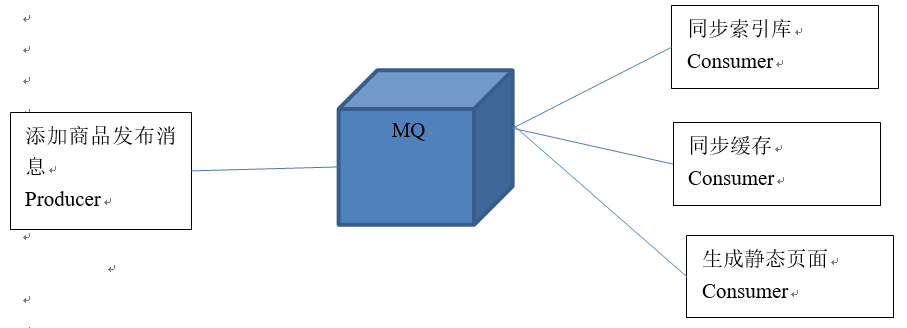
MQ是一个消息中间件,ActiveMQ、RabbitMQ、kafka(大数据)。
系统服务之间,非直接通信,而是通过MQ进行转发,这样既解决了系统之间的通信问题,同时也避免了系统之间的依赖和耦合。
消息队列的主要应用:
解决系统之间的通信问题
降低系统之间的耦合度
互联网项目中,为了用户的体验,必须遵守快速响应用户的原则,比如在电商项目中,当用户下单之后,其实还有很多的后续业务需要完成,用户根本不可能等你的流程全部处理完才得到下单反馈。这是后我们可以利用消息队列,在既能够快速响应用户的同时,有能后将业务消息压入MQ中,通过MQ的流转,通知后续业务的开展,达到数据最终一致。
3. ActiveMQ
3.1. 什么是ActiveMQ
ActiveMQ 是Apache出品,最流行的,能力强劲的开源消息总线。ActiveMQ 是一个完全支持JMS1.1和J2EE 1.4规范的 JMS Provider实现,尽管JMS规范出台已经是很久的事情了,但是JMS在当今的J2EE应用中间仍然扮演着特殊的地位。
主要特点:
1. 多种语言和协议编写客户端。语言: Java, C, C++, C#, Ruby, Perl, Python, PHP。应用协议: OpenWire,Stomp REST,WS Notification,XMPP,AMQP
2. 完全支持JMS1.1和J2EE 1.4规范 (持久化,XA消息,事务)
3. 对Spring的支持,ActiveMQ可以很容易内嵌到使用Spring的系统里面去,而且也支持Spring2.0的特性
4. 通过了常见J2EE服务器(如 Geronimo,JBoss 4, GlassFish,WebLogic)的测试,其中通过JCA 1.5 resource adaptors的配置,可以让ActiveMQ可以自动的部署到任何兼容J2EE 1.4 商业服务器上
5. 支持多种传送协议:in-VM,TCP,SSL,NIO,UDP,JGroups,JXTA
6. 支持通过JDBC和journal提供高速的消息持久化
7. 从设计上保证了高性能的集群,客户端-服务器,点对点
8. 支持Ajax
9. 支持与Axis的整合
10. 可以很容易得调用内嵌JMS provider,进行测试
3.2. ActiveMQ的消息形式
对于消息的传递有两种类型:
一种是点对点的,即一个生产者和一个消费者一一对应;(只能有一个消费者)
另一种是发布/订阅模式,即一个生产者产生消息并进行发送后,可以由多个消费者进行接收。(广播)
JMS定义了五种不同的消息正文格式,以及调用的消息类型,允许你发送并接收以一些不同形式的数据,提供现有消息格式的一些级别的兼容性。
· StreamMessage -- Java原始值的数据流
· MapMessage--一套名称-值对
· TextMessage--一个字符串对象
· ObjectMessage--一个序列化的 Java对象
· BytesMessage--一个字节的数据流
4. ActiveMQ的安装
进入http://activemq.apache.org/下载ActiveMQ
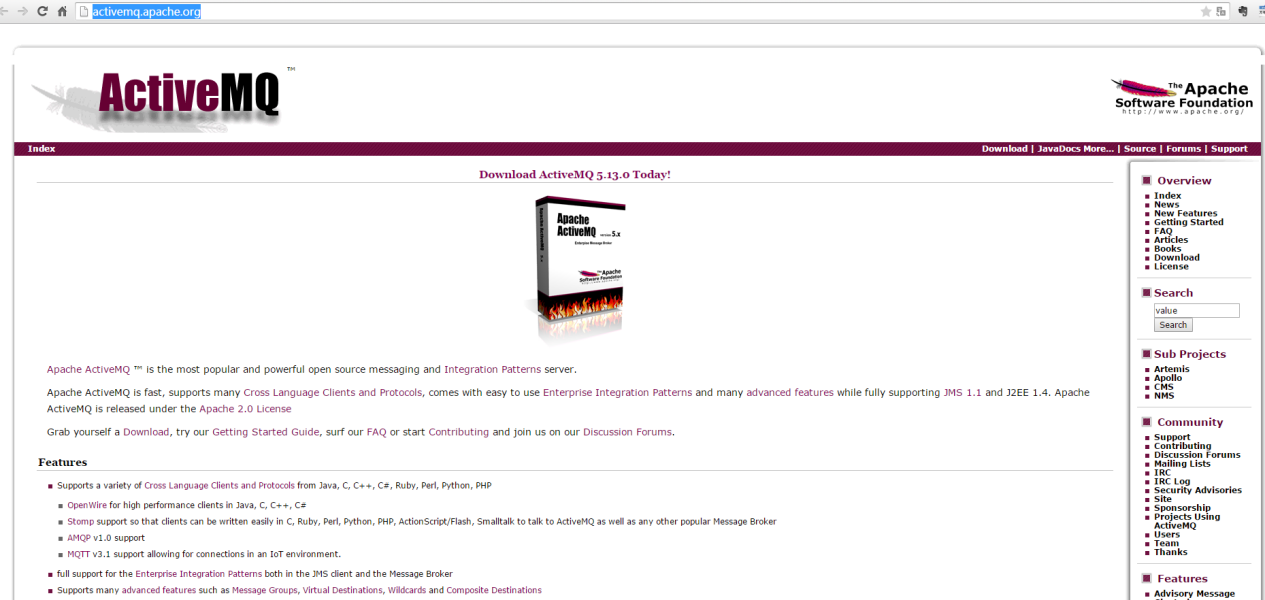
使用的版本是5.12.0
4.1. 安装环境:
1、需要jdk
2、安装Linux系统。生产环境都是Linux系统。
4.2. 安装步骤
第一步: 把ActiveMQ 的压缩包上传到Linux系统。
第二步:解压缩。
第三步:启动。
4.3.启动,查看,关闭
使用bin目录下的activemq命令启动:
[root@localhost bin]# ./activemq start
关闭:
[root@localhost bin]# ./activemq stop
查看状态:
[root@localhost bin]# ./activemq status
4.4 细节
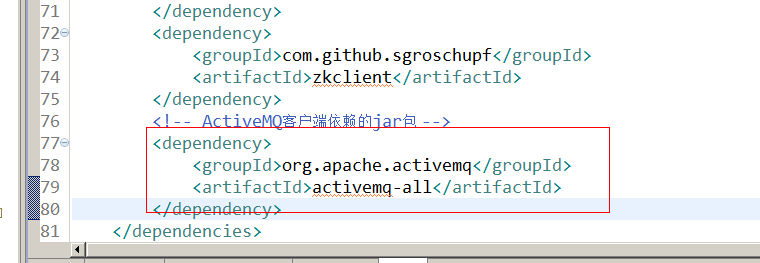
注意:如果ActiveMQ整合spring使用不要使用activemq-all-5.12.0.jar包。建议使用5.11.2
进入管理后台:
http://192.168.25.168:8161/admin
用户名:admin
密码:admin
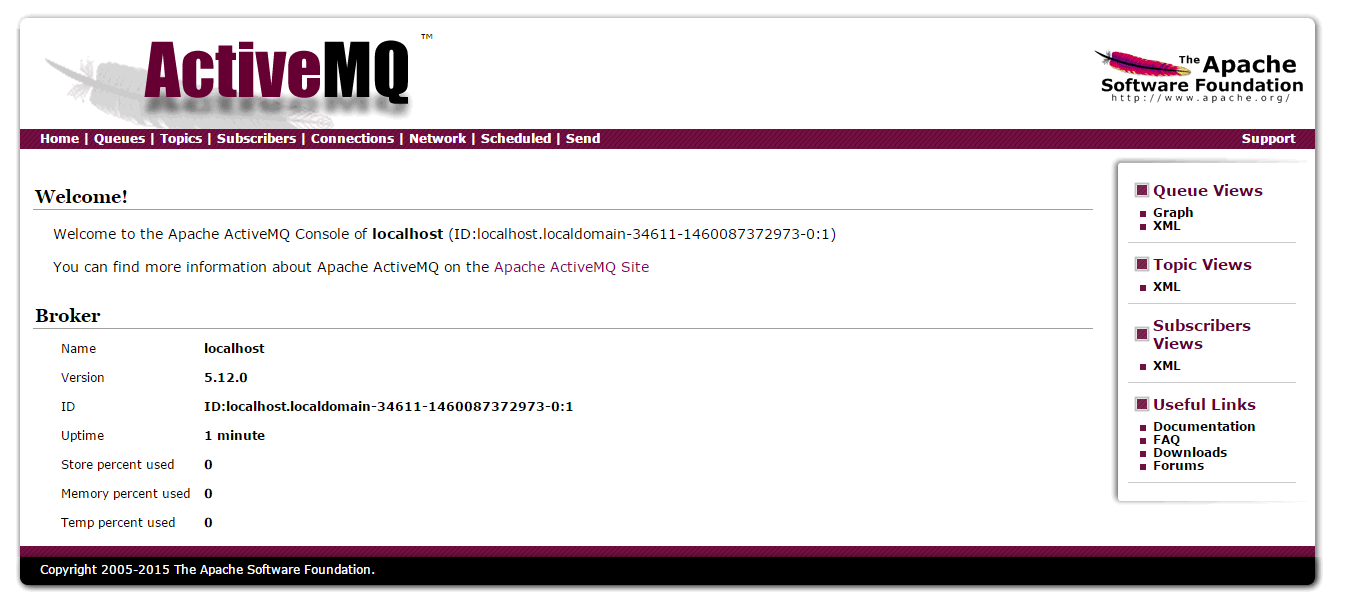
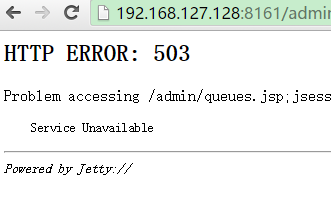
503错误解决:
1、查看机器名
[root@arjenlee168 bin]# cat /etc/sysconfig/network
NETWORKING=yes
HOSTNAME=arjenlee168
2、修改host文件
[root@arjenlee168 bin]# cat /etc/hosts
127.0.0.1 localhost localhost.localdomain localhost4 localhost4.localdomain4 arjenlee168
::1 localhost localhost.localdomain localhost6 localhost6.localdomain6
[root@arjenlee168 bin]#
3、重启Activemq服务
5. ActiveMQ的使用方法
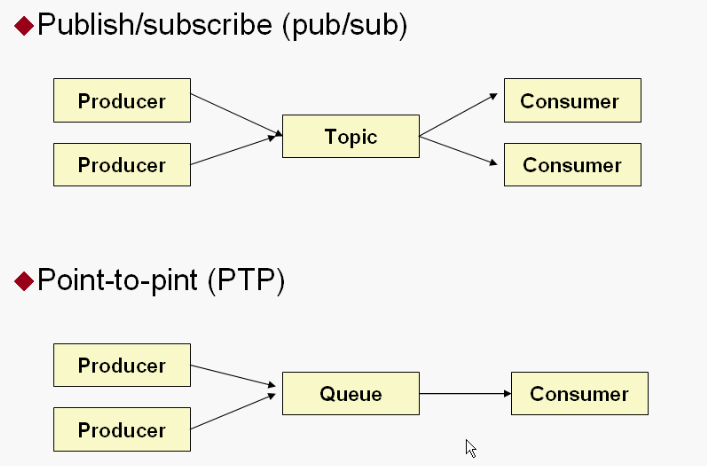
下面是java代码依据JMS规范操作MQ。
5.1. Queue
- Queue消息形式,服务端默认进行持久化。
- Queue消息形式,只要被任意一个consumer消费后,服务端消除该消息,即一个消息只能被一个consumer消费。
如果消息没有被消费,则会一直被保存在服务端,直到被消费为止。
5.1.1. Producer
生产者:生产消息,发送端。
把jar包添加到工程中。使用5.11.2版本的jar包。
5.1.1.1 创建步骤
第一步:创建ConnectionFactory对象,需要指定服务端ip及端口号。
第二步:使用ConnectionFactory对象创建一个Connection对象。
第三步:开启连接,调用Connection对象的start方法。
第四步:使用Connection对象创建一个Session对象。
第五步:使用Session对象创建一个Destination对象(topic、queue),此处创建一个Queue对象。
第六步:使用Session对象创建一个Producer对象。
第七步:创建一个Message对象,创建一个TextMessage对象。
第八步:使用Producer对象发送消息。
第九步:关闭资源。
5.1.1.2 代码示例
@Test

    public void testQueueProducer() throws Exception {

        // 第一步:创建ConnectionFactory对象,需要指定服务端ip及端口号。

        //brokerURL服务器的ip及端口号

        ConnectionFactory connectionFactory = new ActiveMQConnectionFactory("tcp://192.168.25.168:61616");

        // 第二步:使用ConnectionFactory对象创建一个Connection对象。

        Connection connection = connectionFactory.createConnection();

        // 第三步:开启连接,调用Connection对象的start方法。

        connection.start();

        // 第四步:使用Connection对象创建一个Session对象。

        //第一个参数:是否开启事务。true:开启事务,第二个参数忽略。

        //第二个参数:当第一个参数为false时,才有意义。消息的应答模式。1、自动应答2、手动应答。一般是自动应答。

        Session session = connection.createSession(false, Session.AUTO_ACKNOWLEDGE);

        // 第五步:使用Session对象创建一个Destination对象(topic、queue),此处创建一个Queue对象。

        //参数:队列的名称。

        Queue queue = session.createQueue("test-queue");

        // 第六步:使用Session对象创建一个Producer对象。

        MessageProducer producer = session.createProducer(queue);

        // 第七步:创建一个Message对象,创建一个TextMessage对象。

        /*TextMessage message = new ActiveMQTextMessage();

        message.setText("hello activeMq,this is my first test.");*/

        TextMessage textMessage = session.createTextMessage("hello activeMq,this is my first test.");

        // 第八步:使用Producer对象发送消息。

        producer.send(textMessage);

        // 第九步:关闭资源。

        producer.close();

        session.close();

        connection.close();

    }
5.1.2. Consumer
消费者:接收消息。
5.1.2.1 创建步骤
第一步:创建一个ConnectionFactory对象。
第二步:从ConnectionFactory对象中获得一个Connection对象。
第三步:开启连接。调用Connection对象的start方法。
第四步:使用Connection对象创建一个Session对象。
第五步:使用Session对象创建一个Destination对象。和发送端保持一致queue,并且队列的名称一致。
第六步:使用Session对象创建一个Consumer对象。
第七步:接收消息。
第八步:打印消息。
第九步:关闭资源
5.1.2.2 代码示例
@Test

    public void testQueueConsumer() throws Exception {

        // 第一步:创建一个ConnectionFactory对象。

        ConnectionFactory connectionFactory = new ActiveMQConnectionFactory("tcp://192.168.25.168:61616");

        // 第二步:从ConnectionFactory对象中获得一个Connection对象。

        Connection connection = connectionFactory.createConnection();

        // 第三步:开启连接。调用Connection对象的start方法。

        connection.start();

        // 第四步:使用Connection对象创建一个Session对象。

        Session session = connection.createSession(false, Session.AUTO_ACKNOWLEDGE);

        // 第五步:使用Session对象创建一个Destination对象。和发送端保持一致queue,并且队列的名称一致。

        Queue queue = session.createQueue("test-queue");

        // 第六步:使用Session对象创建一个Consumer对象。

        MessageConsumer consumer = session.createConsumer(queue);

        // 第七步:接收消息。

        consumer.setMessageListener(new MessageListener() {

            @Override

            public void onMessage(Message message) {

                try {

                    TextMessage textMessage = (TextMessage) message;

                    String text = null;

                    //取消息的内容

                    text = textMessage.getText();

                    // 第八步:打印消息。

                    System.out.println(text);

                } catch (JMSException e) {

                    e.printStackTrace();

                }

            }

        });

        //等待键盘输入

        System.in.read();

        // 第九步:关闭资源

        consumer.close();

        session.close();

        connection.close();

    }
5.2. Topic
- Topic消息形式,服务端默认不进行持久化存储。
- Topic消息可以被多个consumer接收到,不会因为某一个consumer的消费行为,而是的消息被服务端删除。
5.2.1. Producer
5.2.1.1. 创建步骤
第一步:创建ConnectionFactory对象,需要指定服务端ip及端口号。
第二步:使用ConnectionFactory对象创建一个Connection对象。
第三步:开启连接,调用Connection对象的start方法。
第四步:使用Connection对象创建一个Session对象。
第五步:使用Session对象创建一个Destination对象(topic、queue),此处创建一个Topic对象。
第六步:使用Session对象创建一个Producer对象。
第七步:创建一个Message对象,创建一个TextMessage对象。
第八步:使用Producer对象发送消息。
第九步:关闭资源。
5.2.1.2. 示例代码
@Test

    public void testTopicProducer() throws Exception {

        // 第一步:创建ConnectionFactory对象,需要指定服务端ip及端口号。

        // brokerURL服务器的ip及端口号

        ConnectionFactory connectionFactory = new ActiveMQConnectionFactory("tcp://192.168.25.168:61616");

        // 第二步:使用ConnectionFactory对象创建一个Connection对象。

        Connection connection = connectionFactory.createConnection();

        // 第三步:开启连接,调用Connection对象的start方法。

        connection.start();

        // 第四步:使用Connection对象创建一个Session对象。

        // 第一个参数:是否开启事务。true:开启事务,第二个参数忽略。

        // 第二个参数:当第一个参数为false时,才有意义。消息的应答模式。1、自动应答2、手动应答。一般是自动应答。

        Session session = connection.createSession(false, Session.AUTO_ACKNOWLEDGE);

        // 第五步:使用Session对象创建一个Destination对象(topic、queue),此处创建一个topic对象。

        // 参数:话题的名称。

        Topic topic = session.createTopic("test-topic");

        // 第六步:使用Session对象创建一个Producer对象。

        MessageProducer producer = session.createProducer(topic);

        // 第七步:创建一个Message对象,创建一个TextMessage对象。

        /*

         * TextMessage message = new ActiveMQTextMessage(); message.setText(

         * "hello activeMq,this is my first test.");

         */

        TextMessage textMessage = session.createTextMessage("hello activeMq,this is my topic test");

        // 第八步:使用Producer对象发送消息。

        producer.send(textMessage);

        // 第九步:关闭资源。

        producer.close();

        session.close();

        connection.close();

    }
5.2.2. Consumer
消费者:接收消息。
5.2.2.1. 创建步骤
第一步:创建一个ConnectionFactory对象。
第二步:从ConnectionFactory对象中获得一个Connection对象。
第三步:开启连接。调用Connection对象的start方法。
第四步:使用Connection对象创建一个Session对象。
第五步:使用Session对象创建一个Destination对象。和发送端保持一致topic,并且话题的名称一致。
第六步:使用Session对象创建一个Consumer对象。
第七步:接收消息。需要利用MessageListener。
第八步:打印消息。
第九步:关闭资源
5.2.2.2. 示例代码
@Test

    public void testTopicConsumer() throws Exception {

        // 第一步:创建一个ConnectionFactory对象。

        ConnectionFactory connectionFactory = new ActiveMQConnectionFactory("tcp://192.168.25.168:61616");

        // 第二步:从ConnectionFactory对象中获得一个Connection对象。

        Connection connection = connectionFactory.createConnection();

        // 第三步:开启连接。调用Connection对象的start方法。

        connection.start();

        // 第四步:使用Connection对象创建一个Session对象。

        Session session = connection.createSession(false, Session.AUTO_ACKNOWLEDGE);

        // 第五步:使用Session对象创建一个Destination对象。和发送端保持一致topic,并且话题的名称一致。

        Topic topic = session.createTopic("test-topic");

        // 第六步:使用Session对象创建一个Consumer对象。

        MessageConsumer consumer = session.createConsumer(topic);

        // 第七步:接收消息。

        consumer.setMessageListener(new MessageListener() {

            @Override

            public void onMessage(Message message) {

                try {

                    TextMessage textMessage = (TextMessage) message;

                    String text = null;

                    // 取消息的内容

                    text = textMessage.getText();

                    // 第八步:打印消息。

                    System.out.println(text);

                } catch (JMSException e) {

                    e.printStackTrace();

                }

            }

        });

        System.out.println("topic的消费端03。。。。。");

        // 等待键盘输入

        System.in.read();

        // 第九步:关闭资源

        consumer.close();

        session.close();

        connection.close();

    }
6. Activemq整合spring
使用spring提整合ActiveMQ,可以避免如上繁琐的使用步骤。
6.1. 配置producer
首先是spring和ActiveMQ整合中,如何配置producer
6.1.1. 导入整合包
第一步:引用spring和ActiveMQ整合的相关jar包。
<dependency>

              <groupId>org.springframework</groupId>

              <artifactId>spring-jms</artifactId>

         </dependency>

         <dependency>

              <groupId>org.springframework</groupId>

              <artifactId>spring-context-support</artifactId>

</dependency>
6.1.2. 配置ConnectionFactory
第二步:配置Activemq整合spring。配置ConnectionFactory
spring对ConnectionFactory进行了更上一层的包装(接口),真正的connectionFactory由JMS服务厂商提供,在这里是ActiveMQConnectionFactory,需要注入到spring中的connectionFactory。
<?xml version="1.0" encoding="UTF-8"?>

<beans xmlns="http://www.springframework.org/schema/beans"

    xmlns:context="http://www.springframework.org/schema/context" xmlns:p="http://www.springframework.org/schema/p"

    xmlns:aop="http://www.springframework.org/schema/aop" xmlns:tx="http://www.springframework.org/schema/tx"

xmlns:xsi="http://www.w3.org/2001/XMLSchema-instance"

    xsi:schemaLocation="http://www.springframework.org/schema/beans http://www.springframework.org/schema/beans/spring-beans-4.2.xsd

    http://www.springframework.org/schema/context http://www.springframework.org/schema/context/spring-context-4.2.xsd

    http://www.springframework.org/schema/aop http://www.springframework.org/schema/aop/spring-aop-4.2.xsd

    http://www.springframework.org/schema/tx http://www.springframework.org/schema/tx/spring-tx-4.2.xsd

    http://www.springframework.org/schema/util http://www.springframework.org/schema/util/spring-util-4.2.xsd">

    <!-- 真正可以产生Connection的ConnectionFactory,由对应的 JMS服务厂商提供 -->

    <bean id="targetConnectionFactory" class="org.apache.activemq.ActiveMQConnectionFactory">

        <property name="brokerURL" value="tcp://192.168.25.168:61616" />

    </bean>

    <!-- Spring用于管理真正的ConnectionFactory的ConnectionFactory -->

    <bean id="connectionFactory"

        class="org.springframework.jms.connection.SingleConnectionFactory">

        <!-- 目标ConnectionFactory对应真实的可以产生JMS Connection的ConnectionFactory -->

        <property name="targetConnectionFactory" ref="targetConnectionFactory" />

    </bean>

</beans>
6.1.2. 配置生产者
第三步:配置生产者:spring中提供了一个模板,JMSTemplate用来简化如上展示的发送消息的步骤。
使用JMSTemplate对象。发送消息,template中需要注入connectionFactory。
<!-- Spring提供的JMS工具类,它可以进行消息发送、接收等 -->

    <bean id="jmsTemplate" class="org.springframework.jms.core.JmsTemplate">

        <!-- 这个connectionFactory对应的是我们定义的Spring提供的那个ConnectionFactory对象 -->

        <property name="connectionFactory" ref="connectionFactory" />

    </bean>
6.1.3. 配置Destination
第四步:在spring容器中配置Destination。可以是Queue,也可以是Topic
    <!--这个是队列目的地,点对点的 -->

    <bean id="queueDestination" class="org.apache.activemq.command.ActiveMQQueue">

        <constructor-arg>

            <value>spring-queue</value>

        </constructor-arg>

    </bean>

    <!--这个是主题目的地,一对多的 -->

    <bean id="topicDestination" class="org.apache.activemq.command.ActiveMQTopic">

        <constructor-arg value="topic" />

    </bean>
6.1.4. 完整的配置文件
<?xml version="1.0" encoding="UTF-8"?>

<beans xmlns="http://www.springframework.org/schema/beans"

    xmlns:context="http://www.springframework.org/schema/context" xmlns:p="http://www.springframework.org/schema/p"

    xmlns:aop="http://www.springframework.org/schema/aop" xmlns:tx="http://www.springframework.org/schema/tx"

    xmlns:xsi="http://www.w3.org/2001/XMLSchema-instance"

    xsi:schemaLocation="http://www.springframework.org/schema/beans http://www.springframework.org/schema/beans/spring-beans-4.2.xsd

    http://www.springframework.org/schema/context http://www.springframework.org/schema/context/spring-context-4.2.xsd

    http://www.springframework.org/schema/aop http://www.springframework.org/schema/aop/spring-aop-4.2.xsd http://www.springframework.org/schema/tx http://www.springframework.org/schema/tx/spring-tx-4.2.xsd

    http://www.springframework.org/schema/util http://www.springframework.org/schema/util/spring-util-4.2.xsd">

    <!-- 真正可以产生Connection的ConnectionFactory,由对应的 JMS服务厂商提供 -->

    <bean id="targetConnectionFactory" class="org.apache.activemq.ActiveMQConnectionFactory">

        <property name="brokerURL" value="tcp://192.168.25.168:61616" />

    </bean>

    <!-- Spring用于管理真正的ConnectionFactory的ConnectionFactory -->

    <bean id="connectionFactory"

        class="org.springframework.jms.connection.SingleConnectionFactory">

        <!-- 目标ConnectionFactory对应真实的可以产生JMS Connection的ConnectionFactory -->

        <property name="targetConnectionFactory" ref="targetConnectionFactory" />

    </bean>

    <!-- 配置生产者 -->

    <!-- Spring提供的JMS工具类,它可以进行消息发送、接收等 -->

    <bean id="jmsTemplate" class="org.springframework.jms.core.JmsTemplate">

        <!-- 这个connectionFactory对应的是我们定义的Spring提供的那个ConnectionFactory对象 -->

        <property name="connectionFactory" ref="connectionFactory" />

    </bean>

    <!--这个是队列目的地,点对点的 -->

    <bean id="queueDestination" class="org.apache.activemq.command.ActiveMQQueue">

        <constructor-arg>

            <value>spring-queue</value>

        </constructor-arg>

    </bean>

    <!--这个是主题目的地,一对多的 -->

    <bean id="topicDestination" class="org.apache.activemq.command.ActiveMQTopic">

        <constructor-arg value="topic" />

    </bean>

</beans>
下面看一下spring和ActiveMQ整合中,如何配置cousumer
6.2. 配置consumer
- 导入jar包
- 配置connectionFactory
- 配置destination
以上同producer
6.2.1. 创建MessageListener
消息的接受需要用到,MessageListener,listener一旦监听到有消息传来,便会执行。
public class MyMessageListener implements MessageListener {

    @Override

    public void onMessage(Message message) {

        try {

            TextMessage textMessage = (TextMessage) message;

            //取消息内容

            String text = textMessage.getText();

            System.out.println(text);

        } catch (JMSException e) {

            e.printStackTrace();

        }

    }

}
6.2.2 配置消费者
与是手动创建consumer接受消息的代码相比,在spring中,我们只需要配置消息监听器和消息监听器容器,然后启动spring容器就可以了。
<!-- 接收消息 -->

    <!-- 配置监听器 -->

    <bean id="myMessageListener" class="com.taotao.search.listener.MyMessageListener" />

    <!-- 消息监听容器 -->

    <bean class="org.springframework.jms.listener.DefaultMessageListenerContainer">

        <property name="connectionFactory" ref="connectionFactory" />

        <property name="destination" ref="queueDestination" />

        <property name="messageListener" ref="myMessageListener" />

    </bean>
6.2.3. 完整的配置文件
<?xml version="1.0" encoding="UTF-8"?>

<beans xmlns="http://www.springframework.org/schema/beans"

    xmlns:context="http://www.springframework.org/schema/context" xmlns:p="http://www.springframework.org/schema/p"

    xmlns:aop="http://www.springframework.org/schema/aop" xmlns:tx="http://www.springframework.org/schema/tx"

    xmlns:xsi="http://www.w3.org/2001/XMLSchema-instance"

    xsi:schemaLocation="http://www.springframework.org/schema/beans http://www.springframework.org/schema/beans/spring-beans-4.2.xsd

    http://www.springframework.org/schema/context http://www.springframework.org/schema/context/spring-context-4.2.xsd

    http://www.springframework.org/schema/aop http://www.springframework.org/schema/aop/spring-aop-4.2.xsd http://www.springframework.org/schema/tx http://www.springframework.org/schema/tx/spring-tx-4.2.xsd

    http://www.springframework.org/schema/util http://www.springframework.org/schema/util/spring-util-4.2.xsd">

    <!-- 真正可以产生Connection的ConnectionFactory,由对应的 JMS服务厂商提供 -->

    <bean id="targetConnectionFactory" class="org.apache.activemq.ActiveMQConnectionFactory">

        <property name="brokerURL" value="tcp://192.168.25.168:61616" />

    </bean>

    <!-- Spring用于管理真正的ConnectionFactory的ConnectionFactory -->

    <bean id="connectionFactory"

        class="org.springframework.jms.connection.SingleConnectionFactory">

        <!-- 目标ConnectionFactory对应真实的可以产生JMS Connection的ConnectionFactory -->

        <property name="targetConnectionFactory" ref="targetConnectionFactory" />

    </bean>

    <!--这个是队列目的地,点对点的 -->

    <bean id="queueDestination" class="org.apache.activemq.command.ActiveMQQueue">

        <constructor-arg>

            <value>spring-queue</value>

        </constructor-arg>

    </bean>

    <!--这个是主题目的地,一对多的 -->

    <bean id="topicDestination" class="org.apache.activemq.command.ActiveMQTopic">

        <constructor-arg value="topic" />

    </bean>

    <!-- 接收消息 -->

    <!-- 配置监听器 -->

    <bean id="myMessageListener" class="com.taotao.search.listener.MyMessageListener" />

    <!-- 消息监听容器 -->

    <bean class="org.springframework.jms.listener.DefaultMessageListenerContainer">

        <property name="connectionFactory" ref="connectionFactory" />

        <property name="destination" ref="queueDestination" />

        <property name="messageListener" ref="myMessageListener" />

    </bean>

</beans>
6.3. 代码测试
6.3.1. 发送消息
第一步:初始化一个spring容器
第二步:从容器中获得JMSTemplate对象。
第三步:从容器中获得一个Destination对象
第四步:使用JMSTemplate对象发送消息,需要知道Destination
@Test

     public void testQueueProducer() throws Exception {

         // 第一步:初始化一个spring容器

         ApplicationContext applicationContext = new ClassPathXmlApplicationContext("classpath:spring/applicationContext-activemq.xml");

         // 第二步:从容器中获得JMSTemplate对象。

         JmsTemplate jmsTemplate = applicationContext.getBean(JmsTemplate.class);

         // 第三步:从容器中获得一个Destination对象

         Queue queue = (Queue) applicationContext.getBean("queueDestination");

         // 第四步:使用JMSTemplate对象发送消息,需要知道Destination

         jmsTemplate.send(queue, new MessageCreator() {

              @Override

              public Message createMessage(Session session) throws JMSException {

                   TextMessage textMessage = session.createTextMessage("spring activemq test");

                   return textMessage;

              }

         });

     }
6.3.2. 接收消息
Taotao-search-Service中接收消息。
第一步:把Activemq相关的jar包添加到工程中
第二步:创建一个MessageListener的实现类。
第三步:配置spring和Activemq整合。
第四步:测试代码。
@Test

     public void testQueueConsumer() throws Exception {

         //初始化spring容器

         ApplicationContext applicationContext = new ClassPathXmlApplicationContext("classpath:spring/applicationContext-activemq.xml");

         //等待

         System.in.read();

     }
7. 添加商品同步索引库
7.1. Producer
manager-service工程中发送消息。
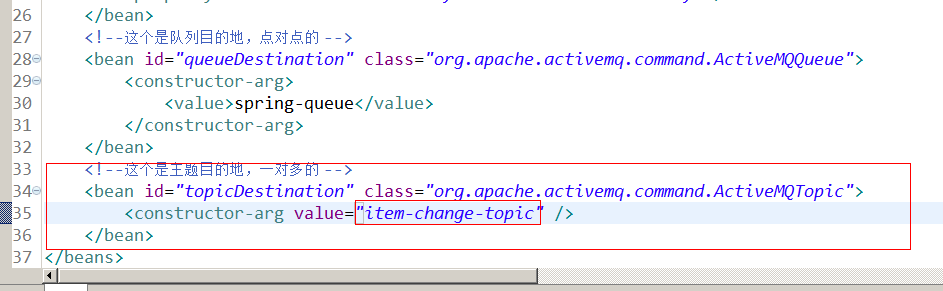
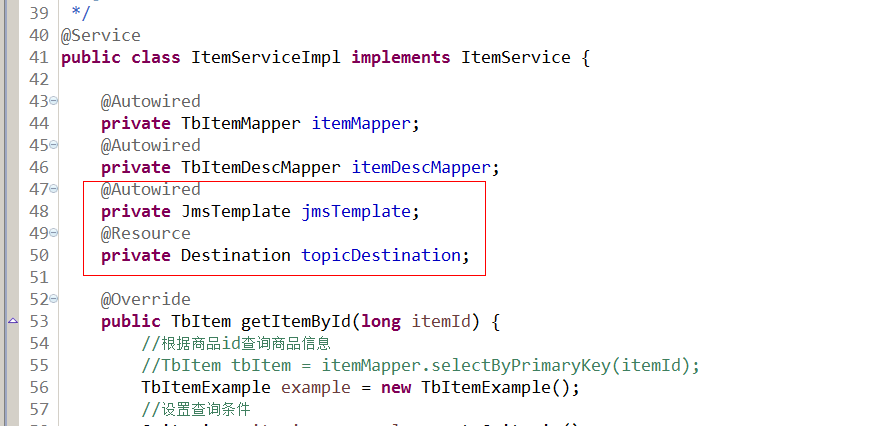
当商品添加完成后发送一个TextMessage,包含一个商品id。search-service从消息队列MQ中接受到推送过来的id值,根据id值去查询数据库,拿到对应的数据;利用查询得到的数据建立索引,添加到索引库中。
@Override

    public TaotaoResult addItem(TbItem item, String desc) {

        // 1、生成商品id

        final long itemId = IDUtils.genItemId();

        // 2、补全TbItem对象的属性

        item.setId(itemId);

        //商品状态,1-正常,2-下架,3-删除

        item.setStatus((byte) 1);

        Date date = new Date();

        item.setCreated(date);

        item.setUpdated(date);

        // 3、向商品表插入数据

        itemMapper.insert(item);

        // 4、创建一个TbItemDesc对象

        TbItemDesc itemDesc = new TbItemDesc();

        // 5、补全TbItemDesc的属性

        itemDesc.setItemId(itemId);

        itemDesc.setItemDesc(desc);

        itemDesc.setCreated(date);

        itemDesc.setUpdated(date);

        // 6、向商品描述表插入数据

        itemDescMapper.insert(itemDesc);

        //发送一个商品添加消息

        jmsTemplate.send(topicDestination, new MessageCreator() {

            @Override

            public Message createMessage(Session session) throws JMSException {

                TextMessage textMessage = session.createTextMessage(itemId + "");

                return textMessage;

            }

        });

        // 7、TaotaoResult.ok()

        return TaotaoResult.ok();

    }
7.2. Consumer
7.2.1. 功能分析
1、接收消息。需要创建MessageListener接口的实现类。
2、取消息,取商品id。
3、根据商品id查询数据库。
4、创建一SolrInputDocument对象。
5、使用SolrServer对象写入索引库。
6、返回成功,返回TaotaoResult。
7.2.2. Dao层
根据商品id查询商品信息。
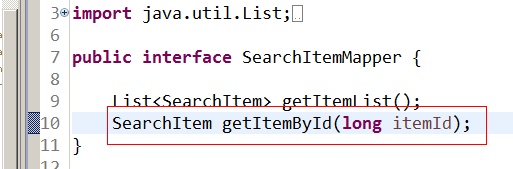
映射文件:
<select id="getItemById" parameterType="long" resultType="com.taotao.common.pojo.SearchItem">

        SELECT

            a.id,

            a.title,

            a.sell_point,

            a.price,

            a.image,

            b. NAME category_name,

            c.item_desc

        FROM

            tb_item a

        JOIN tb_item_cat b ON a.cid = b.id

        JOIN tb_item_desc c ON a.id = c.item_id

        WHERE a.status = 1

          AND a.id=#{itemId}

    </select>
7.2.3. Service层
参数:商品ID
业务逻辑:
1、根据商品id查询商品信息。
2、创建一SolrInputDocument对象。
3、使用SolrServer对象写入索引库。
4、返回成功,返回TaotaoResult。
返回值:TaotaoResult
public TaotaoResult addDocument(long itemId) throws Exception {

        // 1、根据商品id查询商品信息。

        SearchItem searchItem = searchItemMapper.getItemById(itemId);

        // 2、创建一SolrInputDocument对象。

        SolrInputDocument document = new SolrInputDocument();

        // 3、使用SolrServer对象写入索引库。

        document.addField("id", searchItem.getId());

        document.addField("item_title", searchItem.getTitle());

        document.addField("item_sell_point", searchItem.getSell_point());

        document.addField("item_price", searchItem.getPrice());

        document.addField("item_image", searchItem.getImage());

        document.addField("item_category_name", searchItem.getCategory_name());

        document.addField("item_desc", searchItem.getItem_desc());

        // 5、向索引库中添加文档。

        solrServer.add(document);

        solrServer.commit();

        // 4、返回成功,返回TaotaoResult。

        return TaotaoResult.ok();

    }
7.2.4. Listener
public class ItemChangeListener implements MessageListener {

    @Autowired

    private SearchItemServiceImpl searchItemServiceImpl;

    @Override

    public void onMessage(Message message) {

        try {

            TextMessage textMessage = null;

            Long itemId = null;

            //取商品id

            if (message instanceof TextMessage) {

                textMessage = (TextMessage) message;

                itemId = Long.parseLong(textMessage.getText());

            }

            //向索引库添加文档

            searchItemServiceImpl.addDocument(itemId);

        } catch (Exception e) {

            e.printStackTrace();

        }

    }

}
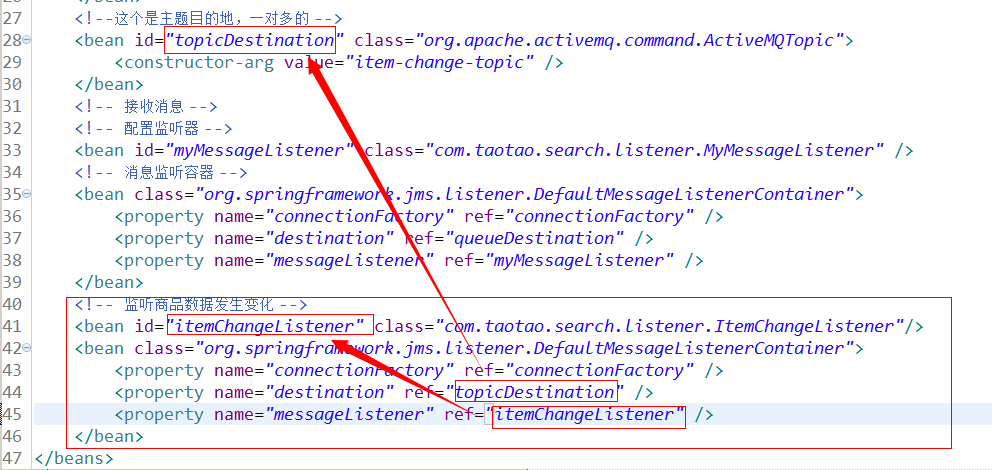
7.2.5. Spring配置监听
消息队列—ActiveMQ的更多相关文章
- 消息队列ActiveMQ的使用详解
通过上一篇文章 <消息队列深入解析>,我们已经消息队列是什么.使用消息队列的好处以及常见消息队列的简单介绍. 这一篇文章,主要带大家详细了解一下消息队列ActiveMQ的使用. 学习消息队 ...
- Java消息队列--ActiveMq 实战
1.下载安装ActiveMQ ActiveMQ官网下载地址:http://activemq.apache.org/download.html ActiveMQ 提供了Windows 和Linux.Un ...
- lesson5:利用jmeter来压测消息队列(activemq)
本文讲述了利用jmeter来压测消息队列,其中消息队列采用apache的activemq,jmeter本身是支持符合jms标准消息队列的压测,由于jmeter的官方sampler配置比较复杂,本文直接 ...
- 深入浅出 消息队列 ActiveMQ(转)
一. 概述与介绍 ActiveMQ 是Apache出品,最流行的.功能强大的即时通讯和集成模式的开源服务器.ActiveMQ 是一个完全支持JMS1.1和J2EE 1.4规范的 JMS Provide ...
- JMS(Java消息服务)与消息队列ActiveMQ基本使用(一)
最近的项目中用到了mq,之前自己一直在码农一样的照葫芦画瓢.最近几天研究了下,把自己所有看下来的文档和了解总结一下. 一. 认识JMS 1.概述 对于JMS,百度百科,是这样介绍的:JMS即Java消 ...
- Java消息队列--ActiveMq 初体验
1.下载安装ActiveMQ ActiveMQ官网下载地址:http://activemq.apache.org/download.html ActiveMQ 提供了Windows 和Linux.Un ...
- java消息队列--ActiveMQ
1.下载安装ActiveMQ ActiveMQ官网下载地址:http://activemq.apache.org/download.html ActiveMQ 提供了Windows 和Linux.Un ...
- 第十一章 企业项目开发--消息队列activemq
注意:本章代码基于 第十章 企业项目开发--分布式缓存Redis(2) 代码的github地址:https://github.com/zhaojigang/ssmm0 消息队列是分布式系统中实现RPC ...
- 消息队列activeMq 使用介绍
深入浅出 消息队列 ActiveMQhttp://blog.csdn.net/jwdstef/article/details/17380471 一. 概述与介绍 ActiveMQ 是Apache出 ...
随机推荐
- Serf 了解
Introduction to Serf Welcome to the intro guide to Serf! This guide will show you what Serf is, expl ...
- socket初步
简单demo:https://blog.csdn.net/ns_code/article/details/14105457
- luvcview,使用mplayer查看摄像头和luvcview保存YUV图像视频的播放(转)
luvcview,使用mplayer查看摄像头和luvcview保存YUV图像视频的播放 在mplayer中查看摄像头,可使用如下命令:mplayer tv:// -tv driver=v4l2:in ...
- CSS内容简单归纳
具体内容请查阅<CSS参考手册> 一.CSS模块介绍 1.1 CSS1中定义了网页基本属性 字体.颜色.补白.基本选择器等 1.2 CSS2中在CSS1的基础上添加了高级功能 浮动和定位. ...
- 2.Python输入pip命令出现Unknown or unsupported command 'install'问题解决
1.在学习python时,输入pip命令的时候出现以下错误: 2.原因:输入where pip命令查找,发现结果如下图,原因是因为电脑原先装了LoadRunner,导致系统无法识别应该使用哪一个pip ...
- Unit06: Spring对JDBC的 整合支持 、 Spring+JDBC Template、Spring异常处理
Unit06: Spring对JDBC的 整合支持 . Spring+JDBC Template .Spring异常处理 1. springmvc提供的异常处理机制 我们可以将异常抛给spring框架 ...
- cocos2d js的一些tip
cocos2d-js-v3.2-rc0 cc.director.end();//退出app cc.Application.getInstance().openURL("http://www. ...
- 将socket程序从linux移植到windows上
今天突然想试下纯socket编程在两个系统上代码重合量有多大,只要不使用VC自定义的宏(比如SOCKET.SOCKADDR等等)感觉代码重合量挺大的. 比如最简单的TCP客户端和服务端对话,在VC中用 ...
- python接口自动化22-签名(signature)鉴权(authentication)之加密(HEX、MD5、HMAC-SHA256)
前言 开放的接口为了避免被别人乱调用,浪费服务器资源,这就涉及到签名(Signature)加密了 API 使用签名方法(Signature)对接口进行鉴权(Authentication).每一次请求都 ...
- USB驱动程序之USB设备驱动程序2鼠标用作键盘学习笔记
1.usbmouse.c (1)probe函数 在这个probe函数后判断是不是一个鼠标,先得到usb_host_interface结构体,除了端点0外,端点个数如果不是1,返回错误,表示不是自己能支 ...