
模板中的 TemplateBinding 问题
昨天一个朋友向我求助一个自定义水印控件绑定的问题,问题出在文本框中输入的文本,不能绑定到
相应的依赖属性上(自定义的依赖属性 PassText),他纠结了很久找不出问题所在。问题帮他解决后,这里稍
做总结。
问题描述:
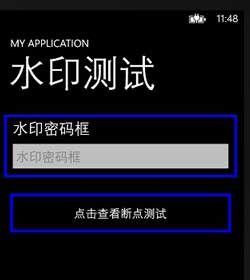
1)默认显示效果:
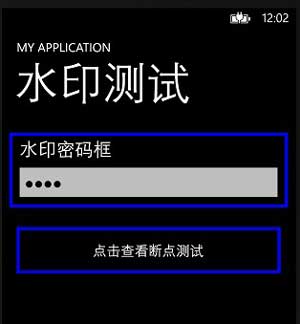
2)在“水印密码框”中输入四个 ‘a’:
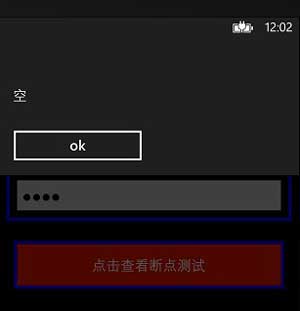
3)单击按钮,打印出密码框中的字符串,但是密码框中的文字并没有显示,显示的还是定义依赖属性时
的默认值:
他的部分源代码:
1)密码框控件类继承自 TextBox ,其中依赖属性 PassText 为绑定到密码框的属性:
public class WaterPasswordBox : TextBox

    {

        public static readonly DependencyProperty PassTextProperty = DependencyProperty.Register(

          "PassText", typeof( string ), typeof( WaterPasswordBox ), new PropertyMetadata( "空" ) );

        public string PassText

        {

            get { return (string)GetValue( PassTextProperty ); }

            set { SetValue( PassTextProperty, value ); }

        }

        public static DependencyProperty WaterContentProprty = DependencyProperty.Register("WaterContent", typeof(object), typeof(WaterPasswordBox), new PropertyMetadata("水印密码框"));

        public object WaterContent

        {

            get

            {

                return GetValue(WaterContentProprty);

            }

            set

            {

                SetValue(WaterContentProprty, value);

            }

        }

        public static DependencyProperty WaterForegroundProprty = DependencyProperty.Register("WaterForeground", typeof(Brush), typeof(WaterPasswordBox), new PropertyMetadata(new SolidColorBrush(Colors.Gray)));

        public Brush WaterForeground

        {

            get

            {

                return (Brush)GetValue(WaterForegroundProprty);

            }

            set

            {

                SetValue(WaterForegroundProprty, value);

            }

        }

        public WaterPasswordBox()

        {

            DefaultStyleKey = typeof(WaterPasswordBox);

        }

        ContentControl WaterContentElement = null;

        PasswordBox PasswordBoxElement = null;

        public override void OnApplyTemplate()

        {

            base.OnApplyTemplate();

            WaterContentElement = this.GetTemplateChild("WaterCoElement") as ContentControl;

            PasswordBoxElement = this.GetTemplateChild("ContentElement") as PasswordBox;

            if (WaterContentElement != null && PasswordBoxElement != null)

            {

                if (string.IsNullOrEmpty(PasswordBoxElement.Password))

                    WaterContentElement.Visibility = System.Windows.Visibility.Visible;

                else

                    WaterContentElement.Visibility = System.Windows.Visibility.Collapsed;

            }

        }

        protected override void OnGotFocus(RoutedEventArgs e)

        {

            if (WaterContentElement != null && string.IsNullOrEmpty(PasswordBoxElement.Password))

                WaterContentElement.Visibility = Visibility.Collapsed;

            base.OnGotFocus(e);

        }

     //   public event TextChangedEventHandler TextChanged +=   ;

        protected override void OnLostFocus(RoutedEventArgs e)

        {

            if (WaterContentElement != null && string.IsNullOrEmpty(PasswordBoxElement.Password))

                WaterContentElement.Visibility = Visibility.Visible;

            base.OnLostFocus(e);

        }

    }
2)在 Generic.xaml 文件中定义该控件的样式:
<ResourceDictionary

    xmlns="http://schemas.microsoft.com/winfx/2006/xaml/presentation"

    xmlns:x="http://schemas.microsoft.com/winfx/2006/xaml"

    xmlns:local="clr-namespace:WaterTextBox"

    xmlns:d="http://schemas.microsoft.com/expression/blend/2008"

    xmlns:mc="http://schemas.openxmlformats.org/markup-compatibility/2006"

    mc:Ignorable="d">

    <ControlTemplate x:Key="PhoneDisabledTextBoxTemplate" TargetType="TextBox">

        <ContentControl x:Name="ContentElement" BorderThickness="" HorizontalContentAlignment="Stretch" Margin="{StaticResource PhoneTextBoxInnerMargin}" Padding="{TemplateBinding Padding}" VerticalContentAlignment="Stretch"/>

    </ControlTemplate>

    <Style TargetType="local:WaterPasswordBox">

        <Setter Property="FontFamily" Value="{StaticResource PhoneFontFamilyNormal}"/>

        <Setter Property="FontSize" Value="{StaticResource PhoneFontSizeMediumLarge}"/>

        <Setter Property="Background" Value="{StaticResource PhoneTextBoxBrush}"/>

        <Setter Property="Foreground" Value="{StaticResource PhoneTextBoxForegroundBrush}"/>

        <Setter Property="BorderBrush" Value="{StaticResource PhoneTextBoxBrush}"/>

        <Setter Property="SelectionBackground" Value="{StaticResource PhoneAccentBrush}"/>

        <Setter Property="SelectionForeground" Value="{StaticResource PhoneTextBoxSelectionForegroundBrush}"/>

        <Setter Property="BorderThickness" Value="{StaticResource PhoneBorderThickness}"/>

        <Setter Property="Padding" Value=""/>

        <Setter Property="Template">

            <Setter.Value>

                <ControlTemplate TargetType="local:WaterPasswordBox">

                    <Grid Background="Transparent">

                        <VisualStateManager.VisualStateGroups>

                            <VisualStateGroup x:Name="CommonStates">

                                <VisualState x:Name="Normal"/>

                                <VisualState x:Name="MouseOver"/>

                                <VisualState x:Name="Disabled">

                                    <Storyboard>

                                        <ObjectAnimationUsingKeyFrames Storyboard.TargetProperty="Visibility" Storyboard.TargetName="EnabledBorder">

                                            <DiscreteObjectKeyFrame KeyTime="">

                                                <DiscreteObjectKeyFrame.Value>

                                                    <Visibility>Collapsed</Visibility>

                                                </DiscreteObjectKeyFrame.Value>

                                            </DiscreteObjectKeyFrame>

                                        </ObjectAnimationUsingKeyFrames>

                                        <ObjectAnimationUsingKeyFrames Storyboard.TargetProperty="Visibility" Storyboard.TargetName="DisabledOrReadonlyBorder">

                                            <DiscreteObjectKeyFrame KeyTime="">

                                                <DiscreteObjectKeyFrame.Value>

                                                    <Visibility>Visible</Visibility>

                                                </DiscreteObjectKeyFrame.Value>

                                            </DiscreteObjectKeyFrame>

                                        </ObjectAnimationUsingKeyFrames>

                                    </Storyboard>

                                </VisualState>

                                <VisualState x:Name="ReadOnly">

                                    <Storyboard>

                                        <ObjectAnimationUsingKeyFrames Storyboard.TargetProperty="Visibility" Storyboard.TargetName="EnabledBorder">

                                            <DiscreteObjectKeyFrame KeyTime="">

                                                <DiscreteObjectKeyFrame.Value>

                                                    <Visibility>Collapsed</Visibility>

                                                </DiscreteObjectKeyFrame.Value>

                                            </DiscreteObjectKeyFrame>

                                        </ObjectAnimationUsingKeyFrames>

                                        <ObjectAnimationUsingKeyFrames Storyboard.TargetProperty="Visibility" Storyboard.TargetName="DisabledOrReadonlyBorder">

                                            <DiscreteObjectKeyFrame KeyTime="">

                                                <DiscreteObjectKeyFrame.Value>

                                                    <Visibility>Visible</Visibility>

                                                </DiscreteObjectKeyFrame.Value>

                                            </DiscreteObjectKeyFrame>

                                        </ObjectAnimationUsingKeyFrames>

                                        <ObjectAnimationUsingKeyFrames Storyboard.TargetProperty="Background" Storyboard.TargetName="DisabledOrReadonlyBorder">

                                            <DiscreteObjectKeyFrame KeyTime="" Value="{StaticResource PhoneTextBoxBrush}"/>

                                        </ObjectAnimationUsingKeyFrames>

                                        <ObjectAnimationUsingKeyFrames Storyboard.TargetProperty="BorderBrush" Storyboard.TargetName="DisabledOrReadonlyBorder">

                                            <DiscreteObjectKeyFrame KeyTime="" Value="{StaticResource PhoneTextBoxBrush}"/>

                                        </ObjectAnimationUsingKeyFrames>

                                        <ObjectAnimationUsingKeyFrames Storyboard.TargetProperty="Foreground" Storyboard.TargetName="DisabledOrReadonlyContent">

                                            <DiscreteObjectKeyFrame KeyTime="" Value="{StaticResource PhoneTextBoxReadOnlyBrush}"/>

                                        </ObjectAnimationUsingKeyFrames>

                                    </Storyboard>

                                </VisualState>

                            </VisualStateGroup>

                            <VisualStateGroup x:Name="FocusStates">

                                <VisualState x:Name="Focused">

                                    <Storyboard>

                                        <ObjectAnimationUsingKeyFrames Storyboard.TargetProperty="Background" Storyboard.TargetName="EnabledBorder">

                                            <DiscreteObjectKeyFrame KeyTime="" Value="{StaticResource PhoneTextBoxEditBackgroundBrush}"/>

                                        </ObjectAnimationUsingKeyFrames>

                                        <ObjectAnimationUsingKeyFrames Storyboard.TargetProperty="BorderBrush" Storyboard.TargetName="EnabledBorder">

                                            <DiscreteObjectKeyFrame KeyTime="" Value="{StaticResource PhoneTextBoxEditBorderBrush}"/>

                                        </ObjectAnimationUsingKeyFrames>

                                    </Storyboard>

                                </VisualState>

                                <VisualState x:Name="Unfocused"/>

                            </VisualStateGroup>

                        </VisualStateManager.VisualStateGroups>

                        <Border x:Name="EnabledBorder" BorderBrush="{TemplateBinding BorderBrush}" BorderThickness="{TemplateBinding BorderThickness}" Background="{TemplateBinding Background}" Margin="{StaticResource PhoneTouchTargetOverhang}">

                            <Grid>

                                <ContentControl x:Name="WaterCoElement" Content="{TemplateBinding WaterContent}" FontStyle="Normal" Foreground="{TemplateBinding WaterForeground}" Margin="{StaticResource PhoneTextBoxInnerMargin}" d:LayoutOverrides="Height" Padding="{TemplateBinding Padding}" HorizontalContentAlignment="Stretch" VerticalContentAlignment="Stretch"/>

                                <!--重点这里的 Password="{Binding PassText}"绑定不了-->

                                <PasswordBox x:Name="ContentElement"  Password="{Binding PassText}" Background="{Binding Background}" BorderThickness="" HorizontalContentAlignment="Stretch" Margin="-12" Padding="{TemplateBinding Padding}" VerticalContentAlignment="Stretch"/>

                            </Grid>

                        </Border>

                        <Border x:Name="DisabledOrReadonlyBorder" BorderBrush="{StaticResource PhoneDisabledBrush}" BorderThickness="{TemplateBinding BorderThickness}" Background="Transparent" Margin="{StaticResource PhoneTouchTargetOverhang}" Visibility="Collapsed">

                            <TextBox x:Name="DisabledOrReadonlyContent" Background="Transparent" Foreground="{StaticResource PhoneDisabledBrush}" FontWeight="{TemplateBinding FontWeight}" FontStyle="{TemplateBinding FontStyle}" FontSize="{TemplateBinding FontSize}" FontFamily="{TemplateBinding FontFamily}" IsReadOnly="True" SelectionForeground="{TemplateBinding SelectionForeground}" SelectionBackground="{TemplateBinding SelectionBackground}" TextAlignment="{TemplateBinding TextAlignment}" TextWrapping="{TemplateBinding TextWrapping}" Text="{TemplateBinding Text}" Template="{StaticResource PhoneDisabledTextBoxTemplate}"/>

                        </Border>

                    </Grid>

                </ControlTemplate>

            </Setter.Value>

        </Setter>

    </Style>

</ResourceDictionary>
3)在引用该控件的页面中,添加该控件:
<Border BorderBrush="Blue" BorderThickness="5" Margin="0,10">

    <StackPanel>

        <TextBlock FontSize="30" Text="水印密码框" Margin="12,0"/>

        <my:WaterPasswordBox Name="WaterPasswordBox" />

    </StackPanel>

</Border>

<Button BorderBrush="Blue" Tap="UIElement_OnTap" BorderThickness="5" Margin="0,10" Height="100">

 点击查看断点测试

</Button>
4)按钮的 Tap 路由事件:
private void UIElement_OnTap(object sender, GestureEventArgs e)

{

    string temp = WaterPasswordBox.PassText.ToString();

    MessageBox.Show(temp);

}
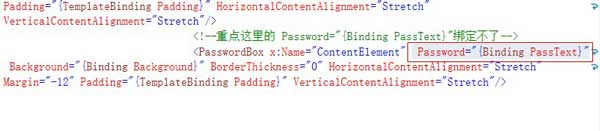
之所以在密码框中输入的文本没有最终传递到 PassText 这个依赖属性上,是因为 TemplateBinding
为 Binding 的单向绑定形式,也就是 依赖属性 PassText 的默认值 “空” 可以绑定到 样式控件里面的
PasswordBox 控件的 Password 属性上,但是 不能反向绑定。
截图:
其中 msdn 对 TemplateBinding的描述:
“您在模板中使用 TemplateBinding 绑定到模板所应用到的控件的值。
TemplateBinding 比 Binding 有效,但较少功能。 使用 TemplateBinding 使用与 RelativeSource 属性的 Binding 等效设置为
RelativeSource.TemplatedParent。 ”
“TemplateBinding是Binding的一个轻量级版本,它失去了成熟版本Binding的很多功能,比如继承内容引用(inheritence context referencing),
RelativeSource引用,还有通过IValueConverter/TypeConverter机制的动态类型转换。它仅支持由模板产生的FrameworkElements,它的数据源引
用会指向模板中的父级元素。TemplateBinding最主要的用途是内置在模板中绑定模板化元素的属性,在这种情况下,比起成熟Binding效率要高得多。”
也就是:
<PasswordBox Password="{TemplateBinding PassText}"/>
等价于:
<PasswordBox Password="{Binding Path=PassText, Mode=OneWay, RelativeSource={RelativeSource TemplatedParent}}"/>
这时,把自定义密码框样式中的 PasswordBox 控件的绑定中,把 Binding 的设置 Mode=OneWay 改成 Mode=TwoWay,就可以实现双向绑定了,
截图:
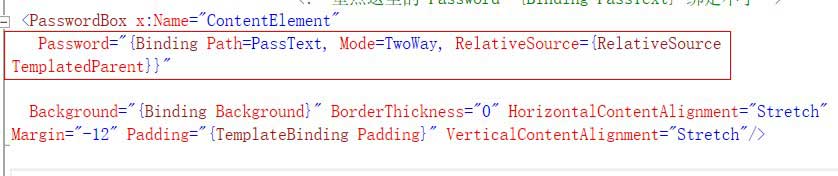
此时虽然完成了双向绑定,但是遇到另一个问题,如果在自定义密码框中输入文本后,立即点击按钮时,弹出框
中显示的还是自定义密码框中之前绑定属性值;如果在填写完成自定义密码框后,单击屏幕其它地方,让密码框
失去焦点,然后再单击按钮,就能显示正确的内容了。
造成这个问题的原因,是因为 这里注册的是按钮的 Tap 这个路由事件,而它的执行时间要早于文本框 LostFocus
事件。这里再为按钮添加一个 Click 事件,为 自定义密码框控件添加一个 LostFocus 事件,同是在 C# 页面打印出
按钮的执行信息:
XAML:
<my:WaterPasswordBox  Name="WaterPasswordBox" LostFocus="WaterPasswordBox_LostFocus"/>

 <Button BorderBrush="Blue" Tap="UIElement_OnTap" BorderThickness="5" Margin="0,10" Height="100" Click="Button_Click">

      点击查看断点测试

 </Button>
C# :
 private void UIElement_OnTap(object sender, GestureEventArgs e)

 {

     Debug.WriteLine("UIElement_OnTap");

     //WaterPasswordBox.PassText = "asd";

     //string temp = WaterPasswordBox.PassText.ToString();

     //MessageBox.Show(temp);

 }

 private void Button_Click(object sender, RoutedEventArgs e)

 {

     Debug.WriteLine("Button_Click");

     string temp = WaterPasswordBox.PassText.ToString();

     MessageBox.Show(temp);

 }

 private void WaterPasswordBox_LostFocus(object sender, RoutedEventArgs e)

 {

     Debug.WriteLine("WaterPasswordBox_LostFocus");

 }
在 Debug 输出窗口中输出:
UIElement_OnTap

WaterPasswordBox_LostFocus

Button_Click
可以看出,Tap 路由事件的触发要早于 LostFocus 事件,最后触发 Click 事件。
此时再在 文本框中输入4个 ‘a’ ,从按钮的 Click 事件中把密码框中的文本打印出来:
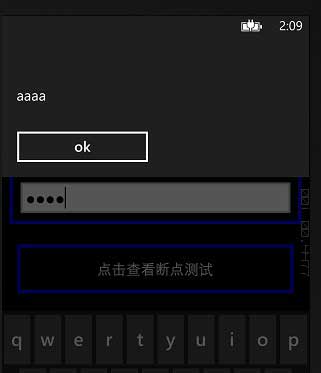
虽然实现了双向绑定,但是从 PasswordBox 的 Password 属性值反向同步并不是及时的,参考了一下
下面的其它属性,暂时还没有找到在 TextChanged 事件里就能触发的 update source 的设置:
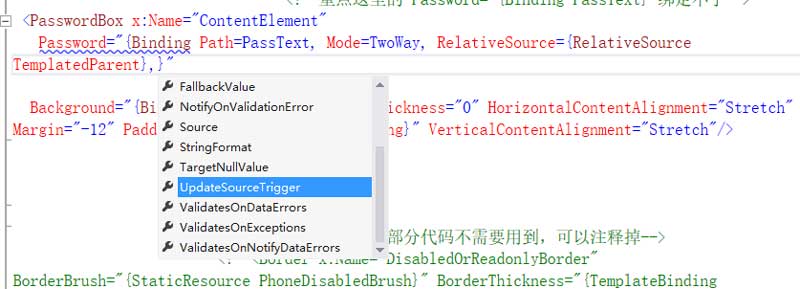
由于时间的关系,有时间再去查相应文档。如果有朋友不幸阅读了本文,并且知道原因,希望能指点一下。
模板中的 TemplateBinding 问题的更多相关文章
- ThinkPHP+Smarty模板中截取包含中英文混合的字符串乱码的解决方案
好几天没写博客了,其实有好多需要总结的,因为最近一直在忙着做项目,但是困惑了几天的Smarty模板中截取包含中英文混合的字符串乱码的问题,终于解决了,所以记录下来,需要的朋友看一下: 出现乱码的原因: ...
- SMARTY模板中如何使用get,post,request,cookies,session,server变量
{$smarty}保留变量不需要从PHP脚本中分配,是可以在模板中直接访问的数组类型变量,通常被用于访问一些特殊的模板变量.例如,直接在模板中访问页面请求变量.获取访问模板时的时间戳.直接访问PHP中 ...
- django url路径与模板中样式相对路径的问题
static目录下有css和js及image等文件夹,里面放置网站的一些静态文件,static位于网站根目录下,django中配置静态文件这个就细说,网上都有,昨天在添加新内容时发现一个问题,我的ur ...
- 走进AngularJs(二) ng模板中常用指令的使用方式
通过使用模板,我们可以把model和controller中的数据组装起来呈现给浏览器,还可以通过数据绑定,实时更新视图,让我们的页面变成动态的.ng的模板真是让我爱不释手.学习ng道路还很漫长,从模板 ...
- [原创]java WEB学习笔记109:Spring学习---spring对JDBC的支持:使用 JdbcTemplate 查询数据库,简化 JDBC 模板查询,在 JDBC 模板中使用具名参数两种实现
本博客的目的:①总结自己的学习过程,相当于学习笔记 ②将自己的经验分享给大家,相互学习,互相交流,不可商用 内容难免出现问题,欢迎指正,交流,探讨,可以留言,也可以通过以下方式联系. 本人互联网技术爱 ...
- Thinkphp回顾(五)之前台模板中的基本语法
一.导入CSS和JS文件 的三种方式 (了解) 1.link方式(常规) <link rel=’stylesheet’ type=’text/css’ href=’__PUBLIC__/Js/ ...
- Thymeleaf+SpringMVC,如何从模板中获取数据
Thymeleaf+SpringMVC,如何从模板中获取数据 在一个典型的SpringMVC应用中,带@Controller注解的类负责准备数据模型Map的数据和选择一个视图进行渲染.这个模型Map对 ...
- ThinkPHP模板中如何操作session,以及如果session中保存的是数组的情况
在ThinkPHP的模板中操作session时,可以参考ThinkPHP参考文档中的“模板—>系统变量”部分,在默认模板引擎中,语法如下: {$Think.session.user} //输出s ...
- ejs模板中的四种表达式输出形式
在ejs模板中,通常会用下面四种方式在HTML中输出服务端的变量或表达式的值: 1. 直接在<%%>中写表达式或变量.这种情况通常只是用来进行表达式计算或给变量赋值,不会有任何输出,被称作 ...
随机推荐
- Openshift 3.11和LDAP的集成
1. OpenLDAP的安装 只记录主要步骤,详细可参考 https://access.redhat.com/solutions/2484371 # yum install -y openldap o ...
- Python实现MapReduce,wordcount实例,MapReduce实现两表的Join
Python实现MapReduce 下面使用mapreduce模式实现了一个简单的统计日志中单词出现次数的程序: from functools import reduce from multiproc ...
- Win7+Qt5.6.0(64位)+msvc2015编译器 环境配置
根据“Qt简介,Qt 5.6.0-VS2015 版本安装配置图文教程”安装第二套IDE,使用Qt官方的集成开发环境 QtCreator + 微软的WinDbg调试器(内含命令行调试器为CDB)的组合. ...
- Opencv 完美配置攻略 2014 (Win8.1 + Opencv 2.4.8 + VS 2013)
http://my.phirobot.com/blog/2014-02-opencv_configuration_in_vs.html 2012年4月给同学写了篇傻瓜式的 VS2010+Opencv- ...
- 算法笔记_034:大整数乘法(Java)
目录 1 问题描述 2 解决方案 2.1 蛮力法 1 问题描述 计算两个大整数相乘的结果. 2 解决方案 2.1 蛮力法 package com.liuzhen.chapter5; import ...
- 〖Linux〗关于Linux软件包安装位置、版本查询
1. 查询版本 aptitude show [软件] 2. 查询路径 dpkg -L [软件] whereis [软件] which [软件]
- PHP项目的“苦逼”经历与思考
PHP项目的"苦逼"经历与思考 PHP零基础.但因为项目人手不够的原因,被安排到一个用户"定制"项目. 该项目是用PHP生成的统计数据报表. 而用户又有新的3个 ...
- Appium完整安装教程
Appium安装教程 发布时间: 2014-12-11 10:34 作者: 柒月 来源: 51Testing软件测试网采编 字体: 小 中 大 | 上一篇 下一篇 | 打印 | ...
- JavaScript异常处理
http://www.yaosansi.com/post/747.html 异常处理概述 在代码的运行过程中,错误是不可避免的,总的来说,错误发生于两种情况:一是程序内部的逻辑或者语法错误, ...
- JSON对象和JSON字符串以及JSON.parse 函数的使用
<!DOCTYPE html PUBLIC "-//W3C//DTD XHTML 1.0 Transitional//EN" "http://www.w3.org/ ...