
基于js全屏动画焦点图幻灯片
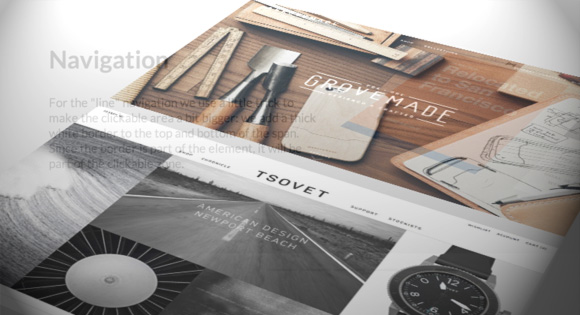
今天给大家分享一款基于js全屏动画焦点图幻灯片。这款焦点图内的内容以动画形式出现和消失。效果图如下:
实现的代码。
html代码:
  <div class="slideshow" id="slideshow">

            <ol class="slides">

                <li class="current">

                    <div class="description">

                        <h2>

                            Tilted Content Slideshow</h2>

                        <p>

                            This slider, as seen on the landing page of the <a href="http://www.w2bc.com/">FWA</a>,

                            plays with 3D perspective and performs some interesting animations on the right-hand

                            side images.</p>

                    </div>

                    <div class="tiltview col">

                        <a href="http://www.w2bc.com/">

                            <img src="img/1_screen.jpg" /></a> <a href="https://www.w2bc.com/">

                                <img src="img/2_screen.jpg" /></a>

                    </div>

                </li>

                <li>

                    <div class="description">

                        <h2>

                            CSS Animations</h2>

                        <p>

                            We are using 12 different animations for showing and hiding the items of a slide.

                            The animations are defined by randomly adding data-attributes called <code>data-effect-in</code>

                            and <code>data-effect-out</code> for every slide.

                        </p>

                    </div>

                    <div class="tiltview row">

                        <a href="http://www.w2bc.com/">

                            <img src="img/3_mobile.jpg" /></a> <a href="http://www.w2bc.com/">

                                <img src="img/4_mobile.jpg" /></a>

                    </div>

                </li>

                <li>

                    <div class="description">

                        <h2>

                            Tilted Items</h2>

                        <p>

                            The perspective view is achieved by adding a perspective value to the slide list

                            item and tilting a division that contains the two screenshots.</p>

                    </div>

                    <div class="tiltview col">

                        <a href="http://www.w2bc/">

                            <img src="img/5_screen.jpg" /></a> <a href="http://www.w2bc.com/">

                                <img src="img/6_screen.jpg" /></a>

                    </div>

                </li>

                <li>

                    <div class="description">

                        <h2>

                            Column or Row</h2>

                        <p>

                            The items in the tilted container are either laid out in a column or in a row. For

                            some directions we need to adjust the animation delays for the items, since we don't

                            want the items to overlap each other when they move in or out.</p>

                    </div>

                    <div class="tiltview row">

                        <a href="http://www.w2bc/">

                            <img src="img/1_mobile.jpg" /></a> <a href="https://tsovet.com/">

                                <img src="img/2_mobile.jpg" /></a>

                    </div>

                </li>

                <li>

                    <div class="description">

                        <h2>

                            Responsiveness</h2>

                        <p>

                            For smaller screens, the items on the right hand side will become less opaque and

                            serve as decoration only. The focus will be on the description which will occupy

                            all the width.</p>

                    </div>

                    <div class="tiltview col">

                        <a href="http://www.w2bc.com/">

                            <img src="img/3_screen.jpg" /></a> <a href="http://foodsense.is/">

                                <img src="img/4_screen.jpg" /></a>

                    </div>

                </li>

                <li>

                    <div class="description">

                        <h2>

                            Navigation</h2>

                        <p>

                            For the "line" navigation we use a little trick to make the clickable area a bit

                            bigger: we add a thick white border to the top and bottom of the span. Since the

                            border is part of the element, it will be part of the clickable zone.</p>

                    </div>

                    <div class="tiltview row">

                        <a href="http://www.w2bc.com/">

                            <img src="img/5_mobile.jpg" /></a> <a href="http://www.herschelsupply.com/">

                                <img src="img/6_mobile.jpg" /></a>

                    </div>

                </li>

            </ol>

        </div>
via:http://www.w2bc.com/Article/23685
基于js全屏动画焦点图幻灯片的更多相关文章
- 基于jQuery的网站首页宽屏焦点图幻灯片
今天给大家分享一款基于jQuery的网站首页宽屏焦点图幻灯片.这款焦点图适用浏览器:IE8.360.FireFox.Chrome.Safari.Opera.傲游.搜狗.世界之窗.效果图如下: 在线预览 ...
- 基于Ascensor.js全屏切换页面插件
今天给大家分享一款基于Ascensor.js全屏切换页面插件,这款实例 适用浏览器:IE8.360.FireFox.Chrome.Safari.Opera.傲游.搜狗.世界之窗.效果图如下: 在线预览 ...
- 全新jquery多点滑动幻灯片——全屏动画animateSlide
首页banner的酷炫效果多来自全屏大图的幻灯片动画,下面提供一种完美兼容的jquery动画特效:全新jquery多点滑动幻灯片——全屏动画animateSlide(代码完全原创). 直接上代码,把h ...
- JS框架_(JQuery.js)文章全屏动画切换
百度云盘 传送门 密码:anap 文章全屏动画切换效果 <!doctype html> <html lang="zh"> <head> < ...
- jQuery可自动播放动画焦点图插件Koala
Koala是一款简单而实用的jQuery焦点图幻灯片插件,焦点图不仅可以在播放图片的时候让图片有淡入淡出的动画效果,而且图片可以自动播放.该jQuery焦点图的每一张图片都可以设置文字描述,并浮动在图 ...
- 基于HTML5全屏图文左右滑动切换特效
基于HTML5全屏图文左右滑动切换特效.这是一款基于jQuery+HTML5实现的全屏图文切换特效代码.效果图如下: 在线预览 源码下载 实现的代码. html代码: <main> & ...
- 基于jQuery果冻式按钮焦点图切换代码
基于jQuery果冻式按钮焦点图切换代码.这是一款基于jQuery+CSS3实现的图片切换代码.效果图如下: 在线预览 源码下载 实现的代码. html代码: <div class=&quo ...
- JS全屏漂浮广告、移入光标停止移动
点击这里查看效果 以下是代码: <!DOCTYPE HTML> <html> <head> <meta http-equiv="Content-Ty ...
- [HTML]JS全屏代码
video全屏参考:https://www.thecssninja.com/javascript/fullscreen <!doctype html> <html> <h ...
随机推荐
- 努力让java学习系统化
这段日子接手一社区系统的开发.开发过程中感觉到自己接触到的和所作的多是业务逻辑性开发,对java开发到如今还没有一个清晰明白的路线,我越来越感觉到问题的重要性. 问题一:代码仅仅注重了功能实现,对代码 ...
- 吐槽win7
在纠结了N次后,终于重装win7了.其间还是不死心,又找了新的xp版本来装了一下,确实不行,才心不甘情不愿地再次回到win7下. 说实话,Win7的各种新功能,我没有感觉到有多好,只有不适应,如: 资 ...
- ASCII对比表
ASCII控制字符和ASCII可显示字符 ASCII控制字符 二进制 十进制 十六进制 缩写 能够显示的表示法 名称/意义 0000 0000 0 00 NUL ␀ 空字符(Null) 0000 00 ...
- js看起来比较怪异的写法 (综合)
1.$(function() {}中$是什么意思? <script type="text/javascript"> $(function(){ $("#tre ...
- 使用ionic中的侧边栏以及angularjs中广播的使用
接着之前的ionic的例子 查看例子:我的第一段ionic代码 demo3.html(黄底内容为增加或修改的内容) <!DOCTYPE html> <html ng-app=&quo ...
- KineticJS教程(9)
KineticJS教程(9) 作者: ysm 9.选择器 Kinetic在舞台.层和组对象上都提供了get方法,用于返回这三者中包含的对象. 9.1.根据ID获取对象 要用id获取对象,首先要给对象 ...
- 软件开发工具GCC
重点掌握以下知识点: 了解gcc编译器的下载和安装方法,包括嵌入式交叉编译平台搭建的方法 重点掌握gcc的基本编译流程和编译方法 重点掌握gcc编译的高级操作及选项 了解gcc编译器性能分析工具,包括 ...
- 打造通用的Android下拉刷新组件(适用于ListView、GridView等各类View)
前言 近期在做项目时,使用了一个开源的下拉刷新ListView组件.极其的不稳定,bug还多.稳定的组件又写得太复杂了,jar包较大.在我的一篇博客中也讲述过下拉刷新的实现,即Android打造(Li ...
- 【VBA】点击工作簿中的每个单元格,整行整列变色
需求描述 在点击单元格的时候,单元格所在行与列都变色显示 实现方案 打开Excle表格,按住ALT+F11 双击上图中的ThisWorkbook Private Sub Workbook_SheetS ...
- 02-maven常用命令,以及使用命令创建目录
maven常用命令 mvn -v 查看maven版本 compile 编译 test 测试 package 打包 clean 删除target install 安装jar包到本地仓库中. mave ...