
C#限速下载网络文件
代码:
using System;
using System.Collections.Concurrent;
using System.Collections.Generic;
using System.ComponentModel;
using System.Data;
using System.Drawing;
using System.IO;
using System.Linq;
using System.Net;
using System.Text;
using System.Text.RegularExpressions;
using System.Threading;
using System.Threading.Tasks;
using System.Windows.Forms;
using Common.Utils;
using Utils; namespace 爬虫
{
public partial class Form1 : Form
{
#region 变量
/// <summary>
/// 已完成字节数
/// </summary>
private long completedCount = ;
/// <summary>
/// 是否完成
/// </summary>
private bool isCompleted = true;
/// <summary>
/// 数据块队列
/// </summary>
private ConcurrentQueue<MemoryStream> msQueue = new ConcurrentQueue<MemoryStream>();
/// <summary>
/// 下载开始位置
/// </summary>
private long range = ;
/// <summary>
/// 文件大小
/// </summary>
private long total = ;
/// <summary>
/// 一段时间内的完成节点数,计算网速用
/// </summary>
private long unitCount = ;
/// <summary>
/// 上次计时时间,计算网速用
/// </summary>
private DateTime lastTime = DateTime.MinValue;
/// <summary>
/// 一段时间内的完成字节数,控制网速用
/// </summary>
private long unitCountForLimit = ;
/// <summary>
/// 上次计时时间,控制网速用
/// </summary>
private DateTime lastTimeForLimit = DateTime.MinValue;
/// <summary>
/// 下载文件sleep时间,控制速度用
/// </summary>
private int sleepTime = ;
#endregion #region Form1
public Form1()
{
InitializeComponent();
}
#endregion #region Form1_Load
private void Form1_Load(object sender, EventArgs e)
{
lblMsg.Text = string.Empty;
lblByteMsg.Text = string.Empty;
lblSpeed.Text = string.Empty;
}
#endregion #region Form1_FormClosing
private void Form1_FormClosing(object sender, FormClosingEventArgs e)
{ }
#endregion #region btnDownload_Click 下载
private void btnDownload_Click(object sender, EventArgs e)
{
isCompleted = false;
btnDownload.Enabled = false;
string url = txtUrl.Text.Trim();
string filePath = CreateFilePath(url); #region 下载线程
Thread thread = new Thread(new ThreadStart(() =>
{
int tryTimes = ;
while (!HttpDownloadFile(url, filePath))
{
Thread.Sleep(); tryTimes++;
LogUtil.Log("请求服务器失败,重新请求" + tryTimes.ToString() + "次");
this.Invoke(new InvokeDelegate(() =>
{
lblMsg.Text = "请求服务器失败,重新请求" + tryTimes.ToString() + "次";
}));
HttpDownloadFile(url, filePath);
}
}));
thread.IsBackground = true;
thread.Start();
#endregion #region 保存文件线程
thread = new Thread(new ThreadStart(() =>
{
while (!isCompleted)
{
MemoryStream ms;
if (msQueue.TryDequeue(out ms))
{
using (FileStream fs = new FileStream(filePath, FileMode.Open, FileAccess.Write))
{
fs.Seek(completedCount, SeekOrigin.Begin);
fs.Write(ms.ToArray(), , (int)ms.Length);
fs.Close();
}
completedCount += ms.Length;
} if (total != && total == completedCount)
{
Thread.Sleep();
isCompleted = true;
} Thread.Sleep();
}
}));
thread.IsBackground = true;
thread.Start();
#endregion #region 计算网速/进度线程
thread = new Thread(new ThreadStart(() =>
{
while (!isCompleted)
{
Thread.Sleep(); if (lastTime != DateTime.MinValue)
{
double sec = DateTime.Now.Subtract(lastTime).TotalSeconds;
double speed = unitCount / sec / ; try
{
#region 显示速度
if (speed < )
{
this.Invoke(new InvokeDelegate(() =>
{
lblSpeed.Text = string.Format("{0}KB/S", speed.ToString("0.00"));
}));
}
else
{
this.Invoke(new InvokeDelegate(() =>
{
lblSpeed.Text = string.Format("{0}MB/S", (speed / ).ToString("0.00"));
}));
}
#endregion #region 显示进度
this.Invoke(new InvokeDelegate(() =>
{
string strTotal = (total / / ).ToString("0.00") + "MB";
if (total < * )
{
strTotal = (total / ).ToString("0.00") + "KB";
}
string completed = (completedCount / / ).ToString("0.00") + "MB";
if (completedCount < * )
{
completed = (completedCount / ).ToString("0.00") + "KB";
}
lblMsg.Text = string.Format("进度:{0}/{1}", completed, strTotal);
lblByteMsg.Text = string.Format("已下载:{0}\r\n总大小:{1}", completedCount, total); if (completedCount == total)
{
MessageBox.Show("完成");
}
}));
#endregion
}
catch { } lastTime = DateTime.Now;
unitCount = ;
}
}
}));
thread.IsBackground = true;
thread.Start();
#endregion #region 限制网速线程
thread = new Thread(new ThreadStart(() =>
{
while (!isCompleted)
{
Thread.Sleep(); if (lastTimeForLimit != DateTime.MinValue)
{
double sec = DateTime.Now.Subtract(lastTimeForLimit).TotalSeconds;
double speed = unitCountForLimit / sec / ; try
{
#region 限速/解除限速
double limitSpeed = ;
if (double.TryParse(txtSpeed.Text.Trim(), out limitSpeed))
{
if (speed > limitSpeed && sleepTime < )
{
sleepTime += ;
}
if (speed < limitSpeed - && sleepTime >= )
{
sleepTime -= ;
}
}
else
{
this.Invoke(new InvokeDelegate(() =>
{
txtSpeed.Text = "";
}));
}
#endregion
}
catch { } lastTimeForLimit = DateTime.Now;
unitCountForLimit = ;
}
}
}));
thread.IsBackground = true;
thread.Start();
#endregion }
#endregion #region HttpDownloadFile 下载文件
/// <summary>
/// Http下载文件
/// </summary>
public bool HttpDownloadFile(string url, string filePath)
{
try
{
if (!File.Exists(filePath))
{
using (FileStream fs = new FileStream(filePath, FileMode.Create))
{
fs.Close();
}
}
else
{
FileInfo fileInfo = new FileInfo(filePath);
range = fileInfo.Length;
} // 设置参数
HttpWebRequest request = WebRequest.Create(url) as HttpWebRequest;
request.UserAgent = "Mozilla/4.0 (compatible; MSIE 8.0; Windows NT 6.0; Trident/4.0)";
request.Proxy = null;
//发送请求并获取相应回应数据
HttpWebResponse response = request.GetResponse() as HttpWebResponse;
if (response.ContentLength == range)
{
this.Invoke(new InvokeDelegate(() =>
{
lblMsg.Text = "文件已下载";
}));
return true;
} // 设置参数
request = WebRequest.Create(url) as HttpWebRequest;
request.UserAgent = "Mozilla/4.0 (compatible; MSIE 8.0; Windows NT 6.0; Trident/4.0)";
request.Proxy = null;
request.AddRange(range);
//发送请求并获取相应回应数据
response = request.GetResponse() as HttpWebResponse;
//直到request.GetResponse()程序才开始向目标网页发送Post请求
Stream responseStream = response.GetResponseStream(); total = range + response.ContentLength;
completedCount = range; MemoryStream ms = new MemoryStream();
byte[] bArr = new byte[];
lastTime = DateTime.Now;
lastTimeForLimit = DateTime.Now;
int size = responseStream.Read(bArr, , (int)bArr.Length);
unitCount += size;
unitCountForLimit += size;
ms.Write(bArr, , size);
while (!isCompleted)
{
size = responseStream.Read(bArr, , (int)bArr.Length);
unitCount += size;
unitCountForLimit += size;
ms.Write(bArr, , size);
if (ms.Length > )
{
msQueue.Enqueue(ms);
ms = new MemoryStream();
}
if (completedCount + ms.Length == total)
{
msQueue.Enqueue(ms);
ms = new MemoryStream();
} Thread.Sleep(sleepTime);
}
responseStream.Close();
return true;
}
catch (Exception ex)
{
LogUtil.LogError(ex.Message + "\r\n" + ex.StackTrace);
return false;
}
}
#endregion #region 根据URL生成文件保存路径
private string CreateFilePath(string url)
{
string path = Application.StartupPath + "\\download";
if (!Directory.Exists(path))
{
Directory.CreateDirectory(path);
} string fileName = Path.GetFileName(url);
if (fileName.IndexOf("?") > )
{
return path + "\\" + fileName.Substring(, fileName.IndexOf("?"));
}
else
{
return path + "\\" + fileName;
}
}
#endregion } //end Form1类
}
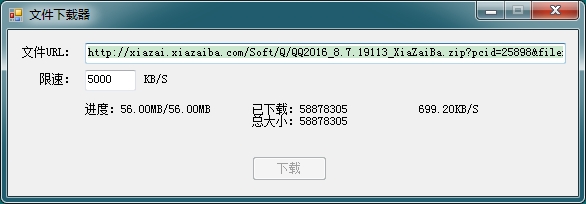
测试截图:
C#限速下载网络文件的更多相关文章
- JAVA多线程下载网络文件
JAVA多线程下载网络文件,开启多个线程,同时下载网络文件. 源码如下:(点击下载 MultiThreadDownload.java) import java.io.InputStream; im ...
- Java读取并下载网络文件
CreateTime--2017年8月21日10:11:07 Author:Marydon import java.io.ByteArrayOutputStream; import java.io ...
- python下载网络文件
python下载网络文件 制作人:全心全意 下载图片 #!/usr/bin/python #-*- coding: utf-8 -*- import requests url = "http ...
- DELPHI TDownLoadURL下载网络文件
DELPHI XE6 FMX 附件:http://files.cnblogs.com/xe2011/IDHttp_fmx.7z unit Unit1; interface uses //引用 Vc ...
- 【python】下载网络文件到本地
# 下载网络图片文件到本地 import urllib.request rsp=urllib.request.urlopen("http://n.sinaimg.cn/ent/transfo ...
- java 下载网络文件
1.FileUtils.copyURLToFile实现: import java.io.File; import java.net.URL; import org.apache.commons.io. ...
- python使用wget下载网络文件
wget是一个从网络上自动下载文件的自由工具.它支持HTTP,HTTPS和FTP协议,可以使用HTTP代理. ubuntu 安装wget pip install wget 从网络或本地硬盘下载文件(并 ...
- 解决FTPClient下载网络文件线程挂起问题
今天在windows上调试FTP下载文件时,出险线程假死,代码如下: if (inputStream != null) { byte[] data = null; ByteArrayOutputStr ...
- 网络编程(一):用C#下载网络文件的2种方法
使用C#下载一个Internet上的文件主要是依靠HttpWebRequest/HttpWebResonse和WebClient.具体处理起来还有同步和异步两种方式,所以我们其实有四种组合. 1.使用 ...
随机推荐
- Android N开发 你需要知道的一切
title: Android N开发 你需要知道的一切 tags: Android N,Android7.0,Android --- 转载请注明出处:http://www.cnblogs.com/yi ...
- VMware下对虚拟机Ubuntu14系统所在分区sda1进行磁盘扩容
VMware下对虚拟机Ubuntu14系统所在分区sda1进行磁盘扩容 一般来说,在对虚拟机里的Ubuntu下的磁盘进行扩容时,都是添加新的分区,而并不是对其系统所在分区进行扩容,如在此链接中http ...
- 数据库备份并分离日志表(按月)sh 脚本
#!/bin/sh year=`date +%Y` month=`date +%m` day=`date +%d` hour=`date +%H` dir="/data/dbbackup/f ...
- JavaScript中的this
本文尽量避免概念性的讲解,那样太抽象 所以下面以一些简单的例子,从易到难对this的用法总结 1.方法中的this会指向当前执行该方法的对象 如: var name = "window&qu ...
- 【一起学OpenFoam】01 OpenFoam的优势
CFD技术发展到今天,已经超过了大半个世纪了,已经涌现出非常多的CFD软件可供人们使用.通用商业CFD软件譬如Fluent.CFX.Star CCM+等在工业上得到了广泛的应用,另外一些专用的软件(如 ...
- 通过Mono 在 Heroku 上运行 .NET 应用
英文原文:Running .NET on Heroku 中文原文:在 Heroku 上运行 .NET 应用 自从加入了Heroku之后,我就想在这个平台上运行.NET程序.现在我很高兴向大家宣布,我们 ...
- 解决Windows 8.1中所有的应用(Modern App)无法打开(闪退)的问题
我已经在3台电脑上遇到这个问题了,症状是,所有应用商店安装的App都无法打开,包括应用商店本身,在开始界面点击应用以后,应用的Logo一闪而过,然后就消失了,回到了开始界面.查看系统应用日志,会有这样 ...
- 在 Linux 中使用 Eclipse 和 Gnu Autotools 管理 C/C++ 项目
在我该系列的之前的所有随笔中,都是采用 Linux 发行版自带的包管理工具(如 apt-get.yum 等)进行软件的安装和卸载,从来没有向大家展示使用源代码自行编译安装软件的方法.但是长期混迹于 U ...
- 菜鸟在C语言编译,链接时可能遇到的两个问题
最近在看 CSAPP (Computer Systems A Programmers Perspective 2nd) 的第七章 链接.学到了点东西,跟大家分享.下文中的例子都是出自CSAPP第七章. ...
- 2000条你应知的WPF小姿势 基础篇<63-68 Triggers和WPF类逻辑结构>
在正文开始之前需要介绍一个人:Sean Sexton. 来自明尼苏达双城的软件工程师.最为出色的是他维护了两个博客:2,000ThingsYou Should Know About C# 和 2,00 ...