
Android ExpandableListView的技巧和问题
前言:
最近一个多月在认真的学习Android和做项目,文章内容表达的不好或者理解错了,希望大家评论指出。 :-)
本文是总结几个比较常用且使用的技巧,和一个大家都会遇到的问题。
文章中大部分语句摘抄自一下两篇大神写的文章:(如果对ExpandableListView一无所知,建议按照顺序去阅读,遇到问题再看本文)
1、Android中ExpandableListView的使用
网址:http://blog.csdn.net/gyflyx/article/details/6461242
2、[Android UI设计]ExpandableListView详解
网址:http://www.tuicool.com/articles/JjaMnqf
ExpandableListView是Android中可以实现下拉ListView的一个控件,是ListView的子类。
直接上图,就是这么一功能~
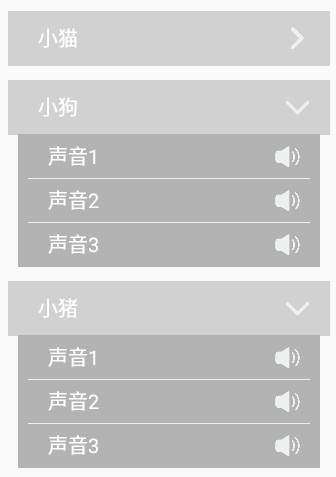 (点击就会展开,再点击就缩回去)
Android自带的布局不是这样的,这个是自定义了Group和Child的布局。
ExpandableListView的使用步骤:
1、在xml中定义一个ExpandableListView
2、在类中定义两个List集合,用于存放Group/Child中的内容,并初始化内容
3、定义ExpandableListView的Adapter,继承BaseExpanableListAdapter
例如:public class MyExpandableAdapter extends BaseExpandableListAdapter
4、最后给定义好的ExpandableView添加上Adapter
这里就贴出两个子布局的代码和MyExpandableAdapter的代码~
expandlist_group.xml
<?xml version="1.0" encoding="utf-8"?>

<LinearLayout xmlns:android="http://schemas.android.com/apk/res/android"

    android:orientation="vertical"

    android:layout_width="match_parent"

    android:layout_height="70dp">

    <RelativeLayout

        android:layout_width="match_parent"

        android:layout_height="55dp"

        android:background="#d1d1d1"

        android:layout_marginTop="15dp">

        <TextView

            android:id="@+id/tv_group_name"

            android:layout_width="wrap_content"

            android:layout_height="match_parent"

            android:layout_marginLeft="30dp"

            android:text="小猫"

            android:textColor="#ffffff"

            android:textSize="20sp"

            android:gravity="center_vertical"/>

        <ImageView

            android:id="@+id/iv_arrow"

            android:layout_width="25dp"

            android:layout_height="25dp"

            android:layout_alignParentRight="true"

            android:layout_centerVertical="true"

            android:layout_marginRight="20dp"

            android:background="@drawable/right_arrow"/>

    </RelativeLayout>

</LinearLayout>
expandlist_item.xml
<?xml version="1.0" encoding="utf-8"?>

<LinearLayout xmlns:android="http://schemas.android.com/apk/res/android"

    android:orientation="vertical"

    android:layout_width="match_parent"

    android:layout_height="45dp">

    <RelativeLayout

        android:layout_width="match_parent"

        android:layout_height="45dp"

        android:layout_marginLeft="10dp"

        android:layout_marginRight="10dp"

        android:background="#b3b3b3">

        <TextView

            android:id="@+id/tv_child_name"

            android:layout_width="wrap_content"

            android:layout_height="match_parent"

            android:layout_marginLeft="30dp"

            android:text="声音1"

            android:textColor="#ffffff"

            android:textSize="20sp"

            android:gravity="center_vertical"/>

        <ImageView

            android:id="@+id/iv_sound"

            android:layout_width="25dp"

            android:layout_height="25dp"

            android:layout_alignParentRight="true"

            android:layout_centerVertical="true"

            android:layout_marginRight="20dp"

            android:background="@drawable/sound"/>

        <ImageView

            android:id="@+id/iv_divider"

            android:layout_width="match_parent"

            android:layout_height="1dp"

            android:background="#ecf0f1"

            android:layout_marginLeft="10dp"

            android:layout_marginRight="10dp"

            android:layout_alignParentTop="true"/>

    </RelativeLayout>

</LinearLayout>
MyExpandableAdapter.java
public class MyExpandableAdapter extends BaseExpandableListAdapter {

    private List<String> groupArray;

    private List<List<String>> childArray;

    private Context mContext;

    public MyExpandableAdapter(Context context, List<String> groupArray, List<List<String>> childArray){

        mContext = context;

        this.groupArray = groupArray;

        this.childArray = childArray;

    }

    @Override

    public int getGroupCount() {

        return groupArray.size();

    }

    @Override

    public int getChildrenCount(int groupPosition) {

        return childArray.get(groupPosition).size();

    }

    @Override

    public Object getGroup(int groupPosition) {

        return groupArray.get(groupPosition);

    }

    @Override

    public Object getChild(int groupPosition, int childPosition) {

        return childArray.get(groupPosition).get(childPosition);

    }

    @Override

    public long getGroupId(int groupPosition) {

        return groupPosition;

    }

    @Override

    public long getChildId(int groupPosition, int childPosition) {

        return childPosition;

    }

    @Override

    public boolean hasStableIds() {

        return true;

    }

    @Override

    public View getGroupView(int groupPosition, boolean isExpanded, View convertView, ViewGroup parent) {

        View view = convertView;

        GroupHolder holder = null;

        if(view == null){

            holder = new GroupHolder();

            view = LayoutInflater.from(mContext).inflate(R.layout.expandlist_group, null);

            holder.groupName = (TextView)view.findViewById(R.id.tv_group_name);

            holder.arrow = (ImageView)view.findViewById(R.id.iv_arrow);

            view.setTag(holder);

        }else{

            holder = (GroupHolder)view.getTag();

        }

        //判断是否已经打开列表

        if(isExpanded){

            holder.arrow.setBackgroundResource(R.drawable.dowm_arrow);

        }else{

            holder.arrow.setBackgroundResource(R.drawable.right_arrow);

        }

        holder.groupName.setText(groupArray.get(groupPosition));

        return view;

    }

    @Override

    public View getChildView(int groupPosition, int childPosition, boolean isLastChild, View convertView, ViewGroup parent) {

        View view = convertView;

        ChildHolder holder = null;

        if(view == null){

            holder = new ChildHolder();

            view = LayoutInflater.from(mContext).inflate(R.layout.expandlist_item, null);

            holder.childName = (TextView)view.findViewById(R.id.tv_child_name);

            holder.sound = (ImageView)view.findViewById(R.id.iv_sound);

            holder.divider = (ImageView)view.findViewById(R.id.iv_divider);

            view.setTag(holder);

        }else{

            holder = (ChildHolder)view.getTag();

        }

        if(childPosition == 0){

            holder.divider.setVisibility(View.GONE);

        }

        holder.sound.setBackgroundResource(R.drawable.sound);

        holder.childName.setText(childArray.get(groupPosition).get(childPosition));

        return view;

    }

    @Override

    public boolean isChildSelectable(int groupPosition, int childPosition) {

        return true;

    }

    class GroupHolder{

        public TextView groupName;

        public ImageView arrow;

    }

    class ChildHolder{

        public TextView childName;

        public ImageView sound;

        public ImageView divider;

    }

}
有一下几点需要注意的:
1.设置指示器
有人也许会发现效果图中没有默认箭头(指示器),因为我隐藏了啊~
ExpandableListView expandableListView;
...省略获取id得到实例的代码
expandableListView.setGroupIndicator(null),这样就是设置没有指示器,就是默认的箭头。
如果刚刚的代码,没有设置隐藏指示器就是下图的效果:
 (这样就不好看了!!)
2.自定义指示器
隐藏了就要自定义一个指示器了喔。

在ExpandableAdapter中的getGroupView中参数有一个参数是isExpanded,代表当前Group是否已经打开。
关键代码:
//判断是否已经打开列表

        if(isExpanded){

            holder.arrow.setBackgroundResource(R.drawable.dowm_arrow);

        }else{

            holder.arrow.setBackgroundResource(R.drawable.right_arrow);

        }
打开了就返回true,没有打开就返回false。
3.默认打开某一个Group
ExpandableListView expandableListView;
...省略获取id得到实例的代码
expandableListView.expandGroup(int)
4.设置每一个item的高度
这个问题困扰了我很久,上面的两个链接也没有明确的说明,于是就百度了半天,终于找出答案了。
但是不知道为什么,要嵌套布局才可以,就是外面一个布局设定高度,里面再设定一个布局也设定高度。然后实际上宽度和高度都是在第二个里设置才有效。
下面是expandlist_group.xml的部分代码:
<LinearLayout xmlns:android="http://schemas.android.com/apk/res/android"

    android:orientation="vertical"

    android:layout_width="match_parent"

    android:layout_height="55dp">

    <RelativeLayout

        android:layout_width="match_parent"

        android:layout_height="55dp"

        android:background="#d1d1d1"

        android:layout_marginTop="15dp">
①第一个布局高度设置55dp,第二个布局高度也设置55dp
效果是这样的:

②第一个布局高度设置75dp,第二个布局高度也设置55dp

然而发现并没有什么用,所以推断第二个布局才是item的高度
这里就演示这么多了,动手实践才是真理,大家可以试一试删除其中一个布局,高度是否还能正常设置。(我试过是不能喔)
第一次写博客,希望对大家有帮助。睡觉~zzzzz
Android ExpandableListView的技巧和问题的更多相关文章
- 【转】你所不知道的Android Studio调试技巧
这篇写Android studio debug技巧个人觉得写得不错,转自:http://www.jianshu.com/p/011eb88f4e0d# Android Studio目前已经成为开发An ...
- Android ListView 常用技巧
Android ListView 常用技巧 Android TextView 常用技巧 1.使用ViewHolder提高效率 ViewHolder模式充分利用了ListView的视图缓存机制,避免了每 ...
- 【开源项目4】Android ExpandableListView
如果你对Android提供的Android ExpandableListView并不满意,一心想要实现诸如Spotify应用那般的效果,那么SlideExpandableListView绝对是你最好的 ...
- Android Studio使用技巧系列教程(二)
尊重劳动成果,转载请注明出处:http://blog.csdn.net/growth58/article/details/46764575 关注新浪微博:@于卫国 邮箱:yuweiguocn@gmai ...
- android studio 调试技巧(简直太好用)
android studio 调试技巧(简直太好用) 说到android studio的调试,很多人可能会说,这有什么可讲的不就是一个断点调试么,刚开始我也是这么认为的,直到我了解之后,才发现,调试原 ...
- 【转】Android Eclipse调试技巧
原文地址:https://www.cnblogs.com/tianchunming/p/5423942.html Android Eclipse调试技巧 在Android 应用程序开发中我们经常需 ...
- Android ListView 常用技巧总结
本文对 ListView 中的一些常用技巧做一个总结.附:虽然现在 RecyclerView 已逐渐取代 ListView,但实际情况是大部分项目中还在使用 ListView.当然,后续我会在我的博客 ...
- 【原创】Android ExpandableListView使用
ExpandableView的使用可以绑定到SimpleExpandableListAdapter,主要是看这个Adapter怎么用. 这个类默认的构造函数有9个参数, 很好地解释了什么叫做又臭又长. ...
- Android drawable微技巧
家都知道,在Android项目当中,drawable文件夹都是用来放置图片资源的,不管是jpg.png.还是9.png,都可以放在这里.除此之外,还有像selector这样的xml文件也是可以放在dr ...
随机推荐
- redis的string类型
string : string类型是二进制安全的, 可以包含任何数据,比如jpg图片或者序列化的对象 . 方法 : set : 设置key对应的值为string类型的value set name ...
- java 最佳且开源的反编译工具
1.jad:2.jode 很多gui的反编译工具(decafe,DJ,cavaJ)差不多都是基于jad和jode的.
- Linux服务器集群系统(一)(转)
add by zhj:虽然是2002年的文章,但读来还是收益良多.在 章文嵩:谈LVS及阿里开源背后的精彩故事 中LVS发起人及主要贡献者谈了LVS的开发过程及阿里开源的一些故事 原文:http:// ...
- cocos2d-x生成随机数
//获取系统时间 //time_t是long类型,精确到秒,通过time()函数可以获得当前时间和1970年1月1日零点时间的差 time_t tt; ...
- UVALive 7461 Separating Pebbles (计算几何)
Separating Pebbles 题目链接: http://acm.hust.edu.cn/vjudge/contest/127401#problem/H Description http://7 ...
- javascript中数组的迭代等操作
- ASP.NET MVC- 数据验证机制
ASP.NET MVC的数据验证机制,比起ASP.NET WEBFORM那种高效很多.下面记录以下两个示例,以便日后方便查阅. 方式一:在Controller里通过AddModelError方法返回错 ...
- 定义文档兼容性,让IE按指定的版本解析我们的页面
作为开发人员,特别是作为Web的前端开发人员 ,最悲催的莫过于要不断的,不断的去调试各种浏览器的显示效果,而这其中最让人头痛的莫过于MS下的IE系列浏览器,在IE系列中的调试我们将会发现没有一个是好伺 ...
- JS基础DOM篇之二:DOM级别与节点层次?
通过上一篇我们大致了解了什么是DOM,今天我们继续深入了解. 1.DOM级别 在大家阅读DOM标准的时候,可能会看到DOM(0/1/2/3)级的字眼,这就是DOM级别.但实际上,DOM0级 ...
- Date、String、Calendar、Timestamp类型之间的转化
1.Calendar 转化 String Calendar calendat = Calendar.getInstance(); SimpleDateFormat sdf = new SimpleDa ...