
selenium IDE & Remote Control & Webdriver
一直忘记写selenium的开始学习的过程,今天趁五一,天气有雨,写下这文章
1.进入selnium官网,了解selenium1,2,grid的区别。下载c#相关的包(使用c#的人非常少)

2.使用IED录制脚本,用C#导出,观察脚本的写法。当然需要在selenium官网下载IDE(firefox)
2.1下载插件成功后会在firefox看到selenium IDE,点击

2.2使用IDE录制对www.google.com的搜索操作
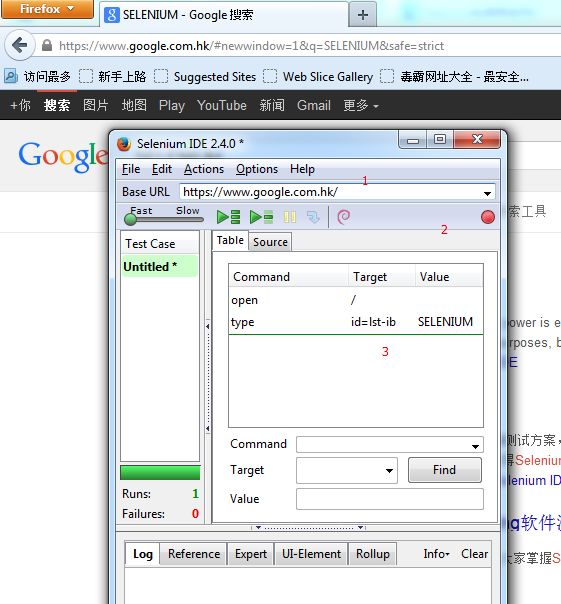
2.3可以导出相应的c# remote control 或webdriver脚本
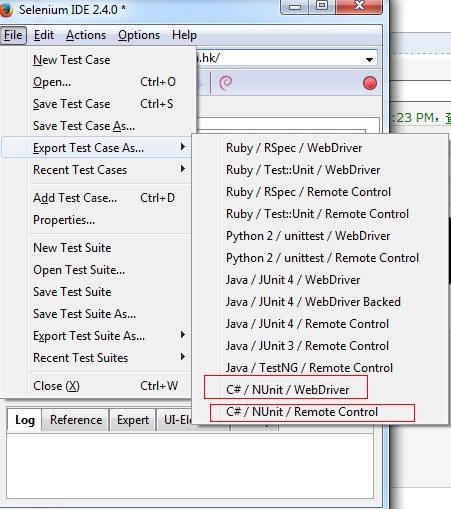
2.3.1使用selenium 1 (Remote control)记得需要启动 rc server,脚本才能运行
原理图:

主要代码:
using System;

using System.Text;

using System.Text.RegularExpressions;

using System.Threading;

using NUnit.Framework;

using Selenium;

namespace SeleniumTests

{

[TestFixture]//测试类

public class re

{

private ISelenium selenium;

private StringBuilder verificationErrors;

[SetUp]//测试准备(数据,方法)

public void SetupTest()

{

selenium = new DefaultSelenium("localhost", , "*chrome", "https://www.google.com.hk/");

selenium.Start();

verificationErrors = new StringBuilder();

}

[TearDown]//测试资源复位

public void TeardownTest()

{

try

{

selenium.Stop();

}

catch (Exception)

{

// Ignore errors if unable to close the browser

}

Assert.AreEqual("", verificationErrors.ToString());

}

[Test]//测试

public void TheReTest()

{

            selenium.Open("/");

            selenium.Type("id=lst-ib", "SELENIUM");

}

}

}
2.3.2 使用selenium 2(selenium 1+webdriver)
原理:利用浏览器native support来操作浏览器,因为firefox有浏览器原生组件webdriver.xpi,故不需要像IE,Chrome需要使用其他命令为浏览器native的调用
FirefoxDriver初始化成功之后,默认会从http://localhost:7055开始,而ChromeDriver则大概是http://localhost:46350
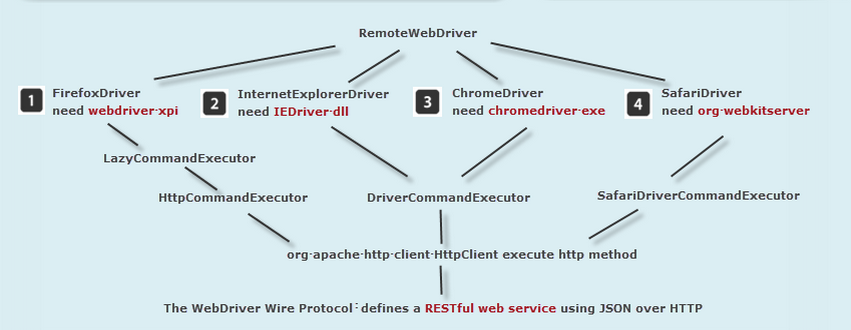
需要在vs references 引进相应的.dll(如果你建的solution为unitTest,需要应用nunit.framework.dll)

主要代码:
using System;

using System.Text;

using System.Text.RegularExpressions;

using System.Threading;

using NUnit.Framework;

using OpenQA.Selenium;

using OpenQA.Selenium.Firefox;

using OpenQA.Selenium.Support.UI;

namespace SeleniumTests

{

    [TestFixture]

    public class Wb

    {

        private IWebDriver driver;

        private StringBuilder verificationErrors;

        private string baseURL;

        private bool acceptNextAlert = true;

        [SetUp]

        public void SetupTest()

        {

            driver = new FirefoxDriver();

            baseURL = "https://www.google.com.hk/";

            verificationErrors = new StringBuilder();

        }

        [TearDown]

        public void TeardownTest()

        {

            try

            {

                driver.Quit();

            }

            catch (Exception)

            {

                // Ignore errors if unable to close the browser

            }

            Assert.AreEqual("", verificationErrors.ToString());

        }

        [Test]

        public void TheWbTest()

        {

            driver.Navigate().GoToUrl(baseURL + "/");

            driver.FindElement(By.Id("lst-ib")).Clear();

            driver.FindElement(By.Id("lst-ib")).SendKeys("SELENIUM");

        }

        private bool IsElementPresent(By by)

        {

            try

            {

                driver.FindElement(by);

                return true;

            }

            catch (NoSuchElementException)

            {

                return false;

            }

        }

        private bool IsAlertPresent()

        {

            try

            {

                driver.SwitchTo().Alert();

                return true;

            }

            catch (NoAlertPresentException)

            {

                return false;

            }

        }

        private string CloseAlertAndGetItsText() {

            try {

                IAlert alert = driver.SwitchTo().Alert();

                string alertText = alert.Text;

                if (acceptNextAlert) {

                    alert.Accept();

                } else {

                    alert.Dismiss();

                }

                return alertText;

            } finally {

                acceptNextAlert = true;

            }

        }

    }

}
可以说selenium自动化的基本脚本就完成了,可以run进行调试了,方法有:nunit/resharper
selenium IDE & Remote Control & Webdriver的更多相关文章
- 使用Selenium IDE和webDriver进行自动化软件测试
1.Selenium IDE 在Chrome浏览器上登录谷歌应用商店可以安装Selenium IDE插件(3.0以上版本的Selenium IDE不支持录制的脚本导出,所以这里使用到的是应用商店上的另 ...
- [Training Video - 1] [Selenium Basics] [What is Selenium IDE,RC,Webdriver, TestNG, Junit And Ant]
Selenium IDE (Only support in Firefox): - Record and Run - UI interface - User extensions - Conversi ...
- 基于webdriver的jmeter性能测试-Selenium IDE
前言: 由于某些项目使用了WebGL技术,需要高版本的Firefox和Chrome浏览器才能支持浏览,兼容性很弱,导致Loadrunner和jmeter(badboy)无法正常进行录制脚本.因此我们采 ...
- 自动化测试模型 Selenium IDE Selenium Gird2
1.线性测试 每个测试脚本相对独立,且不产生其他依赖与调用,其实就是单纯的来模拟用户完整的 操作场景.前一篇所写的测试脚本就属于线性测试. 优点:每个脚本完整且独立 缺点:测试用例的开发与维护成本高 ...
- 【Selenium】3.介绍Selenium IDE
本文供学习交流之用,没有商业用途,没有盈利. 完全是我自己为督促自己学习而翻译的.翻译的不好,见谅.来源于:http://www.guru99.com/introduction-selenuim-id ...
- Selenium IDE 工具总结
基本介绍: Selenium工具专门为WEB应用程序编写的一个验收测试工具. Selenium的核心:browser bot,是用JavaScript编写的. Selenium工具有4种:Seleni ...
- 自动化测试辅助工具(Selenium IDE等)
本随表目录 Selenium IDE安装和使用 FireBug安装和使用 FirePath安装和使用 Selenium IDE安装 方式一:打开Firefox-->添加组件-->搜索出 ...
- Selenium IDE 3.6 命令Command详解
学以致用,个人觉得要学老外的东西,最好的方法就是自己翻译一遍.因此准备把SIDE官网的一些文档,按工作所需做些翻译整理.本文是命令这一块的提纲,未全部完成,占坑中. Selenium IDE中的命令其 ...
- 开源Web自动化测试工具Selenium IDE
Selenium IDE(也有简写SIDE的)是一款开源的Web自动化测试工具,它实现了测试用例的录制与回放. Selenium IDE目前版本为 3.6 系列,支持跨浏览器运行,所以IDE的UI从原 ...
随机推荐
- python学习笔记19(序列的方法)
序列包含有宝值 表(tuple)和表(list).此外,字符串(string)是一种特殊的定值表,表的元素可以更改,定值表一旦建立,其元素不可更改. 任何的序列都可以引用其中的元素(item). 下面 ...
- 去掉url后面的#
<a href="#" 这个代码,当你点击后会在url后面添加# 怎么去掉呢?解决方法:点击这里 <a href="javascript:void(0)&qu ...
- 一个简单的js计数器(web储存)。
<span id="countspan"></span> <a href="#" onclick="countNumbe ...
- MyISAM读写并发优化
MyISAM在读操作占主导的情况下是很高效的.可一旦出现大量的读写并发,同InnoDB相比,MyISAM的效率就会直线下降,而 且,MyISAM和InnoDB的数据存储方式也有显著不同:通常,在MyI ...
- ubuntu的vi
ubuntu12.04的vi 1. 安装vim full版本由于Ubuntu预安装的是tiny版本,就会导致我们在使用上的产生不便.所以我们要安装vim的full版本.首先,先卸掉旧版的vi,输入以下 ...
- sqlmap文件在tomcat7中运行报错原因及<![CDATA[ ]]>
sqlmap在eclipse中运行,好好的.放到tomcat7中抛出如下异常: Caused by: java.lang.RuntimeException: Error occurred. Cause ...
- MySQL exist
http://www.cnblogs.com/glory-jzx/archive/2012/07/19/2599215.html http://www.w3school.com.cn/sql/func ...
- 关于PYTHON的反射,装饰的练习
从基本概念,简单例子才能慢慢走到高级一点的地方. 另外,PYTHON的函数式编程也是我很感兴趣的一点. 总体而言,我觉得OOP可以作大的框架和思路,FP能作细节实现时的优雅牛X. ~~~~~~~~~~ ...
- Spring mvc 模式小结
http://www.taobaotesting.com/blogs/2375 1.spring mvc简介 Spring MVC框架是一个MVC框架,通过实现Model-View-Controlle ...
- linux ubuntu 11.04 samba 服务器设置
安装 SAMBA 组件 sudo apt-get install samba smbfs smbclient 配置相关参数 sudo gedit /etc/samba/smb.conf 文件中相关 ...