
DHCP
安装
yum install -y dhcp
配置文件
默认配置为/etc/dhcpd.conf
[root@samba ~]#
[root@samba ~]# rpm -ql dhcp | grep conf.sample
/usr/share/doc/dhcp-/dhcpd.conf.sample
[root@samba ~]#
使用此示例配置文件覆盖/etc/dhcpd.conf
根据具体情况配置此文件
[root@samba ~]# cat /etc/dhcpd.conf
ddns-update-style interim;
ignore client-updates;

subnet 100.1.1.0 netmask 255.255.255.0 {

# --- default gateway
    option routers         100.1.1.1;
    option subnet-mask     255.255.255.0;

    option nis-domain      "domain.org";
    option domain-name     "domain.org";
    option domain-name-servers 114.114.114.114;

    option ; # Eastern Standard Time
#   option ntp-servers     192.168.1.1;
#   option netbios-name-servers    192.168.1.1;
# --- Selects point-to-point node (default is hybrid). Don't change this unless
# -- you understand Netbios very well
#   option netbios-node-type ;

    range dynamic-bootp 100.1.1.128 100.1.1.254;
    default-lease-;
    max-lease-;

    # we want the nameserver to appear at a fixed address
    host ns {
        next-server marvin.redhat.com;
        hardware ethernet ::::AB:CD;
        fixed-address 207.175.42.254;
    }
}
关于配置文件内容跟参数选项意义参考一下:
/etc/dhcpd.conf通常包括三部分:parameters、declarations 、option。
1.DHCP配置文件中的parameters(参数):表明如何执行任务,是否要执行任务,或将哪些网络配置选项发送给客户。主要内容见表1
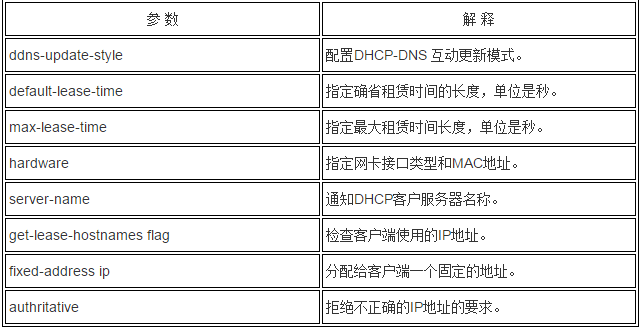
2. DHCP配置文件中的declarations (声明):用来描述网络布局、提供客户的IP地址等。主要内容见表2:

3. DHCP配置文件中的option(选项):用来配置DHCP可选参数,全部用option关键字作为开始,主要内容包括见表3:
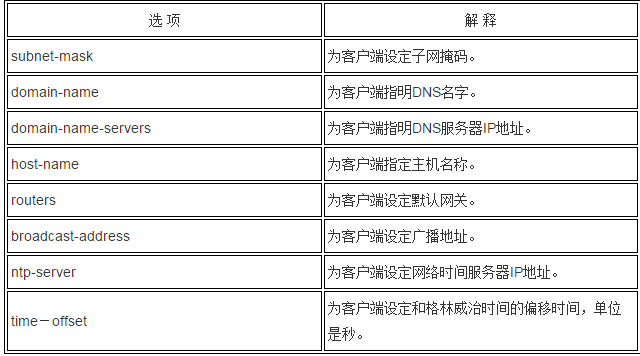
注意:如果客户端使用的是视窗操作系统,不要选择"host-name"选项,即不要为其指定主机名称。
启动服务
service dhcpd start
或者
dhcpd -p -cf /etc/dhcpd.conf
查看端口是否监听
netstat -an |
启动脚本,可以查看很多相关记录文件信息
#!/bin/sh
#
### BEGIN INIT INFO
# Provides: dhcpd
# Default-Start:
# Default-Stop:
# Should-Start:
# Required-Start: $network
# Required-Stop:
# Short-Description: Start and stop the DHCP server
# Description: dhcpd provides the Dynamic Host Configuration Protocol (DHCP)
#              server.
### END INIT INFO
#
# The fields below are left around for legacy tools (will remove later).
#
# chkconfig: -
# description: dhcpd provides the Dynamic Host Configuration Protocol (DHCP) \
#              server
# processname: dhcpd
# config: /etc/dhcpd.conf
# config: /var/lib/dhcpd/dhcpd.leases
# pidfile: /var/run/dhcpd.pid

. /etc/rc.d/init.d/functions

RETVAL=

prog=dhcpd
exec=/usr/sbin/dhcpd
lockfile=/var/lock/subsys/dhcpd
pidfile=/var/run/dhcpd.pid
statedir=/var/lib/dhcpd

[ -f /etc/sysconfig/dhcpd ] && . /etc/sysconfig/dhcpd

# if the user specified a different config file, make sure we reference it
findConfig() {
    for arg in $DHCPDARGS ; do
         ]; then
            [ -f "$arg" ] && echo "$arg"
            return
        fi
        if [ "$arg" = "-cf" ]; then
            found=
            continue
        fi
    done
    echo "/etc/dhcpd.conf"
}

config="$(findConfig "$DHCPDARGS")"

if [ ! -f $statedir/dhcpd.leases ] ; then
    mkdir -p $statedir
    touch $statedir/dhcpd.leases
    [ -x /sbin/restorecon ] && [ -d /selinux ] && /sbin/restorecon $statedir/dhcpd.leases >/dev/>&
fi

configtest() {
    [ -x $exec ] || return
    [ -f $config ] || return
    $exec -q -t -cf $config
    RETVAL=$?
     ]; then
        $exec -t -cf $config
    else

    fi
    return $RETVAL
}

rh_status() {
    status -p $pidfile $exec
}

rh_status_q() {
    rh_status >/dev/>&
}

start() {
    [ ` ] || return
    [ -x $exec ] || return
    [ -f $config ] || return

    rh_status_q && return

    echo -n $"Starting $prog: "
    daemon --pidfile=$pidfile $exec $DHCPDARGS >/dev/null
    RETVAL=$?

    echo
    [ $RETVAL -eq  ] && touch $lockfile
    return $RETVAL
}

stop() {
    [ ` ] || return

    rh_status_q || return

    echo -n $"Shutting down $prog: "
    killproc -p $pidfile $prog
    RETVAL=$?

    echo
    [ $RETVAL -eq  ] && rm -f $lockfile
    return $RETVAL
}

usage() {
    echo $"Usage: $0 {start|stop|restart|force-reload|condrestart|try-restart|configtest|status}"
}

 ]; then
    exit
fi

case "$1" in
    start)
        start
        ;;
    stop)
        stop
        ;;
    restart|force-reload)
        stop ; start
        ;;
    condrestart|try-restart)
        rh_status_q || exit
        stop ; start
        ;;
    reload)
        usage
        # unimplemented feature
        exit
        ;;
    configtest)
        configtest
        ;;
    status)
        rh_status
        ;;
    *)
        usage
        exit
        ;;
esac

exit $?
服务端查看已分配的IP地址
客户端的重新获取都会得到记录
[root@samba ~]#
[root@samba ~]#
[root@samba ~]# cat /var/lib/dhcpd/dhcpd.leases
# All times in this file are in UTC (GMT), not your local timezone.   This is
# not a bug, so please don't ask about it.   There is no portable way to
# store leases in the local timezone, so please don't request this as a
# feature.   If this is inconvenient or confusing to you, we sincerely
# apologize.   Seriously, though - don't ask.
# The format of this ) manual page.
# This lease file was written by isc-dhcp-V3.0.5-RedHat

lease 100.1.1.254 {
  starts  // ::;
  ends  // ::;
  binding state active;
  next binding state free;
  hardware ethernet :0c:::b2:b3;
}
lease 100.1.1.254 {
  starts  // ::;
  ends  // ::;
  binding state active;
  next binding state free;
  hardware ethernet :0c:::b2:b3;
}
客户端查看相关信息
客户端上获取到IP地址后,dhclient 可以查看下相关信息,比如dhcp server等
[root@localhost ~]#
[root@localhost ~]# pkill dhclient
[root@localhost ~]# dhclient
Internet Systems Consortium DHCP Client V3.0.5-RedHat
Copyright - Internet Systems Consortium.
All rights reserved.
For info, please visit http://www.isc.org/sw/dhcp/

Listening on LPF/eth0/:0c:::b2:b3
Sending on   LPF/eth0/:0c:::b2:b3
Sending on   Socket/fallback
DHCPREQUEST on eth0 to  (xid=0x6656d649)
DHCPACK from 100.1.1.100 (xid=0x6656d649)
bound to  seconds.
[root@localhost ~]#
[root@localhost ~]#
如果想查看更详细的信息,例如租期等等,可查看相关文件
[root@localhost ~]# ls /var/lib/dhclient/
dhclient-eth0.leases  dhclient.leases
[root@localhost ~]#
[root@localhost ~]# cat /var/lib/dhclient/dhclient.leases
lease {
  interface "eth0";
  fixed-address 100.1.1.254;
  option subnet-mask 255.255.255.0;
  option ;
  option dhcp-lease-;
  option routers 100.1.1.1;
  option dhcp-message-type ;
  option dhcp-server-identifier 100.1.1.100;
  option domain-name-servers 114.114.114.114;
  option nis-domain "domain.org";
  option domain-name "domain.org";
  renew  // ::;
  rebind  // ::;
  expire  // ::;
}
lease {
  interface "eth0";
  fixed-address 100.1.1.254;
  option subnet-mask 255.255.255.0;
  option ;
  option routers 100.1.1.1;
  option dhcp-lease-;
  option dhcp-message-type ;
  option domain-name-servers 114.114.114.114;
  option dhcp-server-identifier 100.1.1.100;
  option nis-domain "domain.org";
  option domain-name "domain.org";
  renew  // ::;
  rebind  // ::;
  expire  // ::;
}
DHCP的更多相关文章
- 协议森林16 小美的桌号(DHCP协议)
作者:Vamei 出处:http://www.cnblogs.com/vamei 转载请先与我联系. DHCP协议用于动态的配置电脑的网络相关参数,如主机的IP地址,路由器出口地址.DNS域名服务器地 ...
- 获取 dhcp IP 过程分析 - 每天5分钟玩转 OpenStack(91)
前面我们已经讨论了 DHCP agent 的配置以及 namespace 如何隔离 dnsmasq 服务,本节将以 cirros-vm1 为例分析获取 DHCP IP 的详细过程. 在创建 insta ...
- dhcp协议交互报文
DHCP共有八种报文,分别为DHCP Discover.DHCP Offer.DHCP Request.DHCP ACK.DHCP NAK.DHCP Release.DHCP Decline.DHCP ...
- 7、二种 为二个不同的子网配置DHCP服务器(中继代理服务器)
环境如下: (参考之前,保证二个子网可以互相ping通) 虚拟机vm1 192.168.170.3 VMnet8 (NAT模式) 虚拟 ...
- PXE+Kickstart+DHCP+TFTP实现无人值守安装操作系统
PXE+Kickstart+DHCP+TFTP实现无人值守安装操作系统 PXE + Kickstart PXE的工作流程及配置文件 Kickstart的配置文件 Linux安装大致可以分为2个阶段 第 ...
- 思科交换机配置DHCP的四个方面
这里我们主要讲解了思科交换机配置DHCP的相关内容.我们对网络拓扑先进行一下了解,然后对于其在进行一下说明,之后对于配置的代码和命令再进行一下解析. 思科交换机配置DHCP一.网络拓扑 思科交换机配置 ...
- 协议分析 - DHCP协议解码详解
协议分析 - DHCP协议解码详解 [DHCP协议简介] DHCP,全称是 Dynamic Host Configuration Protocol﹐中文名为动态主机配置协议,它的前身是 ...
- 用 namspace 隔离 DHCP 服务 - 每天5分钟玩转 OpenStack(90)
Neutron 通过 dnsmasq 提供 DHCP 服务,而 dnsmasq 如何独立的为每个 network 服务呢? 答案是通过 Linux Network Namespace 隔离,本节将详细 ...
- 配置 DHCP 服务 - 每天5分钟玩转 OpenStack(89)
前面章节我们看到 instance 在启动过程中能够从 Neutron 的 DHCP 服务获得 IP,本节将详细讨论其内部实现机制. Neutron 提供 DHCP 服务的组件是 DHCP agent ...
随机推荐
- sql 优化
1.选择最有效率的表名顺序(只在基于规则的优化器中有效): oracle的解析器按照从右到左的顺序处理 from 子句中的表名,from子句中写在最后的表(基础表driving table)将被最先处 ...
- CentOS安装JDK-1.7
注:以下所有操作均在CentOS 6.5 x86_64位系统下完成. #准备工作# 准备用rpm下载前,看系统是否已经安装有JDK,如果没有则进入正式安装步骤. # rpm -qa | grep jd ...
- 路由集合中已存在名为“ XXXX” 的路由
一般是认为路由的名字Key重复了,改下就行,但是还有种情况,你发现不是的,你把Key名称改了就好,不改就有问题.为什么?那就是有可能在bin目录下其它的DLL中有重复的Key了,这个时候,就要看看该改 ...
- [AC自动机]【学习笔记】
Keywords Search Time Limit: 2000/1000 MS (Java/Others) Memory Limit: 131072/131072 K (Java/Others)To ...
- AC日记——砍树 codevs 1388
1388 砍树 时间限制: 1 s 空间限制: 256000 KB 题目等级 : 黄金 Gold 题解 查看运行结果 题目描述 Description 伐木工人米尔科需要砍倒M米长的木 ...
- Resources.Load加载文件返回null的原因
1.文件夹都要放在Resources目录下 2.加载时photoName不需要扩展名 Texture2D t = Resources.Load<Texture2D>("Loadi ...
- 将 instance 连接到 flat_net - 每天5分钟玩转 OpenStack(88)
上一节我们创建了 "flat_net",本节将在此网络中部署 instance 并验证连通性. launch 新的 instance “cirros-vm1”,选择网络 falt_ ...
- [LeetCode] Shuffle an Array 数组洗牌
Shuffle a set of numbers without duplicates. Example: // Init an array with set 1, 2, and 3. int[] n ...
- Gulp:自动化构建工具
一.介绍: gulp是一个基于流的构建工具,可以自动执行指定的任务,简洁且高效 二.优点: 开发环境下,想要能够按模块组织代码,监听实时变化 css/js预编译,postcss等方案,浏览器前缀自动补 ...
- canvas
1. 画布可以通过两只手指上下移动,画布大小默认为屏幕大小的2倍,通过自定义View,嵌套scollview实现. Y 2. 通过处理手指触摸事件,一根手指时,使用Canvas绘制移动路径,产生直线: ...