
VTK使用矢量数据弯曲几何体
vtkWarpVector is a filter that modifies point coordinates by moving points along vector times the scale factor. Useful for showing flow profiles or mechanical deformation. The filter passes both its point data and cell data to its output.
沿法向膨胀
#!/usr/bin/env python

import vtk

inputPolyData = vtk.vtkPolyData()

sphereSource = vtk.vtkSphereSource()

sphereSource.SetPhiResolution(15)

sphereSource.SetThetaResolution(15)

sphereSource.Update()

inputPolyData = sphereSource.GetOutput()

# merge duplicate points, and/or remove unused points and/or remove degenerate cells

clean = vtk.vtkCleanPolyData()

clean.SetInputData(inputPolyData)

# Generate normals

normals = vtk.vtkPolyDataNormals()

normals.SetInputConnection(clean.GetOutputPort())

normals.SplittingOff()

# vtkWarpVector is a filter that modifies point coordinates by moving points along vector times the scale factor

# Warp using the normals (deform geometry with vector data)

warp = vtk.vtkWarpVector()

warp.SetInputConnection(normals.GetOutputPort())

# Set the input data arrays that this algorithm will process

# The fieldAssociation refers to which field in the data object the array is stored

warp.SetInputArrayToProcess(0, 0, 0,vtk.vtkDataObject.FIELD_ASSOCIATION_POINTS, vtk.vtkDataSetAttributes.NORMALS)

# Specify value to scale displacement

warp.SetScaleFactor(1.0)

# Visualize the original and warped models

colors = vtk.vtkNamedColors()

mapper = vtk.vtkPolyDataMapper()

mapper.SetInputConnection(warp.GetOutputPort())

warpedActor = vtk.vtkActor()

warpedActor.SetMapper(mapper)

warpedActor.GetProperty().SetColor(colors.GetColor3d("Flesh"))

originalMapper = vtk.vtkPolyDataMapper()

originalMapper.SetInputConnection(normals.GetOutputPort())

originalActor = vtk.vtkActor()

originalActor.SetMapper(originalMapper)

originalActor.GetProperty().SetInterpolationToFlat() # Set the shading interpolation method for an object

originalActor.GetProperty().SetColor(colors.GetColor3d("Flesh"))

renderWindow =vtk.vtkRenderWindow()

renderWindow.SetSize(640, 480)

# Create a camera for all renderers

camera = vtk.vtkCamera()

# Define viewport ranges: (xmin, ymin, xmax, ymax)

leftViewport = [0.0, 0.0, 0.5, 1.0]

rightViewport =[0.5, 0.0, 1.0, 1.0]

# Setup both renderers

leftRenderer = vtk.vtkRenderer()

leftRenderer.SetViewport(leftViewport)

leftRenderer.SetBackground(colors.GetColor3d("Burlywood"))

leftRenderer.SetActiveCamera(camera)

rightRenderer = vtk.vtkRenderer()

rightRenderer.SetViewport(rightViewport)

rightRenderer.SetBackground(colors.GetColor3d("CornFlower"))

rightRenderer.SetActiveCamera(camera)

leftRenderer.AddActor(originalActor)

rightRenderer.AddActor(warpedActor)

rightRenderer.ResetCamera()

renderWindow.AddRenderer(rightRenderer)

renderWindow.AddRenderer(leftRenderer)

style = vtk.vtkInteractorStyleTrackballCamera()

interactor = vtk.vtkRenderWindowInteractor()

interactor.SetRenderWindow(renderWindow)

interactor.SetInteractorStyle(style)

renderWindow.Render()

interactor.Start()
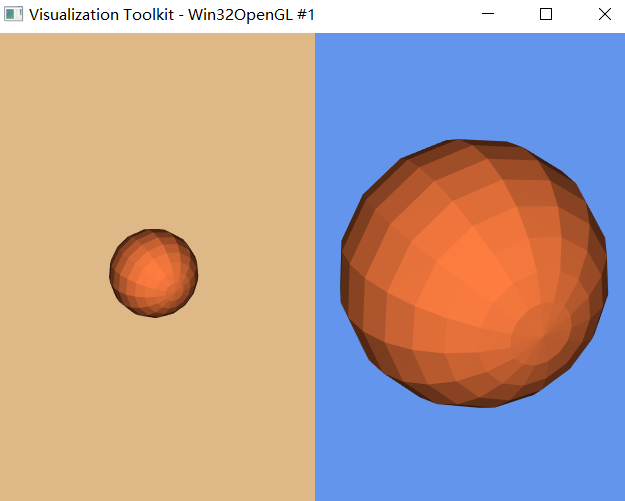
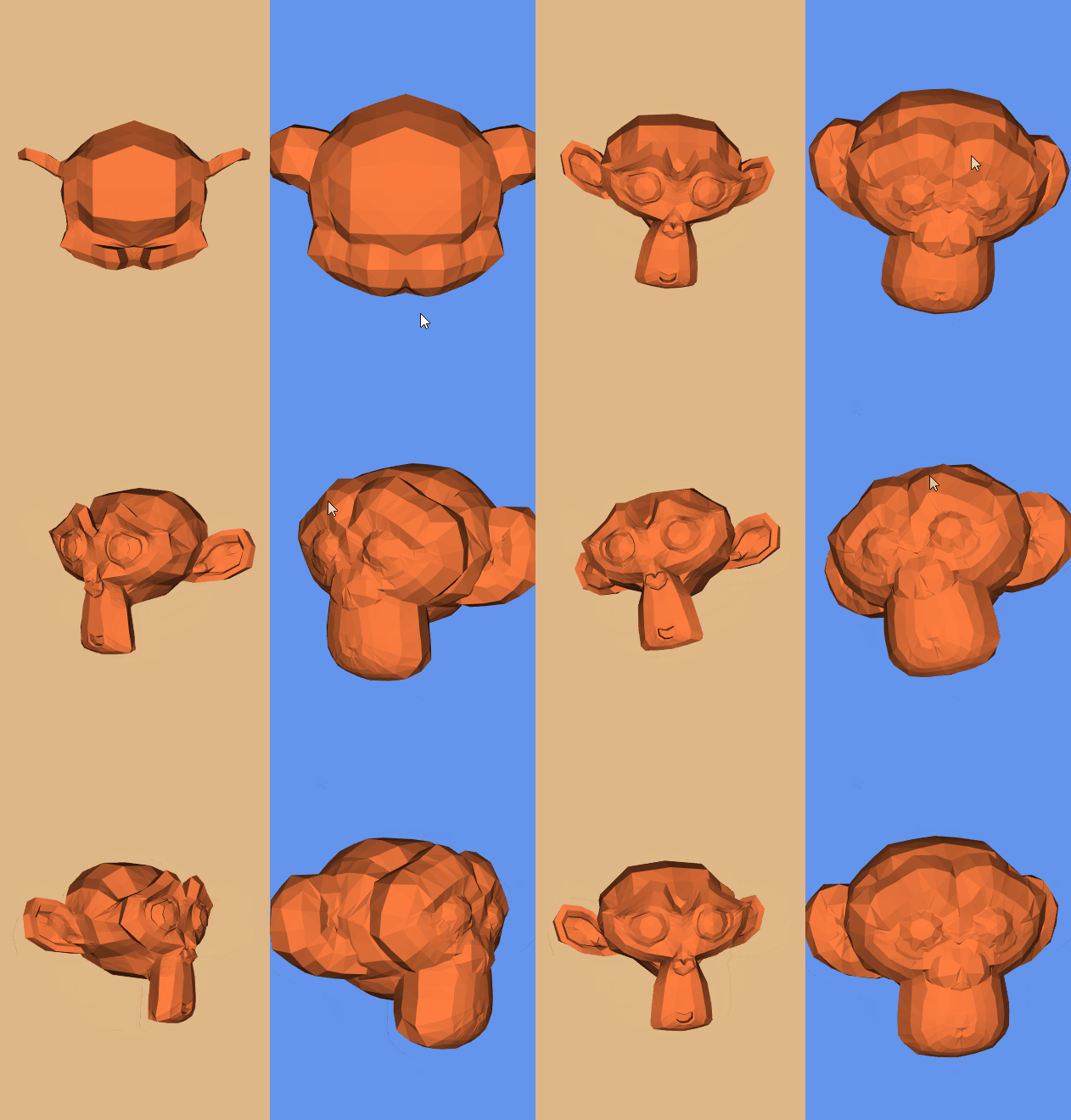
膨胀导入的STL模型
#!/usr/bin/env python

import vtk

inputPolyData = vtk.vtkPolyData()

readerSTL = vtk.vtkSTLReader()

readerSTL.SetFileName("Suzanne.stl")

readerSTL.Update()

inputPolyData = readerSTL.GetOutput()

# merge duplicate points, and/or remove unused points and/or remove degenerate cells

clean = vtk.vtkCleanPolyData()

clean.SetInputData(inputPolyData)

# Generate normals

normals = vtk.vtkPolyDataNormals()

normals.SetInputConnection(clean.GetOutputPort())

normals.SplittingOff() # Turn off the splitting of sharp edges

# vtkWarpVector is a filter that modifies point coordinates by moving points along vector times the scale factor

# Warp using the normals (deform geometry with vector data)

warp = vtk.vtkWarpVector()

warp.SetInputConnection(normals.GetOutputPort())

# Set the input data arrays that this algorithm will process

# The fieldAssociation refers to which field in the data object the array is stored

warp.SetInputArrayToProcess(0, 0, 0,vtk.vtkDataObject.FIELD_ASSOCIATION_POINTS, vtk.vtkDataSetAttributes.NORMALS)

# Specify value to scale displacement

warp.SetScaleFactor(0.3)

# Visualize the original and warped models

colors = vtk.vtkNamedColors()

mapper = vtk.vtkPolyDataMapper()

mapper.SetInputConnection(warp.GetOutputPort())

warpedActor = vtk.vtkActor()

warpedActor.SetMapper(mapper)

warpedActor.GetProperty().SetColor(colors.GetColor3d("Flesh"))

originalMapper = vtk.vtkPolyDataMapper()

originalMapper.SetInputConnection(normals.GetOutputPort())

originalActor = vtk.vtkActor()

originalActor.SetMapper(originalMapper)

originalActor.GetProperty().SetInterpolationToFlat() # Set the shading interpolation method for an object

originalActor.GetProperty().SetColor(colors.GetColor3d("Flesh"))

renderWindow =vtk.vtkRenderWindow()

renderWindow.SetSize(640, 480)

# Create a camera for all renderers

camera = vtk.vtkCamera()

# Define viewport ranges: (xmin, ymin, xmax, ymax)

leftViewport = [0.0, 0.0, 0.5, 1.0]

rightViewport =[0.5, 0.0, 1.0, 1.0]

# Setup both renderers

leftRenderer = vtk.vtkRenderer()

leftRenderer.SetViewport(leftViewport)

leftRenderer.SetBackground(colors.GetColor3d("Burlywood"))

leftRenderer.SetActiveCamera(camera)

rightRenderer = vtk.vtkRenderer()

rightRenderer.SetViewport(rightViewport)

rightRenderer.SetBackground(colors.GetColor3d("CornFlower"))

rightRenderer.SetActiveCamera(camera)

leftRenderer.AddActor(originalActor)

rightRenderer.AddActor(warpedActor)

rightRenderer.ResetCamera()

renderWindow.AddRenderer(rightRenderer)

renderWindow.AddRenderer(leftRenderer)

style = vtk.vtkInteractorStyleTrackballCamera()

interactor = vtk.vtkRenderWindowInteractor()

interactor.SetRenderWindow(renderWindow)

interactor.SetInteractorStyle(style)

renderWindow.Render()

interactor.Start()
参考:
VTK: vtkWarpVector Class Reference
VTK/Examples/Cxx/PolyData/WarpSurface
VTK/Examples/Python/PolyData/WarpVector.py
An algorithm for inflating/deflating (offsetting, buffering) polygons
VTK使用矢量数据弯曲几何体的更多相关文章
- Three.js开发指南---创建,加载高级网格和几何体(第八章)
本章的主要内容: 一, 通过Three.js自带的功能来组合和合并已有的几何体,创建出新的几何体 二, 从外部资源中加载网格和几何体 1 前面的章节中,我们学习到,一个几何体创建的网格,想使用多个材质 ...
- VTK三维点集轮廓凸包提取
碰撞检测问题在虚拟现实.计算机辅助设计与制造.游戏及机器人等领域有着广泛的应用,甚至成为关键技术.而包围盒算法是进行碰撞干涉初步检测的重要方法之一.包围盒算法是一种求解离散点集最优包围空间的方法.基本 ...
- VTK资料收集
使用Qt Creator开发VTK 原文链接:http://blog.csdn.net/numit/article/details/10200507 VTK应用系列:非常强大!非常善良 05-VTK在 ...
- mfc+vtk
MFC中view类主要处理显示视图,doc类处理文档,mainframe主要为整个窗口的和工程的设置管理.由此,VTK与MFC联合编程时,需要主要的是数据操作,以及显示要很好的与MFC中的结构结合,做 ...
- vtk多线程简单测试
vtkMultithreader is a class that provides support for multithreaded execution using sproc() on an SG ...
- Convert PLY to VTK Using PCL 1.6.0 使用PCL库将PLY格式转为VTK格式
PLY格式是比较流行的保存点云Point Cloud的格式,可以用MeshLab等软件打开,而VTK是医学图像处理中比较常用的格式,可以使用VTK库和ITK库进行更加复杂的运算处理.我们可以使用Par ...
- geotrellis使用(八)矢量数据栅格化
目录 前言 栅格化处理 总结 参考链接 一.前言 首先前几天学习了一下Markdown,今天将博客园的编辑器改为Markdown,从编写博客到界面美观明显都清爽多了,也能写出各种样式的东 ...
- vtk工作流
要理解VTK的工作原理,首先应明确几个类型: 1.vtkSource(数据源) 这个就好比一个剧本里面的角色,让演员知道要演的是什么人物. 数据源有:vtkConeSource,vtkSphere ...
- 认识VTK工作原理
VTk通过数据流实现变信息为图形数据的. 数据流一般为:source-filter--mapper--actor--render--renderwindow--interactor. 要理解工作原理, ...
随机推荐
- utf-8和utf8的区别
utf-8 和 utf8 的区别与使用: "UTF-8" 是标准写法,php 在 Windows 系统里的英文不区分大小写,所以也可以写成 "utf-8".&q ...
- sql取逗号前后数据与批量修改某一字段某一值
sql取逗号后的值 SELECT SUBSTRING_INDEX(字段,) FROM 表名 sql取逗号前的值 SELECT SUBSTRING_INDEX(字段,) FROM 表名 批量修改 UPD ...
- Debian 9 VIM 使用鼠标右键复制
起因 装了 debian 9 以后,vim没有办法使用鼠标直接选择并复制,后来发现是默认的配置问题.于是需要按照以下方式解决: 解决方法 1. 编辑 vim 的默认配置文件 vim /usr/shar ...
- Codeforces 1131F Asya And Kittens (构造)【并查集】
<题目链接> 题目大意:有$n$只小猫,开始将它们放在指定的n个单元格内,然后随机从n-1个隔板中拆除隔板,最终使得这些小猫在同一单元格.现在依次给出拆除隔板的顺序,比如:1 4 就表示1 ...
- Web Component
前言 Web Component不是新东西,几年前的技术,但是受限于浏览器兼容性,一直没有大规模应用在项目里,直到现在(2018年年末),除IE仍不支持之外,其它主流浏览器都支持Web Compone ...
- 在cikuapi.com上抓取相关词
最近用到文本相关性计算,要在开放域语料上操作,找了好久没找到好的方法,后来看到了清华的梁斌老师建的cikuapi,上面能查询一些相关词,自己写代码爬的时候出现中文解码问题,遂到Github上找了下相关 ...
- spark实时计算性能优化
1. 计算提供两种模式,一种是jar包本地计算.一种是JSF服务. 2. 第一步是引入spark,因与netty.JDQ均有冲突,解决netty冲突后,隔离计算为单独服务.已在线上,因storm也 ...
- SQL的多种JOIN
- BZOJ.3926.[ZJOI2015]诸神眷顾的幻想乡(广义后缀自动机)
题目链接 要对多个串同时建立SAM,有两种方法: 1.将所有串拼起来,中间用分隔符隔开,插入字符正常插入即可. 2.在这些串的Trie上建SAM.实际上并不需要建Trie,还是只需要正常插入(因为本来 ...
- Codeforces.226D.The table(构造)
题目链接 \(Description\) 给定一个\(n\times m\)的矩阵\(A_{i,j}\),每次可以将一列或一行取负.求一个方案使得若干次操作后,每行每列的和都非负. \(n,m\leq ...