
Matplotlib:tick_params参数设置
1.tick_params语法
参数:
axis : {‘x’, ‘y’, ‘both’} Axis on which to operate; default is ‘both’.
reset : bool If True, set all parameters to defaults before processing other keyword arguments. Default is False.
which : {‘major’, ‘minor’, ‘both’} Default is ‘major’; apply arguments to which ticks.
direction : {‘in’, ‘out’, ‘inout’} Puts ticks inside the axes, outside the axes, or both.
length : float Tick length in points.
width : float Tick width in points.
color : color Tick color; accepts any mpl color spec.
pad : float Distance in points between tick and label.
labelsize : float or str Tick label font size in points or as a string (e.g., ‘large’).
labelcolor : color Tick label color; mpl color spec.
colors : color Changes the tick color and the label color to the same value: mpl color spec.
zorder : float Tick and label zorder.
bottom, top, left, right : bool or {‘on’, ‘off’} controls whether to draw the respective ticks.
labelbottom, labeltop, labelleft, labelright : bool or {‘on’, ‘off’} controls whether to draw the respective tick labels.
labelrotation : float Tick label rotation
2.tick_params例子:
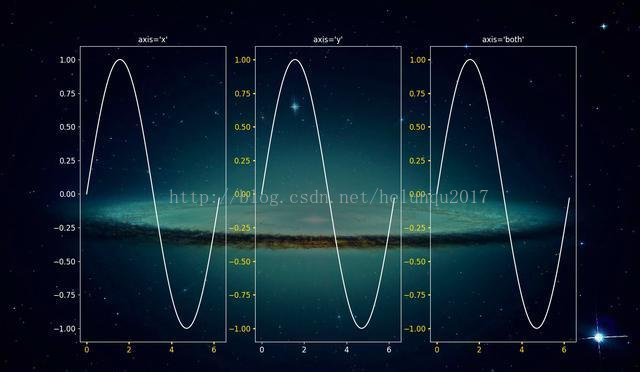
(1)参数axis的值为'x'、'y'、'both',分别代表设置X轴、Y轴以及同时设置,默认值为'both'。
ax1.tick_params(axis='x',width=2,colors='gold')
ax2.tick_params(axis='y',width=2,colors='gold')
ax3.tick_params(axis='both',width=2,colors='gold')
(2)参数which的值为 'major'、'minor'、'both',分别代表设置主刻度线、副刻度线以及同时设置,默认值为'major'
ax1.tick_params(which='major',width=2,colors='gold')
ax2.tick_params(which='minor',width=2,colors='gold')
ax3.tick_params(which='both',width=2,colors='gold')

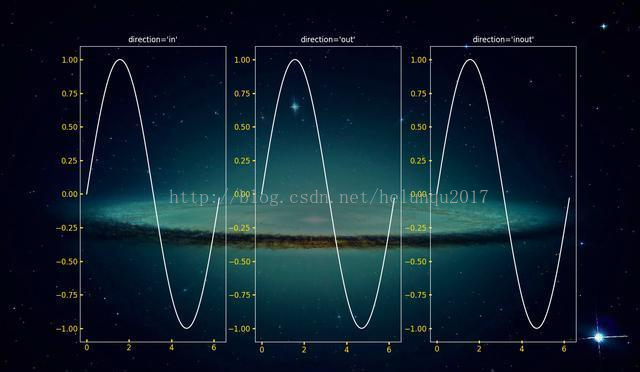
(3)参数direction的值为'in'、'out'、'inout',分别代表刻度线显示在绘图区内侧、外侧以及同时显示
ax1.tick_params(direction='in',width=2,length=4,colors='gold')
ax2.tick_params(direction='out',width=2,length=4,colors='gold')
ax3.tick_params(direction='inout',width=2,length=4,colors='gold')
(4)length和width
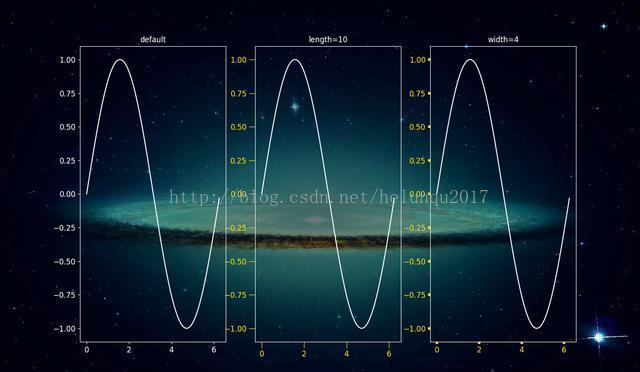
参数length和width分别用于设置刻度线的长度和宽度
ax2.tick_params(width=4,colors='gold')
ax3.tick_params(length=10,colors='gold')
(5)参数pad用于设置刻度线与标签间的距离
ax2.tick_params(pad=1,colors='gold')
ax3.tick_params(pad=10,colors='gold')

(6)参数color、labelcolor、colors分别用于设置刻度线的颜色、刻度线标签的颜色以及同时设置刻度线及标签颜色
ax1.tick_params(width=4,color='gold')
ax2.tick_params(width=4,labelcolor='gold')
ax3.tick_params(width=4,colors='gold')

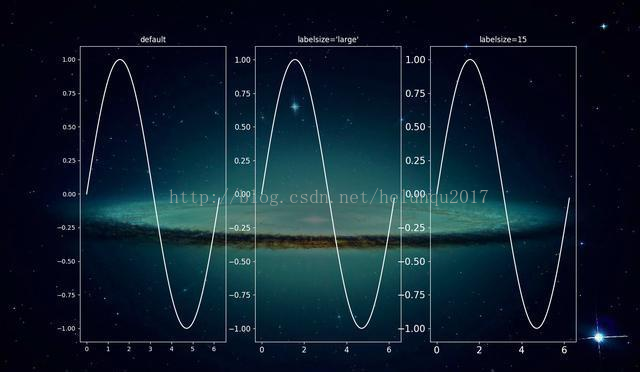
(7)参数labelsize用于设置刻度线标签的字体大小
ax1.tick_params(labelsize='medium')
ax2.tick_params(labelsize='large')
ax3.tick_params(labelsize=15)
(8)参数bottom, top, left, right的值为布尔值,分别代表设置绘图区四个边框线上的的刻度线是否显示
ax1.tick_params(bottom=False,top=True,width=4,colors='gold')
ax2.tick_params(left=False,right=True,width=4,colors='gold')
ax3.tick_params(top=True,right=True,width=4,colors='gold')
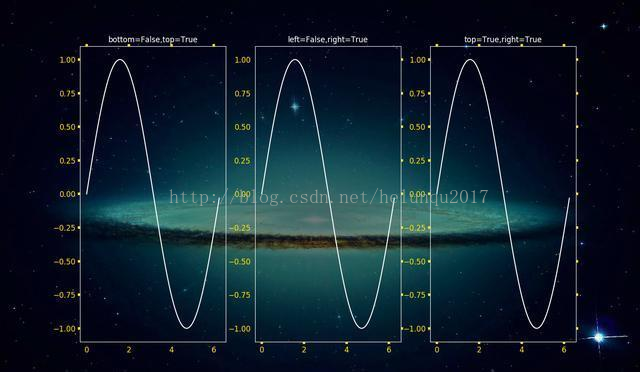
(9)参数labelbottom, labeltop, labelleft, labelright的值为布尔值,分别代表设置绘图区四个边框线上的刻度线标签是否显示
ax1.tick_params(labelbottom=False,labeltop=True,width=4,colors='gold')
ax2.tick_params(labelleft=False,labelright=True,width=4,colors='gold')
ax3.tick_params(labeltop=True,labelright=True,width=4,colors='gold')
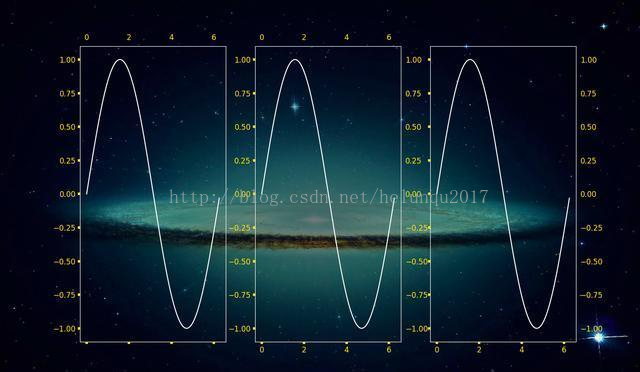
Matplotlib:tick_params参数设置的更多相关文章
- python matplotlib 中文显示参数设置
python matplotlib 中文显示参数设置 方法一:每次编写代码时进行参数设置 #coding:utf-8import matplotlib.pyplot as pltplt.rcParam ...
- matplotlib 中的一些参数设置
首先:在pycharm 中要使图显示出来,最后一定要加上 plt.show(),如: plt.bar(x, y) plt.show() 下面就是我使用 matplotlib 遇到的一些常用参数设置: ...
- 手把手教从零开始在GitHub上使用Hexo搭建博客教程(二)-Hexo参数设置
前言 前文手把手教从零开始在GitHub上使用Hexo搭建博客教程(一)-附GitHub注册及配置介绍了github注册.git相关设置以及hexo基本操作. 本文主要介绍一下hexo的常用参数设置. ...
- jqGrid的autoencode参数设置为true在客户端可能引发的编码问题
不久前使用jqGrid+MVC做过一段时间开发. 一开始,分页参数几乎都是默认值,jqGrid的分页功能很好用. 考虑到each input is evil,我们的系统对安全性又有较高要求,所以,为了 ...
- Hibernate 参数设置一览表
Hibernate 参数设置一览表 属性名 用途 hibernate.dialect 一个Hibernate Dialect类名允许Hibernate针对特定的关系数据库生成优化的SQL. 取值 fu ...
- 使用MEF实现通用参数设置
通用后台管理系统必备功能模块包含日志管理,权限管理,数据字典,参数配置等功能.参数设置主要用于设置系统运行所需的一些基础性配置项,比如redis缓存,mq消息队列,系统版本等信息.好的参数设置需要达到 ...
- MySQL Database on Azure 参数设置
在使用MySQL过程中,经常会根据需要对MySQL的参数进行一些设置和调整.作为PaaS版本的MySQL,MySQL Database on Azure在参数设置方面有一些限制,客户不能像使用on-p ...
- SSRS报表参数设置
一.日期时间类型的参数注意事项: 关于数据类型的选择:(只有数据类型设置为日期/时间格式,在查询的时候才会显示日期控件,提示信息一般改成汉字) 指定默认值:指定开始日期为前10天,
- Lattice 的 Framebuffer IP核使用调试笔记之IP核生成与参数设置
本文由远航路上ing 原创,转载请标明出处. 这节笔记记录IP核的生成以及参数设置. 先再IP库里下载安装Framebuffer 的ipcore 并安装完毕. 一.IP核的生成: 1.先点击IP核则右 ...
随机推荐
- SQL Server性能优化(12)非聚集索引的组合索引存储结构
一,非聚集索引组合索引 用户可以在多个列上建立索引,这种索引叫做复合索引(组合索引).但复合索引在数据库操作期间所需的开销更小,可以代替多个单一索引.当表的行数远远大于索引键的数目时,使用这种方式可以 ...
- sublime text 前端开发插件安装和配置
前端开发sublimeconfig mac配置 此文件目录中文件主要是关于sublime的插件配置,快捷键配置,主题和字体配置. 插件列表 所有插件都可以使用Package Control安装,具体的 ...
- JAVA代理分析
JAVA的动态代理 代理模式 代理模式是常用的java设计模式,他的特征是代理类与委托类有同样的接口,代理类主要负责为委托类预处理消息.过滤消息.把消息转发给委托类,以及事后处理消息等.代理类与委托类 ...
- mybatis--Mapper 常见报错总结(持续总结)
本文版权归 远方的风lyh和博客园共有,欢迎转载,但须保留此段声明,并给出原文链接,谢谢合作. 1.The content of elements must consist of well-f ...
- Docker国内仓库和镜像
由于网络原因,我们在pull Image 的时候,从Docker Hub上下载会很慢...所以,国内的Docker爱好者们就添加了一些国内的镜像(mirror),方便大家使用. 一.国内Docker仓 ...
- 红黑树深入剖析及Java实现
红黑树是平衡二叉查找树的一种.为了深入理解红黑树,我们需要从二叉查找树开始讲起. BST 二叉查找树(Binary Search Tree,简称BST)是一棵二叉树,它的左子节点的值比父节点的值要小, ...
- sass重构响应式unofficial‘s博客轻松适应移动端
前言: 刚刚玩博客园几天时间,发现挺不错的,对于我这个懒人又是一个爱折腾的人来说挺不错的,对于上班玩电脑,下班玩手机的用户来说,博客园中我的博客有一点给我的感觉不是很友好,电脑端看起来很美观的一个页面 ...
- Algolia使用教程 , 超详细傻子看都会
框架描述 发现网上Algolia这块的资料较少,就花了点时间从官网上整理了下,总结了几项常用的功能用法. 现在比较有名的Algolia提供了云搜索的服务.具体办法是我们将数据库的信息以JSON的格式上 ...
- python的Web框架,类视图
类视图 范式 from django.views import View # 继承View class IndexView(View): def get(self, request): #写法和函数视 ...
- [POI2006] PRO-Professor Szu
Description \(n\) 个别墅以及一个主建筑楼,从每个别墅都有很多种不同方式走到主建筑楼,其中不同的定义是(每条边可以走多次,如果走边的顺序有一条不同即称两方式不同). 询问最多的不同方式 ...