
MVC模块化开发方案
核心:
主要利用MVC的区域功能,实现项目模块独立开发和调试。
目标:
各个模块以独立MVC应用程序存在,即模块可独立开发和调试。
动态注册各个模块路由。
一:新建解决方案目录结构
如图:
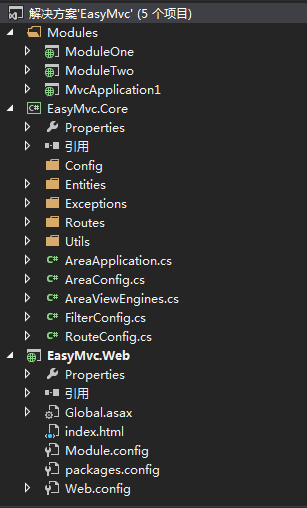
二:EasyMvc.Core即为核心库。
核心库三大主力:AreaConfig 、RouteConfig 、FilterConfig
AreaConfig :为区域启动停止以及其他状态时注入的方法,类似与Global.asax里面Application_Start、Application_End方法。
RouteConfig :路由方法,类似与App_Start里面RouteConfig方法。
FilterConfig:区域全局过滤器,针对当前路区域所有控制器的过滤(未实现)。
AreaConfig.cs

    public class AreaConfig

    {

        public virtual void Area_Start()

        {

        }

        public virtual void Area_End()

        {

        }

    }
RouteConfig.cs
    public class RouteConfig

    {

        public virtual void RegisterRoutes(AreaRoute routes)

        {

            routes.MapRoute(

                name: "Default",

                url: "{controller}/{action}/{id}",

                defaults: new { controller = "Home", action = "Index", id = UrlParameter.Optional }

            );

        }

        public virtual void RegisterRoutes(RouteCollection routes)

        {

            routes.MapRoute(

                name: "Default",

                url: "{controller}/{action}/{id}",

                defaults: new { controller = "Home", action = "Index", id = UrlParameter.Optional }

            );

        }

        private static Dictionary<string, RouteBase> _routes = new Dictionary<string, RouteBase>();

        private static Dictionary<string, RouteConfig> _areas = new Dictionary<string, RouteConfig>();

        #region Fields

        public string Name { get; set; }

        public string Path { get; set; }

        public string[] NameSpaces { get; set; }

        #endregion

        #region Route

        public string FormatName(string name)

        {

            if (string.IsNullOrEmpty(name))

                throw new RouteException("路由名称为空", Name);

            return string.Format("{0}_{1}", Name, name);

        }

        public string FormatUrl(string url)

        {

            if (string.IsNullOrEmpty(url))

                throw new RouteException("路由地址为空", Name);

            return string.Format("{0}/{1}", Path, url);

        }

        public string[] FormatNameSpaces(string[] namespaces)

        {

            if (namespaces != null && namespaces.Length > 0)

            {

                List<string> list = NameSpaces == null ? (new List<string>()) : NameSpaces.ToList();

                foreach (var item in namespaces)

                {

                    if (!list.Contains(item))

                        list.Add(item);

                }

                NameSpaces = list.ToArray();

            }

            return null;

        }

        public void AddRoute(string routeName, RouteBase route)

        {

            if (!string.IsNullOrEmpty(routeName) && route != null)

                _routes.Add(routeName, route);

        }

        public void CheckName(string routeName)

        {

            if (_routes.Any(op => op.Key == routeName))

                throw new RouteException("路由名称已存在", Name, routeName);

        }

        #endregion

        #region Area

        public void Init()

        {

            Regist(RouteTable.Routes);

        }

        private void Regist(RouteCollection routes)

        {

            if (_areas.ContainsKey(Name))

                throw new AreaExcption("区域已存在", Name);

            _areas[Name] = this;

            AreaRegistrationContext context = new AreaRegistrationContext(Name, routes);

            AddNameSpaces(context);

            RegisterArea(context);

            if (Config.MConfig.IsDebug)

            {

                RegisterRoutes(routes);

            }

        }

        private void AddNameSpaces(AreaRegistrationContext context)

        {

            if (NameSpaces != null && NameSpaces.Length > 0)

                foreach (string item in NameSpaces)

                {

                    context.Namespaces.Add(item);

                }

        }

        private void RegisterArea(AreaRegistrationContext context)

        {

            AreaRoute route = new AreaRoute(this, context);

            RegisterRoutes(route);

        }

        #endregion

    }
FilterConfig.cs(未实现)
public class FilterConfig { }
三:模块重写三大核心类
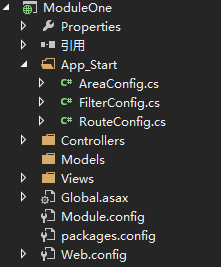
App_Satrt下面的几个类,就是重写EasyMvc.Core的三大核心类的了。
AreaConfig.cs
    public class AreaConfig : EasyMvc.Core.AreaConfig

    {

        public override void Area_Start()

        {

        }

        public override void Area_End()

        {

        }

    }
RouteConfig.cs
    public class RouteConfig : EasyMvc.Core.RouteConfig

    {

        public override void RegisterRoutes(EasyMvc.Core.Routes.AreaRoute routes)

        {

            routes.IgnoreRoute("{resource}.axd/{*pathInfo}");

            routes.MapRoute(

                name: "Default",

                url: "{controller}/{action}/{id}",

                defaults: new { controller = "Home", action = "Index", id = UrlParameter.Optional }

            );

        }

        public override void RegisterRoutes(RouteCollection routes)

        {

            routes.IgnoreRoute("{resource}.axd/{*pathInfo}");

            routes.MapRoute(

                name: "Default",

                url: "{controller}/{action}/{id}",

                defaults: new { controller = "Home", action = "Index", id = UrlParameter.Optional }

            );

        }

    }
FilterConfig.cs
public class FilterConfig : EasyMvc.Core.FilterConfig { }
四:模块配置
主项目和各个模块都可配置Module.config
<?xml version="1.0" encoding="utf-8"?>

<Modules>

  <IsDebug>false</IsDebug>

  <Module>

    <Provider>ModuleOne</Provider>

    <AreaType>ModuleOne.AreaConfig</AreaType>

    <RouteType>ModuleOne.RouteConfig</RouteType>

    <FilterType />

    <Name>ModuleOne</Name>

    <Path>A</Path>

    <NameSpaces>

      <string>ModuleOne.Controllers</string>

    </NameSpaces>

  </Module>

  <Module>

    <Provider>ModuleTwo</Provider>

    <AreaType>ModuleTwo.AreaConfig</AreaType>

    <RouteType>ModuleTwo.RouteConfig</RouteType>

    <FilterType />

    <Name>ModuleTwo</Name>

    <Path>B</Path>

    <NameSpaces>

      <string>ModuleTwo.Controllers</string>

    </NameSpaces>

  </Module>

  <Module>

    <Provider>MvcApplication1</Provider>

    <AreaType>MvcApplication1.AreaConfig</AreaType>

    <RouteType>MvcApplication1.RouteConfig</RouteType>

    <FilterType />

    <Name>Test</Name>

    <Path>C</Path>

    <NameSpaces>

      <string>MvcApplication1.Controllers</string>

    </NameSpaces>

  </Module>

</Modules>
EasyMvc.Core AreaApplication会根据配置动态初始化执行区域方法以及各个区域的路由注册等工作。
另外AreaViewEngines会根据配置动态设置视图查找路径。
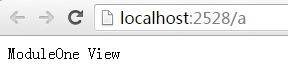
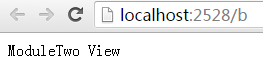
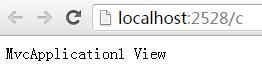
最后效果:
更多东西请查看源码,源码下面提供下载。
原文地址:http://www.cnblogs.com/deeround/p/6706683.html
源码地址:http://files.cnblogs.com/files/deeround/EasyMvc.rar
MVC模块化开发方案的更多相关文章
- net Mvc模块化开发
Asp.net Mvc模块化开发之“部分版本部分模块更新(上线)” 项目开发从来就不是一个简单的问题.更难的问题是维护其他人开发的项目,并且要修改bug.如果原系统有重大问题还需要重构. 怎么重构系统 ...
- Asp.net Mvc模块化开发之分区扩展框架
对于一个企业级项目开发,模块化是非常重要的. 默认Mvc框架的AreaRegistration对模块化开发真的支持很好吗?真的有很多复杂系统在使用默认的分区开发的吗?我相信大部分asp.net的技术团 ...
- Asp.net Mvc模块化开发系列(目录)
模块化开发是非常重要的,模块化开发是个系统性问题,为此我觉得有必须要写一个系列的文章才能基本说的清楚 那又为什么要写一个目录呢? 其一.是对我昨天承诺写一个系列新的文章的回应 其二.是先写出一个大纲, ...
- Mvc 模块化开发
在Mvc中,标准的模块化开发方式是使用Areas,每一个Area都可以注册自己的路由,使用自己的控件器与视图.但是在具体使用上它有如下两个限制 1.必须把视图文件放到主项目的Areas文件夹下才能生效 ...
- 全面解析ASP.NET MVC模块化架构方案
什么叫架构?揭开架构神秘的面纱,无非就是:分层+模块化.任意复杂的架构,你也会发现架构师也就做了这两件事. 本文将会全面的介绍我们团队在模块化设计方面取得的经验.之所以加了“全面”二字,是因为本文的内 ...
- ASP.NET MVC模块化开发——动态挂载外部项目
最近在开发一个MVC框架,开发过程中考虑到以后开发依托于框架的项目,为了框架的维护更新升级,代码肯定要和具体的业务工程分割开来,所以需要解决业务工程挂载在框架工程的问题,MVC与传统的ASP.NET不 ...
- Asp.net Mvc模块化开发之“开启模块开发、调试的简单愉快之旅”
整个世界林林种种,把所有的事情都划分为对立的两个面. 每个人都渴望的财富划分为富有和贫穷,身高被划分为高和矮,身材被划分为胖和瘦,等等. 我们总是感叹,有钱人的生活我不懂;有钱人又何尝能懂我们每天起早 ...
- Asp.net Mvc模块化开发之“部分版本部分模块更新(上线)”
项目开发从来就不是一个简单的问题.更难的问题是维护其他人开发的项目,并且要修改bug.如果原系统有重大问题还需要重构. 怎么重构系统不是本文探讨的问题,但是重构后如何上线部署和本文关系密切.这个大家可 ...
- MVC模块化架构
全面解析ASP.NET MVC模块化架构方案 什么叫架构?揭开架构神秘的面纱,无非就是:分层+模块化.任意复杂的架构,你也会发现架构师也就做了这两件事. 本文将会全面的介绍我们团队在模块化设计方面取得 ...
随机推荐
- [问题解决]基于注解配置dubbo遇到ConnectionLoss for /dubbo/xxx问题解决
今天升级spring版本的时候,同时升级dubbo的版本,采用的是dubbo的基于注解的配置方法,采用curator作为dubbo的客户端, curator版本为4.1.0,启动之后,发现一直报错 C ...
- [书摘]Windows内存管理术语
1. Virtual Address space 虚拟地址空间 一个应用程序能够访问的最大的内存地址空间, 32位的机器上面最大的就是4GB 但是 并不是所有的内存都放到主存里面, 可能放到pagef ...
- linux学习之centos(四):git的安装
整个流程如下:(参考文章:linux安装git方法) [carsonzhu@localhost 桌面]$ wget https://github.com/git/git/archive/v2.8.3. ...
- Alpha、伪Beta 发布个人感想与体会
1.Alpha版本 在Alpha版本发布时,我在Fantacy组,那时的体会我已在前面写过,现在回想起来,我觉得自己的决定似乎做的并不是很糟糕,因为来到新的团队里,我学到了很多东西,认识了很多技术很好 ...
- Get请求,Post请求乱码问题解决方案
下面以两种常见的请求方式为例讲解乱码问题的解决方法. 1.Post方式请求乱码. 自从Tomcat5.x以来,Get方式和Post方式提交的请求,tomcat会采用不同的方式来处理编码. 对于Post ...
- Flutter & Dart
Flutter & Dart https://www.dartlang.org/install https://flutter.dev/ https://flutter.dev/docs/ge ...
- C#實現XML的增刪查改
命名空間:using System.Xml; 1.查找某個節點是否存在: private XmlDocument xmldoc; private string mod="1"; p ...
- HTML DOM 節點
節點: 整個html文檔是文檔節點: 注釋為注釋節點: 文本為文本節點: html元素為元素節點: html包含的內容為html節點. 節點間的關係: 父節點,子節點和同胞節點. html節點為根節點 ...
- python之查询指定目录下的最新文件
使用os模块查询指定目录下的最新文件 import os # 输入目录路径,输出最新文件完整路径 def find_new_file(dir): '''查找目录下最新的文件''' file_lists ...
- matplotlib之scatter绘制散点
# 使用matplotlib.pyplot.scatter绘制散点 import matplotlib.pyplot as plt from pylab import mpl # 设置默认字体,解决中 ...