
2018-6-8随笔-combox绑定-语音-删空格
1.下面介绍三种对comboBox绑定的方式,分别是泛型中IList和Dictionary,还有数据集DataTable ----->>>>>飞机票
2. 简单的语音播报系统
using System;

using System.Collections.Generic;

using System.ComponentModel;

using System.Data;

using System.Drawing;

using System.Linq;

using System.Text;

using System.Windows.Forms;

using System.Speech;

using System.Speech.Synthesis;

namespace 语音功能1

{

    public partial class Form1 : Form

    {

        public Form1()

        {

            InitializeComponent();

        }

        SpeechSynthesizer voice = new SpeechSynthesizer();   //创建语音实例

        private void Form1_Load(object sender, EventArgs e)

        {

            voice.Rate = -; //设置语速,[-10,10]

            voice.Volume = ; //设置音量,[0,100]

           // voice.SpeakAsync("Hellow Word");  //播放指定的字符串,这是异步朗读

            //下面的代码为一些SpeechSynthesizer的属性,看实际情况是否需要使用

            //voice.Dispose();  //释放所有语音资源

          // voice.SpeakAsyncCancelAll();  //取消朗读

            voice.Speak("你好! Word");  //同步朗读

            //voice.Pause();  //暂停朗读

           // voice.Resume(); //继续朗读

        }

        private void button1_Click(object sender, EventArgs e)

        {

            voice.Speak(textBox1.Text);

        }

        private void button2_Click(object sender, EventArgs e)

        {

            voice.Pause();  //暂停朗读

        }

        private void button3_Click(object sender, EventArgs e)

        {

             voice.Resume(); //继续朗读

        }

    }

}
需要添加引用:引用--添加引用--.NET--Speech引用 添加即可;
暂停说明:不会像播放器一样,点击暂停立即暂停,会播放完当前的语音,下次播放则不能正常播放
继续播放:在暂停后需要点击,这样才会正常的播放
可以每次播放完,释放语音资源,这样会减少性能消耗。 释放是把当前对象释放了,下次播放要重新实例对象
切记不能死循环播放,这个不能立即停止,所有这样内存会一直占用的。
using System;

using System.Collections.Generic;

using System.ComponentModel;

using System.Data;

using System.Drawing;

using System.Linq;

using System.Text;

using System.Windows.Forms;

using System.Speech.Synthesis;

namespace 语音功能1

{

    public partial class Form2 : Form

    {

        public Form2()

        {

            InitializeComponent();

        }

        SpeechSynthesizer speech;

        private void button2_Click(object sender, EventArgs e)

        {

            try

                {

                     speech = new SpeechSynthesizer();

                    //同步朗读文本

                    //speech.Speak(richTextBox1.Text);

                    //异步朗读文本

                    speech.SpeakAsync(textBox1.Text);

                    speech.Volume = ;     //设置音量

                    speech.Rate =-;    //设置朗读速度

                    //输出文件

                  //  speech.SetOutputToWaveFile(CheckPathTruth(textBox2.Text.Trim()));//输出语言文件

                }

                catch (Exception ex)

                {  MessageBox.Show(ex.Message);    return;   }

            }

        private void button3_Click(object sender, EventArgs e)

        {

            if (button3.Text == "暂停")

            {

                speech.Pause();//暂停

                button3.Text = "继续";

            }

            else if (button3.Text == "继续")

            {

                speech.Resume();//继续

                button3.Text = "暂停";

            }

        }

        private void button4_Click(object sender, EventArgs e)

        {

            //停止朗读

            speech.SpeakAsyncCancelAll();

            //释放资源!

            speech.Dispose();

        }

        }

    }
上面是我下午写的,发现:异步朗读文本可以用暂停、继续、停止功能,同步朗读是不能的, 想好好理解的,可以看看异步同步问题;
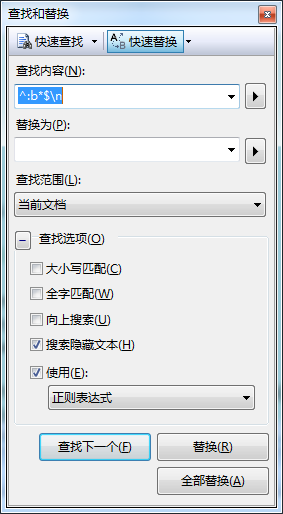
上面可以去除vs中的多余空格 非常实用的哈
using System;

using System.Collections.Generic;

using System.ComponentModel;

using System.Data;

using System.Drawing;

using System.Linq;

using System.Text;

using System.Windows.Forms;

using System.Speech.Synthesis;

using System.IO;

namespace 语音功能1

{

    public partial class Form2 : Form

    {

        public Form2()

        {

            InitializeComponent();

        }

        SpeechSynthesizer speech;

        private void Form2_Load(object sender, EventArgs e)

        {

            //textBox2.Text = Environment.CurrentDirectory;

            button4.Enabled = false;

            button3.Enabled = false;

        }

        //开始朗读

        private void button2_Click(object sender, EventArgs e)

        {

            if (richTextBox1.Text.Trim() == "")

            { return; }

                try

                {

                    speech = new SpeechSynthesizer();

                    //输出文件

                    //speech.SetOutputToWaveFile(CheckPathTruth(textBox2.Text.Trim()));//输出语言文件

                    //同步朗读文本

                    //speech.Speak(richTextBox1.Text);

                    //异步朗读文本

                    speech.SpeakAsync(richTextBox1.Text);

                    speech.Volume = (int)num_yl.Value;     //设置音量

                    speech.Rate = (int)num_speed.Value;    //设置朗读速度

                    button3.Enabled = true; button4.Enabled = true;

                }

                catch (Exception ex)

                { MessageBox.Show(ex.Message); return; }

        }

        //暂停  和继续

        private void button3_Click(object sender, EventArgs e)

        {

            if (button3.Text == "暂停")

            {

                speech.Pause();//暂停

                button3.Text = "继续";

            }

            else if (button3.Text == "继续")

            {

                speech.Resume();//继续

                button3.Text = "暂停";

            }

            button2.Enabled = false;

        }

        //停止

        private void button4_Click(object sender, EventArgs e)

        {

            button2.Enabled = true;

            button3.Enabled = false;

            //停止朗读

            speech.SpeakAsyncCancelAll();

            //释放资源!

            speech.Dispose();

            button4.Enabled = false;

        }

        //读取文件

        private void button1_Click(object sender, EventArgs e)

        {

            OpenFileDialog open = new OpenFileDialog();

            open.InitialDirectory = "c:\\"; //设置初始目录

            open.Multiselect = false;       //设置是否可以选择多个文件

            open.DefaultExt = ".txt";       //设置默认文件拓展名

            open.Filter = "txt文本|*.txt|所以文件|*.*";

            open.ShowHelp = true;       //是否显示帮助按钮

            //判断是否点击了取消或关闭按钮

            //如果不判断,会出现异常

            if (open.ShowDialog() != DialogResult.Cancel)

            {

                string str = open.FileName;

                textBox3.Text = str;

            }

            else

            { return; }

            //获取文件内容,放到   richTextBox1  里

            richTextBox1.Text = GetFileStreamOrReadToEnd(textBox3.Text.Trim());

        }

        //保存按钮

        private void button6_Click(object sender, EventArgs e)

        {

            SaveFileDialog saveFileDialog = new SaveFileDialog();

            saveFileDialog.Title = "保存文档";

            saveFileDialog.Filter = "*.wav|*.wav|*.mp3|*.mp3";

            saveFileDialog.InitialDirectory = Environment.GetFolderPath(Environment.SpecialFolder.MyDocuments);

            DialogResult saveDialog = saveFileDialog.ShowDialog();

            try

            {

                if (saveDialog == System.Windows.Forms.DialogResult.OK)

                {

                    textBox1.Text = saveFileDialog.FileName.ToString();

                    SpeechSynthesizer speechSyn = new SpeechSynthesizer();

                    speechSyn.Volume = (int)num_yl.Value;       //音量

                    speechSyn.Rate = (int)num_speed.Value;     //朗读速度

                    speechSyn.SetOutputToWaveFile(CheckPathTruth(textBox1.Text));

                    speechSyn.Speak(richTextBox1.Text);

                    speechSyn.SetOutputToDefaultAudioDevice();

                    MessageBox.Show("保存录音文件成功,保存路径:" + textBox1.Text + "!");

                    speechSyn.Dispose();

                }

            }

            catch (Exception er)

            {

                MessageBox.Show(er.ToString(), "提示", MessageBoxButtons.OK, MessageBoxIcon.Error);

            }

        }

        /// <summary>

        /// 判断文件路径是否正确

        /// </summary>

        /// <param name="path"></param>

        /// <returns>返回正确的文件路径</returns>

        public string CheckPathTruth(string path)

        {

            if (!path.Contains(".wav"))

            {

                MessageBox.Show("输出文件有误!");

                return null;

            }

            else

            {

                return path;

            }

        }

        /// <summary>

        /// 获取文件内容

        /// </summary>

        /// <param name="filepath"></param>

        /// <returns></returns>

        public string GetFileStreamOrReadToEnd(string filepath)

        {

            FileStream fs = new FileStream(filepath, FileMode.OpenOrCreate);

            StreamReader sr = new StreamReader(fs, Encoding.Default);

            //获取所以文本

            string str = sr.ReadToEnd();

            //要关闭!

            fs.Close(); sr.Close();

            return str;

        }

        private void textBox3_TextChanged(object sender, EventArgs e)

        {

            button2.Enabled = true;

            button6.Enabled = true;

        }

    }

}

//System.Diagnostics.Process.Start("Explorer.exe", string.Format(@"/select,{0}", saveFileDialog.FileName));//打开wav目录并选中文件
上面是完整的文字转换为语音软件代码:从播放到保存的,利用的都是系统的speech
2018-6-8随笔-combox绑定-语音-删空格的更多相关文章
- winform Combox绑定数据时不触发SelectIndexChanged事件
做了一个仓库选择的联动,选了仓库选其下的货区,选了货区选其下的货架分区.每个combox初始化.绑定数据是都会触发SelectIndexChanged事件,相当头疼. 后来无意中在网上看到了一种方法— ...
- silverlight中Combox绑定数据以及动态绑定默认选定项的用法
在Sliverlight中,经常要用到下拉框Combox,然而Combox的数据绑定却是一件令初学者很头疼的事情.今天就来总结一下下拉框的使用方法: 下面写一个简单的例子吧.先写一个日期的Model, ...
- ComBox绑定枚举
(转自:http://blog.csdn.net/chao88552828/article/details/9903159) /// <summary> /// 参数枚举 /// < ...
- combox绑定后添加自定义列
DataTable dt = shUBll.FindAllByWhere(""); DataRow dr = dt.NewRow(); dr["SUID"] = ...
- winform ComBox绑定数据
初始化数据: List<KeyValuePair<string, string>> list: ComBox1.ValueMember = "Key";Co ...
- combox绑定数据
HSMobile_Function.HSMobile_ProjectIDSelect(ProjectID, out dt_Machine);//取出表数据 comboBox_Ma ...
- 2018.11.2JavaScript随笔
构造函数首字母大写 通过new创建对象 BOM:浏览器对象模型
- php 随笔 截取字符串 跳出循环 去除空格 修改上传文件大小限制
substr(string,start,length) echo substr("Hello world",6); world 跳出循环 for($i=1; $i<5; $i ...
- itchat个人练习 语音与文本图灵测试例程
背景介绍 itchat是一个开源的微信个人号接口,使用python调用微信从未如此简单. 使用不到三十行的代码,你就可以完成一个能够处理所有信息的微信机器人. 官方文档参考https://itchat ...
随机推荐
- HTML&javaSkcript&CSS&jQuery&ajax(五)
一.Framset标签定义了每个框架中的HTML文档, 1. <framset cols="25%,75%"> <frame src="frame_a. ...
- Django将默认的SQLite更换为MySQL
1.注释默认的SQLite3配置: blogproject/settings.py ''' DATABASES = { 'default': { 'ENGINE': 'django.db.backen ...
- 饮冰三年-人工智能-linux-08 软件包管理(Python的安装)
1:软件包存放的位置 media/CentOS_6.9_Final/Packages文件夹下 2.RPM就是Red Hat Package Manger(红帽软件包管理工具)的缩写. 2.1 常用的命 ...
- error: <item> inner element must either be a resource reference or empty.
FAQ: Android resource compilation failedOutput: /home/cmm/code/AndroidHttpCapture/app/build/intermed ...
- 各厂商服务器存储默认管理口登录信息(默认IP、用户名、密码)收集
666:https://blog.csdn.net/xiezuoyong/article/details/84997917
- innobackupex做MySQL增量备份及恢复
http://www.cnblogs.com/paul8339/p/6731688.html
- [转] js中的事件委托或是事件代理详解
起因: 1.这是前端面试的经典题型,要去找工作的小伙伴看看还是有帮助的: 2.其实我一直都没弄明白,写这个一是为了备忘,二是给其他的知其然不知其所以然的小伙伴们以参考: 概述: 那什么叫事件委托呢?它 ...
- [转] web前端js构造无法销毁的类UUID识别码,识别浏览器设备唯一性
用户行为统计在如今的前端生态中已是稀松寻常,如各种站长统计工具.识别用户访问客户端唯一性是必要的实现,对于web前端获取的设备信息,一般容易想到的是通过navigator.userAgent,但相同设 ...
- tjoi2018
1.[TJOI2018]数学计算 傻逼题 会发现符合线段树分治的特点 每个数的操作范围都是连续的 然后就等于区间修改了 #include <bits/stdc++.h> using nam ...
- URL地址编码和解码
0. 参考 [整理]关于http(GET或POST)请求中的url地址的编码(encode)和解码(decode) python3中的urlopen对于中文url是如何处理的? 中文URL的编码问题 ...