
网络基础配置--usg系统升级
1、usg2000系统升级
1.1、TFTP设置
这里用到一个工具:3CDeamon, 是在由3Com开发类别 Web Development Freeware 软件,是一个简易服务器工具,含TFTP服务器、FTP服务器、Syslog服务器及TFTP客户机。3CDaemon,支持多种协议的小型服务软件,其功能简练、使用方便是最大的优点。
下载站点:
1、http://www.updatestar.com/directdownload/3cdaemon/2005987
2、https://pan.baidu.com/s/1gumyFTmtUKQvJVS3mjQ_0g u7on
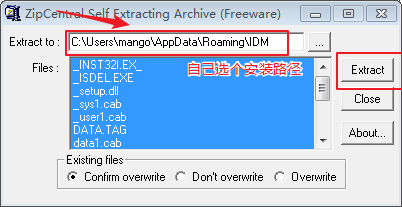
下载后直接安装即可



1.2、升级步骤
查看设备的版本
[SD-JN-]dis version

::  //

Huawei Versatile Routing Platform Software

Software Version : USG2110 V300R001C00SPC900 (VRP (R) Software, Version 5.30)

Copyright (C) - Huawei Technologies Co., Ltd.

Secoway USG2110-F uptime is  week,  day,  hour,  minutes

RPU's Version Information:

512M           bytes SDRAM

64M            bytes FLASH

Pcb            Version : VER.D

CPLD Logic     Version :

Small BootROM  Version :

Big BootROM    Version :
查看设备上的文件
<SD-JN->dir

::  //

Directory of flash:/

      -rw-    Apr   ::   SUP_512M.BIN

      drw-         -  Aug   ::   url

      -rw-          May   ::   private-data.txt

      -rw-         Aug   ::   um_database_cfg.zip

      -rw-        Aug   ::   vrpcfg.zip

      -rw-     Aug   ::   utm_update.zip

 KB total ( KB free)
先备份下原先的系统文件
<SD-JN-70>tftp 192.168.0.3 put sup_512M.bin

14:20:27  2018/05/10

  Transfer file in binary mode.

  Now begin to copy file to remote tftp server, please wait for a while... /

  TFTP: 23981700 bytes sent in 149 seconds.

  File uploaded successfully.
<SD-JN-70>tftp 192.168.0.3 put um_database_cfg.zip

14:26:38  2018/05/10

  Transfer file in binary mode.

  Now begin to copy file to remote tftp server, please wait for a while... \

  TFTP:      780 bytes sent in 1 second.

  File uploaded successfully.

<SD-JN-70>tftp 192.168.0.3 put vrpcfg.zip

14:26:50  2018/05/10

  Transfer file in binary mode.

  Now begin to copy file to remote tftp server, please wait for a while... \

  TFTP:     3267 bytes sent in 1 second.

  File uploaded successfully.

<SD-JN-70>tftp 192.168.0.3 put utm_update.zip

14:27:01  2018/05/10

  Transfer file in binary mode.

  Now begin to copy file to remote tftp server, please wait for a while... |

  TFTP:  1971449 bytes sent in 13 seconds.

  File uploaded successfully.
下载镜像文件
<SD-JN->tftp 192.168.0.3 get sup_512M.bin

::  //

The file sup_512M.bin exists. Overwrite it?[Y/N]:y

  Transfer file in binary mode.

-- :: SD-JN- %%01VFS//OVERWRITE(l): When asked whether to overwrite the file sup_512M.bin, the user entered Y.

  Now begin to download file from remote tftp server, please wait for a while... |

  TFTP:  bytes received in  seconds.

  File downloaded successfully.
查看目前启动的镜像
<SD-JN->dis startup   #华三是dis boot-loader

::  //

MainBoard:

  Configed startup system software:          flash:/SUP_512M.BIN

  Startup system software:                   flash:/SUP_512M.BIN

  Next startup system software:              flash:/SUP_512M.BIN

  Startup saved-configuration file:          flash:/vrpcfg.zip

  Next startup saved-configuration file:     flash:/vrpcfg.zip
设定启动时要加载的镜像
<SD-JN->startup system-software SUP_512M.BIN

::  //

Info:System software for the next startup:flash:/sup_512m.bin, start reading file....

Succeeded in setting the software for booting system.
重启
<SD-JN->reboot

::  //

  System will reboot, could you want to save current configuration [Y/N]?y

 Next config file is flash:/vrpcfg.zip

Now saving the current configuration to the device..................................................

Info:The current configuration was saved to the device successfully.

  System will reboot! Continue?[Y/N]:y
重启时间大约要经过4分钟左右。可以看到版本已经升级到SPC600了。
<SD-JN->dis version

::  //

Huawei Versatile Routing Platform Software

Software Version : USG2110 V300R001C10SPC600 (VRP (R) Software, Version 5.30)

Copyright (C) - Huawei Technologies Co., Ltd.

Secoway USG2110-F uptime is  week,  day,  hour,  minutes

RPU's Version Information:

512M           bytes SDRAM

64M            bytes FLASH

Pcb            Version : VER.D

CPLD Logic     Version :

Small BootROM  Version :

Big BootROM    Version :
------------------------------------------------------------------------------------------------------------------------------------------------
2、官方教程
操作步骤
- 在PC2上通过FTP方式登录USG。
本文档中以Windows操作系统自带的FTP client为例进行介绍,在实际操作过程中,建议您使用第三方FTP client程序来传送文件,例如Cute FTP等。
显示信息如下:
C:\> ftp 192.168.0.1

Connected to 192.168.0.1.

220 FTP service ready.

User (192.168.0.1:(none)): ftpuser

331 Password required for ftpuser.

Password:

230 User logged in.

ftp> - 设置文件的传输模式,同时设置PC2上存放升级所需文件的目录路径为D:\FTP,该文件夹必须已经存在。此处仅以D:\FTP为例进行说明,您可以根据实际需要配置为其他的目录。
ftp> binary   /输入binary命令,以二进制格式传输文件

ftp> lcd D:\FTP /设置PC2上存放升级所需文件的目录 - 使用put命令,将v300r001c10spc600.bin上传至USG的Flash中。上传的文件不能和Flash中已有的文件同名。如果Flash中已经有同名的文件,将会直接覆盖原来的文件。
ftp> put D:\FTP\v300r001c10spc600.bin
受网络状况影响,上传版本软件时将会需要一段时间,请您耐心等待上传完成提示。上传完成后,请您确认设备Flash中文件的大小与PC2上文件的大小是否一致,如果不一致,请重新上传,确保文件完整上传到设备SD卡或Flash中。
- 使用put命令,将经过配置转换工具转换并手工调整后的配置文件如vrpcfg_new.cfg上传至USG的Flash中。上传的文件不能和Flash中已有的文件同名。如果Flash中已经有同名的文件,将会直接覆盖原来的文件。
ftp> put D:\FTP\vrpcfg_new.cfg
上传完成后,请您确认设备Flash中文件的大小与PC2上文件的大小是否一致,如果不一致,请重新上传,确保文件完整上传到设备Flash中。
- 文件上传完成后,退出FTP环境,在PC1上通过Telnet或SSH方式登录到USG的命令行环境中。
- 在用户视图下使用startup system-software filename命令设置USG下次启动时使用的版本软件。
<USG> startup system-software v300r001c10spc600.bin

  Info:System software for the next startup:flash:/v300r001c10spc600.bin, starting reading file....

Succeeded in setting the software for booting system. - 在用户视图下使用startup saved-configuration filename命令设置USG下次启动时使用的配置文件。
<USG> startup saved-configuration vrpcfg_new.cfg

Info: Succeeded in setting the configuration for booting system. - 在用户视图下使用reboot命令重新启动USG。
执行reboot命令后,设备将会显示两次提示信息,请您不保存配置重新启动。重启后请您耐心等待,待设备启动完成后再进行后续操作。
注意:第一个是否保存当前配置的提示,执行y后当前配置会覆盖本次升级的目标配置。如果确认已将当前配置同步保存到升级目标配置,请输入n。
<USG> reboot

   System will reboot, could you want to save current configuration [Y/N]?n

System will reboot, continue?[Y/N]:y说明:设备启动耗时受当前的硬件配置以及配置文件影响。配置越多,需要恢复配置的时间就越长。
网络基础配置--usg系统升级的更多相关文章
- Linux网络基础配置
这是看itercast视频的笔记 Linux网络基础配置 以太网连接 在Linux中,以太网接口被命令为:eth0, eth1等, 0,1代表网卡编号 通过lspci命令可以查看网上硬件信息(如果是u ...
- docker数据卷管理及网络基础配置
数据卷 数据卷容器 数据卷迁移数据 端口映射 容器间通信 数据卷的管理 当需要查看容器内应用产生的数据或者把容器内数据备份及多个容器数据共享.有两种方式,数据卷以及数据卷容器. 数据卷 数据卷是一个可 ...
- linux基础之网络基础配置
基础命令:ifconfig/route/netstat,ip/ss,nmcli 一.ifconfig/route/netstat相关命令 1. ifconfig - configure a netw ...
- docker网络基础配置
常用两种方式: 1)映射容器端口到宿主机 2)容器互联机制 --------------------------------------------- 端口映射实现访问容器的用法: docker ru ...
- 网络基础配置--开启SSH,关闭Telnet
1.Telnet和SSH对比 1.1.TELNET 使用Telnet这个用来访问远程计算机的TCP/IP协议以控制你的网络设备相当于在离开某个建筑时大喊你的用户名和口令.很快会有人进行监听,并且他们会 ...
- docker-ce-17.09 网络基础配置
一.端口映射实现访问容器 1.我们先从pull一个nginx镜像,然后后台运行该镜像 > docker pull nginx > docker run -d -P nginx:latest ...
- 基于RHEL8/CentOS8的网络基础配置
在rhel7上,同时支持network.service和NetworkManager.service(简称NM).默认情况下,这2个服务都有开启,但许多人都会将NM禁用掉.而在rhel8上,已废弃ne ...
- 七、【Docker笔记】Docker中网络基础配置
一个系统一般都包含多个服务组件,这些大量的服务组件不可能放在同一个容器中,这就需要多个容器之间可以互相通信.Docker提供了两种方式来实现网络服务:映射容器端口到宿主主机.容器互联机制. 一.端口映 ...
- Linux:网络基础配置
一.修改主机名 hostname 查看主机名 1.hostname zy 修改主机名为zy,临时生效,重新登录系统生效. 2.想要永久修改,,需修改配置文件: vi /etc/sysconf ...
随机推荐
- BrupSuite渗透测试笔记(十一)
一.数据查找和拓展功能的使用 1.BrupSuite高级功能在界面布局上主要分成两个部分,一是菜单栏,另一个是Engagement tools,Brup菜单下包含的数据查找Search 组件状态存储. ...
- 论文阅读笔记二十七:Faster R-CNN: Towards Real-Time Object Detection with Region Proposal Networks(CVPR 2016)
论文源址:https://arxiv.org/abs/1506.01497 tensorflow代码:https://github.com/endernewton/tf-faster-rcnn 室友对 ...
- 步步为营-90-SEO(url重写+超链接技巧)
目的:便于搜索引擎抓取 url重写:将带参数的url如:https://i.cnblogs.com/EditPosts.aspx?opt=1.修改为https://i.cnblogs.com/Edit ...
- json如果不在pom中添加依赖会抛出500异常
所以必须添加以下依赖: <!--jackson相关依赖--><!-- https://mvnrepository.com/artifact/com.fasterxml.jackson ...
- Scrapy库的安装(windows版)
这个是需要安装的所有文件 1. wheel pip install wheel 2. lxml http://www.lfd.uci.edu/~gohlke/pythonlibs/#lxml 3. P ...
- 微信小程序--WXS---JS 代码插入
主页要使用的JS代码放在index.js里面 例 Page({ data: { array: [1, 2, 3, 4, 5, 1, 2, 3, 4] } }) 只复制以下这段 data: { arra ...
- SpringMVC - 1.快速入门
1. HelloWorld 步骤: 加入 jar 包 mons-logging-1.1.3.jar spring-aop-4.0.0.RELEASE.jar spring-beans-4.0.0.RE ...
- Hadoop ConnectException: Connection refused的一种解决办法
跟着视频学习天气案例,把代码敲好,准备提交运行时才发现集群没启动.然后在node02.node03.node04使用zkServer.sh start启动ZooKeeper,然后在node01使用st ...
- js 函数参数为什么是按值传递?
首先说下,在js中有两大类数据类型: 基本类型和引用类型. 其次,基本类型有5种: Undefined,Null,Boolean,Number.String, 引用类型有一种: Object(Func ...
- Java 中 static 和 volatile 关键字的区别?
static指的是类的静态成员,实例间共享 volatile跟Java的内存模型有关,线程执行时会将变量从主内存加载到线程工作内存,建立一个副本,在某个时刻写回.valatile指的每次都读取主内存的 ...