
机器学习系列-tensorflow-01-急切执行API
tensorflow急切执行概述
Eager execution is an imperative, define-by-run interface where operations are executed immediately as they are called from Python. This makes it easier to get started with TensorFlow, and can make research and development more intuitive. A vast majority of the TensorFlow API remains the same whether eager execution is enabled or not. As a result, the exact same code that constructs TensorFlow graphs (e.g. using the layers API) can be executed imperatively by using eager execution. Conversely, most models written with Eager enabled can be converted to a graph that can be further optimized and/or extracted for deployment in production without changing code.
**急切执行**是一个必要的,逐个运行的界面,其中操作在从Python调用时立即执行。 这使得TensorFlow开始变得更容易,并且可以使研究和开发更加直观。 无论是否启用了急切执行,绝大多数TensorFlow API都保持不变。 通过使用急切执行,可以强制执行构造TensorFlow图的完全相同的代码。 相反,大多数使用Eager编写的模型都可以转换为可以进一步优化和/或提取的图形,以便在不更改代码的情况下在生产中进行部署。
代码图解分析如下
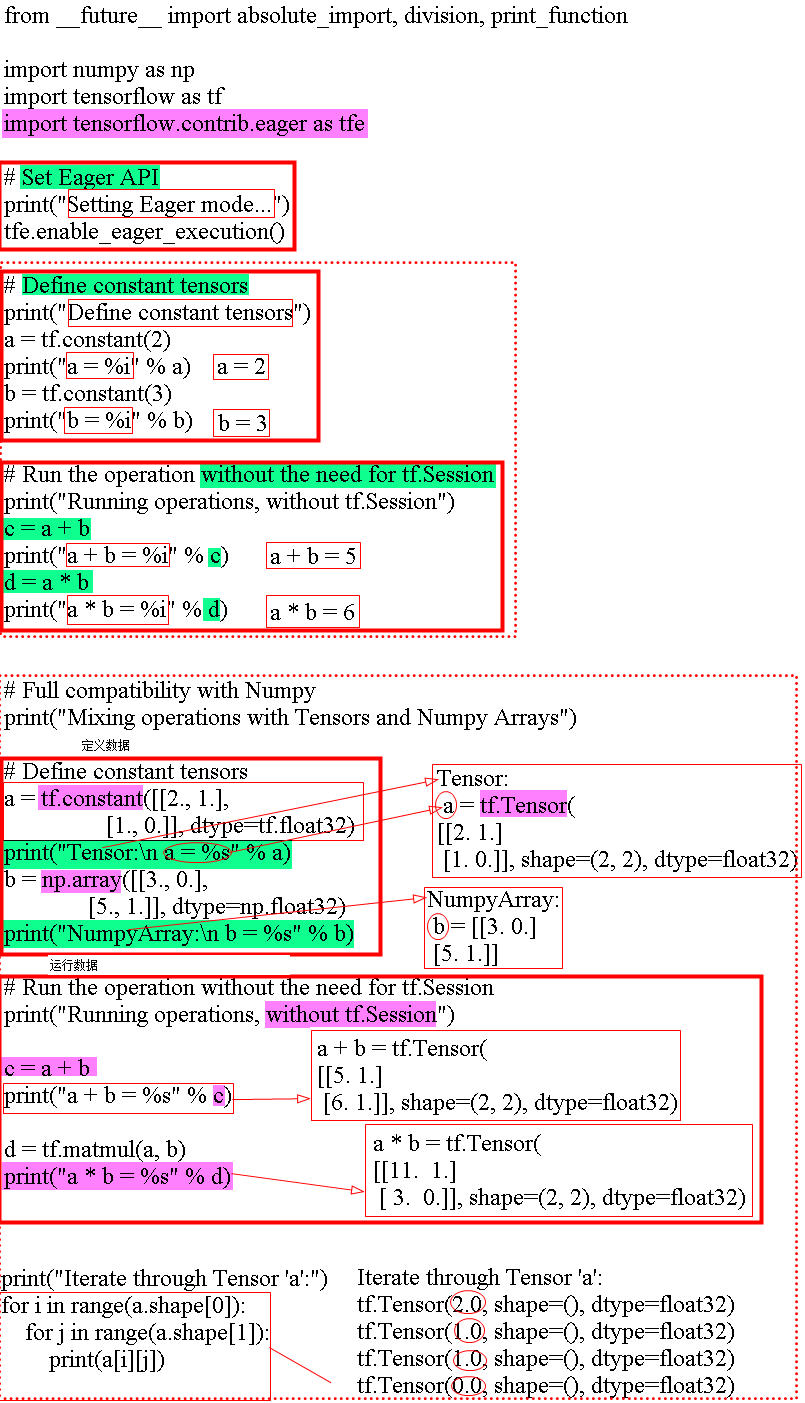
代码
from __future__ import absolute_import, division, print_function

import numpy as np

import tensorflow as tf

import tensorflow.contrib.eager as tfe

# Set Eager API

print("Setting Eager mode...")

tfe.enable_eager_execution()

# Define constant tensors

print("Define constant tensors")

a = tf.constant(2)

print("a = %i" % a)

b = tf.constant(3)

print("b = %i" % b)

# Run the operation without the need for tf.Session

print("Running operations, without tf.Session")

c = a + b

print("a + b = %i" % c)

d = a * b

print("a * b = %i" % d)

# Full compatibility with Numpy

print("Mixing operations with Tensors and Numpy Arrays")

# Define constant tensors

a = tf.constant([[2., 1.],

                 [1., 0.]], dtype=tf.float32)

print("Tensor:\n a = %s" % a)

b = np.array([[3., 0.],

              [5., 1.]], dtype=np.float32)

print("NumpyArray:\n b = %s" % b)

# Run the operation without the need for tf.Session

print("Running operations, without tf.Session")

c = a + b

print("a + b = %s" % c)

d = tf.matmul(a, b)

print("a * b = %s" % d)

print("Iterate through Tensor 'a':")

for i in range(a.shape[0]):

    for j in range(a.shape[1]):

        print(a[i][j])
参考点
https://github.com/brightyu/TensorFlow-Examples/blob/master/examples/
机器学习系列-tensorflow-01-急切执行API的更多相关文章
- Weka中数据挖掘与机器学习系列之Weka系统安装(四)
能来看我这篇博客的朋友,想必大家都知道,Weka采用Java编写的,因此,具有Java“一次编译,到处运行”的特性.支持的操作系统有Windows x86.Windows x64.Mac OS X.L ...
- tensorflow中slim模块api介绍
tensorflow中slim模块api介绍 翻译 2017年08月29日 20:13:35 http://blog.csdn.net/guvcolie/article/details/77686 ...
- Spark2.0机器学习系列之9: 聚类(k-means,Bisecting k-means,Streaming k-means)
在Spark2.0版本中(不是基于RDD API的MLlib),共有四种聚类方法: (1)K-means (2)Latent Dirichlet allocation (LDA) ...
- 机器学习之TensorFlow编程环境_TensorFlow_Estimator
title: Machine-learning subtitle: 1. 机器学习之TensorFlow编程环境_TensorFlow_Estimator date: 2018-12-13 10:17 ...
- Weka中数据挖掘与机器学习系列之Exploer界面(七)
不多说,直接上干货! Weka的Explorer(探索者)界面,是Weka的主要图形化用户界面,其全部功能都可通过菜单选择或表单填写进行访问.本博客将详细介绍Weka探索者界面的图形化用户界面.预处理 ...
- Hadoop 系列(三)Java API
Hadoop 系列(三)Java API <dependency> <groupId>org.apache.hadoop</groupId> <artifac ...
- JavaScript进阶系列05,事件的执行时机, 使用addEventListener为元素同时注册多个事件,事件参数
本篇体验JavaScript事件的基本面,包括: ■ 事件必须在页面元素加载之后起效■ 点击事件的一个简单例子■ 为元素注册多个点击事件■ 获取事件参数 ■ 跨浏览器事件处理 □ 事件必须在页面元素加 ...
- Zookeeper 系列(五)Curator API
Zookeeper 系列(五)Curator API 一.Curator 使用 Curator 框架中使用链式编程风格,易读性更强,使用工程方法创建连接对象使用. (1) CuratorFramewo ...
- Zookeeper 系列(三)Zookeeper API
Zookeeper 系列(三)Zookeeper API 本节首先介绍 Zookeeper 的 Shell 命令,再对 Java 操作 Zookeeper 的三种方式进行讲解,本节先介绍 Zookee ...
随机推荐
- php 数组函数学习
1.array_change_key_case array_change_key_case(array,case)函数将数组的所有的键都转换为大写字母或小写字母.array表示目标数组,case表示转 ...
- 理解并设计rest/restful风格接口
网络应用程序,分为前端和后端两个部分.当前的发展趋势,就是前端设备层出不穷(手机.平板.桌面电脑.其他专用设备......). 因此,必须有一种统一的机制,方便不同的前端设备与后端进行通信.这导致AP ...
- document.getElementsByClassName() 原生方法 通过className 选择DOM节点
<div id="box"> <div class="box">1</div> <div class="bo ...
- 磁盘修改AF
请严格按照如下流程: 1 以管理员打开 硬盘安装助手 2 选择苹果Mac系统镜像 (cdr格式的) 3 直接选择要写入的盘,不要点击右边的方框中的勾选 (此时就可以写入了,虽然最后还是显示 Chang ...
- h5网页在微信里打开 右上角分享到微信好友或者朋友圈
首先你需要一个分享接口地址,然后在自定义图片 标题 描述 如下: <script src="http://res.wx.qq.com/open/js/jweixin-1.0.0.js& ...
- JSP基础知识➣语法整理(二)
A.脚本程序 脚本程序可以包含任意量的Java语句.变量.方法或表达式,只要它们在脚本语言中是有效的. 脚本程序的语法格式:<% 代码片段 %>,但是不能包含文件的方法和变量的声明 B.J ...
- linux服务器查看tcp链接shell
netstat -nt |awk '{++S[$NF]} END {for (a in S ) print a,S[a]}'
- 基于spring security 实现前后端分离项目权限控制
前后端分离的项目,前端有菜单(menu),后端有API(backendApi),一个menu对应的页面有N个API接口来支持,本文介绍如何基于spring security实现前后端的同步权限控制. ...
- Kudu之Tablet的发现过程
当创建Kudu客户端时,其会从主服务器上获取tablet位置信息,然后直接与服务于该tablet的服务器进行交谈.为了优化读取和写入路径,客户端将保留该信息的本地缓存,以防止他们在每个请求时需要查询主 ...
- python 链接数据库错误
用python3链接oracle产生错误: DPI-1047: Cannot locate a 64-bit Oracle Client library: "The specified mo ...