
Android学习:AlertDialog对话框
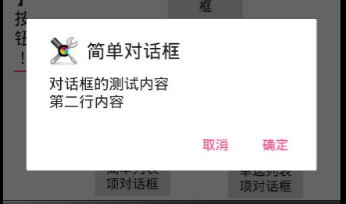
AlertDialog可以生成各种内容的对话框,它生成的对话框包含4个区域:
图标区,标题区,内容区,按钮区
<?xml version="1.0" encoding="utf-8"?>

<android.support.constraint.ConstraintLayout xmlns:android="http://schemas.android.com/apk/res/android"

    xmlns:app="http://schemas.android.com/apk/res-auto"

    xmlns:tools="http://schemas.android.com/tools"

    android:layout_width="match_parent"

    android:layout_height="match_parent"

    tools:context="allegro.alertdialog.MainActivity"

    tools:layout_editor_absoluteY="81dp"

    tools:layout_editor_absoluteX="0dp">

    <!-- 显示一个普通的文本编辑框组件 -->

    <EditText

        android:id="@+id/show"

        android:layout_width="0dp"

        android:layout_height="wrap_content"

        android:layout_marginEnd="8dp"

        android:layout_marginStart="8dp"

        android:editable="false"

        android:layout_marginRight="8dp"

        app:layout_constraintRight_toRightOf="parent"

        android:layout_marginLeft="8dp"

        app:layout_constraintLeft_toLeftOf="parent"

        app:layout_constraintTop_toTopOf="parent"

        android:layout_marginTop="8dp"

        tools:layout_constraintRight_creator="1"

        tools:layout_constraintLeft_creator="1" />

    <!-- 定义一个普通的按钮组件 -->

    <Button

        android:layout_width="88dp"

        android:layout_height="wrap_content"

        android:text="简单对话框"

        android:onClick="simple"

        android:id="@+id/button"

        android:layout_marginEnd="26dp"

        app:layout_constraintRight_toLeftOf="@+id/button2"

        tools:layout_constraintTop_creator="1"

        tools:layout_constraintRight_creator="1"

        tools:layout_constraintBottom_creator="1"

        app:layout_constraintBottom_toTopOf="@+id/button2"

        app:layout_constraintTop_toTopOf="@+id/button2" />

    <!-- 定义一个普通的按钮组件 -->

    <Button

        android:layout_width="88dp"

        android:layout_height="wrap_content"

        android:text="简单列表项对话框"

        android:onClick="simpleList"

        android:id="@+id/button4"

        android:layout_marginStart="16dp"

        tools:layout_constraintTop_creator="1"

        android:layout_marginTop="52dp"

        app:layout_constraintTop_toBottomOf="@+id/button3"

        tools:layout_constraintLeft_creator="1"

        app:layout_constraintLeft_toLeftOf="@+id/button3" />

    <!-- 定义一个普通的按钮组件 -->

    <Button

        android:layout_width="88dp"

        android:layout_height="wrap_content"

        android:text="单选列表项对话框"

        android:onClick="singleChoice"

        android:layout_marginEnd="36dp"

        tools:layout_constraintRight_creator="1"

        tools:layout_constraintBottom_creator="1"

        app:layout_constraintBottom_toBottomOf="parent"

        app:layout_constraintRight_toRightOf="parent"

        android:layout_marginBottom="191dp" />

    <!-- 定义一个普通的按钮组件 -->

    <Button

        android:layout_width="88dp"

        android:layout_height="wrap_content"

        android:text="多选列表项对话框"

        android:onClick="multiChoice"

        tools:layout_constraintTop_creator="1"

        tools:layout_constraintRight_creator="1"

        tools:layout_constraintBottom_creator="1"

        app:layout_constraintBottom_toTopOf="@+id/button2"

        android:layout_marginEnd="16dp"

        app:layout_constraintRight_toRightOf="parent"

        app:layout_constraintTop_toTopOf="@+id/button2" />

    <!-- 定义一个普通的按钮组件 -->

    <Button

        android:layout_width="88dp"

        android:layout_height="wrap_content"

        android:text="自定义列表项对话框"

        android:onClick="customList"

        android:id="@+id/button2"

        android:layout_marginStart="6dp"

        tools:layout_constraintBottom_creator="1"

        app:layout_constraintBottom_toTopOf="@+id/button3"

        tools:layout_constraintLeft_creator="1"

        android:layout_marginBottom="9dp"

        app:layout_constraintLeft_toRightOf="@+id/button3" />

    <!-- 定义一个普通的按钮组件 -->

    <Button

        android:layout_width="88dp"

        android:layout_height="wrap_content"

        android:text="自定义View对话框"

        android:onClick="customView"

        android:id="@+id/button3"

        android:layout_marginStart="78dp"

        tools:layout_constraintTop_creator="1"

        android:layout_marginTop="186dp"

        tools:layout_constraintLeft_creator="1"

        app:layout_constraintLeft_toLeftOf="parent"

        app:layout_constraintTop_toTopOf="parent" />

</android.support.constraint.ConstraintLayout>
package allegro.alertdialog;

import android.content.DialogInterface;

import android.support.v7.app.AlertDialog;

import android.support.v7.app.AppCompatActivity;

import android.os.Bundle;

import android.view.View;

import android.widget.ArrayAdapter;

import android.widget.TableLayout;

import android.widget.TextView;

public class MainActivity extends AppCompatActivity {

    TextView show;

    String[] items = new String[] {

            "疯狂Java讲义", "疯狂Ajax讲义",

            "轻量级Java EE企业应用实战",

            "疯狂Android讲义" };

    @Override

    protected void onCreate(Bundle savedInstanceState) {

        super.onCreate(savedInstanceState);

        setContentView(R.layout.activity_main);

        show = (TextView) findViewById(R.id.show);

    }

    public void simple(View source)

    {

        AlertDialog.Builder builder = new AlertDialog.Builder(this)

                // 设置对话框标题

                .setTitle("简单对话框")

                // 设置图标

                .setIcon(R.drawable.tools)

                .setMessage("对话框的测试内容\n第二行内容");

        // 为AlertDialog.Builder添加“确定”按钮

        setPositiveButton(builder);

        // 为AlertDialog.Builder添加“取消”按钮

        setNegativeButton(builder)

                .create()

                .show();

    }

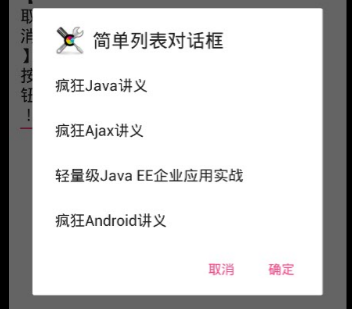
    public void simpleList(View source)

    {

        AlertDialog.Builder builder = new AlertDialog.Builder(this)

                // 设置对话框标题

                .setTitle("简单列表对话框")

                // 设置图标

                .setIcon(R.drawable.tools)

                // 设置简单的列表项内容

                .setItems(items, new DialogInterface.OnClickListener()

                {

                    @Override

                    public void onClick(DialogInterface dialog, int which)

                    {

                        show.setText("你选中了《" + items[which] + "》");

                    }

                });

        // 为AlertDialog.Builder添加“确定”按钮

        setPositiveButton(builder);

        // 为AlertDialog.Builder添加“取消”按钮

        setNegativeButton(builder)

                .create()

                .show();

    }

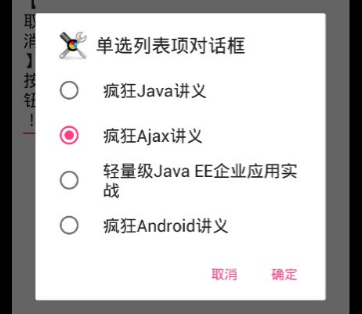
    public void singleChoice(View source)

    {

        AlertDialog.Builder builder = new AlertDialog.Builder(this)

                // 设置对话框标题

                .setTitle("单选列表项对话框")

                // 设置图标

                .setIcon(R.drawable.tools)

                // 设置单选列表项,默认选中第二项(索引为1)

                .setSingleChoiceItems(items, 1, new DialogInterface.OnClickListener()

                {

                    @Override

                    public void onClick(DialogInterface dialog, int which)

                    {

                        show.setText("你选中了《" + items[which] + "》");

                    }

                });

        // 为AlertDialog.Builder添加“确定”按钮

        setPositiveButton(builder);

        // 为AlertDialog.Builder添加“取消”按钮

        setNegativeButton(builder)

                .create()

                .show();

    }

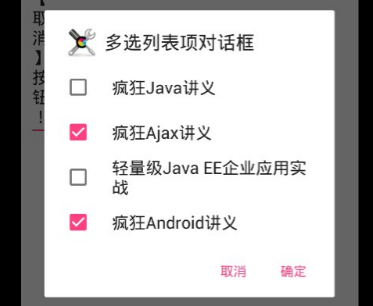
    public void multiChoice(View source)

    {

        AlertDialog.Builder builder = new AlertDialog.Builder(this)

                // 设置对话框标题

                .setTitle("多选列表项对话框")

                // 设置图标

                .setIcon(R.drawable.tools)

                // 设置多选列表项,设置勾选第2项、第4项

                .setMultiChoiceItems(items

                        , new boolean[]{false , true ,false ,true}, null);

        // 为AlertDialog.Builder添加“确定”按钮

        setPositiveButton(builder);

        // 为AlertDialog.Builder添加“取消”按钮

        setNegativeButton(builder)

                .create()

                .show();

    }

    public void customList(View source)

    {

        AlertDialog.Builder builder = new AlertDialog.Builder(this)

                // 设置对话框标题

                .setTitle("自定义列表项对话框")

                // 设置图标

                .setIcon(R.drawable.tools)

                // 设置自定义列表项

                .setAdapter(new ArrayAdapter<String>(this

                        , R.layout.array_item

                        , items), null);

        // 为AlertDialog.Builder添加“确定”按钮

        setPositiveButton(builder);

        // 为AlertDialog.Builder添加“取消”按钮

        setNegativeButton(builder)

                .create()

                .show();

    }

    public void customView(View source)

    {

        // 装载app\src\main\res\layout\login.xml界面布局文件

        TableLayout loginForm = (TableLayout)getLayoutInflater()

                .inflate( R.layout.login, null);

        new AlertDialog.Builder(this)

                // 设置对话框的图标

                .setIcon(R.drawable.tools)

                // 设置对话框的标题

                .setTitle("自定义View对话框")

                // 设置对话框显示的View对象

                .setView(loginForm)

                // 为对话框设置一个“确定”按钮

                .setPositiveButton("登录", new DialogInterface.OnClickListener() {

                    @Override

                    public void onClick(DialogInterface dialog,

                                        int which) {

                        // 此处可执行登录处理

                    }

                })

                // 为对话框设置一个“取消”按钮

                .setNegativeButton("取消", new DialogInterface.OnClickListener()

                {

                    @Override

                    public void onClick(DialogInterface dialog,

                                        int which)

                    {

                        // 取消登录,不做任何事情

                    }

                })

                // 创建并显示对话框

                .create()

                .show();

    }

    private AlertDialog.Builder setPositiveButton(

            AlertDialog.Builder builder)

    {

        // 调用setPositiveButton方法添加“确定”按钮

        return builder.setPositiveButton("确定", new DialogInterface.OnClickListener()

        {

            @Override

            public void onClick(DialogInterface dialog, int which)

            {

                show.setText("单击了【确定】按钮!");

            }

        });

    }

    private AlertDialog.Builder setNegativeButton(

            AlertDialog.Builder builder)

    {

        // 调用setNegativeButton方法添加“取消”按钮

        return builder.setNegativeButton("取消", new DialogInterface.OnClickListener()

        {

            @Override

            public void onClick(DialogInterface dialog, int which)

            {

                show.setText("单击了【取消】按钮!");

            }

        });

    }

}



Android学习:AlertDialog对话框的更多相关文章
- android学习笔记 对话框合集
package com.zhangbz.dialog; import android.app.Activity; import android.app.AlertDialog; import andr ...
- Android:AlertDialog对话框
1.简单的ALertDialog: Dialog alertDialog = new AlertDialog.Builder(this) .setTitle("标题") .setM ...
- 【Android】Android中AlertDialog对话框的使用实例
package com.ceac.deng; import android.R.string; import android.support.v7.app.ActionBarActivity; imp ...
- Android学习-各种对话框
在android的编程中,对话框的用处是非常多的,然而,有时对对话框的需求也是不一样的,那么现在,就总结对话框的种类,以及事件的处理形势. 1.简单的对话框 public void showDialo ...
- Android在 Alertdialog对话框中点击消失?
在开发的时候遇到一个问题.就是一触摸对话框边缘外部,对话框会自己主动消失.这个问题非常纠结啊,查找了一下发现从Android 4.0開始.AlertDialog有了变化.就是在触摸对话框边缘外部.对话 ...
- android学习九 对话框碎片
1.android的对话框是异步的,对话框创建后马上执行下面的代码.好处: a.通过实现对话框的回调方法反馈用户与对话框的交互. b.能够在代码中清楚对话框. 2.碎片对话框基 ...
- android 的AlertDialog对话框
private int selectedFruitIndex = 0; private void showMsg2() {// Dialog alertDialog = new AlertDial ...
- android入门 — AlertDialog对话框
常见的对话框主要分为消息提示对话框.确认对话框.列表对话框.单选对话框.多选对话框和自定义对话框. 对话框可以阻碍当前的UI线程,常用于退出确认等方面. 在这里主要的步骤可以总结为: 1.创建Aler ...
- Android中AlertDialog对话框禁止按[返回键]或[搜索键]
alertDialog.setOnKeyListener(new DialogInterface.OnKeyListener() { @Override public boolean onKey(Di ...
- 11.Android之常用对话框AlertDialog学习
(1)首先我们写个简单的AlertDialog对话框,要创建一个AlertDialog,就要用到AlertDialog.Builder中的create()方法,然后创建对话框可以设置对话框的属性,比如 ...
随机推荐
- sql 2008 查询性能优化笔记
索引: set statistics io on select p.productID,p.name,p.Weight,p.StandardCost from production.product p ...
- Mac安装Linux的KVM管理工具virt-manager
安装: brew tap jeffreywildman/homebrew-virt-manager brew install virt-manager virt-viewer 中途会碰到很多问题,可以 ...
- new Random().Next(1, 100); 多线程同时执行结果很高概率相同,
/// <summary> /// new Random().Next(1, 100); 多线程同时执行结果很高概率相同, /// 是用的当前时间为seed,时间相同结果相同 /// // ...
- mui 打开外网链接返回的正姿势!
我们的返回分两种: 一:按返回按钮只能返回上一页 二:向右滑动一步返回app的面页
- vue 父子组件的方法调用
$emit 子组件触发父组件的方法: <!-- 子组件 --> <template> <div id="child"> <button @ ...
- 命令 上传项目到git中
点击Clone or dowload会出现一个地址,copy这个地址备用. 接下来就到本地操作了,首先右键你的项目,如果你之前安装git成功的话,右键会出现两个新选项,分别为Git Gui Here, ...
- AYUI -AYUI风格的 超美 百度网盘8.0
2017-03-23 19:18:43 (截止到2017-3-23 20:20:33开发结束)体验地址: http://pan.baidu.com/s/1bX28H4 新增传输列表 ======== ...
- TLB的作用及工作原理
TLB的作用及工作过程 以下内容摘自<步步惊芯——软核处理器内部设计分析>一书 页表一般都很大,并且存放在内存中,所以处理器引入MMU后,读取指令.数据需要访问两次内存:首先通过查询页表得 ...
- hive SQL COALESCE 函数
COALESCE是一个函数, (expression_1, expression_2, ...,expression_n)依次参考各参数表达式,遇到非null值即停止并返回该值.如果所有的表达式都是空 ...
- app优化之流量节省
前言:“客户端上传时间戳”的玩法,你玩过么?一起聊聊时间戳的奇技淫巧!,其实这个类似于数据版本号的东西. 缘起:无线时代,流量敏感.APP在登录后,往往要向服务器同步非常多的数据,很费流量,技术上有没 ...