
git 里面遇到的问题
第一步:建立git仓库(本地)
cd到你的本地项目根目录下,执行git命令
git init
第二步:将项目的所有文件添加到仓库中
git add .
如果想添加某个特定的文件,只需把.换成特定的文件名即可
第三步:将add的文件commit到仓库
git commit -m "注释语句"
第四步:去github上创建自己的Repository,创建页面如下图所示:
第五步:重点来了,将本地的仓库关联到github上
git remote add origin https://github.com/Interesting6/my_numeral_calculations.git
后面的https链接地址换成你自己的仓库url地址
第六步:上传github之前,要先pull一下,执行如下命令:
git pull origin master
敲回车后,会执行输出类似如下
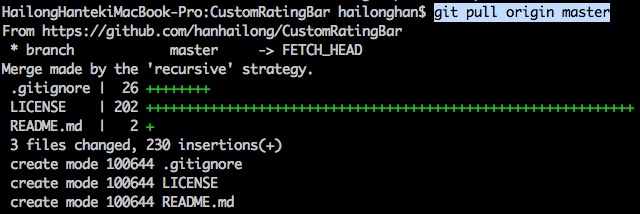
第七步,也就是最后一步,上传代码到github远程仓库
git push -u origin master
执行完后,如果没有异常,等待执行完就上传成功了,中间可能会让你输入Username和Password,你只要输入github的账号和密码就行了
-----------------------------------------------------------------------------------------------------------------------------------
遇到的问题,有时我只需要上传一个文件,而这个文件在GitHub上还没有目录,在刚刚仓库(本地)的目录下打开git bash:
Mr.Black@DESKTOP-4Q3FM6F MINGW64 /e/Sublime/python/calculate (master)

$ git add ./functionroot/iteration_method.py

# 添加该functionroot目录下的文件iteration_method.py
然后提交一下
Mr.Black@DESKTOP-4Q3FM6F MINGW64 /e/Sublime/python/calculate (master)

$ git commit -m "solving nonlinear function in iteration method"

[master c08aed3] solving nonlinear function in iteration method

 1 file changed, 133 insertions(+)

 create mode 100644 functionroot/iteration_method.py
然后push就出错了:
Mr.Black@DESKTOP-4Q3FM6F MINGW64 /e/Sublime/python/calculate (master)

$ git push -u origin master

To https://github.com/Interesting6/my_numeral_calculations.git

 ! [rejected]        master -> master (fetch first)

error: failed to push some refs to 'https://github.com/Interesting6/my_numeral_calculations.git'

hint: Updates were rejected because the remote contains work that you do         # 更新被拒绝,因为远程包含本地没有的工作。

hint: not have locally. This is usually caused by another repository pushing

hint: to the same ref. You may want to first integrate the remote changes

hint: (e.g., 'git pull ...') before pushing again.

hint: See the 'Note about fast-forwards' in 'git push --help' for details.
试了一下网上说的:
Mr.Black@DESKTOP-4Q3FM6F MINGW64 /e/Sublime/python/calculate (master)

$ git pull --rebase origin master

error: cannot pull with rebase: You have unstaged changes.

error: please commit or stash them.
也没用,然后试了下下面的:
You may want to first merge the remote changes (e.g., 'git pull') before pushing again.
在再次推送之前,您可能需要首先合并远程更改(例如,“git pull”)。
that is:
git pull

# Fix any merge conflicts, if you have a `README.md` locally

git push -u origin master
输入下面就通过vim进入一个文件内,我直接保存退出
Mr.Black@DESKTOP-4Q3FM6F MINGW64 /e/Sublime/python/calculate (master)

$ git pull

remote: Counting objects: 3, done.

remote: Compressing objects: 100% (3/3), done.

remote: Total 3 (delta 0), reused 0 (delta 0), pack-reused 0

Unpacking objects: 100% (3/3), done.

From https://github.com/Interesting6/my_numeral_calculations

   8fd4a0c..31dacac  master     -> origin/master

 * [new branch]      Interesting6-solve_linear_equations -> origin/Interesting6-solve_linear_equations

Merge made by the 'recursive' strategy.

 Interpolation.html => Interpolation/Interpolation.html | 0

 1 file changed, 0 insertions(+), 0 deletions(-)

 rename Interpolation.html => Interpolation/Interpolation.html (100%)
然后再push一下就好了,很迷。。
Mr.Black@DESKTOP-4Q3FM6F MINGW64 /e/Sublime/python/calculate (master)

$ git push -u origin master

Counting objects: 6, done.

Delta compression using up to 4 threads.

Compressing objects: 100% (5/5), done.

Writing objects: 100% (6/6), 1.61 KiB | 0 bytes/s, done.

Total 6 (delta 2), reused 0 (delta 0)

remote: Resolving deltas: 100% (2/2), completed with 1 local object.

To https://github.com/Interesting6/my_numeral_calculations.git

   31dacac..8447fed  master -> master

Branch master set up to track remote branch master from origin.
-------------------------------------------------------------------------------------------
下面是我对文件里面的README.md进行更新:
Mr.Black@DESKTOP-4Q3FM6F MINGW64 /e/Sublime/python/calculate (master)

$ git add README.md

Mr.Black@DESKTOP-4Q3FM6F MINGW64 /e/Sublime/python/calculate (master)

$ git commit -m "update readme"

[master 3db337d] update readme

 1 file changed, 7 insertions(+), 2 deletions(-)

Mr.Black@DESKTOP-4Q3FM6F MINGW64 /e/Sublime/python/calculate (master)

$ git push -u origin master

Counting objects: 3, done.

Delta compression using up to 4 threads.

Compressing objects: 100% (3/3), done.

Writing objects: 100% (3/3), 433 bytes | 0 bytes/s, done.

Total 3 (delta 1), reused 0 (delta 0)

remote: Resolving deltas: 100% (1/1), completed with 1 local object.

To https://github.com/Interesting6/my_numeral_calculations.git

   8447fed..3db337d  master -> master

Branch master set up to track remote branch master from origin.

Mr.Black@DESKTOP-4Q3FM6F MINGW64 /e/Sublime/python/calculate (master)
就好了。
git 里面遇到的问题的更多相关文章
- Git 子模块 - submodule
有种情况我们经常会遇到:某个工作中的项目需要包含并使用另一个项目. 也许是第三方库,或者你 独立开发的,用于多个父项目的库. 现在问题来了:你想要把它们当做两个独立的项目,同时又想在 一个项目中使用另 ...
- Git 在团队中的最佳实践--如何正确使用Git Flow
我们已经从SVN 切换到Git很多年了,现在几乎所有的项目都在使用Github管理, 本篇文章讲一下为什么使用Git, 以及如何在团队中正确使用. Git的优点 Git的优点很多,但是这里只列出我认为 ...
- Git与Repo入门
版本控制 版本控制是什么已不用在说了,就是记录我们对文件.目录或工程等的修改历史,方便查看更改历史,备份以便恢复以前的版本,多人协作... 一.原始版本控制 最原始的版本控制是纯手工的版本控制:修改文 ...
- Git Bash的一些命令和配置
查看git版本号: git --version 如果是第一次使用Git,你需要设置署名和邮箱: $ git config --global user.name "用户名" $ gi ...
- 在Ubuntu 16.10 安装 git 并上传代码至 git.oschina.net
1. 注册一个账号和创建项目 先在git.oschina.net上注册一个账号和新建一个project ,如project name 是"myTest". 2.安装git sudo ...
- 史上最详细git教程
题外话 虽然这个标题很惊悚,不过还是把你骗进来了,哈哈-各位看官不要着急,耐心往下看 Git是什么 Git是目前世界上最先进的分布式版本控制系统. SVN与Git的最主要的区别 SVN是集中式版本控制 ...
- [版本控制之道] Git 常用的命令总结(欢迎收藏备用)
坚持每天学习,坚持每天复习,技术永远学不完,自己永远要前进 总结日常开发生产中常用的Git版本控制命令 ------------------------------main-------------- ...
- 【解决方案】Myeclipse 10 安装 GIT 插件 集成 步骤 图解
工程开发中,往往要使用到集成GIT ,那么下面说说插件安装步骤 PS:以Myeclipse 10 为例,讲解集成安装步骤. ----------------------main------------ ...
- git 命令
切换仓库地址: git remote set-url origin xxx.git切换分支:git checkout name撤销修改:git checkout -- file删除文件:git rm ...
- git亲测命令
一.Git新建本地分支与远程分支关联问题 git checkout -b branch_name origin/branch_name 或者 git branch --set-upstream bra ...
随机推荐
- EasyNVR摄像机无插件直播进行摄像机云台控制的接入及调用详解
EasyNVR云台接入及控制详解 摄像机云台控制在摄像机当中很常见摄像机能将当前状态下云台的水平角度.倾斜角度和摄像机镜头焦距等位置参数存储到设备中,需要时可以迅速调用这些参数并将云台和摄像头调整至该 ...
- Java中Solr集群的测试
import org.apache.solr.client.solrj.impl.CloudSolrServer; import org.apache.solr.common.SolrInputDoc ...
- javascript实例:路由的跳转
<!doctype html> <html lang="en"> <body> <a href="#/home"> ...
- element-ui tree组件 return span 标签报错
原因: webpack无法解析vue-jsx的语法问题 解决方案 (1).安装依赖 [babel-plugin-transform-vue-jsx][1] npm install\ babel-plu ...
- opencv3计算机视觉+Python(四)
使用分水岭和GrabCut算法进行物体分割 用GrabCut算法进行图像分割 在OpenCV中,实现了grabcut分割算法,该算法可以方便的分割出前景图像,操作简单,而且分割的效果很好.算法的原理参 ...
- [转] CentOS---网络配置详解
原文地址: http://blog.chinaunix.net/uid-26495963-id-3230810.html 一.配置文件详解在RHEL或者CentOS等Redhat系的Linux系统里, ...
- myql命令
ALTER TABLE 表名 DROP COLUMN 列名#删除某一列
- LeetCode 14. Longest Common Prefix字典树 trie树 学习之 公共前缀字符串
所有字符串的公共前缀最长字符串 特点:(1)公共所有字符串前缀 (好像跟没说一样...) (2)在字典树中特点:任意从根节点触发遇见第一个分支为止的字符集合即为目标串 参考问题:https://lee ...
- iOS系统自带分享功能
很多APP中都带有社交分享功能,通过用户的分享,让更多地人去了解和使用这个APP,目前社交分享是移动互联网应用程序推广的最重要手段之一,国内较或的分享平台有微信,IOS6后苹果集成的新浪微博,还有IO ...
- Apache的order、allow、deny
Allow和Deny可以用于apache的conf文件或者.htaccess文件中(配合Directory, Location, Files等),用来控制目录和文件的访问授权. 所以,最常用的是:Or ...