
BroadCastRecieve
首先介绍一下BroadCastRecieve有几种:
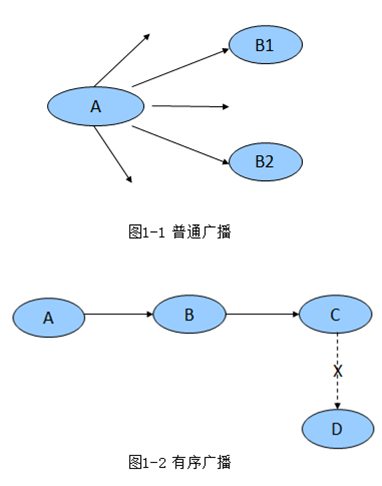
1.无序广播(普通广播):sendBroadcast()方式
2.有序广播:sendOrderedBroadcast()方式
3.粘性广播:sendStickyBroadcast()方式
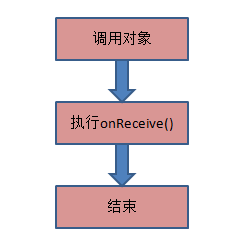
生命周期比较简单:
下面是无序广播与有序广播的区别:



下面是普通广播(无序广播,有序广播)与粘性广播的区别:
  sendBroadcast(intent); 发送之前必须注册广播,否则无法接收到广播信息。

  sendStickyBroadcast(intent);发送广播后,注册也可收到广播信息。
首先看下一个无序广播,有序广播的例子:
package com.example.demo_broadcast2;

import android.app.Activity;

import android.content.Intent;

import android.os.Bundle;

import android.view.View;

public class MainActivity extends Activity {

    @Override

    protected void onCreate(Bundle savedInstanceState) {

        super.onCreate(savedInstanceState);

        setContentView(R.layout.activity_main);

    }

    /**

     * 发送无序广播

     *

     * @param view

     */

    public void send1(View view) {

        Intent intent = new Intent();

        intent.setAction("com.itheima.broadcasttest.songwennuan");

        intent.putExtra("msg", "发1万块");

        intent.putExtra("isUnordered", true);

        // 无序广播,不可被拦截,不可终止

        sendBroadcast(intent);

    }

    public void send2(View view) {

        Intent intent = new Intent();

        intent.setAction("com.itheima.broadcasttest.songwennuan");

        // 有序广播,可被拦截,可终止,可以修改数据

        sendOrderedBroadcast(intent, null, null, null, 0,

                "给农民兄弟发10000块钱", null);

    }

}
send1,send2分别为点击事件触发时调用的函数分别为发送无序广播按钮,发送有序广播按钮。
activity_main.xml文件
<RelativeLayout xmlns:android="http://schemas.android.com/apk/res/android"

    xmlns:tools="http://schemas.android.com/tools"

    android:layout_width="match_parent"

    android:layout_height="match_parent"

    tools:context=".MainActivity" >

     <Button

        android:onClick="send1"

        android:layout_width="fill_parent"

        android:layout_height="wrap_content"

        android:text="发送无序广播" />

    <Button

        android:layout_width="fill_parent"

        android:layout_height="wrap_content"

        android:layout_alignParentLeft="true"

        android:layout_alignParentTop="true"

        android:layout_marginTop="51dp"

        android:onClick="send2"

        android:text="发送有序广播" />

</RelativeLayout>
下面依次是多个广播的实例(为了体现有序广播)
package com.example.demo_broadcast2;

import android.content.BroadcastReceiver;

import android.content.Context;

import android.content.Intent;

import android.util.Log;

public class Level1Receiver extends BroadcastReceiver {

    private static final String TAG = "Broadcasttest";

    @Override

    public void onReceive(Context context, Intent intent) {

        boolean isUnordered = intent.getBooleanExtra("isUnordered", false);

        if (isUnordered) {

            String message = intent.getStringExtra("msg");

            Log.i(TAG, "省级部门得到中央的消息:" + message);

        } else {

            String message = getResultData();

            Log.i(TAG, "省级部门得到中央的消息:" + message);

            abortBroadcast(); // 这里是终止了消息,可以关闭或者取消这里查看LogCat中打印的效果。

            setResultData("给农民兄弟发5000块钱"); // setResultData()方法,就是为了在有序广播中修改传到下一个广播中的值而存在的,且只能存储一个String.

        }

    }

}
package com.example.demo_broadcast2;

import android.content.BroadcastReceiver;

import android.content.Context;

import android.content.Intent;

import android.util.Log;

public class Level2Receiver extends BroadcastReceiver {

    private static final String TAG = "Broadcasttest";

    @Override

    public void onReceive(Context context, Intent intent) {

        boolean isUnordered = intent.getBooleanExtra("isUnordered", false);

        if (isUnordered) {

            String message = intent.getStringExtra("msg");

            Log.i(TAG, "市级部门得到省级的消息" + message);

        } else {

            String message = getResultData();

            Log.i(TAG, "市级部门得到省级的消息" + message);

            setResultData("给农民兄弟发2000块钱");

        }

    }

}
package com.example.demo_broadcast2;

import android.content.BroadcastReceiver;

import android.content.Context;

import android.content.Intent;

import android.util.Log;

public class Level3Receiver extends BroadcastReceiver {

    private static final String TAG = "Broadcasttest";

    @Override

    public void onReceive(Context context, Intent intent) {

        boolean isUnordered = intent.getBooleanExtra("isUnordered", false);

        if (isUnordered) {

            String message = intent.getStringExtra("msg");

            Log.i(TAG, "乡级部门得到市的消息:" + message);

        } else {

            String message = getResultData();

            Log.i(TAG, "乡级部门得到市的消息:" + message);

            setResultData("给农民兄弟发两大大米");

        }

    }

}
package com.example.demo_broadcast2;

import android.content.BroadcastReceiver;

import android.content.Context;

import android.content.Intent;

import android.util.Log;

public class FinalReceiver extends BroadcastReceiver {

    private static final String TAG = "Broadcasttest";

    @Override

    public void onReceive(Context context, Intent intent) {

        boolean isUnordered = intent.getBooleanExtra("isUnordered", false);

        if (isUnordered) {

            String message = intent.getStringExtra("msg");

            Log.i(TAG, "农民兄弟得到乡的消息:" + message);

        } else {

            String message = getResultData();

            Log.i(TAG, "农民兄弟得到乡的消息:" + message);

        }

    }

}
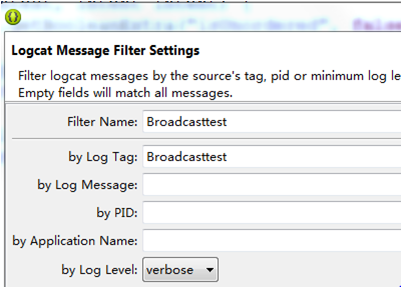
首先我么线设置一下logcat如下:
接下来我们看一下效果:
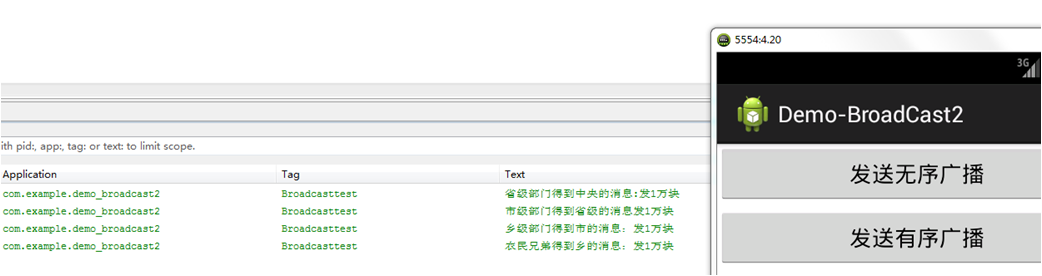
当我们点击“发送无序广播”的时候效果如下:
可见只要我们发送一个广播,注册此广播的都会搜到相同的信息。
当我们点击“发送有序广播”的时候效果如下:
我们在Level1Receiver 中调用了一下方法截断了消息传输到下一个广播接收者。
abortBroadcast(); // 这里是终止了消息

如果我们把下面函数注释掉。
//abortBroadcast();
可见效果每个接收者接收到的数据都不一样这是因为我们通过一下函数向下发送了消息:
setResultData("给农民兄弟发2000块钱");

可见这是有顺序的,顺序是由广播接收者定义时可以设置优先级。代码可参考androidManifast.xml
<?xml version="1.0" encoding="utf-8"?>

<manifest xmlns:android="http://schemas.android.com/apk/res/android"

    package="com.example.demo_broadcast2"

    android:versionCode="1"

    android:versionName="1.0" >

    <uses-sdk

        android:minSdkVersion="8"

        android:targetSdkVersion="17" />

    <application

        android:allowBackup="true"

        android:icon="@drawable/ic_launcher"

        android:label="@string/app_name"

        android:theme="@style/AppTheme" >

        <activity

            android:name="com.example.demo_broadcast2.MainActivity"

            android:label="@string/app_name" >

            <intent-filter>

                <action android:name="android.intent.action.MAIN" />

                <category android:name="android.intent.category.LAUNCHER" />

            </intent-filter>

        </activity>

         <receiver android:name=".Level1Receiver" >

            <intent-filter android:priority="1000" >

                <action android:name="com.itheima.broadcasttest.songwennuan" />

            </intent-filter>

        </receiver>

        <receiver android:name=".Level2Receiver" >

            <intent-filter android:priority="500" >

                <action android:name="com.itheima.broadcasttest.songwennuan" />

            </intent-filter>

        </receiver>

        <receiver android:name=".Level3Receiver" >

            <intent-filter android:priority="100" >

                <action android:name="com.itheima.broadcasttest.songwennuan" />

            </intent-filter>

        </receiver>

        <receiver android:name=".FinalReceiver" >

            <intent-filter android:priority="-100" >

                <action android:name="com.itheima.broadcasttest.songwennuan" />

            </intent-filter>

        </receiver>

    </application>

</manifest>
还有一点我们要注意的是如果通过下面方法中指定final接收者时:
sendOrderedBroadcast(intent, null, new finalReceiver(), null, 0,"给农民兄弟发10000块钱", null);
同时调用 abortBroadcast(); // 这里是终止了消息
此时的效果如下:

也就是说发送有序广播时可以指定一个final接收者来充当无序广播,即不管是中间截断了消息传递只要定义了final接收者那么久可以收到传递下来的消息。
接下来我么看一下粘性广播与普通广播有什么区别代码如下:
package com.example.demo_stickybroadcast;

import android.app.Activity;

import android.content.Context;

import android.content.Intent;

import android.os.Bundle;

import android.view.View;

import android.view.View.OnClickListener;

import android.widget.Button;

/*

 * sendBroadcast(intent); 发送之前必须注册广播,否则无法接收到广播信息。

 * sendStickyBroadcast(intent);发送广播后,注册也可收到广播信息。

*/

public class MainActivity extends Activity {

    Button btnSendi;

    Button btnSends;

    Button btnStart;

    Context mContext;

    /** Called when the activity is first created. */

    @Override

    public void onCreate(Bundle savedInstanceState) {

        super.onCreate(savedInstanceState);

        setContentView(R.layout.activity_main);

        btnSendi = (Button) findViewById(R.id.broadcast);

        btnSends = (Button) findViewById(R.id.stickybroadcast);

        btnStart = (Button) findViewById(R.id.next_activity);

        mContext = getApplicationContext();

        btnSendi.setOnClickListener(new OnClickListener() {

            @Override

            public void onClick(View v) {

                // TODO Auto-generated method stub

                Intent intent = new Intent();

                intent.setAction("com.android.my.action"); //指定意图Action

                mContext.sendBroadcast(intent); //普通广播发送

            }

        });

        btnStart.setOnClickListener(new OnClickListener() {

            @Override

            public void onClick(View v) {

                // TODO Auto-generated method stub

                Intent intent = new Intent(MainActivity.this,

                        ReceiverActivity.class);

                startActivity(intent); //跳转到ReceiverActivity

            }

        });

        btnSends.setOnClickListener(new OnClickListener() {

            @Override

            public void onClick(View v) {

                // TODO Auto-generated method stub

                Intent intent = new Intent();

                intent.setAction("com.android.my.action.sticky");//指定意图Action

                mContext.sendStickyBroadcast(intent);//sticky广播发送

            }

        });

    }

}
package com.example.demo_stickybroadcast;

import android.app.Activity;

import android.content.BroadcastReceiver;

import android.content.Context;

import android.content.Intent;

import android.content.IntentFilter;

import android.os.Bundle;

import android.widget.TextView;

public class ReceiverActivity extends Activity {

    private IntentFilter mIntentFilter;

    private TextView text;

    /** Called when the activity is first created. */

    @Override

    public void onCreate(Bundle savedInstanceState) {

        super.onCreate(savedInstanceState);

        setContentView(R.layout.activity_second);

        text = (TextView) findViewById(R.id.context);

        mIntentFilter = new IntentFilter(); //初始化intent过滤器

         //添加action

        mIntentFilter.addAction("com.android.my.action");

        mIntentFilter.addAction("com.android.my.action.sticky");

    }

    private BroadcastReceiver mReceiver = new BroadcastReceiver() {

        @Override

        public void onReceive(Context context, Intent intent) {

            final String action = intent.getAction();

            text.setText("action: " + action);

        }

    };

    @Override

    protected void onResume() {

        // TODO Auto-generated method stub

        super.onResume();

        registerReceiver(mReceiver, mIntentFilter); //註冊廣播

    }

    @Override

    protected void onPause() {

        // TODO Auto-generated method stub

        super.onPause();

        unregisterReceiver(mReceiver); //註銷廣播

    }

}
<?xml version="1.0" encoding="utf-8"?>

<manifest xmlns:android="http://schemas.android.com/apk/res/android"

    package="com.example.demo_stickybroadcast"

    android:versionCode="1"

    android:versionName="1.0" >

    <uses-sdk

        android:minSdkVersion="8"

        android:targetSdkVersion="17" />

    <uses-permission android:name="android.permission.BROADCAST_STICKY" />

    <application

        android:allowBackup="true"

        android:icon="@drawable/ic_launcher"

        android:label="@string/app_name"

        android:theme="@style/AppTheme" >

        <activity

            android:name="com.example.demo_stickybroadcast.MainActivity"

            android:label="@string/app_name" >

            <intent-filter>

                <action android:name="android.intent.action.MAIN" />

                <category android:name="android.intent.category.LAUNCHER" />

            </intent-filter>

        </activity>

        <activity android:name="com.example.demo_stickybroadcast.ReceiverActivity" >

        </activity>

    </application>

</manifest>
运行应用后可以操作一下步骤:
1.点击“sendbroadcast”
2.点击进入“StartAcitivity”
此时你会发现没有显示任何信息这说明,在ReceiverActivity中注册的广播没有收到任何信息。
这是因为普通广播发送以后即通过sendbroadcast() 或 sendOrderedbroadcast(),只有已经注册相应的广播的接受者可以接到信息,而后注册此广播的广播接收者是无法接受到的。
也就是说要接收普通广播发出的广播时,需发送广播之前先注册相应的广播。
而当你操作一下步骤时:
1.点击“sendStickybroadcast”
2.点击进入“StartAcitivity”
你会发现广播发送出去以后注册此广播的广播接收者是可以收到此消息的。
BroadCastRecieve的更多相关文章
随机推荐
- 基于阿里云服务器Linux系统部署JavaWeb项目
前段时间刚完成一个JavaWeb项目,想着怎么部署到服务器上,边学边做,花了点时间终于成功部署了,这里总结记录一下过程中所遇到的问题及解决方法.之所以选择阿里云,考虑到它是使用用户最多也是最广泛的云服 ...
- Qt_C++交换两个数
在编程过程中,交换两个数是我用常用的 ,这里做下简单的搬运 bool Widget::swap(int a, int b) { int temp =a; a= b; b = temp; } 这种方式其 ...
- APP功能性测试-4
弱网络测试 使用fiddler模拟低速环境 使用fiddler抓取手机上某个应用的包 手机连接fiddler fiddler 代理地址127.0.0.1默认端口8888 只抓http协议(https, ...
- C指针分析详解
局部变量和全局变量初始化区别: 局部变量,在未初始化情况下,初值为随机值.C规范对该初值并没有做规定,具体实现由编译器决定.如VC/VS等编译器,会将初始值值为0xCCCCCCCC, 而GCC等编译器 ...
- pandas DataFrame的修改方法
pandas DataFrame的增删查改总结系列文章: pandas DaFrame的创建方法 pandas DataFrame的查询方法 pandas DataFrame行或列的删除方法 pand ...
- 容器基础(五): 实现一个简单容器sdocker
在前面几部分的基础上, 我们更新一下代码,实现一个简单容器 sdocker. sdocker目录构成 linux: # tree . ├── Makefile ├── cpu-test.c # 由cp ...
- Linux下的命令行
一.文件传输(两种方式) 1. 使用CRT传输 1. 一定要修改编码为UTF-8类型 1. 按住alt + p 切换成传输文件的窗口,然后拖拽文件进来即可 2. 使用类似xftp这种软件传输 这种软件 ...
- DFS——hdu5682zxa and leaf
一.题目回顾 题目链接:zxa and leaf Sample Input 2 3 2 1 2 1 3 2 4 3 9 6 2 1 2 1 3 1 4 2 5 2 6 3 6 5 9 Sample ...
- 功能规格说明书Version2
此功能规格说明书是Week8 功能规格说明书的第二个版本, 版本1地址:http://www.cnblogs.com/Z-XML/p/3407687.html 此功能规格说明书是面向用户的,所以作者将 ...
- lintcode-93-平衡二叉树
93-平衡二叉树 给定一个二叉树,确定它是高度平衡的.对于这个问题,一棵高度平衡的二叉树的定义是:一棵二叉树中每个节点的两个子树的深度相差不会超过1. 您在真实的面试中是否遇到过这个题? Yes 样例 ...