
java Excel导入导出工具类
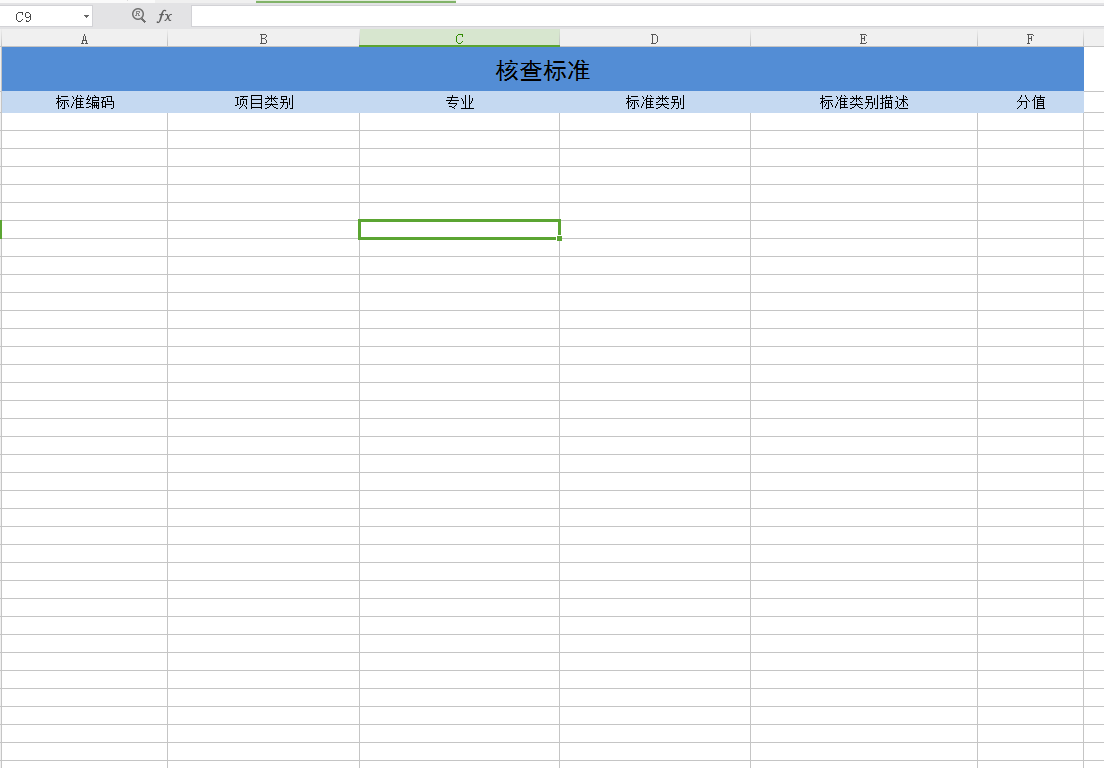
本文章,导入导出依赖提前定义好的模板
package com.jd.nb.wishplat.man.util; import java.io.File;
import java.io.FileInputStream;
import java.io.FileNotFoundException;
import java.io.IOException;
import java.util.Date; import javax.servlet.ServletOutputStream;
import javax.servlet.http.HttpServletResponse; import org.apache.commons.lang.ArrayUtils;
import org.apache.commons.lang.StringUtils;
import org.apache.poi.hssf.usermodel.HSSFCell;
import org.apache.poi.hssf.usermodel.HSSFDateUtil;
import org.apache.poi.hssf.usermodel.HSSFRow;
import org.apache.poi.hssf.usermodel.HSSFSheet;
import org.apache.poi.hssf.usermodel.HSSFWorkbook;
import org.apache.poi.poifs.filesystem.POIFSFileSystem;
import org.apache.poi.xssf.usermodel.XSSFCell;
import org.apache.poi.xssf.usermodel.XSSFRow;
import org.apache.poi.xssf.usermodel.XSSFSheet;
import org.apache.poi.xssf.usermodel.XSSFWorkbook;
import org.springframework.web.context.request.RequestContextHolder;
import org.springframework.web.context.request.ServletRequestAttributes;
import org.springframework.web.multipart.MultipartFile; import com.alibaba.fastjson.JSONArray;
import com.alibaba.fastjson.JSONObject;
/**
*
* @author zhenwei.shi
*
*/
public class ImpAndExpExcel { public static JSONArray doImpXlsx(MultipartFile file, String[] fields, String[] requiredFields, Integer docReadStartRowIndex) throws IOException {
XSSFWorkbook wb = new XSSFWorkbook(file.getInputStream()); JSONArray jsonArray = new JSONArray();
int startRowIndex = (null == docReadStartRowIndex?2:docReadStartRowIndex); XSSFSheet sheet = wb.getSheetAt(0); // 遍历所有行记录,sheet.getLastRowNum()获取的是最后一行的index
for (int startRow = startRowIndex; startRow <= sheet.getLastRowNum(); startRow++) {
// 遍历记录所有列
JSONObject jsonObj = new JSONObject();
boolean isErrorObj = false; for (int columnIndex = 0; columnIndex < fields.length; columnIndex++) {
XSSFCell nowCell = getXssfCell(sheet, startRow, columnIndex);
String cellValue = getXssfCellValue(nowCell);
if(isRequired(fields[columnIndex],requiredFields) && StringUtils.isEmpty(cellValue)){
isErrorObj = true;
break;
}
jsonObj.put(fields[columnIndex], cellValue);
} if(!isErrorObj){
jsonArray.add(jsonObj);
}
}
wb.close();
return jsonArray;
} /**
* 导入03版Excel .xls
* 依据上传文件返还JSON数组对象,JSON属性为heads
* @param file 导入的文件
* @param heads 定义对象的列名
* @param rowStartIndex 从第几行开始读取
* @return
* @throws IOException
*/
@SuppressWarnings("resource")
public static JSONArray doImpXls(MultipartFile file, String[] fields, Integer docReadStartRowIndex) throws IOException {
POIFSFileSystem fs = new POIFSFileSystem(file.getInputStream());
HSSFWorkbook wb = new HSSFWorkbook(fs); JSONArray jsonArray = new JSONArray();
int startRowIndex = (null == docReadStartRowIndex?2:docReadStartRowIndex); HSSFSheet sheet = wb.getSheetAt(0);//只导入sheet第一页 // 遍历所有行记录,sheet.getLastRowNum()获取的是最后一行的index
for (int startRow = startRowIndex; startRow <= sheet.getLastRowNum(); startRow++) {
// 遍历记录所有列
JSONObject jsonObj = new JSONObject();
boolean isBlankObj = true;
for (int columnIndex = 0; columnIndex < fields.length; columnIndex++) {
HSSFCell nowCell = getHssfCell(sheet, startRow, columnIndex, true);
String value = getHssfCellStringValue(nowCell);
if(null!=value){
value=value.trim();
}
jsonObj.put(fields[columnIndex], value);
if(!StringUtils.isEmpty(value) && !"0".equals(value)){
isBlankObj = false;
}
} if(!isBlankObj){
jsonArray.add(jsonObj);
}
}
return jsonArray;
} /**
* 导出03版Excel .xls
* @param object//导出对象,可以是数组可以是对象
* @param fields//要导出对象的所需要的属性,注意跟模板书序一直
* @param docTemplatePath 如 1:/D:/saw_workspace/property/property-manage-ui/target/classes//templates/supplier/设施设备管理导入模板.xls
* 2:/templates/supplier/供应商管理导入模板.xls
* docTemplatePath = this.getClass().getResource("/").getPath()+/templates/supplier/供应商管理导入模板.xls";
* @param docWriteStartRowIndex//从模板第几行开始写入
* @return
* @throws FileNotFoundException
* @throws IOException
*/
public static void doExpXls(Object object,String[] fields,String docTemplatePath,Integer docWriteStartRowIndex) throws IOException{
doExpXls(object, fields, docTemplatePath, docWriteStartRowIndex,null);
} /**
* 导出03版Excel .xls
* @param object//导出对象,可以是数组可以是对象
* @param fields//要导出对象的所需要的属性,注意跟模板书序一直
* @param docTemplatePath 如 1:/D:/saw_workspace/property/property-manage-ui/target/classes//templates/supplier/设施设备管理导入模板.xls
* 2:/templates/supplier/供应商管理导入模板.xls
* docTemplatePath = this.getClass().getResource("/").getPath()+/templates/supplier/供应商管理导入模板.xls";
* @param docWriteStartRowIndex//从模板第几行开始写入
* @param sheetRowsCount//sheet页数据最大行数
* @return
* @throws IOException
*/
@SuppressWarnings("resource")
public static void doExpXls(Object object,String[] fields,String docTemplatePath,Integer docWriteStartRowIndex,Integer sheetRowsCount) throws IOException{
docTemplatePath = docTemplatePath.replaceAll("\\\\", "/");
String projectPath = ImpAndExpExcel.class.getResource("/").getPath().replaceAll("\\\\", "/");
if(!docTemplatePath.contains(projectPath)){
docTemplatePath = projectPath+"/"+docTemplatePath;
}
FileInputStream inputStream = new FileInputStream(new File(docTemplatePath));; HSSFWorkbook workbook = new HSSFWorkbook(new POIFSFileSystem(inputStream)); JSONArray jsonArr = (JSONArray) JSONArray.toJSON(object);
int everyCount = null==sheetRowsCount?50000:sheetRowsCount;
int pageCount = (int)Math.ceil(jsonArr.size()/(everyCount*1.0));
//创建SHEET页
for(int i=0; i<pageCount; i++){
HSSFSheet sheet = null;
if(0==i){
sheet = workbook.getSheetAt(0);
}else{
sheet = workbook.cloneSheet(0);
} int index = workbook.getSheetIndex(sheet);
workbook.setSheetName(index, "第"+(i+1)+"页");
workbook.setSheetOrder(sheet.getSheetName(), i);
}
//sheet页赋值数据
for(int i=0; i<pageCount; i++){
int startIndex = i*everyCount;
int endIndex = startIndex+everyCount;
if(i==pageCount-1){
endIndex = jsonArr.size();
}
JSONArray subjsonArr = (JSONArray)JSONArray.toJSON(jsonArr.subList(startIndex, endIndex));
int startRowIndex = (null == docWriteStartRowIndex?2:docWriteStartRowIndex); HSSFSheet sheet = workbook.getSheetAt(i); for (int j = 0; j < subjsonArr.size(); j++,startRowIndex++) {
JSONObject jsonObj = subjsonArr.getJSONObject(j);
for (int colIndex = 0; colIndex < fields.length; colIndex++) {
HSSFCell tempCell = getHssfCell(sheet, startRowIndex, colIndex, true);
tempCell.setCellValue(jsonObj.getString(fields[colIndex]));
}
}
} ServletOutputStream out = null;
String excName = docTemplatePath.substring(docTemplatePath.lastIndexOf("/")+1);
try {
HttpServletResponse response = ((ServletRequestAttributes) RequestContextHolder.getRequestAttributes()).getResponse();
response.setCharacterEncoding("UTF-8");
response.setContentType("application/octet-stream; charset=UTF-8");
response.addHeader("Content-Disposition", "attachment; filename=\""+new String(excName.getBytes("GB2312"),"ISO8859-1")+"\";");//
out = response.getOutputStream();
workbook.write(out);
out.flush();
} catch (IOException e) {
e.printStackTrace();
} finally{
try {
out.close();
inputStream.close();
} catch (IOException e) {
// TODO Auto-generated catch block
e.printStackTrace();
}
}
} /**
* 获取导出03版Excel .xls的workbook
* @param object//导出对象,可以是数组可以是对象
* @param fields//要导出对象的所需要的属性,注意跟模板书序一直
* @param docTemplatePath 如 1:/D:/saw_workspace/property/property-manage-ui/target/classes//templates/supplier/设施设备管理导入模板.xls
* 2:/templates/supplier/供应商管理导入模板.xls
* docTemplatePath = this.getClass().getResource("/").getPath()+/templates/supplier/供应商管理导入模板.xls";
* @param docWriteStartRowIndex//从模板第几行开始写入
* @return
* @throws FileNotFoundException
* @throws IOException
*/
public static HSSFWorkbook getHSSFWorkbook(Object object,String[] fields,String docTemplatePath,Integer docWriteStartRowIndex) throws FileNotFoundException,IOException {
docTemplatePath = docTemplatePath.replaceAll("\\\\", "/");
String projectPath = ImpAndExpExcel.class.getResource("/").getPath().replaceAll("\\\\", "/");
if(!docTemplatePath.contains(projectPath)){
docTemplatePath = projectPath+"/"+docTemplatePath;
}
FileInputStream inputStream = new FileInputStream(new File(docTemplatePath));
HSSFWorkbook workbook = new HSSFWorkbook(new POIFSFileSystem(inputStream));
HSSFSheet sheet = workbook.getSheetAt(0); int startRowIndex = (null == docWriteStartRowIndex?2:docWriteStartRowIndex); JSONArray jsonArr = (JSONArray) JSONArray.toJSON(object);
for (int i = 0; i < jsonArr.size(); i++,startRowIndex++) {
JSONObject jsonObj = jsonArr.getJSONObject(i);
for (int colIndex = 0; colIndex < fields.length; colIndex++) {
HSSFCell tempCell = getHssfCell(sheet, startRowIndex, colIndex, true); tempCell.setCellValue(jsonObj.getString(fields[colIndex]));
}
} return workbook;
}
/**
* 此方法用于下载指定文件。
* @param response 用于防止下载乱码,设置输出流的相关信息
* @param filePath 如 1:/D:/saw_workspace/property/property-manage-ui/target/classes//templates/supplier/设施设备管理导入模板.xls
* 2:/templates/supplier/供应商管理导入模板.xls
* filePath = this.getClass().getResource("/").getPath()+/templates/supplier/供应商管理导入模板.xls";
* @return true 下载成功, false 下载失败
*/
public static void download(String filePath){
ServletOutputStream out = null;
FileInputStream inputStream = null;
filePath = filePath.replaceAll("\\\\", "/");
String projectPath = ImpAndExpExcel.class.getResource("/").getPath().replaceAll("\\\\", "/");
if(!filePath.contains(projectPath)){
filePath = projectPath+"/"+filePath;
}
String fileName = filePath.substring(filePath.lastIndexOf("/")+1, filePath.length());
try{
inputStream = new FileInputStream(new File(filePath));
HttpServletResponse response = ((ServletRequestAttributes) RequestContextHolder.getRequestAttributes()).getResponse();
response.setCharacterEncoding("UTF-8");
response.setContentType("application/octet-stream; charset=UTF-8");
response.addHeader("Content-Disposition", "attachment; filename=\""+new String(fileName.getBytes("GB2312"),"ISO8859-1")+"\";");// out = response.getOutputStream(); int b = 0;
byte[] buffer = new byte[512];
while ((b=inputStream.read(buffer)) != -1){
out.write(buffer,0,b);
}
out.flush();
} catch (IOException e) {
e.printStackTrace();
}finally{
try {
if(inputStream != null){
inputStream.close();
}
} catch (IOException e) {
e.printStackTrace();
} try {
if(out != null){
out.close();
}
} catch (IOException e) {
e.printStackTrace();
}
}
} // 获取xlsx单元格,不存在是否创建
public static XSSFCell getXssfCell(XSSFSheet sheet, int rowIndex, int colIndex,
boolean isCreate) {
if (isCreate) {
XSSFRow row = sheet.getRow(rowIndex);
if (row == null) {
row = sheet.createRow(rowIndex);
row.setHeightInPoints(24);// 设置行的高度(单元格的高度)
}
XSSFCell cell = row.getCell(colIndex);
if (cell == null) {
cell = row.createCell(colIndex);
}
return cell;
} else {
return getXssfCell(sheet, rowIndex, colIndex);
}
} // 获取xlsx单元格
public static XSSFCell getXssfCell(XSSFSheet sheet, int rowIndex, int colIndex) {
XSSFRow row = sheet.getRow(rowIndex);
if (row != null) {
XSSFCell cell = row.getCell(colIndex);
if (cell != null) {
return cell;
}
}
return null;
} // 获取xlsx单元格Cell里面的值
// 因为cell单元格有格式,所以针对不同的格式取值
public static String getXssfCellValue(XSSFCell cell) {
String cellValue = "";
if(null==cell) {
return cellValue;
}
switch (cell.getCellType()) {
case XSSFCell.CELL_TYPE_STRING:// 字符串类型
cellValue = cell.getStringCellValue();
if (cellValue.trim().equals("") || cellValue.trim().length() <= 0)
cellValue = "";
break;
case XSSFCell.CELL_TYPE_NUMERIC: // 数值类型
if (HSSFDateUtil.isCellDateFormatted(cell)) {
Date d = cell.getDateCellValue();
if (d != null) {
cellValue = DateTimeUtils.getDate(d);
} else {
cellValue = "";
}
} else {
cellValue = cell.getNumericCellValue() + "";
if(cellValue.contains(".")){
cellValue = cellValue.substring(0, cellValue.indexOf("."));
}
}
break;
case HSSFCell.CELL_TYPE_FORMULA: // 公式
try{
cell.setCellType(HSSFCell.CELL_TYPE_NUMERIC);
cellValue = String.valueOf(cell.getNumericCellValue());
}catch (Exception e) {
try{
cellValue = String.valueOf(cell.getStringCellValue());
}catch(Exception e2){
cellValue ="";
}
}
break;
case HSSFCell.CELL_TYPE_BLANK:
break;
case HSSFCell.CELL_TYPE_BOOLEAN:
cellValue = String.valueOf(cell.getBooleanCellValue());
break;
case HSSFCell.CELL_TYPE_ERROR:
break;
default:
break;
}
if(cellValue!=null) {
cellValue = cellValue.trim();
}
return cellValue;
} // 获取xls单元格,不存在是否创建
public static HSSFCell getHssfCell(HSSFSheet sheet, int rowIndex, int colIndex,
boolean isCreate) {
if (isCreate) {
HSSFRow row = sheet.getRow(rowIndex);
if (row == null) {
row = sheet.createRow(rowIndex);
row.setHeightInPoints(24);// 设置行的高度(单元格的高度)
}
HSSFCell cell = row.getCell(colIndex);
if (cell == null) {
cell = row.createCell(colIndex);
}
return cell;
} else {
return getHssfCell(sheet, rowIndex, colIndex);
}
} // 获取xls单元格
public static HSSFCell getHssfCell(HSSFSheet sheet, int rowIndex, int colIndex) {
HSSFRow row = sheet.getRow(rowIndex);
if (row != null) {
HSSFCell cell = row.getCell(colIndex);
if (cell != null) {
return cell;
}
}
return null;
} // 获取xls单元格Cell里面的值
// 因为cell单元格有格式,所以针对不同的格式取值
public static String getHssfCellStringValue(HSSFCell cell) {
String cellValue = "";
switch (cell.getCellType()) {
case HSSFCell.CELL_TYPE_STRING:// 字符串类型
cellValue = cell.getStringCellValue();
if (cellValue.trim().equals("") || cellValue.trim().length() <= 0)
cellValue = " ";
break;
case HSSFCell.CELL_TYPE_NUMERIC: // 数值类型
if (HSSFDateUtil.isCellDateFormatted(cell)) {
Date d = cell.getDateCellValue();
if (d != null) {
cellValue = DateTimeUtils.getDate(d);
} else {
cellValue = "";
}
} else {
cellValue = cell.getNumericCellValue() + "";
if(cellValue.contains(".")){
cellValue = cellValue.substring(0, cellValue.indexOf("."));
}
}
break;
case HSSFCell.CELL_TYPE_FORMULA: // 公式
try{
cell.setCellType(HSSFCell.CELL_TYPE_NUMERIC);
cellValue = String.valueOf(cell.getNumericCellValue());
}catch (Exception e) {
try{
cellValue = String.valueOf(cell.getStringCellValue());
}catch(Exception e2){
cellValue ="";
}
}
break;
case HSSFCell.CELL_TYPE_BLANK:
cellValue = " ";
break;
case HSSFCell.CELL_TYPE_BOOLEAN:
break;
case HSSFCell.CELL_TYPE_ERROR:
break;
default:
break;
}
return cellValue;
} public static boolean isRequired(String checkFiled, String[] requireds) {
if(StringUtils.isEmpty(checkFiled) || ArrayUtils.isEmpty(requireds)) {
return false;
}
for(String required : requireds) {
if(required.equals(checkFiled)) {
return true;
}
}
return false;
}
}
模板样子
java Excel导入导出工具类的更多相关文章
- Java基础学习总结(49)——Excel导入导出工具类
在项目的pom文件中引入 <dependency> <groupId>net.sourceforge.jexcelapi</groupId> <artifac ...
- 一个基于POI的通用excel导入导出工具类的简单实现及使用方法
前言: 最近PM来了一个需求,简单来说就是在录入数据时一条一条插入到系统显得非常麻烦,让我实现一个直接通过excel导入的方法一次性录入所有数据.网上关于excel导入导出的例子很多,但大多相互借鉴. ...
- java中excel导入\导出工具类
1.导入工具 package com.linrain.jcs.test; import jxl.Cell; import jxl.Sheet; import jxl.Workbook; import ...
- 【原创】POI操作Excel导入导出工具类ExcelUtil
关于本类线程安全性的解释: 多数工具方法不涉及共享变量问题,至于添加合并单元格方法addMergeArea,使用ThreadLocal变量存储合并数据,ThreadLocal内部借用Thread.Th ...
- java word导入导出工具类
package com.shareworx.yjwy.utils; import java.io.InputStream; import java.util.HashMap; import java. ...
- java简易excel导入导出工具(封装POI)
Octopus 如何导入excel 如何导出excel github项目地址 Octopus Octopus 是一个简单的java excel导入导出工具. 如何导入excel 下面是一个excel文 ...
- Octopus——excel导入导出工具
Octopus Octopus是一个简易的Excel导入导出工具.目前主要就两个功能: 导入:将excel中一行数据转换为指定的java对象,并通过指定的正则表达式检查合法性. 导出:按照给定的xml ...
- Excel导入导出工具(简单、好用且轻量级的海量Excel文件导入导出解决方案.)
Excel导入导出工具(简单.好用且轻量级的海量Excel文件导入导出解决方案.) 置顶 2019-09-07 16:47:10 $9420 阅读数 261更多 分类专栏: java 版权声明:本 ...
- Excel导入导出帮助类
/// <summary> /// Excel导入导出帮助类 /// 记得引入 NPOI /// 下载地址 http://npoi.codeplex.com/rele ...
随机推荐
- UVA 1640 The Counting Problem UVA1640 求[a,b]或者[b,a]区间内0~9在里面各个数的数位上出现的总次数。
/** 题目:UVA 1640 The Counting Problem UVA1640 链接:https://vjudge.net/problem/UVA-1640 题意:求[a,b]或者[b,a] ...
- SpringBoot对比传统开发以及自身的优缺点
SpringBoot是伴随着Spring4.0诞生的,继承了Spring的优点,一经推出,引起了巨大的反向:目前Spring Boot的版本为2.1.0,需要Java7及Spring Framewor ...
- [已解决]pycharm报错:AttributeError: module 'pip' has no attribute 'main'
> 更新pip后,pycharm更新模块报错,经过一番查找,现提供两种解决办法. 报错片段信息如下: AttributeError: module 'pip' has no attribute ...
- Matlab字符串分割
data = '1.21, 1.985, 1.955, 2.015, 1.885'; C = strsplit(data,', ') C = '1.21' '1.985' '1.955' '2.015 ...
- [浪风推荐]php的memcache应用入门教程
所需环境: php 5.3.3 apache 2.2.7 mysql 5.5.8 解压Memcached_1.2.5文档,cmd下执行memcached.exe -d -install 将php5.3 ...
- Eclipse 创建 Java 项目
打开新建 Java 项目向导 通过新建 Java 项目向导可以很容易的创建 Java 项目.打开向导的途径有: 通过点击 "File" 菜单然后选择 New > Java P ...
- python django -7 Git与项目
git的使用,主要包括: 本地仓库的命令 远程仓库的命令 项目需求.页面.模型类的设计,及页面的使用 Git简介 Git是目前世界上最先进的分布式版本控制系统 安装 sudo apt-get inst ...
- matlab中双站异面直线法定位目标
calc.m %% 参数信息初始化 [x1,y1,z1]=deal(); [x2,y2,z2]=deal(,,); m1=/; n1=/; p1=^(/)/; m2=; n2=-^(/)/; p2=^ ...
- day4笔记
今日讲解内容:1,int数字:运算.1 ,2,3... # 数字类型:int #范围.用于运算, + - * / // %.... bit_lenth :十进制数字用二进制表示的最小位数 a=10 p ...
- Laravel5.1 请求
这篇主要说说Request 每当用户访问我们的网站功能时都会用到它 我们可以使用Request中的一些数据来做出适当的相应. 1 常用的属性和方法 我们可以从Request中取到一些重要属性来做一些逻 ...