
Bypassing iPhone Code Signatures
【Bypassing iPhone Code Signatures】
Starting with the recent beta releases of the iPhoneOS, Apple has started requiring that all code on the device is signed. This is mostly to make it impossible for programs running through Apple's AppStore to download more software and run it (so no competition for AppStore).
iOS要求所有程序都必须签名。
In order to get around this (and thereby to install our own code onto the device) the iPhone Dev Team has patched the signature verification out of the kernel. However, another half of the codesign problem is that the binary contains a number of SHA1 verification hashes that are checked in numerous locations throughout the kernel. Patching this out is A) difficult (especially to track as Apple makes changes) and B) of marginal benefit as adding these hashes is easy. This means you do still have to at least pay lipservice to the code signature process. There are currently three viable options.
iPhone Dev Team已经把签名校验机制从内核中抽离出来。可是,对于SHA1的校验确无处不在,A)把所有这些校验机制抽离出来很困难(尤其是要跟得上苹果的变化),B)添加这些hashes很容易。
所以有以下3种方式可以用来帮助绕过这些SHA1校验:
1、Option #1: Self-Signing
使用苹果的签名工具codesign进行签名即可。
2、Option #2: Pseudo-Signing
codesign是macos平台上的工具,linux平台可以使用ldid。
3、Option #3: Disable Checks
关闭所有的校验。
【Entitlements】
Every executable also has an XML file (specifically an Objective-C Property List) that is signed into it that is its block of "entitlements". This area is read (I'm not certain by who, but I'd guess the kernel) to determine what seatbelt profile to apply to that process and what extra abilities it gets.
To dump or set the entitlements of a binary we can use ldid. Dumping uses -e and setting involves passing an argument to -S as you sign the file. You can also pass --entitlements to codesign.
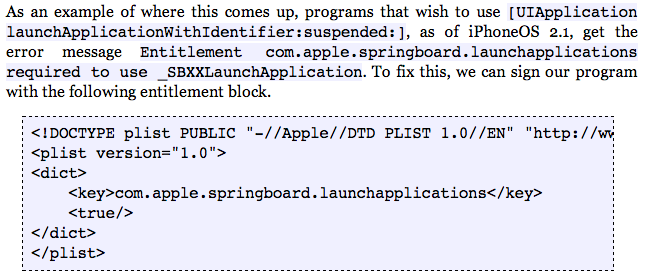
ldid -e选项用于从bin中导出entitlements权限,-S选项用于签名,给-S添加参数的是一个entitlements文件。也可通过给codesign --entitlements选项来设置权限。如下:

【Entitlement实战】
Bypassing iPhone Code Signatures的更多相关文章
- [转]Bypassing iPhone Code Signatures
Source Link: http://www.saurik.com/id/8 Due to popular demand, I am putting some of the content I ha ...
- Code Sign error: Provisioning profile XXXX can't be found
[iphone]Code Sign error: Provisioning profile XXXX can't be found 如果你更新了profile,再编译iphone项目,发现下面的错误, ...
- iPhone较为基础的代码片段
Iphone代码片段导航 1.给UITableViewController添加ToolBar. self.navigationController.toolbarHidden = NO; //默认是隐 ...
- ipa重签名
为什么要研究重签名问题?将程序打包成ipa包后,ipa包中会包含Provisioning Profile和_CodeSignature等文件,里面包含了对整个ipa的签名信息. 一旦改动ipa中的不论 ...
- An iOS zero-click radio proximity exploit odyssey
NOTE: This specific issue was fixed before the launch of Privacy-Preserving Contact Tracing in iOS 1 ...
- github上所有大于800 star OC框架
https://github.com/XCGit/awesome-objc-frameworks#awesome-objc-frameworks awesome-objc-frameworks ID ...
- IOS常用加密GTMBase64
GTMDefines.h // // GTMDefines.h // // Copyright 2008 Google Inc. // // Licensed under the Apache Lic ...
- 验证Xcode真伪的方法,来自苹果官网
验证Xcode真伪的方法,来自苹果官网 Xcode的验证你的版本 2015年9月22日 注意:中文为有道翻译,看下验证方法即可. 我们最近将应用程序从应用程序商店,还建有Xcode的假冒 ...
- iOS使用MD5 - 字符串加密至MD5&获取文件MD5
iOS 字符串加密至MD5 + (NSString *) md5:(NSString *)str { unsigned ]; CC_MD5( cStr, strlen(cStr), result ); ...
随机推荐
- div垂直水平居中的四种方法总结
5.利用弹性布局 与 margin: <style> .container{ height: 600px; width: 600px; border:1px solid black; di ...
- Unity3d command line arguments
Options Many of these relate to Unity3d command line arguments Batch Mode - should be left enabled u ...
- struts2逻辑视图类型汇总与解释(转)
在struts2框架中,当action处理完之后,就应该向用户返回结果信息,该任务被分为两部分:结果类型和结果本身. 结果类型提供了返回给用户信息类型的实现细节.结果类型通常在Struts2中就已预定 ...
- 【解题报告】[动态规划]-PID69 / 过河卒
原题地址:http://www.rqnoj.cn/problem/69 解题思路: 用DP[i][j]表示到达(i,j)点的路径数,则 DP[0][0]=1 DP[i][j]=DP[i-1][j]+D ...
- webservice WS-RS独立发布
一.基本介绍 Web Services是一个软件接口,它描述了一组可以在网络上通过标准化的 XML 消息传递访问的操作.它使用基于 XML 语言的协议来描述要执行的操作或者要与另一个 Web 服务交换 ...
- [BZOJ5133][CodePlus2017年12月]白金元首与独舞
bzoj luogu 题意 给你一个\(n*m\)的网格,每个位置上有一个箭头指向上或下或左或右.有些位置上还没有箭头,现在要求你在这些没有箭头的位置上填入箭头,使得从网格的任意一个位置开始,都可以沿 ...
- matlab数据流仿真和时间流仿真
simulink 使用的动态系统仿真,仿真需要求状态方程和输出方程,关键是求状态方程,而状态方程的求解有多种算法,可变步长和定步长,所以仿真时对求解器的选择和步长的设置就比较重要. 所谓基於数据流的仿 ...
- springboot 不同环境不同的配置
前言 我们在开发Spring Boot应用时,通常同一套程序会被应用和安装到几个不同的环境,比如:开发.测试.生产等.其中每个环境的数据库地址.服务器端口等等配置都会不同,如果在为不同环境打包时都要频 ...
- 利用 Excel 写 C51 的宏定义
利用 Excel 写 C51 的宏定义 填好占空比,自动生成宏. #define LIGHT_LEVEL_00 0xFF #define LIGHT_LEVEL_10 0xE5 #define LIG ...
- [转]Mac上的抓包工具Charles
$*********************************************************************************************$ 博主推荐 ...