
C#中的foreach和yield

1. foreach
C#编译器会把foreach语句转换为IEnumerable接口的方法和属性。
foreach (Person p in persons)

 {

     Console.WriteLine(p);

 }
foreach语句会解析为下面的代码段。
调用GetEnumerator()方法,获得数组的一个枚举
在while循环中,只要MoveNext()返回true,就一直循环下去
用Current属性访问数组中的元素
IEnumerator enumerator = persons. GetEnumerator();

 while (enumerator.MoveNext())

 {

    Person p = (Person) enumerator.Current;

    Console.WriteLine(p);

}
2. yield语句
yield语句的两种形式:
yield return <expression>;

yield break;
使用一个yield return语句返回集合的一个元素
包含yield语句的方法或属性是迭代器。迭代器必须满足以下要求
a. 返回类型必须是IEnumerable、IEnumerable<T>、IEnumerator或 IEnumerator<T>。
b. 它不能有任何ref或out参数
yield return语句不能位于try-catch快。yield return语句可以位于try-finally的try块
try

              {

                  // ERROR: Cannot yield a value in the boday of a try block with a catch clause

                 yield return "test";

              }

             catch

             { }

              try

             {

                 //

                 yield return "test again";

             }

             finally

             { }

             try

             { }

             finally

             {

                 // ERROR: Cannot yield in the body of a finally clause

                yield return "";

             }
yield break语句可以位于try块或catch块,但是不能位于finally块
下面的例子是用yield return语句实现一个简单集合的代码,以及用foreach语句迭代集合
using System;

using System.Collections.Generic;

namespace ConsoleApplication6

{

    class Program

    {

        static void Main(string[] args)

        {

            HelloCollection helloCollection = new HelloCollection();

            foreach (string s in helloCollection)

            {

                Console.WriteLine(s);

                Console.ReadLine();

            }

        }

    }

    public class HelloCollection

    {

        public IEnumerator<String> GetEnumerator()

        {

            // yield return语句返回集合的一个元素,并移动到下一个元素上;yield break可以停止迭代

            yield return "Hello";

            yield return "World";

        }

    }

}
使用yield return语句实现以不同方式迭代集合的类:
using System;

using System.Collections.Generic;

namespace ConsoleApplication8

{

    class Program

    {

        static void Main(string[] args)

        {

            MusicTitles titles = new MusicTitles();

            foreach (string title in titles)

            {

                Console.WriteLine(title);

            }

            Console.WriteLine();

            foreach (string title in titles.Reverse())

            {

                Console.WriteLine(title);

            }

            Console.WriteLine();

            foreach (string title in titles.Subset(, ))

            {

                Console.WriteLine(title);

                Console.ReadLine();

            }

        }

    }

    public class MusicTitles

    {

        string[] names = { "a", "b", "c", "d" };

        public IEnumerator<string> GetEnumerator()

        {

            for (int i = ; i < ; i++)

            {

                yield return names[i];

            }

        }

        public IEnumerable<string> Reverse()

        {

            for (int i = ; i >= ; i--)

            {

                yield return names[i];

            }

        }

        public IEnumerable<string> Subset(int index, int length)

        {

            for (int i = index; i < index + length; i++)

            {

                yield return names[i];

            }

        }

    }

}
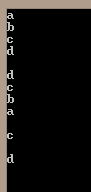

以上动图由“图斗罗”提供
C#中的foreach和yield的更多相关文章
- .net 反射访问私有变量和私有方法 如何创建C# Closure ? C# 批量生成随机密码,必须包含数字和字母,并用加密算法加密 C#中的foreach和yield 数组为什么可以使用linq查询 C#中的 具名参数 和 可选参数 显示实现接口 异步CTP(Async CTP)为什么那样工作? C#多线程基础,适合新手了解 C#加快Bitmap的访问速度 C#实现对图片文件的压
以下为本次实践代码: using System; using System.Collections.Generic; using System.ComponentModel; using System ...
- C#中的IEnumerator、foreach、yield
[C#中的IEnumerator.foreach.yield] 1.IEnumerator,是一个接口,它的方法如下: 2.foreach语句,在编译后会变成IEnumerator的调用: 3.yie ...
- C#编程(三十五)----------foreach和yield
枚举 在foreach语句中使用枚举,可以迭代集合中的元素,且无需知道集合中的元素个数. 数组或集合实现带GetEumerator()方法的IEumerable接口.GetEumerator()方法返 ...
- “mybatis 中使用foreach 传
为了帮助网友解决“mybatis 中使用foreach 传”相关的问题,中国学网通过互联网对“mybatis 中使用foreach 传”相关的解决方案进行了整理,用户详细问题包括:mybatismap ...
- 【吐血推荐】简要分析unity3d中剪不断理还乱的yield
在学习unity3d的时候很容易看到下面这个例子: void Start () { StartCoroutine(Destroy()); } IEnumerator Destroy(){ yield ...
- C#中的foreach语句与枚举器接口(IEnumerator)及其泛型 相关问题
这个问题从<C#高级编程>数组一节中的foreach语句(6.7.2)发现的. 因为示例代码与之前的章节连贯,所以我修改了一下,把自定义类型改为了int int[] bs = { 2, 3 ...
- Unity 3D中不得不说的yield协程与消息传递
1. 协程 在Unity 3D中,我们刚开始写脚本的时候肯定会遇到类似下面这样的需求:每隔3秒发射一个烟花.怪物死亡后20秒再复活之类的.刚开始的时候喜欢把这些东西都塞到Update里面去,就像下面这 ...
- 基于mysql对mybatis中的foreach进行深入研究
鉴于上一篇博文一次修改mysql字段类型引发的技术探究提到的,要对foreach里面的collection相关的内容做一些介绍,今天就围绕foreach,做一些数据插入和查询相关的研究. 首先介绍一下 ...
- 在弹框中获取foreach中遍历的id值,并传递给地址栏(方法2)
1.php有时候我们需要再弹框中获取foreach中遍历的数据(例如id),在弹框中点击按钮并传递给地址栏跳转.那么应该怎么做呢.第二种方法. 2. 可以在弹框中给出一个input hidden 点击 ...
随机推荐
- [转载]几个开源Javascript图形库
[转载]原文地址:http://www.cnblogs.com/webgis8/articles/1516639.html 因为Google Map项目的需要,最近一直在寻求相关的Javascript ...
- Crypto++库安装、测试
项目中需要使用到C++加密解密库,选择了Crypto++这个开源库,于是先安装并写一个小例子试试 一.下载 网址:http://www.cryptopp.com/#download 二.打开项目 下载 ...
- error C2998: 'XXXXXXX' : cannot be a template definition 的可能原因。
从错误信息的字面意思可以看出来是 XXXXX 不能作为模板定义. 但是为什么不能,并没有说明,最后我翻阅各种资料,各种尝试后,发现往往可能是由于找不到模板函数的某个参数的定义而导致的. templat ...
- poj 2942 Knights of the Round Table(无向图的双连通分量+二分图判定)
#include<cstdio> #include<cstring> #include<cmath> #include<cstdlib> #includ ...
- ToString(string format)输出格式简述
ToString说明 ToString 是 .NET Framework 中主要的格式化方法.它将对象转换为其字符串表现形式,使它适合于显示.(有关对 .NET Framework 中的格式设置支持的 ...
- HUAWEI HiAI常见FAQ小贴士
8月7日,HUAWEI HiAI系统架构师在CSDN平台为广大开发者进行了以“APP进阶实战:最快10分钟接入HUAWEI HiAI”主题的直播,迎来600多名开发者在线上观看. 直播中,讲师详细 ...
- Problem H. The Fence 通过取余判重,求得某个区间的某些个数为某个数的倍数。
/** 题目:Problem H. The Fence 链接:https://vjudge.net/problem/Gym-101090H 题意:给定一个字符串,只有0或者1: 问:假如两个不同的1之 ...
- strrev 字符串反转函数
strrev (PHP 3, PHP 4, PHP 5) strrev -- Reverse a string Description string strrev ( string string ) ...
- Oracle----Oracle 11g XE release2安装与指导
今天上午我安装了Oracle 11g企业版,发现太占内存了,考虑到MS SQL有express版本,所以寻思着尝试尝试Oracle 11g的express版本,就是EX版本.下面是具体的安装步骤. 1 ...
- 第一百九十八节,jQuery EasyUI,ProgressBar(进度条)组件
jQuery EasyUI,ProgressBar(进度条)组件 学习要点: 1.加载方式 2.属性列表 3.事件列表 4.方法列表 本节课重点了解 EasyUI 中 ProgressBar(进度条) ...