
solr6.6 高级搜索Facet
1、介绍
facet分面查询是solr中以导航为目的的查询,在用户查询的结果上根据分类增加了count信息,然后用户根据count信息做进一步实现渐进式精确搜索。
什么字段适合用facet呢?
facet中适宜的字段一般代表某个实体的公共属性,比如品牌、型号、价格区间、作者、厂商、书籍出版商等。
Facet 字段的要求有什么要求呢?
Facet 的字段必须被索引 . 一般来说该字段无需分词 , 无需存储 。
无需分词是因为该字段的值代表了一个整体概念 , 如电脑的品牌 ” 联想 ” 代表了一个整体概念 , 如果拆成 ” 联 ”,” 想 ” 两个字都不具有实际意义 . 另外该字段的值无需进行大小写转换等处理 , 保持其原貌即可 。
无需存储是因为一般而言用户所关心的并不是该字段的具体值 , 而是作为对查询结果进行分组的一种手段 , 用户一般会沿着这个分组进一步深入搜索 。
对于文本(text)字段, 如果包含分词等处理,处理后的term可能不是你想要的。如果你想要solr对文本字段既分析(搜索),又做分面处理,使用copyField对字段创建两个版本:一个Text和一个String。
比如 CPU 类型 ”Intel 酷睿 2 双核 P7570”,拆分成 ”Intel”,” 酷睿 ”,”P7570” 这样一些关键字并分别索引 , 可能提供更好的搜索体验 . 但是如果将 CPU 作为 Facet 字段 , 最好不进行分词 . 这样就造成了矛盾 ,
解决方法为 ,将 CPU 字段设置为不分词不存储 , 然后建立另外一个字段为它的 COPY, 对这个 COPY 的字段进行分词和存储 。
在managed-schema文件中:

2、建立内核,索引数据
建立内核: solr create -c mycore
导入数据,将solr-6.6.0\example\exampledocs文件夹下的文件导入: java -jar -Dc=mycore -Dauto post.jar ..\example\exampledocs\*

3、分面查询测试
3.1、Field-value Faceting
主要参数:
facet.field :指定字段
facet=true 该参数设置为true,分面查询才能起作用
facet.field: 标识一个字段被视为一个方面,可以设置多个字段
facet.mincount:在分面值返回之前设置必须出现的最小文档数,默认情况下,当前搜索中没有匹配的结果的词项会包含在分面结果中。
因此通常将facet.mincount至少设置为1, 默认值0
facet.missing: 如果设置为true, 会返回匹配查询但没有facet的所有结果的计数。默认为false.
facet.contains: 限制分面term为包含指定子串(substring)
facet.prefix :限制分面term为指定前缀。
facet.contains.ignoreCase:使用facet.contains和facet.prefix时,忽略子串大小写,默认是是false,不忽略大小写,true:忽略大小写
facet.limit:此参数指定应该为方面字段返回的约束计数的最大数量(基本上是返回的字段的构面数)。 负值意味着Solr将返回无限数量的约束计数。默认值是100。
facet.sort: count 按计数排序,最高的在前。index 按字符顺序。默认是按照count 按计数排序
例如查询:
http://localhost:8983/solr/mycore/select?q=*:*&fl=id,name,price&facet=true&facet.field=cat
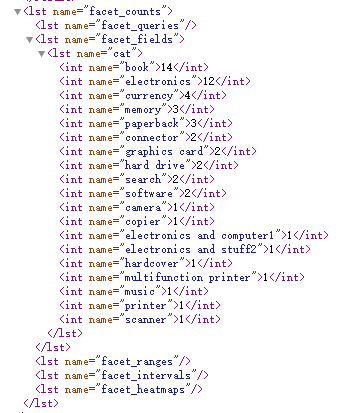
http://localhost:8983/solr/mycore/select?q=price:[0 TO 10]&fl=id,name,price,author&facet=true&facet.field=cat
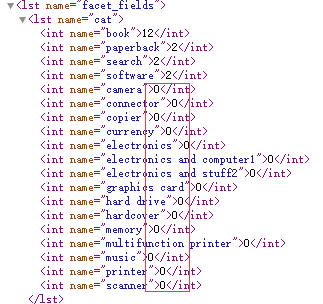
facet.mincount=2
http://localhost:8983/solr/mycore/select?q=price:[0 TO 10]&fl=id,name,price,author&facet=true&facet.field=cat&facet.mincount=2
结果:

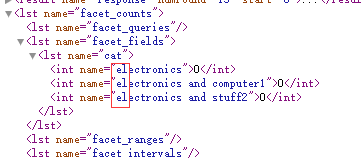
facet.contains =el
http://localhost:8983/solr/mycore/select?q=price:[0 TO 10]&fl=id,name,price,author&facet=true&facet.field=cat&facet.contains =el
结果:
facet.contains =the&facet.contains.ignoreCase=true
http://localhost:8983/solr/mycore/select?q=price:[0 TO 10]&fl=id,name,price,author&facet=true&facet.field=name&facet.contains =the
结果:

http://localhost:8983/solr/mycore/select?q=price:[0 TO 10]&fl=id,name,price,author&facet=true&facet.field=name&facet.contains =the&facet.contains.ignoreCase=true
结果:
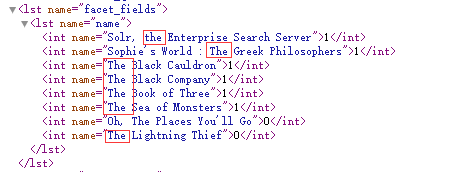
facet.prefix =The
http://localhost:8983/solr/mycore/select?q=price:[0 TO 10]&fl=id,name,price,author&facet=true&facet.field=name&facet.prefix =The
结果:
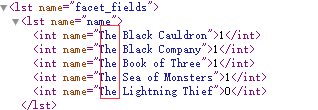
facet.limit =2 只返回两条
http://localhost:8983/solr/mycore/select?q=price:[0 TO 10]&fl=id,name,price,author&facet=true&facet.field=name&facet.limit =2
结果:

facet.sort =count
http://localhost:8983/solr/mycore/select?q=price:[0 TO 10]&fl=id,name,price,author&facet=true&facet.field=cat&facet.sort =count
的结果和
http://localhost:8983/solr/mycore/select?q=price:[0 TO 10]&fl=id,name,price,author&facet=true&facet.field=cat
一样
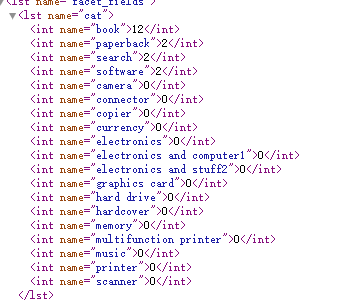
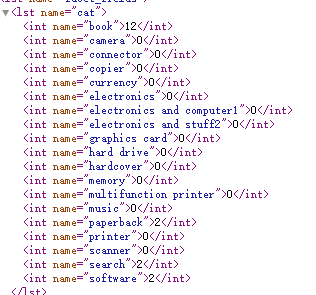
facet.sort =index
http://localhost:8983/solr/mycore/select?q=price:[0 TO 10]&fl=id,name,price,author&facet=true&facet.field=cat&facet.sort =index
按字符顺序
http://localhost:8983/solr/mycore/select?q=*:*&fl=id,name,price&facet=true&facet.field=cat&facet.field=genre_s

3.2、key 操作符
可以用 key 操作符为 Facet 字段取一个别名 :
&facet.field={!key=猫}cat
http://localhost:8983/solr/mycore/select?q=*:*&fl=id,name,price&facet=true&facet.field={!key=猫}cat
查询结果:

3.3、tag 操作符和 ex 操作符
当查询使用 filter query 的时候 , 如果 filter query 的字段正好是 Facet 字段 , 那么查询结果往往被限制在某一个值内
&fq=cat:currency
&facet=true
&facet.field=cat
http://localhost:8983/solr/mycore/select?q=*:*&fl=id,name,price&facet=true&facet.field=cat&fq=cat:currency
返回结果:
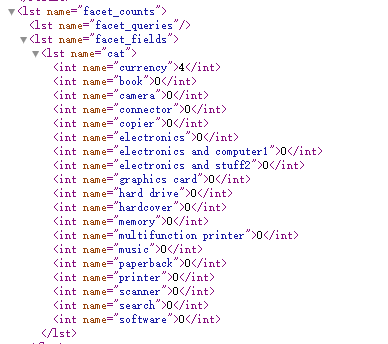
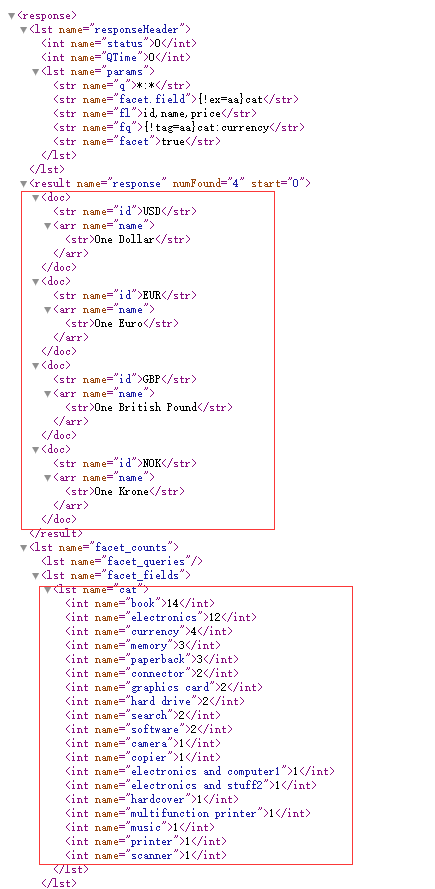
可以看到 , cat值 为 currency的产品共有 4件 , 其它的数目都是0, 这是因为在 filter 里已经限制了 cat:currency. 这样 , 查询结果中 , 除了 cat = currency 的这一项之外 , 其它项目没有实际的意义 .
有些时候 , 用户希望把结果限制在某一范围内 , 又希望查看该范围外的概况 . 比如上述情况 ,既要把查询结果限制在 cat = currency的数据 , 又想查看一下其它类型的有多少产品 . 这个时候需要用到 tag 和 ex 操作符 .
tag 就是把一个 filter 标记起来 ,ex(exclude) 是在 Facet 的时候把标记过的 filter 排除在外 .
例 :
&fq={!tag=aa}cat:currency
&facet=true
&facet.field={!ex=aa}cat
http://localhost:8983/solr/mycore/select?q=*:*&fl=id,name,price&facet=true&facet.field={!ex=aa}cat&fq={!tag=aa}cat:currency
返回结果:
3.4、Range Faceting
主要参数:
facet.range: 指定字段
facet.range.start:区间开始值
facet.range.end: 区间结束值
facet.range.gap:步长
- facet.range
facet.range=price&facet.range=age
facet.range=lastModified_dt
- facet.range.start
f.price.facet.range.start=0.0&f.age.facet.range.start=10
f.lastModified_dt.facet.range.start=NOW/DAY-30DAYS
- facet.range.end
f.price.facet.range.end=1000.0&f.age.facet.range.start=99
f.lastModified_dt.facet.range.end=NOW/DAY+30DAYS
- facet.range.gap
f.price.facet.range.gap=100&f.age.facet.range.gap=10
f.lastModified_dt.facet.range.gap=+1DAY
http://localhost:8983/solr/mycore/select?q=*:*&fl=id,name,price&facet=true&facet.range=price&f.price.facet.range.start=0.0&f.price.facet.range.end=1000.0&f.price.facet.range.gap=100

3.5、Interval Faceting
主要参数:
facet.interval:指定字段
facet.interval.set: 间隔设置
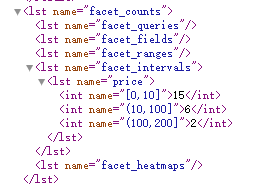
http://localhost:8983/solr/mycore/select?q=*:*&fl=id,name,price&facet=true&facet.interval=price&f.price.facet.interval.set=[0,10]&f.price.facet.interval.set=(10,100]&f.price.facet.interval.set=(100,200]
java实现代码:
import org.apache.solr.client.solrj.SolrClient;

import org.apache.solr.client.solrj.SolrQuery;

import org.apache.solr.client.solrj.SolrServerException;

import org.apache.solr.client.solrj.impl.HttpSolrClient;

import org.apache.solr.client.solrj.response.FacetField;

import org.apache.solr.client.solrj.response.IntervalFacet;

import org.apache.solr.client.solrj.response.QueryResponse;

import org.apache.solr.client.solrj.response.RangeFacet;

import java.io.IOException;

import java.util.List;

/**

 * @Author:sks

 * @Description:

 * @Date:Created in 15:38 2017/12/21

 * @Modified by:

 **/

public class facet {

    private static SolrClient solr;

    /**

     * @Author:sks

     * @Description:初始化solr客户端

     * @Date:

     */

    public static void Init(String urlString){

        solr = new HttpSolrClient.Builder(urlString).build();

    }

    /**

    * @Author:sks

    * @Description:分面查询,别名

    * @Date:

    */

    private static void FacetSearch() throws SolrServerException,IOException {

        SolrQuery params = new SolrQuery();

        params.setQuery("*:*");

        params.setFields("id,name,price");

        params.setParam("omitHeader",true);//隐藏responseHeader

        params.setFacet(true);//设置facet=on

//        params.addFacetField(new String[] { "{!key=猫}cat","genre_s" }); //给cat别名

        params.addFacetField(new String[] { "cat","genre_s" });

        QueryResponse queryResponse = solr.query(params);

        List<FacetField> list = queryResponse.getFacetFields();

        for (FacetField ff:list){

            System.out.println(ff.getName());

            List<FacetField.Count> lc = ff.getValues();

            for (FacetField.Count fc:lc){

                System.out.println("    "+fc.getName()+": "+fc.getCount());

            }

        }

    }

    /**

    * @Author:sks

    * @Description:分面查询,运用fq,tag,ex操作符

    * @Date:

    */

    private static void FacetFqTagExSearch() throws SolrServerException,IOException {

        SolrQuery params = new SolrQuery();

        params.setQuery("*:*");

        params.setFacet(true);

        params.setFields("id,name,price");

        params.setParam("omitHeader",true);//隐藏responseHeader

        params.setParam("fq","{!tag=aa}cat:currency");

        params.addFacetField(new String[] { "{!ex=aa}cat" });

        QueryResponse queryResponse = solr.query(params);

        List<FacetField> list = queryResponse.getFacetFields();

        for (FacetField ff:list){

            System.out.println(ff.getName());

            List<FacetField.Count> lc = ff.getValues();

            for (FacetField.Count fc:lc){

                System.out.println("    "+fc.getName()+": "+fc.getCount());

            }

        }

    }

    /**

    * @Author:sks

    * @Description:范围分面查询

    * @Date:

    */

    private static void FacetRangeSearch() throws SolrServerException,IOException {

        SolrQuery params = new SolrQuery();

        params.setQuery("*:*");

        params.setFields("id,name,price");

        params.setParam("omitHeader",true);//隐藏responseHeader

        params.setFacet(true);//设置facet=on

//        params.addFacetField(new String[] { "cat","genre_s" });//设置需要facet的字段

        String field = "price";

        double start = 0;

        double end = 1000;

        double gap = 100;

        params.addNumericRangeFacet(field,start,end,gap);

        QueryResponse queryResponse = solr.query(params);

        List<RangeFacet> list = queryResponse.getFacetRanges();

        for (RangeFacet ff:list){

            System.out.println(ff.getName());

            List<RangeFacet.Count> rclist = ff.getCounts();

            for(RangeFacet.Count rc: rclist){

                System.out.println("    " + rc.getValue() + ": " + rc.getCount());

            }

        }

    }

    /**

    * @Author:sks

    * @Description:区间分面查询

    * @Date:

    */

    private static void FacetIntervalSearch() throws SolrServerException,IOException {

        SolrQuery params = new SolrQuery();

        params.setQuery("*:*");

        params.setFields("id,name,price");

        params.setParam("omitHeader",true);//隐藏responseHeader

        params.setFacet(true);

        String field = "price";

        String[] intervals = new String[] { "[0,10]","(10,100]" ,"(100,200]"};

        params.addIntervalFacets(field,intervals);

        QueryResponse queryResponse = solr.query(params);

        List<IntervalFacet> list = queryResponse.getIntervalFacets();

        for (IntervalFacet ff:list){

            System.out.println(ff.getField());

            List<IntervalFacet.Count> rclist = ff.getIntervals();

            for(IntervalFacet.Count ic: rclist){

                System.out.println("    " + ic.getKey() + ": " + ic.getCount());

            }

        }

    }

    public static void main(String []args) throws SolrServerException, IOException {

        String urlString = "http://localhost:8983/solr/mycore";

        Init(urlString);

//        FacetSearch();

        FacetFqTagExSearch();

//        FacetRangeSearch();

//        FacetIntervalSearch();

    }

}
参考资料:https://lucene.apache.org/solr/guide/6_6/faceting.html
solr6.6 高级搜索Facet的更多相关文章
- Google高级搜索语法
Google高级搜索语法 Google搜索果真是一个强悍的不得了的搜索引擎,今天转了一些 google的高级搜索语法 希望能帮助到大家. 一.allinanchor: anchor是一处说明性的文 ...
- 如何使用GOOGLE高级搜索技巧
如何使用GOOGLE高级搜索技巧 一,GOOGLE简介 Google(www.google.com)是一个搜索引擎,由两个斯坦福大学博士生Larry Page与Sergey Brin于1998年9月发 ...
- google、baidu高级搜索技巧
1.baidu(可以去高级搜索查看更多信息) intitle搜索范围限定在网页标题:intitle:和后面的关键词之间不要有空格----intitle:中国 site搜索范围限定在特定站点中:“sit ...
- SEO-搜索引擎高级搜索指令
搜索引擎高级搜索指令 1.双引号 把搜索词放在双引号中,代表完全匹配搜索,也就是说搜索结果返回的页面包含双引号中出现的所有的词,连顺序也必须完全匹配.bd和Google 都支持这个指令.例如搜索: & ...
- Google高级搜索技巧十则
前言:多数人在使用Google搜索的过程是非常低效和无谓的,如果你只是输入几个关键词,然后按搜索按钮,你将是那些无法得到Google全部信息的用户,在这篇文章中,Google搜索专家迈克尔.米勒将向您 ...
- python3百度设置高级搜索例子
#=======================================#作者:邓沛友#2018.12.16=============================coding:utf-8f ...
- 通过wui登陆 sap 页面对数据进行高级 搜索
1: 登陆QGL系统. 在 T-CODE搜索框输入wui 会跳到搜索的web页面,进行搜索. 或者浏览器输入: https://ldciqgl.wdf.sap.corp:44300/sap(bD1lb ...
- 谷歌商店高级搜索 Google play advanced search
这个问题一直搜索了很久都没有答案,后来在StackOverflow上提问,很久也没人回答. 详见我的SO:https://stackoverflow.com/questions/52939493/ho ...
- 65. XPages自定义控件(三)高级搜索之三
RecordView控件的两个文件的完整代码在本文末尾给出.虽说完整,仅靠这两个文件,RecordView控件还不能正常工作,因为在这两个文件里还引用了其他自定义控件,调用了作为managed bea ...
随机推荐
- 原生sql和django的事务控制
def test(request): with connections['default'].cursor() as c: try: with transaction.atomic(using='de ...
- Django-models,继承AbstractUser类
1.UserInfo类继承了Django模型自带的User类,需要导入AbstractUser 2.然后在settings.py中配置
- 【MT8382/8121】使用绝对路径编译模块会导致recourse_overlay无法应用的问题
之前为了方便mm模块编译,写了个脚本,实现了在任意模块其子目录下执行脚本即可编译的功能. 其实原理就是一层一层目录地往上寻找Android.mk文件,找到存放Android.mk目录后,就把该目录当作 ...
- [转载]Go的50度灰:Golang新开发者要注意的陷阱和常见错误
初级 开大括号不能放在单独的一行 未使用的变量 未使用的Imports 简式的变量声明仅可以在函数内部使用 使用简式声明重复声明变量 偶然的变量隐藏Accidental Variable Shadow ...
- 解决vim没有颜色的办法
首先打开vim,输入命令 scriptnames看看vim加载了哪些脚本. :scriptnames 输出入下 : /home/users/xxx/.vimrc : /home/users/xxx/t ...
- Selenium2+python自动化46-js解决click失效问题【转载】
前言 有时候元素明明已经找到了,运行也没报错,点击后页面没任何反应.这种问题遇到了,是比较头疼的,因为没任何报错,只是click事件失效了. 本篇用2种方法解决这种诡异的点击事件失效问题 一.遇到的问 ...
- AC日记——codeforces Ancient Berland Circus 1c
1C - Ancient Berland Circus 思路: 求出三角形外接圆: 然后找出三角形三条边在小数意义下的最大公约数; 然后n=pi*2/fgcd; 求出面积即可: 代码: #includ ...
- 吊销openvpn证书
#cd /tools/openvpn-2.0.9/easy-rsa/2.0/ #source vars 低版本的openssl需要注销以下几个配置 vim openssl.cnf #[ pkcs11_ ...
- (二)openvpn客户端配置
1)下载和安装openvpn客户端 下载连接:https://build.openvpn.net/downloads/releases/ 注意:这里下载连接使用国内的网已被强,我通过FQ下载 链接:h ...
- STL模板整理 map
map容器: 继上一篇 ,Map是STL的一个关联容器,它提供一对一(其中第一个可以称为关键字,每个关键字只能在map中出现一次,第二个可能称为该关键字的值)的数据处理能力,由于这个特性,它完成有可能 ...