
idea中如何配置git以及在idea中初始化git
idea中如何配置git以及在idea中初始化git呢:
参考此博文:
http://blog.csdn.net/qq_28867949/article/details/73012300
*为了这个问题折腾了半天...在这里记录下,方便大参考,欢迎评论提出宝贵意见,谢谢!**
问题说明:


解决方法一:
◆打开IDEA,按照路径 Fie--》Settings --》 Tools --》Terminal 找到后设置右边的Shell path(自己安装的Git路径下相对位置),如下图所示


不完美之处:当我们点击idea中的Terminal终端时,会自动弹出Windows安装的bash窗口,如下图所示:

解决方法二:
◆更改路径即可
git\bin\bash.exe
或 Git\bin\sh.exe
然后重新启动idea即可

********************88注意:每次更改完成后需要重新启动IDEA******************
=============================记录End=============================
git在idea中使用:
(1)创建README.md文件
fengli@DESKTOP-FEQ1N4I MINGW32 /f/workspace/imallproject (master)
$ touch README.md
(2)创建.gitignore文件(用于忽略上传的文件)
#提交到码云上面忽略的东西配置

*.class

#package file

*.war

*.ear

*.orig

target/

.settings/

.project

.classpath

.idea/

/idea/

*.ipr

*.iml

*.iws

*.log

*.cache

*.diff

*.patch

*.tmp

.DS_Store

Thumbs.db
fengli@DESKTOP-FEQ1N4I MINGW32 /f/workspace/imallproject (master)
$ touch .gitignore
(3)初始化git
fengli@DESKTOP-FEQ1N4I MINGW32 /f/workspace/imallproject (master)
$ git init
Initialized empty Git repository in F:/workspace/imallproject/.git/
fengli@DESKTOP-FEQ1N4I MINGW32 /f/workspace/imallproject (master)
查看git状态:现在是在master上(一般分支开发主干合并)
$ git status
On branch master
(4)commit提示错误,先git add一下
Initial commit
Untracked files:
(use "git add <file>..." to include in what will be committed)
.gitignore
README.md
pom.xml
src/
nothing added to commit but untracked files present (use "git add" to track)
fengli@DESKTOP-FEQ1N4I MINGW32 /f/workspace/imallproject (master)
$ git add .
fengli@DESKTOP-FEQ1N4I MINGW32 /f/workspace/imallproject (master)
$ git status
On branch master
Initial commit
Changes to be committed:
(use "git rm --cached <file>..." to unstage)
new file: .gitignore
new file: README.md
new file: pom.xml
new file: src/main/webapp/WEB-INF/web.xml
new file: src/main/webapp/index.jsp
fengli@DESKTOP-FEQ1N4I MINGW32 /f/workspace/imallproject (master)
$ git commit -am 'first commit '
[master (root-commit) 5ef0663] first commit
5 files changed, 65 insertions(+)
create mode 100644 .gitignore
create mode 100644 README.md
create mode 100644 pom.xml
create mode 100644 src/main/webapp/WEB-INF/web.xml
create mode 100644 src/main/webapp/index.jsp
git连接到码云仓库:
fengli@DESKTOP-FEQ1N4I MINGW32 /f/workspace/imallproject (master)
$ git remote add origin git@git.oschina.net:marrymayun/imalllearning.git
fengli@DESKTOP-FEQ1N4I MINGW32 /f/workspace/imallproject (master)
$ git branch
* master
(5)推送
fengli@DESKTOP-FEQ1N4I MINGW32 /f/workspace/imallproject (master)
$ git push -u origin master
The authenticity of host 'git.oschina.net (120.55.226.24)' can't be established.
ECDSA key fingerprint is SHA256:FQGC9Kn/eye1W8icdBgrQp+KkGYoFgbVr17bmjey0Wc.
Are you sure you want to continue connecting (yes/no)? no
Host key verification failed.
fatal: Could not read from remote repository.
Please make sure you have the correct access rights
and the repository exists.
fengli@DESKTOP-FEQ1N4I MINGW32 /f/workspace/imallproject (master)
$ git pull
The authenticity of host 'git.oschina.net (120.55.226.24)' can't be established.
ECDSA key fingerprint is SHA256:FQGC9Kn/eye1W8icdBgrQp+KkGYoFgbVr17bmjey0Wc.
Are you sure you want to continue connecting (yes/no)? yes
Warning: Permanently added 'git.oschina.net,120.55.226.24' (ECDSA) to the list of known hosts.
warning: no common commits
remote: Counting objects: 4, done.
remote: Compressing objects: 100% (3/3), done.
remote: Total 4 (delta 0), reused 0 (delta 0)
Unpacking objects: 100% (4/4), done.
From git.oschina.net:marrymayun/imalllearning
* [new branch] master -> origin/master
There is no tracking information for the current branch.
Please specify which branch you want to merge with.
See git-pull(1) for details.
git pull <remote> <branch>
If you wish to set tracking information for this branch you can do so with:
git branch --set-upstream-to=origin/<branch> master
fengli@DESKTOP-FEQ1N4I MINGW32 /f/workspace/imallproject (master)
$ git push -u -f origin master
Counting objects: 11, done.
Delta compression using up to 4 threads.
Compressing objects: 100% (7/7), done.
Writing objects: 100% (11/11), 1.29 KiB | 0 bytes/s, done.
Total 11 (delta 0), reused 0 (delta 0)
To git@git.oschina.net:marrymayun/imalllearning.git
+ a5a27d2...5ef0663 master -> master (forced update)
Branch master set up to track remote branch master from origin.
fengli@DESKTOP-FEQ1N4I MINGW32 /f/workspace/imallproject (master)
$ git branch
* master
fengli@DESKTOP-FEQ1N4I MINGW32 /f/workspace/imallproject (master)
$ git branch -r
origin/master
在master下创建分支v1.0
fengli@DESKTOP-FEQ1N4I MINGW32 /f/workspace/imallproject (master)
$ git checkout -b v1.0 origin/master
Branch v1.0 set up to track remote branch master from origin.
Switched to a new branch 'v1.0'
fengli@DESKTOP-FEQ1N4I MINGW32 /f/workspace/imallproject (v1.0)
$ git branch
master
* v1.0
推送到分支,我们在分支开发,主干合并
fengli@DESKTOP-FEQ1N4I MINGW32 /f/workspace/imallproject (v1.0)
$ git push origin HEAD -u
Total 0 (delta 0), reused 0 (delta 0)
To git@git.oschina.net:marrymayun/imalllearning.git
* [new branch] HEAD -> v1.0
Branch v1.0 set up to track remote branch v1.0 from origin.
fengli@DESKTOP-FEQ1N4I MINGW32 /f/workspace/imallproject (v1.0)
$
完成:
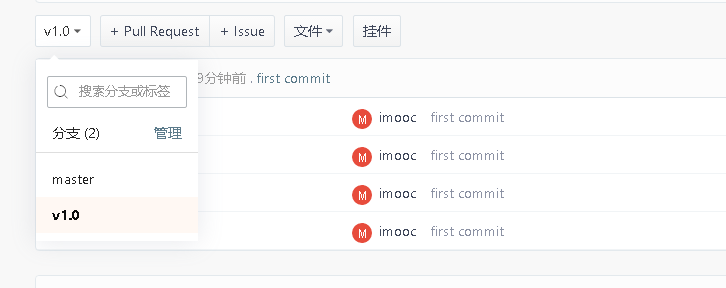
至此在idea中初始化git完成。
idea中如何配置git以及在idea中初始化git的更多相关文章
- J2EE进阶(五)Spring在web.xml中的配置
J2EE进阶(五)Spring在web.xml中的配置 前言 在实际项目中spring的配置文件applicationcontext.xml是通过spring提供的加载机制自动加载到容器中.在web ...
- 3、带你一步一步学习ASP.NET Core中的配置之Configuration
如果你是刚接触ASP.NET Core的学习的话,你会注意到:在ASP.NET Core项目中,看不到.NET Fraemwork时代中的web.config文件和app.config文件了.那么你肯 ...
- Bear 實驗室: 什麼是Git flow ? 如何在SourceTree使用Git flow管理開發!
http://www.takobear.tw/12/post/2014/02/bear-git-flow-sourcetreegit-flow.html Bear 實驗室: 什麼是Git ...
- [转]git在eclipse中的配置
一_安装EGIT插件 http://download.eclipse.org/egit/updates/ 或者使用Eclipse Marketplace,搜索EGit 二_使用EGIT前的配置 配置个 ...
- 【转】git在eclipse中的配置
原文网址:http://www.cnblogs.com/zhxiaomiao/archive/2013/05/16/3081148.html 一_安装EGIT插件 http://download.ec ...
- git在eclipse中的配置 转载
git在eclipse中的配置 转载 一_安装EGIT插件 http://download.eclipse.org/egit/updates/ 或者使用Eclipse Marketplace,搜索EG ...
- 使用Homebrew安装Git与Github在idea中的配置
系统环境:macOS 10.13.4 一.Homebrew的安装 linux系统有个让人蛋疼的通病,软件包依赖,好在当前主流的两大发行版本都自带了解决方案,Red hat有yum,Ubuntu有apt ...
- Git在eclipse中的配置
1:git在eclipse中的配置 windows - >preferences->team->git->configuration 点击add Entry key值:输入 u ...
- Git在Xcode中的配置与使用常见问题总结
书接上回提出的Git在Xcode中的配置与使用常见问题4个问题 问题1,如何在Xcode中创建代码库,并添加和提交代码到代码库? 问题2,如何在Xcode中提交推送给远程服务器代码库? 问题3,如何在 ...
随机推荐
- codeblocks编译出错问题的解答!(编译c++ 或者c程序)
典型错误:https://blog.csdn.net/jingmiaa/article/details/52054204 MinGW下载并配置gcc/g++编译环境:https://blog.csdn ...
- AVL重平衡细节——插入
话说这个系列鸽了好久,之前在准备语言考试,就没管博客了,现在暑假咱们继续上路! 每当我们进行一次插入之后,整棵AVL树的平衡性就有可能发生改变,为了控制整棵树的高度,我们需要通过一系列变换(重平衡)来 ...
- python2.7入门---变量类型&案例
这篇文章呢,主要是用来记录python中的变量类型学习内容的.接下来就来看一下变量类型,那么什么是变量呢.变量存储在内存中的值.这就意味着在创建变量时会在内存中开辟一个空间.基于变量的数据类型,解 ...
- python2.7练习小例子(二十二)
22):题目:有一分数序列:2/1,3/2,5/3,8/5,13/8,21/13...求出这个数列的前20项之和. 程序分析:请抓住分子与分母的变化规律. #!/usr/bin/pyt ...
- python基础之进程间通信、进程池、协程
进程间通信 进程彼此之间互相隔离,要实现进程间通信(IPC),multiprocessing模块支持两种形式:队列和管道,这两种方式都是使用消息传递的. 进程队列queue 不同于线程queue,进程 ...
- Xshell启动时显示丢失MSVCP110.dll解决方法
成功安装xshell之后,在运行时却弹出“无法启动此程序,因为计算机中丢失MSVCP110.dll.尝试重新安装该程序以解决此问题”,很多人按照提示重装了还是出现同样的问题,本集教程将具体讲解如何处理 ...
- app:showAsAction 和android:showAsAction
app:showAsAction 它有三个可选项1.always:总是显示在界面上2.never:不显示在界面上,只让出现在右边的三个点中3.ifRoom:如果有位置才显示,不然就出现在右边的三个点中 ...
- Java线程和多线程(九)——死锁
Java中的死锁指的就是一种多于两个线程永远阻塞的特殊状况.Java中的死锁状态至少需要多于两个线程以及资源的时候才会产生.这里,我写了一个产生死锁的程序,并且讲下如何分析死锁. 首先来看一下产生死锁 ...
- ResolutionException: Cannot find candidate artifact for com.google.android.gms:play-services-ads-lite:[10.2.4]
I had the same issue and I think it's solved now. Open AdMobDependencies.cs file, located inside of ...
- SVN 使用时的小错误
在使用SVN的时候总是出现一些小问题,今天又出现了一个,诶,分享一下吧! Error:(个人文件夹名http://www.qdjhu.com/anli_xq/f_wancheng.php) is ...