
idea中如何配置git以及在idea中初始化git
idea中如何配置git以及在idea中初始化git呢:
参考此博文:
http://blog.csdn.net/qq_28867949/article/details/73012300
*为了这个问题折腾了半天...在这里记录下,方便大参考,欢迎评论提出宝贵意见,谢谢!**
问题说明:


解决方法一:
◆打开IDEA,按照路径 Fie--》Settings --》 Tools --》Terminal 找到后设置右边的Shell path(自己安装的Git路径下相对位置),如下图所示


不完美之处:当我们点击idea中的Terminal终端时,会自动弹出Windows安装的bash窗口,如下图所示:

解决方法二:
◆更改路径即可
git\bin\bash.exe
或 Git\bin\sh.exe
然后重新启动idea即可

********************88注意:每次更改完成后需要重新启动IDEA******************
=============================记录End=============================
git在idea中使用:
(1)创建README.md文件
fengli@DESKTOP-FEQ1N4I MINGW32 /f/workspace/imallproject (master)
$ touch README.md
(2)创建.gitignore文件(用于忽略上传的文件)
#提交到码云上面忽略的东西配置

*.class

#package file

*.war

*.ear

*.orig

target/

.settings/

.project

.classpath

.idea/

/idea/

*.ipr

*.iml

*.iws

*.log

*.cache

*.diff

*.patch

*.tmp

.DS_Store

Thumbs.db
fengli@DESKTOP-FEQ1N4I MINGW32 /f/workspace/imallproject (master)
$ touch .gitignore
(3)初始化git
fengli@DESKTOP-FEQ1N4I MINGW32 /f/workspace/imallproject (master)
$ git init
Initialized empty Git repository in F:/workspace/imallproject/.git/
fengli@DESKTOP-FEQ1N4I MINGW32 /f/workspace/imallproject (master)
查看git状态:现在是在master上(一般分支开发主干合并)
$ git status
On branch master
(4)commit提示错误,先git add一下
Initial commit
Untracked files:
(use "git add <file>..." to include in what will be committed)
.gitignore
README.md
pom.xml
src/
nothing added to commit but untracked files present (use "git add" to track)
fengli@DESKTOP-FEQ1N4I MINGW32 /f/workspace/imallproject (master)
$ git add .
fengli@DESKTOP-FEQ1N4I MINGW32 /f/workspace/imallproject (master)
$ git status
On branch master
Initial commit
Changes to be committed:
(use "git rm --cached <file>..." to unstage)
new file: .gitignore
new file: README.md
new file: pom.xml
new file: src/main/webapp/WEB-INF/web.xml
new file: src/main/webapp/index.jsp
fengli@DESKTOP-FEQ1N4I MINGW32 /f/workspace/imallproject (master)
$ git commit -am 'first commit '
[master (root-commit) 5ef0663] first commit
5 files changed, 65 insertions(+)
create mode 100644 .gitignore
create mode 100644 README.md
create mode 100644 pom.xml
create mode 100644 src/main/webapp/WEB-INF/web.xml
create mode 100644 src/main/webapp/index.jsp
git连接到码云仓库:
fengli@DESKTOP-FEQ1N4I MINGW32 /f/workspace/imallproject (master)
$ git remote add origin git@git.oschina.net:marrymayun/imalllearning.git
fengli@DESKTOP-FEQ1N4I MINGW32 /f/workspace/imallproject (master)
$ git branch
* master
(5)推送
fengli@DESKTOP-FEQ1N4I MINGW32 /f/workspace/imallproject (master)
$ git push -u origin master
The authenticity of host 'git.oschina.net (120.55.226.24)' can't be established.
ECDSA key fingerprint is SHA256:FQGC9Kn/eye1W8icdBgrQp+KkGYoFgbVr17bmjey0Wc.
Are you sure you want to continue connecting (yes/no)? no
Host key verification failed.
fatal: Could not read from remote repository.
Please make sure you have the correct access rights
and the repository exists.
fengli@DESKTOP-FEQ1N4I MINGW32 /f/workspace/imallproject (master)
$ git pull
The authenticity of host 'git.oschina.net (120.55.226.24)' can't be established.
ECDSA key fingerprint is SHA256:FQGC9Kn/eye1W8icdBgrQp+KkGYoFgbVr17bmjey0Wc.
Are you sure you want to continue connecting (yes/no)? yes
Warning: Permanently added 'git.oschina.net,120.55.226.24' (ECDSA) to the list of known hosts.
warning: no common commits
remote: Counting objects: 4, done.
remote: Compressing objects: 100% (3/3), done.
remote: Total 4 (delta 0), reused 0 (delta 0)
Unpacking objects: 100% (4/4), done.
From git.oschina.net:marrymayun/imalllearning
* [new branch] master -> origin/master
There is no tracking information for the current branch.
Please specify which branch you want to merge with.
See git-pull(1) for details.
git pull <remote> <branch>
If you wish to set tracking information for this branch you can do so with:
git branch --set-upstream-to=origin/<branch> master
fengli@DESKTOP-FEQ1N4I MINGW32 /f/workspace/imallproject (master)
$ git push -u -f origin master
Counting objects: 11, done.
Delta compression using up to 4 threads.
Compressing objects: 100% (7/7), done.
Writing objects: 100% (11/11), 1.29 KiB | 0 bytes/s, done.
Total 11 (delta 0), reused 0 (delta 0)
To git@git.oschina.net:marrymayun/imalllearning.git
+ a5a27d2...5ef0663 master -> master (forced update)
Branch master set up to track remote branch master from origin.
fengli@DESKTOP-FEQ1N4I MINGW32 /f/workspace/imallproject (master)
$ git branch
* master
fengli@DESKTOP-FEQ1N4I MINGW32 /f/workspace/imallproject (master)
$ git branch -r
origin/master
在master下创建分支v1.0
fengli@DESKTOP-FEQ1N4I MINGW32 /f/workspace/imallproject (master)
$ git checkout -b v1.0 origin/master
Branch v1.0 set up to track remote branch master from origin.
Switched to a new branch 'v1.0'
fengli@DESKTOP-FEQ1N4I MINGW32 /f/workspace/imallproject (v1.0)
$ git branch
master
* v1.0
推送到分支,我们在分支开发,主干合并
fengli@DESKTOP-FEQ1N4I MINGW32 /f/workspace/imallproject (v1.0)
$ git push origin HEAD -u
Total 0 (delta 0), reused 0 (delta 0)
To git@git.oschina.net:marrymayun/imalllearning.git
* [new branch] HEAD -> v1.0
Branch v1.0 set up to track remote branch v1.0 from origin.
fengli@DESKTOP-FEQ1N4I MINGW32 /f/workspace/imallproject (v1.0)
$
完成:
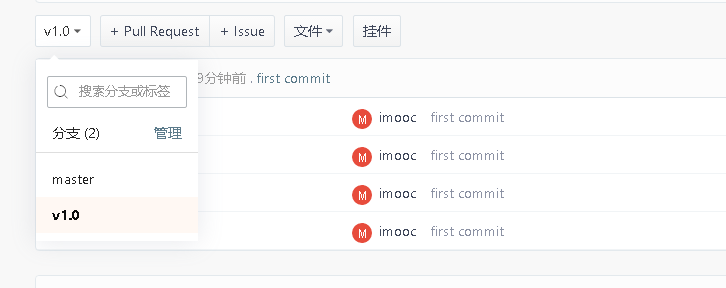
至此在idea中初始化git完成。
idea中如何配置git以及在idea中初始化git的更多相关文章
- J2EE进阶(五)Spring在web.xml中的配置
J2EE进阶(五)Spring在web.xml中的配置 前言 在实际项目中spring的配置文件applicationcontext.xml是通过spring提供的加载机制自动加载到容器中.在web ...
- 3、带你一步一步学习ASP.NET Core中的配置之Configuration
如果你是刚接触ASP.NET Core的学习的话,你会注意到:在ASP.NET Core项目中,看不到.NET Fraemwork时代中的web.config文件和app.config文件了.那么你肯 ...
- Bear 實驗室: 什麼是Git flow ? 如何在SourceTree使用Git flow管理開發!
http://www.takobear.tw/12/post/2014/02/bear-git-flow-sourcetreegit-flow.html Bear 實驗室: 什麼是Git ...
- [转]git在eclipse中的配置
一_安装EGIT插件 http://download.eclipse.org/egit/updates/ 或者使用Eclipse Marketplace,搜索EGit 二_使用EGIT前的配置 配置个 ...
- 【转】git在eclipse中的配置
原文网址:http://www.cnblogs.com/zhxiaomiao/archive/2013/05/16/3081148.html 一_安装EGIT插件 http://download.ec ...
- git在eclipse中的配置 转载
git在eclipse中的配置 转载 一_安装EGIT插件 http://download.eclipse.org/egit/updates/ 或者使用Eclipse Marketplace,搜索EG ...
- 使用Homebrew安装Git与Github在idea中的配置
系统环境:macOS 10.13.4 一.Homebrew的安装 linux系统有个让人蛋疼的通病,软件包依赖,好在当前主流的两大发行版本都自带了解决方案,Red hat有yum,Ubuntu有apt ...
- Git在eclipse中的配置
1:git在eclipse中的配置 windows - >preferences->team->git->configuration 点击add Entry key值:输入 u ...
- Git在Xcode中的配置与使用常见问题总结
书接上回提出的Git在Xcode中的配置与使用常见问题4个问题 问题1,如何在Xcode中创建代码库,并添加和提交代码到代码库? 问题2,如何在Xcode中提交推送给远程服务器代码库? 问题3,如何在 ...
随机推荐
- node获取头信息数据
req.fresh req.stale var version = 100; app.get('/test',function(req,res){ res.set('etag',version); i ...
- 简单整理React的Context API
之前做项目时经常会遇到某个组件需要传递方法或者数据到其内部的某个子组件,中间跨越了甚至三四层组件,必须层层传递,一不小心哪层组件忘记传递下去了就不行.然而我们的项目其实并没有那么复杂,所以也没有使用r ...
- [网站日志]今天早上遭遇的CPU 100%情况
今天早上9:06左右,Windows性能监视器监测到主站的Web服务器出现了CPU 100%的情况,伴随着Requests/Sec的上升,详见下图. 上图中红色线条表示的是%Processor Tim ...
- 第三十三篇 Python中关于OOP(面向对象)的常用术语
面向对象的优点 从编程进化论可知,面向对象是一种更高等级的结构化编程方式,它的好处主要有两点: 1. 通过封装明确了内外,你做为类的缔造者,你就是女娲,女娲造物的逻辑别人无需知道,女娲想让你知道,你才 ...
- 【Selenium-Python】Selenium-Firefox 环境配置 win64
Python 已安装完毕 Selenium 安装: Windows > cmd pip install selenium 注:未加selenium版本号时默认安装最新版本. 查询当前Seleni ...
- 剑指offer-合并两个排序链表16
题目描述 输入两个单调递增的链表,输出两个链表合成后的链表,当然我们需要合成后的链表满足单调不减规则. class Solution: # 返回合并后列表 def Merge(self, pHead1 ...
- 小旭讲解 LeetCode 53. Maximum Subarray 动态规划 分治策略
原题 Given an integer array nums, find the contiguous subarray (containing at least one number) which ...
- 图解Transformer
图解Transformer 前言 Attention这种机制最开始应用于机器翻译的任务中,并且取得了巨大的成就,因而在最近的深度学习模型中受到了大量的关注.在在这个基础上,我们提出一种完全基于Atte ...
- 启动 SQL Server 管理 Studio 在 SQL Server 2008R2 中的错误消息:"无法读取此系统上以前注册的服务器的列表" 解决方法
问题: 服务器被人直接停掉,重启后,发现sqlserver2008r2 启动管理器报错: "无法读取此系统上以前注册的服务器的列表" 如图: 点击继续,进入后: 解决方法: 点击上 ...
- Julia 学习笔记(一):数组
个人向,只会记录一些需要注意的点. 前言 学习 Julia 已经有一段时间了,但是进步缓慢.这一方面是最近代码写得少,一方面是 Julia 学习资料少.中文资料更少,但也有我没做笔记的缘故导致学习效率 ...