
关于POI 中单元格背景色设置(转)
关于POI 中单元格背景色设置(转)
csdn 中找到了用Apache POI 实现单元格背景色的小例子
我用了JDK6 + POI 3.17 ,调试中报错
最终将
CellStyle.SOLID_FOREGROUND 替换为
FillPatternType.SOLID_FOREGROUND,代码运行成功

/**
 *
 */
package com.totest.poiDemo;

import java.io.FileOutputStream;
import java.io.IOException;

import org.apache.poi.ss.usermodel.Cell;
import org.apache.poi.ss.usermodel.CellStyle;
import org.apache.poi.ss.usermodel.FillPatternType;
import org.apache.poi.ss.usermodel.IndexedColors;
import org.apache.poi.ss.usermodel.Row;
import org.apache.poi.ss.usermodel.Sheet;
import org.apache.poi.ss.usermodel.Workbook;
import org.apache.poi.xssf.usermodel.XSSFWorkbook;

public class POIFillAndColorExample {
    public static void main(String[] args) throws IOException {
        // Create a workbook object
        Workbook workbook = new XSSFWorkbook();
        // Create sheet
        Sheet sheet = workbook.createSheet();

        // Create a row and put some cells in it.
        Row row = sheet.createRow((short) 1);

        // Aqua background
        CellStyle style = workbook.createCellStyle();
        style.setFillForegroundColor(IndexedColors.AQUA.getIndex());
        style.setFillPattern(FillPatternType.SOLID_FOREGROUND);

        style.setFillPattern(FillPatternType.SOLID_FOREGROUND);
        Cell cell = row.createCell((short) 1);
        cell.setCellValue("X1");
        cell.setCellStyle(style);

        // Orange "foreground", foreground being the fill foreground not the
        // font color.
        style = workbook.createCellStyle();
        style.setFillForegroundColor(IndexedColors.AUTOMATIC.getIndex());
        style.setFillPattern(FillPatternType.SOLID_FOREGROUND);
        cell = row.createCell((short) 2);
        cell.setCellValue("X2");
        cell.setCellStyle(style);

        style = workbook.createCellStyle();
        style.setFillForegroundColor(IndexedColors.BLUE.getIndex());
        style.setFillPattern(FillPatternType.SOLID_FOREGROUND);
        cell = row.createCell((short) 3);
        cell.setCellValue("X3");
        cell.setCellStyle(style);

        style = workbook.createCellStyle();
        style.setFillForegroundColor(IndexedColors.BLUE_GREY.getIndex());
        style.setFillPattern(FillPatternType.SOLID_FOREGROUND);
        cell = row.createCell((short) 4);
        cell.setCellValue("X4");
        cell.setCellStyle(style);

        style = workbook.createCellStyle();
        style.setFillForegroundColor(IndexedColors.BRIGHT_GREEN.getIndex());
        style.setFillPattern(FillPatternType.SOLID_FOREGROUND);
        cell = row.createCell((short) 5);
        cell.setCellValue("X5");
        cell.setCellStyle(style);

        // Create a row and put some cells in it.
        Row row2 = sheet.createRow((short) 2);

        style = workbook.createCellStyle();
        style.setFillForegroundColor(IndexedColors.BROWN.getIndex());
        style.setFillPattern(FillPatternType.SOLID_FOREGROUND);
        cell = row2.createCell((short) 1);
        cell.setCellValue("X6");
        cell.setCellStyle(style);

        style = workbook.createCellStyle();
        style.setFillForegroundColor(IndexedColors.CORAL.getIndex());
        style.setFillPattern(FillPatternType.SOLID_FOREGROUND);
        cell = row2.createCell((short) 2);
        cell.setCellValue("X7");
        cell.setCellStyle(style);

        style = workbook.createCellStyle();
        style.setFillForegroundColor(IndexedColors.CORNFLOWER_BLUE.getIndex());
        style.setFillPattern(FillPatternType.SOLID_FOREGROUND);
        cell = row2.createCell((short) 3);
        cell.setCellValue("X8");
        cell.setCellStyle(style);

        style = workbook.createCellStyle();
        style.setFillForegroundColor(IndexedColors.DARK_BLUE.getIndex());
        style.setFillPattern(FillPatternType.SOLID_FOREGROUND);
        cell = row2.createCell((short) 4);
        cell.setCellValue("X9");
        cell.setCellStyle(style);
        style = workbook.createCellStyle();
        style.setFillForegroundColor(IndexedColors.DARK_GREEN.getIndex());
        style.setFillPattern(FillPatternType.SOLID_FOREGROUND);
        cell = row2.createCell((short) 5);
        cell.setCellValue("X10");
        cell.setCellStyle(style);

        // Create a row and put some cells in it.
        Row row3 = sheet.createRow((short) 3);

        style = workbook.createCellStyle();
        style.setFillForegroundColor(IndexedColors.DARK_RED.getIndex());
        style.setFillPattern(FillPatternType.SOLID_FOREGROUND);
        cell = row3.createCell((short) 1);
        cell.setCellValue("X11");
        cell.setCellStyle(style);
        style = workbook.createCellStyle();
        style.setFillForegroundColor(IndexedColors.DARK_TEAL.getIndex());
        style.setFillPattern(FillPatternType.SOLID_FOREGROUND);
        cell = row3.createCell((short) 2);
        cell.setCellValue("X12");
        cell.setCellStyle(style);

        style = workbook.createCellStyle();
        style.setFillForegroundColor(IndexedColors.DARK_YELLOW.getIndex());
        style.setFillPattern(FillPatternType.SOLID_FOREGROUND);
        cell = row3.createCell((short) 3);
        cell.setCellValue("X13");
        cell.setCellStyle(style);
        style = workbook.createCellStyle();
        style.setFillForegroundColor(IndexedColors.GOLD.getIndex());
        style.setFillPattern(FillPatternType.SOLID_FOREGROUND);
        cell = row3.createCell((short) 4);
        cell.setCellValue("X14");
        cell.setCellStyle(style);

        style = workbook.createCellStyle();
        style.setFillForegroundColor(IndexedColors.GREEN.getIndex());
        style.setFillPattern(FillPatternType.SOLID_FOREGROUND);
        cell = row3.createCell((short) 5);
        cell.setCellValue("X15");
        cell.setCellStyle(style);

        // Create a row and put some cells in it.
        Row row4 = sheet.createRow((short) 4);
        style = workbook.createCellStyle();
        style.setFillForegroundColor(IndexedColors.GREY_25_PERCENT.getIndex());
        style.setFillPattern(FillPatternType.SOLID_FOREGROUND);
        cell = row4.createCell((short) 1);
        cell.setCellValue("X16");
        cell.setCellStyle(style);

        style = workbook.createCellStyle();
        style.setFillForegroundColor(IndexedColors.GREY_40_PERCENT.getIndex());
        style.setFillPattern(FillPatternType.SOLID_FOREGROUND);
        cell = row4.createCell((short) 2);
        cell.setCellValue("X17");
        cell.setCellStyle(style);
        style = workbook.createCellStyle();
        style.setFillForegroundColor(IndexedColors.GREY_50_PERCENT.getIndex());
        style.setFillPattern(FillPatternType.SOLID_FOREGROUND);
        cell = row4.createCell((short) 3);
        cell.setCellValue("X18");
        cell.setCellStyle(style);

        style = workbook.createCellStyle();
        style.setFillForegroundColor(IndexedColors.GREY_80_PERCENT.getIndex());
        style.setFillPattern(FillPatternType.SOLID_FOREGROUND);
        cell = row4.createCell((short) 4);
        cell.setCellValue("X19");
        cell.setCellStyle(style);
        style = workbook.createCellStyle();
        style.setFillForegroundColor(IndexedColors.INDIGO.getIndex());
        style.setFillPattern(FillPatternType.SOLID_FOREGROUND);
        cell = row4.createCell((short) 5);
        cell.setCellValue("X20");
        cell.setCellStyle(style);

        // Create a row and put some cells in it.
        Row row5 = sheet.createRow((short) 5);

        style = workbook.createCellStyle();
        style.setFillForegroundColor(IndexedColors.LAVENDER.getIndex());
        style.setFillPattern(FillPatternType.SOLID_FOREGROUND);
        cell = row5.createCell((short) 1);
        cell.setCellValue("X21");
        cell.setCellStyle(style);

        style = workbook.createCellStyle();
        style.setFillForegroundColor(IndexedColors.LEMON_CHIFFON.getIndex());
        style.setFillPattern(FillPatternType.SOLID_FOREGROUND);
        cell = row5.createCell((short) 2);
        cell.setCellValue("X22");
        cell.setCellStyle(style);

        style = workbook.createCellStyle();
        style.setFillForegroundColor(IndexedColors.LIGHT_BLUE.getIndex());
        style.setFillPattern(FillPatternType.SOLID_FOREGROUND);
        cell = row5.createCell((short) 3);
        cell.setCellValue("X23");
        cell.setCellStyle(style);
        style = workbook.createCellStyle();
        style.setFillForegroundColor(IndexedColors.LEMON_CHIFFON.getIndex());
        style.setFillPattern(FillPatternType.SOLID_FOREGROUND);
        cell = row5.createCell((short) 4);
        cell.setCellValue("X24");
        cell.setCellStyle(style);

        style = workbook.createCellStyle();
        style.setFillForegroundColor(IndexedColors.LIGHT_BLUE.getIndex());
        style.setFillPattern(FillPatternType.SOLID_FOREGROUND);
        cell = row5.createCell((short) 5);
        cell.setCellValue("X25");
        cell.setCellStyle(style);

        // Create a row and put some cells in it.
        Row row6 = sheet.createRow((short) 6);
        style = workbook.createCellStyle();
        style.setFillForegroundColor(IndexedColors.LIGHT_CORNFLOWER_BLUE
                .getIndex());
        style.setFillPattern(FillPatternType.SOLID_FOREGROUND);
        cell = row6.createCell((short) 1);
        cell.setCellValue("X26");
        cell.setCellStyle(style);

        style = workbook.createCellStyle();
        style.setFillForegroundColor(IndexedColors.LIGHT_GREEN.getIndex());
        style.setFillPattern(FillPatternType.SOLID_FOREGROUND);
        cell = row6.createCell((short) 2);
        cell.setCellValue("X27");
        cell.setCellStyle(style);
        style = workbook.createCellStyle();
        style.setFillForegroundColor(IndexedColors.LIGHT_ORANGE.getIndex());
        style.setFillPattern(FillPatternType.SOLID_FOREGROUND);
        cell = row6.createCell((short) 3);
        cell.setCellValue("X28");
        cell.setCellStyle(style);

        style = workbook.createCellStyle();
        style.setFillForegroundColor(IndexedColors.LIGHT_TURQUOISE.getIndex());
        style.setFillPattern(FillPatternType.SOLID_FOREGROUND);
        cell = row6.createCell((short) 4);
        cell.setCellValue("X29");
        cell.setCellStyle(style);

        style = workbook.createCellStyle();
        style.setFillForegroundColor(IndexedColors.LIGHT_YELLOW.getIndex());
        style.setFillPattern(FillPatternType.SOLID_FOREGROUND);
        cell = row6.createCell((short) 5);
        cell.setCellValue("X30");
        cell.setCellStyle(style);

        // Create a row and put some cells in it.
        Row row7 = sheet.createRow((short) 7);
        style = workbook.createCellStyle();
        style.setFillForegroundColor(IndexedColors.LIME.getIndex());
        style.setFillPattern(FillPatternType.SOLID_FOREGROUND);
        cell = row7.createCell((short) 1);
        cell.setCellValue("X31");
        cell.setCellStyle(style);
        style = workbook.createCellStyle();
        style.setFillForegroundColor(IndexedColors.MAROON.getIndex());
        style.setFillPattern(FillPatternType.SOLID_FOREGROUND);
        cell = row7.createCell((short) 2);
        cell.setCellValue("X32");
        cell.setCellStyle(style);

        style = workbook.createCellStyle();
        style.setFillForegroundColor(IndexedColors.OLIVE_GREEN.getIndex());
        style.setFillPattern(FillPatternType.SOLID_FOREGROUND);
        cell = row7.createCell((short) 3);
        cell.setCellValue("X33");
        cell.setCellStyle(style);
        style = workbook.createCellStyle();
        style.setFillForegroundColor(IndexedColors.ORANGE.getIndex());
        style.setFillPattern(FillPatternType.SOLID_FOREGROUND);
        cell = row7.createCell((short) 4);
        cell.setCellValue("X34");
        cell.setCellStyle(style);

        style = workbook.createCellStyle();
        style.setFillForegroundColor(IndexedColors.ORCHID.getIndex());
        style.setFillPattern(FillPatternType.SOLID_FOREGROUND);
        cell = row7.createCell((short) 5);
        cell.setCellValue("X35");
        cell.setCellStyle(style);

        // Create a row and put some cells in it.
        Row row8 = sheet.createRow((short) 8);

        style = workbook.createCellStyle();
        style.setFillForegroundColor(IndexedColors.PALE_BLUE.getIndex());
        style.setFillPattern(FillPatternType.SOLID_FOREGROUND);
        cell = row8.createCell((short) 1);
        cell.setCellValue("X36");
        cell.setCellStyle(style);

        style = workbook.createCellStyle();
        style.setFillForegroundColor(IndexedColors.PINK.getIndex());
        style.setFillPattern(FillPatternType.SOLID_FOREGROUND);
        cell = row8.createCell((short) 2);
        cell.setCellValue("X37");
        cell.setCellStyle(style);
        style = workbook.createCellStyle();
        style.setFillForegroundColor(IndexedColors.PLUM.getIndex());
        style.setFillPattern(FillPatternType.SOLID_FOREGROUND);
        cell = row8.createCell((short) 3);
        cell.setCellValue("X38");
        cell.setCellStyle(style);

        style = workbook.createCellStyle();
        style.setFillForegroundColor(IndexedColors.RED.getIndex());
        style.setFillPattern(FillPatternType.SOLID_FOREGROUND);
        cell = row8.createCell((short) 4);
        cell.setCellValue("X39");
        cell.setCellStyle(style);
        style = workbook.createCellStyle();
        style.setFillForegroundColor(IndexedColors.ROSE.getIndex());
        style.setFillPattern(FillPatternType.SOLID_FOREGROUND);
        cell = row8.createCell((short) 5);
        cell.setCellValue("X40");
        cell.setCellStyle(style);

        // Create a row and put some cells in it.
        Row row9 = sheet.createRow((short) 9);

        style = workbook.createCellStyle();
        style.setFillForegroundColor(IndexedColors.ROYAL_BLUE.getIndex());
        style.setFillPattern(FillPatternType.SOLID_FOREGROUND);
        cell = row9.createCell((short) 1);
        cell.setCellValue("X41");
        cell.setCellStyle(style);
        style = workbook.createCellStyle();
        style.setFillForegroundColor(IndexedColors.SEA_GREEN.getIndex());
        style.setFillPattern(FillPatternType.SOLID_FOREGROUND);
        cell = row9.createCell((short) 2);
        cell.setCellValue("X42");
        cell.setCellStyle(style);

        style = workbook.createCellStyle();
        style.setFillForegroundColor(IndexedColors.SKY_BLUE.getIndex());
        style.setFillPattern(FillPatternType.SOLID_FOREGROUND);
        cell = row9.createCell((short) 3);
        cell.setCellValue("X43");
        cell.setCellStyle(style);
        style = workbook.createCellStyle();
        style.setFillForegroundColor(IndexedColors.TAN.getIndex());
        style.setFillPattern(FillPatternType.SOLID_FOREGROUND);
        cell = row9.createCell((short) 4);
        cell.setCellValue("X44");
        cell.setCellStyle(style);

        style = workbook.createCellStyle();
        style.setFillForegroundColor(IndexedColors.TEAL.getIndex());
        style.setFillPattern(FillPatternType.SOLID_FOREGROUND);
        cell = row9.createCell((short) 5);
        cell.setCellValue("X45");
        cell.setCellStyle(style);

        // Create a row and put some cells in it.
        Row row10 = sheet.createRow((short) 10);

        style = workbook.createCellStyle();
        style.setFillForegroundColor(IndexedColors.TURQUOISE.getIndex());
        style.setFillPattern(FillPatternType.SOLID_FOREGROUND);
        cell = row10.createCell((short) 1);
        cell.setCellValue("X46");
        cell.setCellStyle(style);

        style = workbook.createCellStyle();
        style.setFillForegroundColor(IndexedColors.VIOLET.getIndex());
        style.setFillPattern(FillPatternType.SOLID_FOREGROUND);
        cell = row10.createCell((short) 2);
        cell.setCellValue("X47");
        cell.setCellStyle(style);
        style = workbook.createCellStyle();
        style.setFillForegroundColor(IndexedColors.WHITE.getIndex());
        style.setFillPattern(FillPatternType.SOLID_FOREGROUND);
        cell = row10.createCell((short) 3);
        cell.setCellValue("X48");
        cell.setCellStyle(style);

        style = workbook.createCellStyle();
        style.setFillForegroundColor(IndexedColors.YELLOW.getIndex());
        style.setFillPattern(FillPatternType.SOLID_FOREGROUND);
        cell = row10.createCell((short) 3);
        cell.setCellValue("X49");
        cell.setCellStyle(style);

        // Write the output to a file
        FileOutputStream fileOut = new FileOutputStream(
                "POIFillAndColorExample.xlsx");
        workbook.write(fileOut);
        fileOut.close();

    }
}
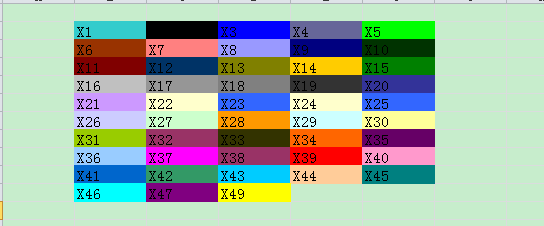
转载地址如下:http://xiaohewoai.iteye.com/blog/1300817
关于POI 中单元格背景色设置(转)的更多相关文章
- poi 合并单元格、设置边框
HSSFWorkbook wb = new HSSFWorkbook(); HSSFSheet sheet = wb.createSheet(); //创建一个样式 HSSFCellStyle sty ...
- NPOI设置单元格背景色
NPOI设置单元格背景色在网上有好多例子都是设置为NPOI内置的颜色值 但是想用rgb值来设置背景色,即:通过HSSFPalette类获取颜色值时会抛出异常:Could not Find free c ...
- NPOI之Excel——设置单元格背景色
NPOI Excel 单元格颜色对照表,在引用了 NPOI.dll 后可通过 ICellStyle 接口的 FillForegroundColor 属性实现 Excel 单元格的背景色设置,FillP ...
- 在Asp.Net MVC中使用NPOI插件实现对Excel的操作(导入,导出,合并单元格,设置样式,输入公式)
前言 NPOI 是 POI 项目的.NET版本,它不使用 Office COM 组件,不需要安装 Microsoft Office,目前支持 Office 2003 和 2007 版本. 1.整个Ex ...
- Gridview 重建表头/单击单元格弹出对话框/改变单元格背景色
整理工作~ 完整的代码在GitHub上, 路径: 项目背景:追踪某个issue,并且记录每天的状态. 要求:1.点击日期就能更改,并且用颜色标志不同的状态 2.增加按钮可关闭issue 3.布局要求日 ...
- 【Excel】Excel根据单元格背景色求和
例:用公式计算单元格背景色为浅蓝色的数字之和 步骤一: Office 2003 Insert->Name->Define,Names in workbook输入getColor或ge ...
- Excel 2013中单元格添加下拉列表的方法
使用Excel录入数据的时候我们通常使用下拉列表来限定输入的数据,这样录入数据就很少发生错误了.Excel 2013较以前的版本发生了很大的变化,那么在Excel 2013是如何添加下拉列表的呢? 下 ...
- 表格单元格td设置宽度无效的解决办法 .
http://zzstudy.offcn.com/archives/11366 在做table页面时,有时对td设置的宽度是无效的,td的宽度始终有内部的内容撑开,可以设置padding,但直接设置w ...
- poi合并单元格同时导出excel
poi合并单元格同时导出excel POI进行跨行需要用到对象HSSFSheet对象,现在就当我们程序已经定义了一个HSSFSheet对象sheet. 跨第1行第1个到第2个单元格的操作为 sheet ...
随机推荐
- Codeforces 1023 B.Pair of Toys (Codeforces Round #504 (rated, Div. 1 + Div. 2, based on VK Cup 2018 Fi)
B. Pair of Toys 智障题目(嘤嘤嘤~) 代码: 1 //B 2 #include<iostream> 3 #include<cstdio> 4 #include& ...
- HDU 1061.Rightmost Digit-规律题 or 快速幂取模
Rightmost Digit Time Limit: 2000/1000 MS (Java/Others) Memory Limit: 65536/32768 K (Java/Others)T ...
- log4j笔记:升级2.X版本的日志滚动问题
因为slf4j依赖的log4j在流量大的时候总遇到多线程引起的死锁问题,升级到log4j2.x版本.原来的log4j.properties配置文件已经不被log4j2支持了,需要改写为log4j2.x ...
- 软件工程中的反面模式(anti-pattern)
软件设计 抽象倒置(Abstraction inversion):不把用户需要的功能直接提供出来,导致他们要用更上层的函数来重复实现 用意不明(Ambiguous viewpoint):给出一个模型( ...
- [LOJ6433]最大前缀和
深刻感受到自己的水平和机房里的其他人相差甚远,他们都是随手秒这个题的... $n$很小,考虑状压DP 当一个序列在某个位置取到最大前缀和后,意味着如果把后面的数抽出来单独成序列,那么它的每个前缀和都$ ...
- 【Heap-Dijkstra】【分层图】bzoj2763 [JLOI2011]飞行路线
建立k+1张图, 在图与图之间,若在原图中x到y有边,就建立从 第i层的x 到 i+1层的y 建边,权值为0.代表一次免费机会. 由于一旦到了第i+1层的图里,则无法回到之前的层,所以免费最多只有k次 ...
- 【动态规划】bzoj3992 [Sdoi2015]序列统计 10分
#include<cstdio> using namespace std; #define MOD 1004535809 int a[8001],f[1001][101],n,m,x,S; ...
- [转][译] 分分钟学会一门语言之 Python 篇
Python was created by Guido Van Rossum in the early 90's. It is now one of the most popularlanguages ...
- Java杂谈2——引用与跟搜索算法
Java中的引用 Java“引用”的概念源于C++,原本的定义相当有限:一个引用(Reference)代表的内存通常用于指向另一块内存区域的起始地址.通过引用类型保存的起始地址,可以找到这个引用所指向 ...
- 在GIT中修改提交记录
在SVN中,提交记录是无法修改的.比如说,当我们提交了某次修改后,发现该次提交中有错误时,只能将将补丁再次提交一遍.这样,就存在两次提交记录,没有保证提交的原子性. 在GIT中,由于提交是在本地进行的 ...