
关于POI 中单元格背景色设置(转)
关于POI 中单元格背景色设置(转)
csdn 中找到了用Apache POI 实现单元格背景色的小例子
我用了JDK6 + POI 3.17 ,调试中报错
最终将
CellStyle.SOLID_FOREGROUND 替换为
FillPatternType.SOLID_FOREGROUND,代码运行成功

/**
 *
 */
package com.totest.poiDemo;

import java.io.FileOutputStream;
import java.io.IOException;

import org.apache.poi.ss.usermodel.Cell;
import org.apache.poi.ss.usermodel.CellStyle;
import org.apache.poi.ss.usermodel.FillPatternType;
import org.apache.poi.ss.usermodel.IndexedColors;
import org.apache.poi.ss.usermodel.Row;
import org.apache.poi.ss.usermodel.Sheet;
import org.apache.poi.ss.usermodel.Workbook;
import org.apache.poi.xssf.usermodel.XSSFWorkbook;

public class POIFillAndColorExample {
    public static void main(String[] args) throws IOException {
        // Create a workbook object
        Workbook workbook = new XSSFWorkbook();
        // Create sheet
        Sheet sheet = workbook.createSheet();

        // Create a row and put some cells in it.
        Row row = sheet.createRow((short) 1);

        // Aqua background
        CellStyle style = workbook.createCellStyle();
        style.setFillForegroundColor(IndexedColors.AQUA.getIndex());
        style.setFillPattern(FillPatternType.SOLID_FOREGROUND);

        style.setFillPattern(FillPatternType.SOLID_FOREGROUND);
        Cell cell = row.createCell((short) 1);
        cell.setCellValue("X1");
        cell.setCellStyle(style);

        // Orange "foreground", foreground being the fill foreground not the
        // font color.
        style = workbook.createCellStyle();
        style.setFillForegroundColor(IndexedColors.AUTOMATIC.getIndex());
        style.setFillPattern(FillPatternType.SOLID_FOREGROUND);
        cell = row.createCell((short) 2);
        cell.setCellValue("X2");
        cell.setCellStyle(style);

        style = workbook.createCellStyle();
        style.setFillForegroundColor(IndexedColors.BLUE.getIndex());
        style.setFillPattern(FillPatternType.SOLID_FOREGROUND);
        cell = row.createCell((short) 3);
        cell.setCellValue("X3");
        cell.setCellStyle(style);

        style = workbook.createCellStyle();
        style.setFillForegroundColor(IndexedColors.BLUE_GREY.getIndex());
        style.setFillPattern(FillPatternType.SOLID_FOREGROUND);
        cell = row.createCell((short) 4);
        cell.setCellValue("X4");
        cell.setCellStyle(style);

        style = workbook.createCellStyle();
        style.setFillForegroundColor(IndexedColors.BRIGHT_GREEN.getIndex());
        style.setFillPattern(FillPatternType.SOLID_FOREGROUND);
        cell = row.createCell((short) 5);
        cell.setCellValue("X5");
        cell.setCellStyle(style);

        // Create a row and put some cells in it.
        Row row2 = sheet.createRow((short) 2);

        style = workbook.createCellStyle();
        style.setFillForegroundColor(IndexedColors.BROWN.getIndex());
        style.setFillPattern(FillPatternType.SOLID_FOREGROUND);
        cell = row2.createCell((short) 1);
        cell.setCellValue("X6");
        cell.setCellStyle(style);

        style = workbook.createCellStyle();
        style.setFillForegroundColor(IndexedColors.CORAL.getIndex());
        style.setFillPattern(FillPatternType.SOLID_FOREGROUND);
        cell = row2.createCell((short) 2);
        cell.setCellValue("X7");
        cell.setCellStyle(style);

        style = workbook.createCellStyle();
        style.setFillForegroundColor(IndexedColors.CORNFLOWER_BLUE.getIndex());
        style.setFillPattern(FillPatternType.SOLID_FOREGROUND);
        cell = row2.createCell((short) 3);
        cell.setCellValue("X8");
        cell.setCellStyle(style);

        style = workbook.createCellStyle();
        style.setFillForegroundColor(IndexedColors.DARK_BLUE.getIndex());
        style.setFillPattern(FillPatternType.SOLID_FOREGROUND);
        cell = row2.createCell((short) 4);
        cell.setCellValue("X9");
        cell.setCellStyle(style);
        style = workbook.createCellStyle();
        style.setFillForegroundColor(IndexedColors.DARK_GREEN.getIndex());
        style.setFillPattern(FillPatternType.SOLID_FOREGROUND);
        cell = row2.createCell((short) 5);
        cell.setCellValue("X10");
        cell.setCellStyle(style);

        // Create a row and put some cells in it.
        Row row3 = sheet.createRow((short) 3);

        style = workbook.createCellStyle();
        style.setFillForegroundColor(IndexedColors.DARK_RED.getIndex());
        style.setFillPattern(FillPatternType.SOLID_FOREGROUND);
        cell = row3.createCell((short) 1);
        cell.setCellValue("X11");
        cell.setCellStyle(style);
        style = workbook.createCellStyle();
        style.setFillForegroundColor(IndexedColors.DARK_TEAL.getIndex());
        style.setFillPattern(FillPatternType.SOLID_FOREGROUND);
        cell = row3.createCell((short) 2);
        cell.setCellValue("X12");
        cell.setCellStyle(style);

        style = workbook.createCellStyle();
        style.setFillForegroundColor(IndexedColors.DARK_YELLOW.getIndex());
        style.setFillPattern(FillPatternType.SOLID_FOREGROUND);
        cell = row3.createCell((short) 3);
        cell.setCellValue("X13");
        cell.setCellStyle(style);
        style = workbook.createCellStyle();
        style.setFillForegroundColor(IndexedColors.GOLD.getIndex());
        style.setFillPattern(FillPatternType.SOLID_FOREGROUND);
        cell = row3.createCell((short) 4);
        cell.setCellValue("X14");
        cell.setCellStyle(style);

        style = workbook.createCellStyle();
        style.setFillForegroundColor(IndexedColors.GREEN.getIndex());
        style.setFillPattern(FillPatternType.SOLID_FOREGROUND);
        cell = row3.createCell((short) 5);
        cell.setCellValue("X15");
        cell.setCellStyle(style);

        // Create a row and put some cells in it.
        Row row4 = sheet.createRow((short) 4);
        style = workbook.createCellStyle();
        style.setFillForegroundColor(IndexedColors.GREY_25_PERCENT.getIndex());
        style.setFillPattern(FillPatternType.SOLID_FOREGROUND);
        cell = row4.createCell((short) 1);
        cell.setCellValue("X16");
        cell.setCellStyle(style);

        style = workbook.createCellStyle();
        style.setFillForegroundColor(IndexedColors.GREY_40_PERCENT.getIndex());
        style.setFillPattern(FillPatternType.SOLID_FOREGROUND);
        cell = row4.createCell((short) 2);
        cell.setCellValue("X17");
        cell.setCellStyle(style);
        style = workbook.createCellStyle();
        style.setFillForegroundColor(IndexedColors.GREY_50_PERCENT.getIndex());
        style.setFillPattern(FillPatternType.SOLID_FOREGROUND);
        cell = row4.createCell((short) 3);
        cell.setCellValue("X18");
        cell.setCellStyle(style);

        style = workbook.createCellStyle();
        style.setFillForegroundColor(IndexedColors.GREY_80_PERCENT.getIndex());
        style.setFillPattern(FillPatternType.SOLID_FOREGROUND);
        cell = row4.createCell((short) 4);
        cell.setCellValue("X19");
        cell.setCellStyle(style);
        style = workbook.createCellStyle();
        style.setFillForegroundColor(IndexedColors.INDIGO.getIndex());
        style.setFillPattern(FillPatternType.SOLID_FOREGROUND);
        cell = row4.createCell((short) 5);
        cell.setCellValue("X20");
        cell.setCellStyle(style);

        // Create a row and put some cells in it.
        Row row5 = sheet.createRow((short) 5);

        style = workbook.createCellStyle();
        style.setFillForegroundColor(IndexedColors.LAVENDER.getIndex());
        style.setFillPattern(FillPatternType.SOLID_FOREGROUND);
        cell = row5.createCell((short) 1);
        cell.setCellValue("X21");
        cell.setCellStyle(style);

        style = workbook.createCellStyle();
        style.setFillForegroundColor(IndexedColors.LEMON_CHIFFON.getIndex());
        style.setFillPattern(FillPatternType.SOLID_FOREGROUND);
        cell = row5.createCell((short) 2);
        cell.setCellValue("X22");
        cell.setCellStyle(style);

        style = workbook.createCellStyle();
        style.setFillForegroundColor(IndexedColors.LIGHT_BLUE.getIndex());
        style.setFillPattern(FillPatternType.SOLID_FOREGROUND);
        cell = row5.createCell((short) 3);
        cell.setCellValue("X23");
        cell.setCellStyle(style);
        style = workbook.createCellStyle();
        style.setFillForegroundColor(IndexedColors.LEMON_CHIFFON.getIndex());
        style.setFillPattern(FillPatternType.SOLID_FOREGROUND);
        cell = row5.createCell((short) 4);
        cell.setCellValue("X24");
        cell.setCellStyle(style);

        style = workbook.createCellStyle();
        style.setFillForegroundColor(IndexedColors.LIGHT_BLUE.getIndex());
        style.setFillPattern(FillPatternType.SOLID_FOREGROUND);
        cell = row5.createCell((short) 5);
        cell.setCellValue("X25");
        cell.setCellStyle(style);

        // Create a row and put some cells in it.
        Row row6 = sheet.createRow((short) 6);
        style = workbook.createCellStyle();
        style.setFillForegroundColor(IndexedColors.LIGHT_CORNFLOWER_BLUE
                .getIndex());
        style.setFillPattern(FillPatternType.SOLID_FOREGROUND);
        cell = row6.createCell((short) 1);
        cell.setCellValue("X26");
        cell.setCellStyle(style);

        style = workbook.createCellStyle();
        style.setFillForegroundColor(IndexedColors.LIGHT_GREEN.getIndex());
        style.setFillPattern(FillPatternType.SOLID_FOREGROUND);
        cell = row6.createCell((short) 2);
        cell.setCellValue("X27");
        cell.setCellStyle(style);
        style = workbook.createCellStyle();
        style.setFillForegroundColor(IndexedColors.LIGHT_ORANGE.getIndex());
        style.setFillPattern(FillPatternType.SOLID_FOREGROUND);
        cell = row6.createCell((short) 3);
        cell.setCellValue("X28");
        cell.setCellStyle(style);

        style = workbook.createCellStyle();
        style.setFillForegroundColor(IndexedColors.LIGHT_TURQUOISE.getIndex());
        style.setFillPattern(FillPatternType.SOLID_FOREGROUND);
        cell = row6.createCell((short) 4);
        cell.setCellValue("X29");
        cell.setCellStyle(style);

        style = workbook.createCellStyle();
        style.setFillForegroundColor(IndexedColors.LIGHT_YELLOW.getIndex());
        style.setFillPattern(FillPatternType.SOLID_FOREGROUND);
        cell = row6.createCell((short) 5);
        cell.setCellValue("X30");
        cell.setCellStyle(style);

        // Create a row and put some cells in it.
        Row row7 = sheet.createRow((short) 7);
        style = workbook.createCellStyle();
        style.setFillForegroundColor(IndexedColors.LIME.getIndex());
        style.setFillPattern(FillPatternType.SOLID_FOREGROUND);
        cell = row7.createCell((short) 1);
        cell.setCellValue("X31");
        cell.setCellStyle(style);
        style = workbook.createCellStyle();
        style.setFillForegroundColor(IndexedColors.MAROON.getIndex());
        style.setFillPattern(FillPatternType.SOLID_FOREGROUND);
        cell = row7.createCell((short) 2);
        cell.setCellValue("X32");
        cell.setCellStyle(style);

        style = workbook.createCellStyle();
        style.setFillForegroundColor(IndexedColors.OLIVE_GREEN.getIndex());
        style.setFillPattern(FillPatternType.SOLID_FOREGROUND);
        cell = row7.createCell((short) 3);
        cell.setCellValue("X33");
        cell.setCellStyle(style);
        style = workbook.createCellStyle();
        style.setFillForegroundColor(IndexedColors.ORANGE.getIndex());
        style.setFillPattern(FillPatternType.SOLID_FOREGROUND);
        cell = row7.createCell((short) 4);
        cell.setCellValue("X34");
        cell.setCellStyle(style);

        style = workbook.createCellStyle();
        style.setFillForegroundColor(IndexedColors.ORCHID.getIndex());
        style.setFillPattern(FillPatternType.SOLID_FOREGROUND);
        cell = row7.createCell((short) 5);
        cell.setCellValue("X35");
        cell.setCellStyle(style);

        // Create a row and put some cells in it.
        Row row8 = sheet.createRow((short) 8);

        style = workbook.createCellStyle();
        style.setFillForegroundColor(IndexedColors.PALE_BLUE.getIndex());
        style.setFillPattern(FillPatternType.SOLID_FOREGROUND);
        cell = row8.createCell((short) 1);
        cell.setCellValue("X36");
        cell.setCellStyle(style);

        style = workbook.createCellStyle();
        style.setFillForegroundColor(IndexedColors.PINK.getIndex());
        style.setFillPattern(FillPatternType.SOLID_FOREGROUND);
        cell = row8.createCell((short) 2);
        cell.setCellValue("X37");
        cell.setCellStyle(style);
        style = workbook.createCellStyle();
        style.setFillForegroundColor(IndexedColors.PLUM.getIndex());
        style.setFillPattern(FillPatternType.SOLID_FOREGROUND);
        cell = row8.createCell((short) 3);
        cell.setCellValue("X38");
        cell.setCellStyle(style);

        style = workbook.createCellStyle();
        style.setFillForegroundColor(IndexedColors.RED.getIndex());
        style.setFillPattern(FillPatternType.SOLID_FOREGROUND);
        cell = row8.createCell((short) 4);
        cell.setCellValue("X39");
        cell.setCellStyle(style);
        style = workbook.createCellStyle();
        style.setFillForegroundColor(IndexedColors.ROSE.getIndex());
        style.setFillPattern(FillPatternType.SOLID_FOREGROUND);
        cell = row8.createCell((short) 5);
        cell.setCellValue("X40");
        cell.setCellStyle(style);

        // Create a row and put some cells in it.
        Row row9 = sheet.createRow((short) 9);

        style = workbook.createCellStyle();
        style.setFillForegroundColor(IndexedColors.ROYAL_BLUE.getIndex());
        style.setFillPattern(FillPatternType.SOLID_FOREGROUND);
        cell = row9.createCell((short) 1);
        cell.setCellValue("X41");
        cell.setCellStyle(style);
        style = workbook.createCellStyle();
        style.setFillForegroundColor(IndexedColors.SEA_GREEN.getIndex());
        style.setFillPattern(FillPatternType.SOLID_FOREGROUND);
        cell = row9.createCell((short) 2);
        cell.setCellValue("X42");
        cell.setCellStyle(style);

        style = workbook.createCellStyle();
        style.setFillForegroundColor(IndexedColors.SKY_BLUE.getIndex());
        style.setFillPattern(FillPatternType.SOLID_FOREGROUND);
        cell = row9.createCell((short) 3);
        cell.setCellValue("X43");
        cell.setCellStyle(style);
        style = workbook.createCellStyle();
        style.setFillForegroundColor(IndexedColors.TAN.getIndex());
        style.setFillPattern(FillPatternType.SOLID_FOREGROUND);
        cell = row9.createCell((short) 4);
        cell.setCellValue("X44");
        cell.setCellStyle(style);

        style = workbook.createCellStyle();
        style.setFillForegroundColor(IndexedColors.TEAL.getIndex());
        style.setFillPattern(FillPatternType.SOLID_FOREGROUND);
        cell = row9.createCell((short) 5);
        cell.setCellValue("X45");
        cell.setCellStyle(style);

        // Create a row and put some cells in it.
        Row row10 = sheet.createRow((short) 10);

        style = workbook.createCellStyle();
        style.setFillForegroundColor(IndexedColors.TURQUOISE.getIndex());
        style.setFillPattern(FillPatternType.SOLID_FOREGROUND);
        cell = row10.createCell((short) 1);
        cell.setCellValue("X46");
        cell.setCellStyle(style);

        style = workbook.createCellStyle();
        style.setFillForegroundColor(IndexedColors.VIOLET.getIndex());
        style.setFillPattern(FillPatternType.SOLID_FOREGROUND);
        cell = row10.createCell((short) 2);
        cell.setCellValue("X47");
        cell.setCellStyle(style);
        style = workbook.createCellStyle();
        style.setFillForegroundColor(IndexedColors.WHITE.getIndex());
        style.setFillPattern(FillPatternType.SOLID_FOREGROUND);
        cell = row10.createCell((short) 3);
        cell.setCellValue("X48");
        cell.setCellStyle(style);

        style = workbook.createCellStyle();
        style.setFillForegroundColor(IndexedColors.YELLOW.getIndex());
        style.setFillPattern(FillPatternType.SOLID_FOREGROUND);
        cell = row10.createCell((short) 3);
        cell.setCellValue("X49");
        cell.setCellStyle(style);

        // Write the output to a file
        FileOutputStream fileOut = new FileOutputStream(
                "POIFillAndColorExample.xlsx");
        workbook.write(fileOut);
        fileOut.close();

    }
}
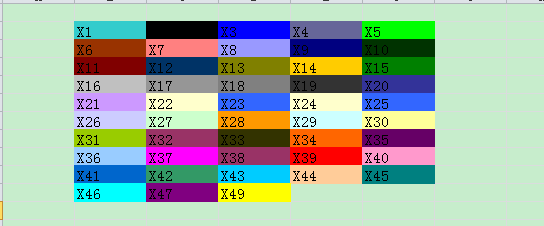
转载地址如下:http://xiaohewoai.iteye.com/blog/1300817
关于POI 中单元格背景色设置(转)的更多相关文章
- poi 合并单元格、设置边框
HSSFWorkbook wb = new HSSFWorkbook(); HSSFSheet sheet = wb.createSheet(); //创建一个样式 HSSFCellStyle sty ...
- NPOI设置单元格背景色
NPOI设置单元格背景色在网上有好多例子都是设置为NPOI内置的颜色值 但是想用rgb值来设置背景色,即:通过HSSFPalette类获取颜色值时会抛出异常:Could not Find free c ...
- NPOI之Excel——设置单元格背景色
NPOI Excel 单元格颜色对照表,在引用了 NPOI.dll 后可通过 ICellStyle 接口的 FillForegroundColor 属性实现 Excel 单元格的背景色设置,FillP ...
- 在Asp.Net MVC中使用NPOI插件实现对Excel的操作(导入,导出,合并单元格,设置样式,输入公式)
前言 NPOI 是 POI 项目的.NET版本,它不使用 Office COM 组件,不需要安装 Microsoft Office,目前支持 Office 2003 和 2007 版本. 1.整个Ex ...
- Gridview 重建表头/单击单元格弹出对话框/改变单元格背景色
整理工作~ 完整的代码在GitHub上, 路径: 项目背景:追踪某个issue,并且记录每天的状态. 要求:1.点击日期就能更改,并且用颜色标志不同的状态 2.增加按钮可关闭issue 3.布局要求日 ...
- 【Excel】Excel根据单元格背景色求和
例:用公式计算单元格背景色为浅蓝色的数字之和 步骤一: Office 2003 Insert->Name->Define,Names in workbook输入getColor或ge ...
- Excel 2013中单元格添加下拉列表的方法
使用Excel录入数据的时候我们通常使用下拉列表来限定输入的数据,这样录入数据就很少发生错误了.Excel 2013较以前的版本发生了很大的变化,那么在Excel 2013是如何添加下拉列表的呢? 下 ...
- 表格单元格td设置宽度无效的解决办法 .
http://zzstudy.offcn.com/archives/11366 在做table页面时,有时对td设置的宽度是无效的,td的宽度始终有内部的内容撑开,可以设置padding,但直接设置w ...
- poi合并单元格同时导出excel
poi合并单元格同时导出excel POI进行跨行需要用到对象HSSFSheet对象,现在就当我们程序已经定义了一个HSSFSheet对象sheet. 跨第1行第1个到第2个单元格的操作为 sheet ...
随机推荐
- 见微知著(三):解析ctf中的pwn--Fastbin和bins的溢出
1月1号写博客,也是不容易呀!大家新年快乐呀! 先从Fastbin看起,是2015年RCTF的一道pwn题,shaxian.先看看代码的大致流程,随便输入一下: 这个题目关键之处在于堆溢出,对于堆种类 ...
- 第3天-DIV+CSS布局
盒子模型 margin 设置外边距宽度 有4个值的时候: maigin 10px 5px 15px 20px; (上.右.下.左)有3个值的时候: margin: 10px 5px 15px; (上. ...
- 通用数据库管理工具DBeaver
通用数据库管理工具DBeaver 在渗透测试中,用户往往需要管理很多数据库.这些数据库可能是渗透软件使用的(如Metasploit使用的Postgresql),也有目标主机的数据库(如网站的数据库 ...
- POJ 3068 "Shortest" pair of paths(费用流)
[题目链接] http://poj.org/problem?id=3068 [题目大意] 给出一张图,要把两个物品从起点运到终点,他们不能运同一条路过 每条路都有一定的费用,求最小费用 [题解] 题目 ...
- 【Splay】【块状链表】bzoj3223 Tyvj 1729 文艺平衡树
让蒟蒻见识到了常数大+滥用STL的危害. <法一>很久之前的Splay #include<cstdio> #include<algorithm> using nam ...
- Python中内置的日志模块logging用法详解
logging模块简介 Python的logging模块提供了通用的日志系统,可以方便第三方模块或者是应用使用.这个模块提供不同的日志级别,并可以采用不同的方式记录日志,比如文件,HTTP GET/P ...
- [TC-FindingFriends]Finding Friends
题目大意: 给定一个长度为$n(n\le10^5)$的数列$A(A_i\le10^9)$,求最小的$k$满足存在一个长度至少为$m(m\le n)$的子串,对于串中的每一个数$A_i$,都至少存在一个 ...
- Java高级架构师(一)第08节:基本业务功能和数据字典
- Swift中混编OC第三方库
现在Swift的第三方库还比较少,有时候需要使用OC的第三方库,其实也是很容易的. 我们使用如下步骤: 1.新建的Swift项目,第一次创建OC文件时会询问是否生成 桥接头,选择是的话会生成一个桥 ...
- redis系列文章
http://blog.csdn.net/liubenlong007/article/details/53690103