
ASP NET Core ---POST, PUT, PATCH, DELETE,Model 验证
参照 草根专栏- ASP.NET Core + Ng6 实战:https://v.qq.com/x/page/u0765jbwc6f.html
一、POST
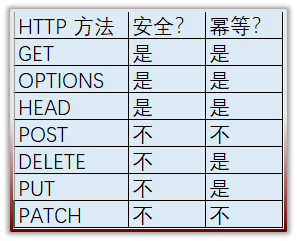
安全性和幂等性
- 安全性是指方法执行后并不会改变资源的表述
- 幂等性是指方法无论执行多少次都会得到同样的结果
POST添加资源:
- 不安全, 不幂等
- 参数 [FromBody]
- 返回 201 Create : CreatedAtRoute(): 它允许响应里带着Location Header,在这个Location Header里包含着一个uri,通过这个uri就可以GET到我们刚刚创建好的资源
- HATEOAS
(1)添加 PostAddResource.cs 类
namespace BlogDemo.Infrastructure.Resources

{

    public class PostAddResource

    {

        public string Title { get; set; }

        public string Body { get; set; }

        public string Remark { get; set; }

    }

}
(2)添加映射
namespace BlogDemo.Api.Extensions

{

    public class MappingProfile:Profile

    {

        public MappingProfile()

        {

            CreateMap<Post, PostDTO>().ForMember(dest=>dest.Updatetime,opt=>opt.MapFrom(src=>src.LastModified));

            CreateMap<PostDTO, Post>();

            CreateMap<PostAddResource, Post>();

        }

    }

}
(3)添加post方法:
        [HttpPost(Name = "CreatePost")]

         public async Task<IActionResult> Post([FromBody] PostAddResource postAddResource)

        {

            if (postAddResource == null)

            {

                return BadRequest();

            }

            var newPost = _mapper.Map<PostAddResource, Post>(postAddResource);

            newPost.Author = "admin";

            newPost.LastModified = DateTime.Now;

            _postRepository.AddPost(newPost);

            if (!await _unitOfWork.SaveAsync())

            {

                throw new Exception("Save Failed!");

            }

            var resultResource = _mapper.Map<Post, PostDTO>(newPost);

            var links = CreateLinksForPost(newPost.Id);

            var linkedPostResource = resultResource.ToDynamic() as IDictionary<string, object>;

            linkedPostResource.Add("links", links);

            return CreatedAtRoute("GetPost", new { id = linkedPostResource["Id"] }, linkedPostResource);

        }
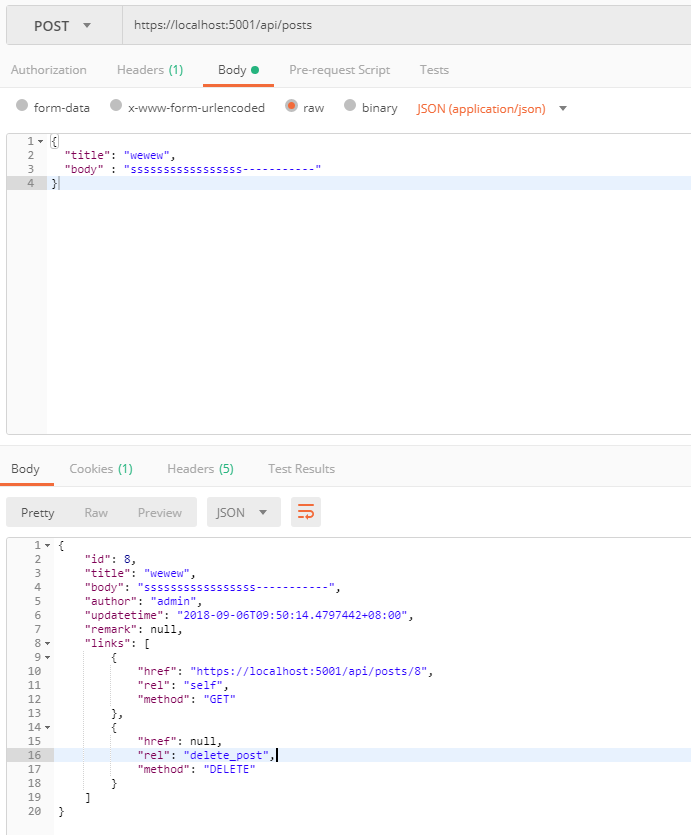
(4) 测试:
二、Model验证:
定义验证规则
检查验证规则
把验证错误信息发送给API的消费者
1、验证方式:
内置验证:
DataAnnotation
ValidationAttribute
IValidatebleObject
第三方: FluentValidation
2、使用FluentValidation组件(关注点分离)
(1) 安装:
FluentValidation.AspNetCore
FluentValidation
(2) 为每一个Resource建立验证器:
继承AbstractValidator<T>
namespace BlogDemo.Infrastructure.Resources

{

   public class PostAddResourceValidator:AbstractValidator<PostAddResource>

    {

        public PostAddResourceValidator()

        {

            RuleFor(x => x.Title).NotEmpty()

                .WithName("标题").WithMessage("{PropertyName}是必须填写的")

                .MaximumLength().WithMessage("{PropertyName}的最大长度是{MaxLength}");

            RuleFor(x => x.Body).NotEmpty()

                .WithName("正文").WithMessage("{PropertyName}是必须填写的")

                .MinimumLength().WithMessage("{PropertyName}的最大长度是{MinLength}");

        }

    }

}
(3)配置:
services.AddMvc(……).AddFluentValidation();

services.AddTransient<IValidator<PostAddResource>, PostAddResourceValidator>();
(4)Action添加验证:
ModelState.IsValid
ModelState
它是一个字典,包含了Model的状态以及Model所绑定的验证
对于提交的每个属性,它都包含了一个错误信息的集合
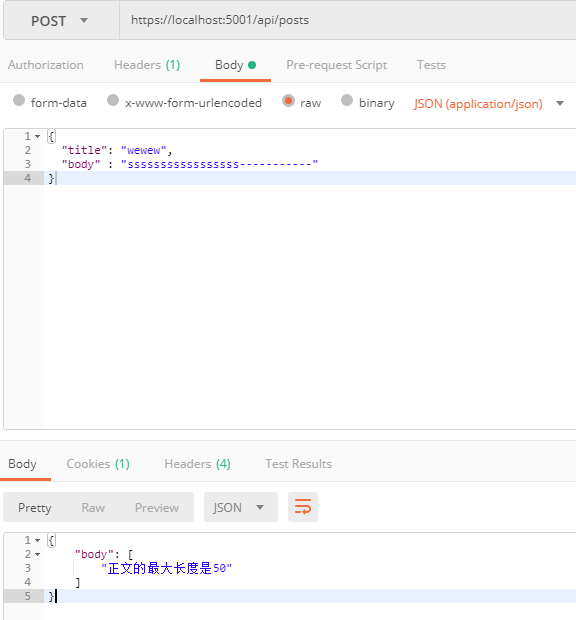
返回: 422 Unprocessable Entity
验证错误信息在响应的body里面带回去
            if (!ModelState.IsValid)

            {

                return  UnprocessableEntity(ModelState);

            }
(5)测试
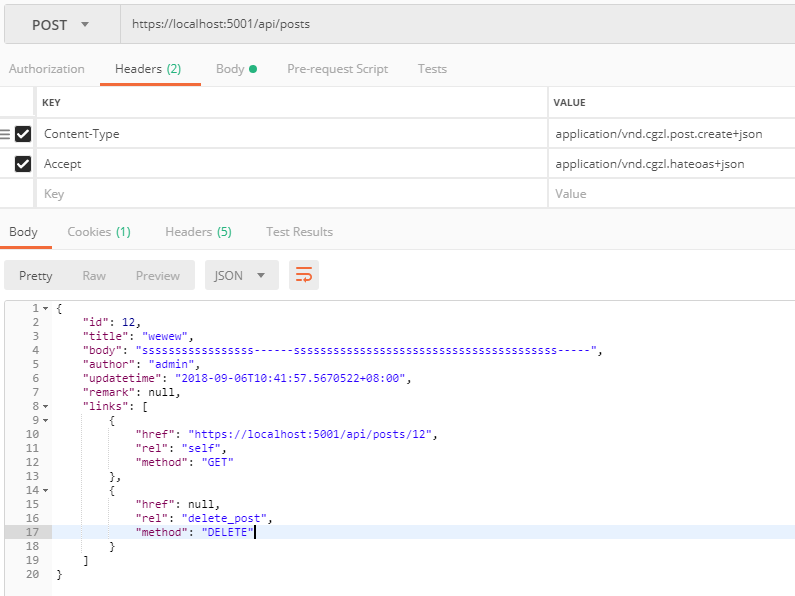
(6)Action添加Accpet和Content-Type 的自定义hateoas
        [RequestHeaderMatchingMediaType("Content-Type", new[] { "application/vnd.cgzl.post.create+json" })]

        [RequestHeaderMatchingMediaType("Accept", new[] { "application/vnd.cgzl.hateoas+json" })]
(7) staupDevelopment 注册hateoas
            services.AddMvc(option => {

                option.ReturnHttpNotAcceptable = true;

              //  option.OutputFormatters.Add(new XmlDataContractSerializerOutputFormatter());

                var outputFormatter = option.OutputFormatters.OfType<JsonOutputFormatter>().FirstOrDefault();

                if (outputFormatter != null)

                {

                    outputFormatter.SupportedMediaTypes.Add("application/vnd.cgzl.hateoas+json");

                }

                var intputFormatter = option.InputFormatters.OfType<JsonInputFormatter>().FirstOrDefault();

                if (intputFormatter != null)

                {

                    intputFormatter.SupportedMediaTypes.Add("application/vnd.cgzl.post.create+json");

                    intputFormatter.SupportedMediaTypes.Add("application/vnd.cgzl.post.update+json");

                }

            })
(8)测试:
3、自定义错误验证返回结果:
(1) 添加MyUnprocessableEntityObjectResult.cs ResourceValidationError.cs ResourceValidationResult.cs 类
namespace BlogDemo.Api.Helpers

{

    public class MyUnprocessableEntityObjectResult : UnprocessableEntityObjectResult

    {

        public MyUnprocessableEntityObjectResult(ModelStateDictionary modelState) : base(new ResourceValidationResult(modelState))

        {

            if (modelState == null)

            {

                throw new ArgumentNullException(nameof(modelState));

            }

            StatusCode = ;

        }

    }

}
namespace BlogDemo.Api.Helpers

{

    public class ResourceValidationError

    {

        public string ValidatorKey { get; private set; }

        public string Message { get; private set; }

        public ResourceValidationError(string message, string validatorKey = "")

        {

            ValidatorKey = validatorKey;

            Message = message;

        }

    }

}
namespace BlogDemo.Api.Helpers

{

    public class ResourceValidationResult : Dictionary<string, IEnumerable<ResourceValidationError>>

    {

        public ResourceValidationResult() : base(StringComparer.OrdinalIgnoreCase)

        {

        }

        public ResourceValidationResult(ModelStateDictionary modelState)

            : this()

        {

            if (modelState == null)

            {

                throw new ArgumentNullException(nameof(modelState));

            }

            foreach (var keyModelStatePair in modelState)

            {

                var key = keyModelStatePair.Key;

                var errors = keyModelStatePair.Value.Errors;

                if (errors != null && errors.Count > )

                {

                    var errorsToAdd = new List<ResourceValidationError>();

                    foreach (var error in errors)

                    {

                        var keyAndMessage = error.ErrorMessage.Split('|');

                        if (keyAndMessage.Length > )

                        {

                            errorsToAdd.Add(new ResourceValidationError(keyAndMessage[], keyAndMessage[]));

                        }

                        else

                        {

                            errorsToAdd.Add(new ResourceValidationError(keyAndMessage[]));

                        }

                    }

                    Add(key, errorsToAdd);

                }

            }

        }

    }

}
(2)Action中添加自定义验证:
        public async Task<IActionResult> Post([FromBody] PostAddResource postAddResource)

        {

            if (!ModelState.IsValid)

            {

                return new  MyUnprocessableEntityObjectResult(ModelState);

            }

         }
(3)测试
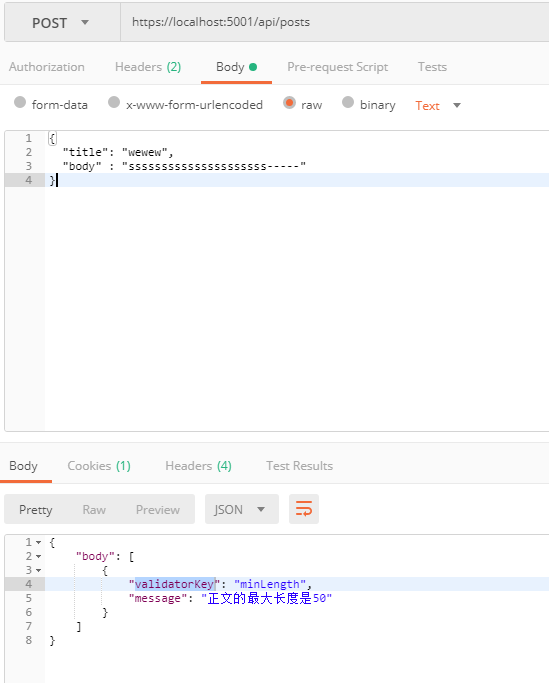
三、Delete
1、 在PostRepository 添加Delete方法
        public void Delete(Post post)

        {

            _myContext.Posts.Remove(post);

        }
2、Action添加Delete方法:
        [HttpDelete("{id}", Name = "DeletePost")]

        public async Task<IActionResult> DeletePost(int id)

        {

            var post = await _postRepository.GetPostId(id);

            if (post == null)

            {

                return NotFound();

            }

            _postRepository.Delete(post);

            if (!await _unitOfWork.SaveAsync())

            {

                throw new Exception($"Deleting post {id} failed when saving.");

            }

            return NoContent();

        }
四、PUT(整体更新)
1、添加PostUpdateResource.cs 类;
    public class PostUpdateResource : PostAddOrUpdateResource

    {

    }
2、重构 PostAddOrUpdateResourceValidator.cs ,改成泛型
namespace BlogDemo.Infrastructure.Resources

{

   public class PostAddOrUpdateResourceValidator<T> : AbstractValidator<T> where T: PostAddOrUpdateResource

    {

        public PostAddOrUpdateResourceValidator()

        {

            RuleFor(x => x.Title).NotEmpty()

                .WithName("标题").WithMessage("required|{PropertyName}是必须填写的")

                .MaximumLength().WithMessage("maxLength|{PropertyName}的最大长度是{MaxLength}");

            RuleFor(x => x.Body).NotEmpty()

                .WithName("正文").WithMessage("required|{PropertyName}是必须填写的")

                .MinimumLength().WithMessage("minLength|{PropertyName}的最小长度是{MinLength}");

        }

    }

}
3、资源验证注册:
services.AddTransient<IValidator<PostUpdateResource>, PostAddOrUpdateResourceValidator<PostUpdateResource>>();
4、添加Map
namespace BlogDemo.Api.Extensions

{

    public class MappingProfile:Profile

    {

        public MappingProfile()

        {

            CreateMap<Post, PostDTO>().ForMember(dest=>dest.Updatetime,opt=>opt.MapFrom(src=>src.LastModified));

            CreateMap<PostDTO, Post>();

            CreateMap<PostAddResource, Post>();

            CreateMap<PostUpdateResource, Post>();

        }

    }

}
5、添加自定义hateoas
        public void ConfigureServices(IServiceCollection services)

        {

            services.AddMvc(option => {

                option.ReturnHttpNotAcceptable = true;

              //  option.OutputFormatters.Add(new XmlDataContractSerializerOutputFormatter());

                var outputFormatter = option.OutputFormatters.OfType<JsonOutputFormatter>().FirstOrDefault();

                if (outputFormatter != null)

                {

                    outputFormatter.SupportedMediaTypes.Add("application/vnd.cgzl.hateoas+json");

                }

                var intputFormatter = option.InputFormatters.OfType<JsonInputFormatter>().FirstOrDefault();

                if (intputFormatter != null)

                {

                    intputFormatter.SupportedMediaTypes.Add("application/vnd.cgzl.post.create+json");

                    intputFormatter.SupportedMediaTypes.Add("application/vnd.cgzl.post.update+json");

                }

            })
        }
6、Action添加PUT方法:
        [HttpPut("{id}", Name = "UpdatePost")]

        [RequestHeaderMatchingMediaType("Content-Type", new[] { "application/vnd.cgzl.post.update+json" })]

        public async Task<IActionResult> UpdatePost(int id, [FromBody] PostUpdateResource postUpdate)

        {

            if (postUpdate == null)

            {

                return BadRequest();

            }

            if (!ModelState.IsValid)

            {

                return new MyUnprocessableEntityObjectResult(ModelState);

            }

            var post = await _postRepository.GetPostId(id);

            if (post == null)

            {

                return NotFound();

            }

            post.LastModified = DateTime.Now;

            _mapper.Map(postUpdate, post);

            if (!await _unitOfWork.SaveAsync())

            {

                throw new Exception($"Updating post {id} failed when saving.");

            }

            return NoContent();

        }
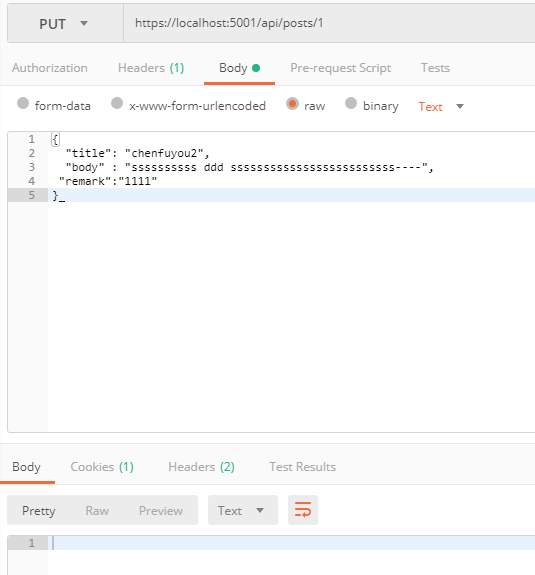
7、测试
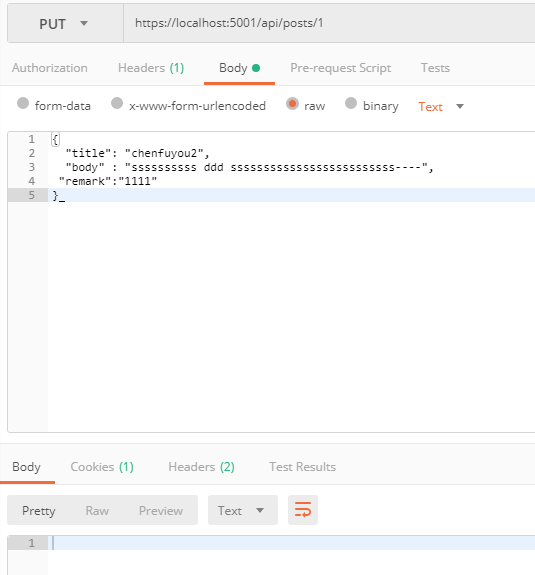
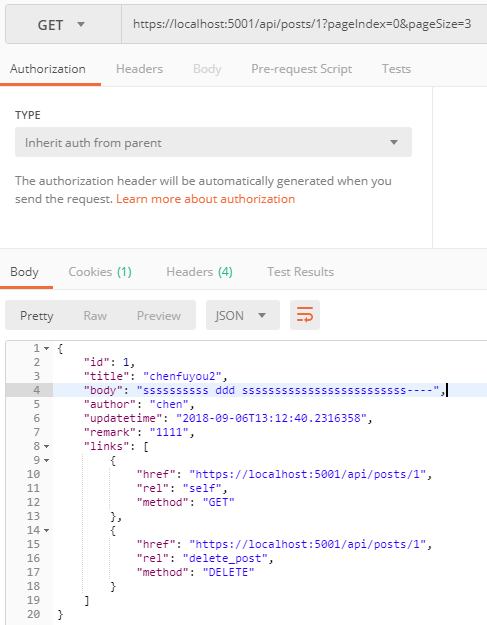
五、Patch(局部更新)
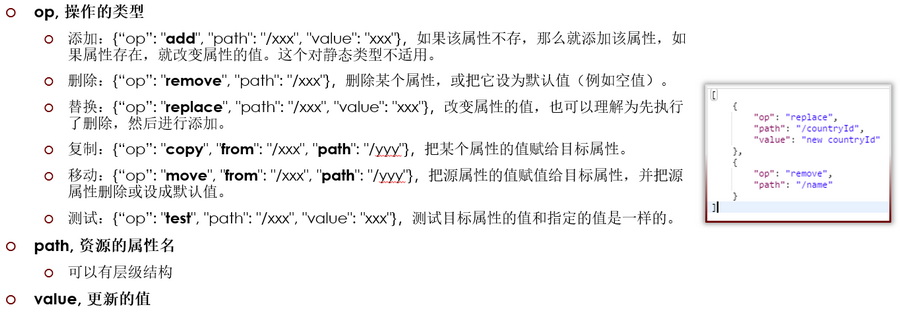
1、 PostRepository 添加Update方法:
        public void Update(Post post)

        {

            _myContext.Entry(post).State = EntityState.Modified;

        }
2、Action添加Patch方法:
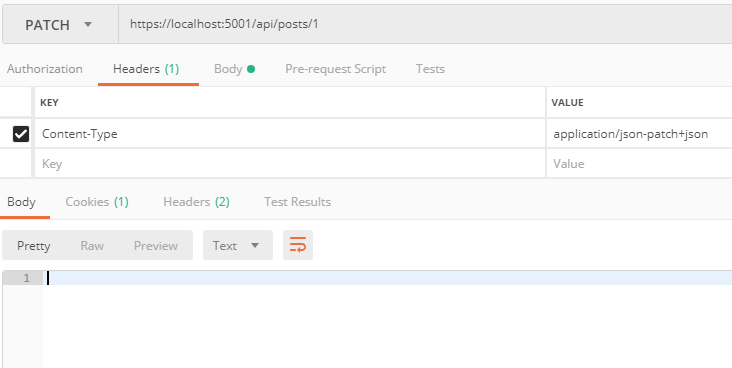
        [HttpPatch("{id}", Name = "PartiallyUpdatePost")]

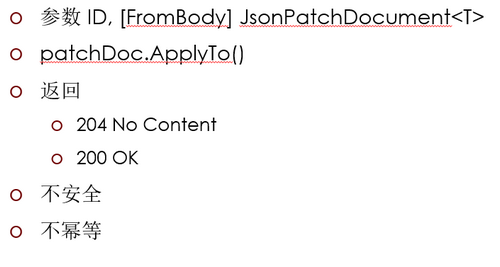
        public async Task<IActionResult> PartiallyUpdateCityForCountry(int id,

            [FromBody] JsonPatchDocument<PostUpdateResource> patchDoc)

        {

            if (patchDoc == null)

            {

                return BadRequest();

            }

            var post = await _postRepository.GetPostByIdAsync(id);

            if (post == null)

            {

                return NotFound();

            }

            var postToPatch = _mapper.Map<PostUpdateResource>(post);

            patchDoc.ApplyTo(postToPatch, ModelState);

            TryValidateModel(postToPatch);

            if (!ModelState.IsValid)

            {

                return new MyUnprocessableEntityObjectResult(ModelState);

            }

            _mapper.Map(postToPatch, post);

            post.LastModified = DateTime.Now;

            _postRepository.Update(post);

            if (!await _unitOfWork.SaveAsync())

            {

                throw new Exception($"Patching city {id} failed when saving.");

            }

            return NoContent();

        }
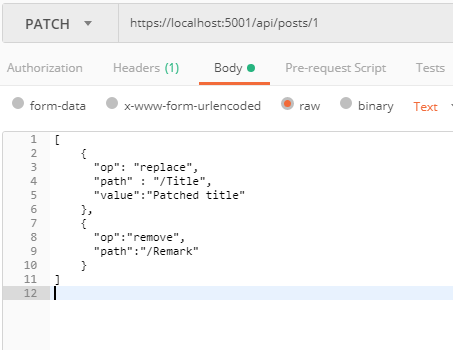
3、测试
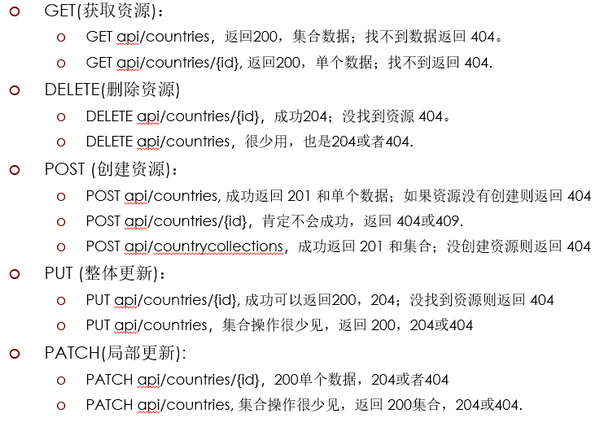
六、HTTP常用方法总结
ASP NET Core ---POST, PUT, PATCH, DELETE,Model 验证的更多相关文章
- 008.Adding a model to an ASP.NET Core MVC app --【在 asp.net core mvc 中添加一个model (模型)】
Adding a model to an ASP.NET Core MVC app在 asp.net core mvc 中添加一个model (模型)2017-3-30 8 分钟阅读时长 本文内容1. ...
- 创建ASP.NET Core MVC应用程序(6)-添加验证
创建ASP.NET Core MVC应用程序(6)-添加验证 DRY原则 DRY("Don't Repeat Yourself")是MVC的设计原则之一.ASP.NET MVC鼓励 ...
- ASP.NET MVC基于标注特性的Model验证:将ValidationAttribute应用到参数上
原文:ASP.NET MVC基于标注特性的Model验证:将ValidationAttribute应用到参数上 ASP.NET MVC默认采用基于标准特性的Model验证机制,但是只有应用在Model ...
- ASP.NET MVC基于标注特性的Model验证:一个Model,多种验证规则
原文:ASP.NET MVC基于标注特性的Model验证:一个Model,多种验证规则 对于Model验证,理想的设计应该是场景驱动的,而不是Model(类型)驱动的,也就是对于同一个Model对象, ...
- 如何为ASP.NET Core设置客户端IP白名单验证
原文链接:Client IP safelist for ASP.NET Core 作者:Damien Bowden and Tom Dykstra 译者:Lamond Lu 本篇博文中展示了如何在AS ...
- Asp.net Core, 基于 claims 实现权限验证 - 引导篇
什么是Claims? 这个直接阅读其他大神些的文章吧,解释得更好. 相关文章阅读: http://www.cnblogs.com/JustRun1983/p/4708176.html http://w ...
- 【ASP.NET Core】JSON Patch 使用简述
JSON Patch 是啥玩意儿?不知道,直接翻译吧,就叫它“Json 补丁”吧.干吗用的呢?当然是用来修改 JSON 文档的了.那咋修改呢?比较常见有四大操作:AMRR. 咋解释呢? A—— Add ...
- Asp.Net Core 入门(四)—— Model、View、Controller
和我们学习Asp.Net MVC一样,Asp.Net Core MVC的Model.View.Controller也和我们熟悉的Asp.Net MVC中的相似.不同的是我们在使用Asp.Net Cor ...
- ASP.NET Core MVC 之模型(Model)
1.模型绑定 ASP.NET Core MVC 中的模型绑定将数据从HTTP请求映射到操作方法参数.参数既可以是简单类型,也可以是复杂类型.MVC 通过抽象绑定解决了这个问题. 2.使用模型绑定 当 ...
随机推荐
- 【洛谷P1039】侦探推理
侦探推理 题目链接 这是一道恶心至极的模拟题 我们可以枚举罪犯是谁,今天是星期几,从而判断每个人说的话是真是假 若每个人说的话的真假一致,且说谎话的人数<=k且说真话的人数<=m-k,就是 ...
- Code First 一
Code-First和我们的数据库优先方式是相反的,数据库优先是通过数据库映射出相应的类和上下文,Code-First测试通过创建的类和上下文得到相应的数据库. Code-First主要用于领域驱动设 ...
- AngularJS 控制器函数
<!DOCTYPE html><html><head><meta http-equiv="Content-Type" content=&q ...
- 数据库——MySQL
MySQL是一个关系型数据库管理系统,是一个基于socket编写的C/S架构的软件. mysql服务端软件即mysqld帮我们管理好文件夹以及文件,前提是作为使用者的我们,需要下载mysql的客户端, ...
- Vue nodejs商城项目- 前后端数据传递
.利用Mongoose查询MongoDB 通过mongoose插件可以简捷地从mondodb中获取数据,首先安装mongoose: cnpm install mongoose --save 使用m ...
- Oracle 11g行字段拼接WMSYS.WM_CONCAT问题Not A LOB
Oracle 11g行字段拼接WMSYS.WM_CONCAT问题Not A LOB 一.问题出现 项目中的某个查询需要将表中某个字段不重复地拼接起来,百度得到该函数WMSYS.WM_CONCAT(字段 ...
- python之selectors
selectors是select模块的包装器,ptython文档建议大部分情况使用selectors而不是直接使用selectors 样例代码如下 # -*- coding: utf-8 -*- __ ...
- iOS之网络请求及各类错误代码含义总结(包含AFN错误码大全)
转自http://blog.csdn.net/wangyanchang21/article/details/50932191 在很多时候都会遇到错误, 还会带有一些 Error Code , 比如在各 ...
- JavaScript中BOM的基础知识总结
一.什么是BOM BOM(Browser Object Model)即浏览器对象模型. BOM提供了独立于内容 而与浏览器窗口进行交互的对象: 由于BOM主要用于管理窗口 ...
- 滑动窗口(poj,线段树维护区间最值)
题目描述 现在有一堆数字共N个数字(N<=10^6),以及一个大小为k的窗口.现在这个从左边开始向右滑动,每次滑动一个单位,求出每次滑动后窗口中的最大值和最小值. 例如: The array i ...