
OFFICE_EXCEL_Combine text from two or more cells into one cell.
Combine text from two or more cells into one cell
You can combine text from two or more cells into one cell. For example, if you have one cell in your worksheet with a person’s first name and one cell with their last name, you can combine them in another cell. In this topic, we'll discuss several different methods for doing this.
Flash Fill
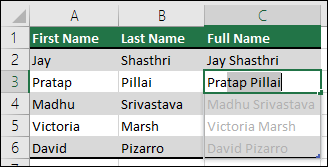
If you have a lot of rows of data where you want to combine text, you don’t have to repeat the above procedure for every row. For example, if column A contains peoples’ first names and column B has all their last names, and you want to fill column C with all their first and last names combined, you can simply start typing the combined text in column C and Excel will fill in the rest for you.
Click the cell where you want to put the first set of combined text.
Type the combined text.
Press ENTER.
Type the next set of combined text. Excel will show you a preview of the rest of the column filled in with your combined text.
To accept the preview, press ENTER.
Note: Flash Fill is only available for Excel 2013 for Windows and later.
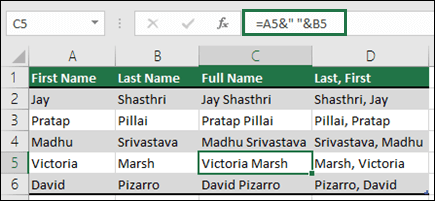
Using the Ampersand symbol, which you can enter with Shift+7, is the simplest way of joining cell contents. In the following example, we'll use =A2&" "&B2 to join first and last names.
Click the cell where you want to put the combined text.
Type =, then click the cell that contains the first text you want to combine, such as a person’s first name.
Type &” “& (a space enclosed in quotation marks).
Click the next cell with the text that you want to combine, such as the person’s last name, then press Enter.
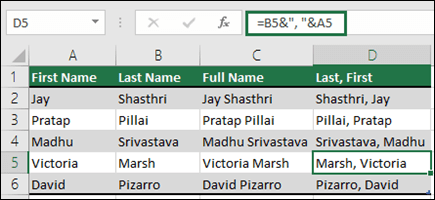
Tip: To combine the text from more than two cells, continue selecting cells, and typing &” “& after each cell you select. If you don’t want to add a space between the combined text, type & instead of &” “&. To add a comma, type &”, “& (a comma followed by a space, both enclosed in quotation marks).
Instead of using the Ampersand (&), you can use the CONCAT function.
Example
The example may be easier to understand if you copy it to a blank worksheet.
Select the text in the example, starting with “First name” and ending with the phone number in the last row.
Press Ctrl+C to copy the text.
In a blank worksheet, select cell A1, and press Ctrl+V.
|
First name |
Last name |
Phone |
|
|---|---|---|---|
|
Steve |
Riley |
555-1875 ext. 2007 |
|
|
Terry |
Adams |
555-2306 |
|
|
Jim |
Hance |
555-1896 |
|
|
Wendy |
Wheeler |
555-2307 ext. 705 |
|
|
Function |
=CONCAT(A2," ",B2," ",C2) |
||
|
Result: |
Steve Riley 555-1875 ext. 2007 |
The formula in the Function column of the preceding example table uses the CONCAT function to combine the contents of three cells in columns A, B, and C. In the function, you separate the cells or strings that you want combined by commas. To add a space between the strings, include a space enclosed in quotation marks (" "). If you look at the CONCAT function in the formula, you’ll see that the contents of A2 are combined with a space, the contents of B2, another space, and the contents of C2.
After you paste the example into your worksheet, drag the formula in D2 down to cells D3:D5 to combine the contents of those cells.
Note: Some browsers put an apostrophe (') in front of copied formulas, which makes Excel see them as text. If the formula displays as text instead of the result after you paste it, select the formula cell, then press F2, delete the apostrophe and press Enter.
Here’s a similar example that uses the CHAR function to insert a new line. These results are better suited for a mailing label.
|
First name |
Last name |
Street address |
City |
State |
Zip code |
|---|---|---|---|---|---|
|
Steve |
Riley |
4567 Main St. |
Buffalo |
NY |
98052 |
|
Function: |
=CONCAT("The ",B2," Family",CHAR(10),C2,CHAR(10),D2,", ",E2," ",F2) |
||||
|
Description: |
Combines the last name with the words "The" and "Family" and then combines the address with it. CHAR(10) is used to insert a new line. You will need to set the cells to wrap text for the new line to display properly. |
||||
|
Result: |
The Riley Family |
Need more help?
You can always ask an expert in the Excel Tech Community, get support in the Answers community, or suggest a new feature or improvement on Excel User Voice.
See Also
Find and correct errors in formulas
Excel keyboard shortcuts and function keys
OFFICE_EXCEL_Combine text from two or more cells into one cell.的更多相关文章
- C# WinForm 导出导入Excel/Doc 完整实例教程[使用Aspose.Cells.dll]
[csharp] view plain copy 1.添加引用: Aspose.Cells.dll(我们就叫工具包吧,可以从网上下载.关于它的操作我在“Aspose.Cells操作说明 中文版 下载 ...
- NPOI、MyXls、Aspose.Cells 导入导出Excel(转)
Excel导入及导出问题产生: 从接触.net到现在一直在维护一个DataTable导s出到Excel的类,时不时还会维护一个导入类.以下是时不时就会出现的问题: 导出问题: 如果是asp.net,你 ...
- (转)Aspone.Cells设置Cell数据格式 Setting Display Formats of Numbers and Dates
Setting Display Formats Using Microsoft Excel: Right-click on any desired cell and select Format Cel ...
- C# WinForm使用Aspose.Cells.dll 导出导入Excel/Doc 完整实例教程
1.添加引用: Aspose.Cells.dll(我们就叫工具包吧,可以从网上下载.关于它的操作我在“Aspose.Cells操作说明 中文版 下载 Aspose C# 导出Excel 实例”一文中的 ...
- iOS:通过Self-Sizing Cells新特性自动计算cell的高度
iOS8 新特性Self-Sizing Cells,自动计算cell的高度 一.简单介绍 UITableView是iOS开发最常用的一个控件,通过代理和数据源方法,几乎能实现各种各样的列表功能.在这里 ...
- Table View Programming Guide for iOS---(六)---A Closer Look at Table View Cells
A Closer Look at Table View Cells A table view uses cell objects to draw its visible rows and then c ...
- 利用Aspose.cells 将查询出的数据导出为excel,并在浏览器中下载。
正题前的唠叨 本人是才出来工作不久的小白菜一颗,技术很一般,总是会有遇到一些很简单的问题却不知道怎么做,这些问题可能是之前解决过的.发现这个问题,想着提升一下自己的技术水平,将一些学的新的‘好’东西记 ...
- 对Aspose.Cells Excel文件操作的扩展
工作中对Excel操作的需求很是常见,今天其他项目组的同事在进行Excel数据导入时,使用Aspose.Cells Excel 遇到了些问题. 刚好闲来不忙,回想自己用过的Excel文件操作,有NPO ...
- iOS UITableView 与 UITableViewController
很多应用都会在界面中使用某种列表控件:用户可以选中.删除或重新排列列表中的项目.这些控件其实都是UITableView 对象,可以用来显示一组对象,例如,用户地址薄中的一组人名.项目地址. UITab ...
随机推荐
- POJ_2480 Longge's problem【积性函数+欧拉函数的理解与应用】
题目: Longge is good at mathematics and he likes to think about hard mathematical problems which will ...
- Covering(矩阵快速幂)
Bob's school has a big playground, boys and girls always play games here after school. To protect b ...
- python-Generalization of Hops
python provides a general purpose HOP,map simple form-a unary function and a collection of suitable ...
- vue项目用webpack打包后跨域问题
在app.js的最开始加上 app.all('*', (req, res, next) => { res.header("Access-Control-Allow-Origin&quo ...
- Element UI 中国省市区级联数据
https://www.npmjs.com/package/element-china-area-data
- Oracle RAC集群添加节点
一,节点环境 所有节点分发/etc/hosts,这里我添加两个节点,一个是上次删除的节点,另一个是什么都没有的节点,尝试添加 服务器介绍什么的都在这hosts文件了,大家自己琢磨下 [grid@nod ...
- storm中KafkaSpout的选择
Storm最常用的消息源就是Kafka,在对接的时候大多需要使用KafkaSpout: 在网上大概有两种KafkaSpout,一种是只有几十行,一种却有一大啪啦类文件. 在kafka中,同一个part ...
- python 生成、删除、拷贝目录
1. 生成目录 函数原型:distutils.dir_util.mkpath(name[, mode=0777, verbose=0, dry_run=0]) from distutils impor ...
- Java根据byte数组,生成文件
原文出自:https://blog.csdn.net/seesun2012 根据byte数组,生成文件 自己写的小案例,找个地方记录一下 package com.seesun2012.utils; i ...
- Log4j和Slf4j的比较
简单日记门面(simple logging Facade for java)SLF4J是为各种loging APIs提供一个简单统一的接口,从而使得最终用户能够在部署的时候配置自己希 望的loging ...