
问题:Excel在“xxx.xlsx”中发现不可读取的内容。是否恢复此工作薄的内容?【原创】
现象:

点"是(Y)"

提示信息中提到的error242440_02.xml文件:

问题重现:

package poi;

import java.io.FileNotFoundException;

import java.io.FileOutputStream;

import java.io.IOException;

import java.io.OutputStream;

import org.apache.poi.ss.usermodel.Cell;

import org.apache.poi.ss.usermodel.Row;

import org.apache.poi.ss.usermodel.Sheet;

import org.apache.poi.ss.util.CellRangeAddress;

import org.apache.poi.xssf.usermodel.XSSFWorkbook;

public class FoundUnreadRecord {

    public static void main(String[] args) throws IOException {

        int rowNum = 1;

        createExcel_Reference(rowNum);

        createExcel_WithTips(rowNum);

        rowNum = 0;

        createExcel_Reference(rowNum);

        createExcel_WithTips(rowNum);

    }

    private static void createExcel_Reference(int rowNum) throws FileNotFoundException,

            IOException {

        String fileName = "UnreadRecordTips_Reference"+rowNum+".xlsx";

        XSSFWorkbook wb = new XSSFWorkbook();

        Sheet sheet = wb.createSheet("UnreadRecordTips");

        for (int i = 0; i <= rowNum; i++) {

            Row row = sheet.createRow(i);

            Cell cell = row.createCell(0);

            cell.setCellValue("test" + i);

        }

        write(fileName, wb);

    }

    private static void createExcel_WithTips(int rowNum) throws FileNotFoundException,

            IOException {

        String fileName = "UnreadRecordTips"+rowNum+".xlsx";;

        XSSFWorkbook wb = new XSSFWorkbook();

        Sheet sheet = wb.createSheet("UnreadRecordTips");

        for (int i = 0; i <= rowNum; i++) {

            Row row = sheet.createRow(i);

            Cell cell = row.createCell(0);

            cell.setCellValue("test" + i);

            sheet.addMergedRegion(new CellRangeAddress(0, rowNum, 0, 0));

        }

        write(fileName, wb);

    }

    private static void write(String fileName, XSSFWorkbook wb)

            throws FileNotFoundException, IOException {

        OutputStream stream = new FileOutputStream(fileName);

        wb.write(stream);

        stream.close();

    }

}
package poi;

import java.io.FileInputStream;

import java.io.FileNotFoundException;

import java.io.FileOutputStream;

import java.io.IOException;

import java.io.InputStream;

import java.io.OutputStream;

import org.apache.poi.hssf.usermodel.HSSFWorkbook;

import org.apache.poi.ss.usermodel.Cell;

import org.apache.poi.ss.usermodel.Row;

import org.apache.poi.ss.usermodel.Sheet;

import org.apache.poi.ss.usermodel.Workbook;

import org.apache.poi.ss.util.CellRangeAddress;

import org.apache.poi.xssf.usermodel.XSSFWorkbook;

public class MergedRegionReadHiddenValue {

    private static final String sheetName="mergedRegion";

    public static void main(String[] args) throws IOException {

        Workbook wb;

        wb=new HSSFWorkbook();

        String fileName="mergedRegion.xls";

        createExcelWithMergedRegion(wb,fileName);

        InputStream s=new FileInputStream(fileName);

        wb=new HSSFWorkbook(s);

        travelSheet(wb, sheetName);

        s.close();

        System.out.println("xls End.=========================xlsx Begin");

        wb=new XSSFWorkbook();

        fileName="mergedRegion.xlsx";

        createExcelWithMergedRegion(wb,fileName);

        s=new FileInputStream(fileName);

        wb=new XSSFWorkbook(s);

        travelSheet(wb, sheetName);

        s.close();

    }

    private static void createExcelWithMergedRegion(Workbook wb,String fileName)

            throws FileNotFoundException, IOException {

        Sheet sheet=wb.createSheet(sheetName);

        int lastRowNum=2;

        for (int i=0;i<=lastRowNum;i++) {

            createRowFillValue(sheet,i);

        }

        sheet.addMergedRegion(new CellRangeAddress(0, lastRowNum, 0, 0));

        write(wb, fileName);

    }

    private static void travelSheet(Workbook wb, String sheetName) {

        Sheet sheet;

        sheet=wb.getSheet(sheetName);

        for (Row row : sheet) {

            System.out.println(row.getCell(0).getStringCellValue());

        }

    }

    private static void write(Workbook wb, String fileName)

            throws FileNotFoundException, IOException {

        OutputStream stream=new FileOutputStream(fileName);

        wb.write(stream);

        stream.close();

    }

    private static void createRowFillValue(Sheet sheet,int rowIdx) {

        Row row=sheet.createRow(rowIdx);

        Cell cell=row.createCell(0);

        cell.setCellValue("CellValue,"+rowIdx+",0");;

    }

}
OutPut:
CellValue,0,0

CellValue,1,0

CellValue,2,0

xls End.=========================xlsx Begin

CellValue,0,0

CellValue,1,0

CellValue,2,0
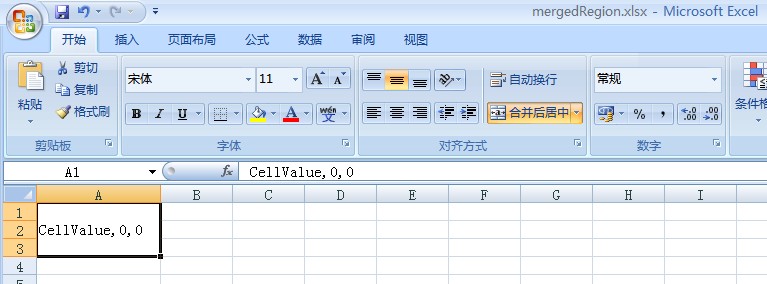
生成的Sheet内容示例:
问题:Excel在“xxx.xlsx”中发现不可读取的内容。是否恢复此工作薄的内容?【原创】的更多相关文章
- NPOI “发现 中的部分内容有问题,是否要恢复此工作薄的内容?如果信任此工作薄的来源。。。”的问题的解决方法
网上说的方法是调整Sheet可见和顺序:https://blog.csdn.net/hulihui/article/details/21196951 stackoverflow给出的解释是:单元格存储 ...
- Excel催化剂开源第10波-VSTO开发之用户配置数据与工作薄文件一同存储
在传统的VBA开发中,若是用的是普通加载项方法,是可以存储数据在xlam上的,若用的是Com加载项方法同时是Addins程序级别的项目开发的,配置文件没法保存到工作薄中,一般另外用配置文件来存放供调用 ...
- Excel VBA入门(九)操作工作薄
虽然我前面讲过,在VBA中操作工作薄并不是件明智的事,但有些时候,还是避免不了要这么做.绝大多数情况下,我们要做的是获取到某个工作薄对象,并以此来获得其中的工作表对象,然后再对工作表中的数据进行处理. ...
- Excel无法打开文件xxx.xlsx,因为文件格式或文件扩展名无效。请确定文件未损坏,并且文件扩展名与文件的格式匹配
office版本:2016 系统版本:win10 问题描述: 1.桌面新建excel表格后,打开时,提示“Excel无法打开文件xxx.xlsx,因为文件格式或文件扩展名无效.请确定文件未损坏,并且文 ...
- POI导出Excel发现不可读取的内容
环境说明:MyEclipse Tomcat7.0 通过后台查询数据,导出Excel在打开时会出现以下提示: 点击否,则不显示任何内容,点击是,弹出 查看修改记录为: 通过WPS打开不会出现任何提示,可 ...
- POI导出Excel(xls、xlsx均可以,也支持图片)——(三)
Jar包
- DataTable to Excel(使用NPOI、EPPlus将数据表中的数据读取到excel格式内存中)
/// <summary> /// DataTable to Excel(将数据表中的数据读取到excel格式内存中) /// </summary> /// <param ...
- 为Secure Store Service生成新密钥,解决“生成密钥过程中发现错误”的问题
我们集成TFS和SharePoint Server以后,一个最常见的需求是通过SharePoint Server的Excel Service读取TFS报表中的信息,利用Excel Service的强大 ...
- C#读取Excel显示到repeater中
首先需要一个用来存储我们需要显示的内容,防止页面回发丢失(添加时使用) #region 缓存文件 private DataTable excelData; /// <summary> // ...
随机推荐
- CodeForces 508C Anya and Ghosts 贪心
做不出题目,只能怪自己不认真 题目: Click here 题意: 给你3个数m,t,r分别表示鬼的数量,每只蜡烛持续燃烧的时间,每个鬼来时要至少亮着的蜡烛数量,接下来m个数分别表示每个鬼来的时间点( ...
- NHibernate变的简单
前言 这篇文章出自于我尝试学习使用Nhiberbnate的挫败感.我发现好像Nhibernate全部的介绍材料不是很模糊就是太详细.我所需要的就是一个简单直接的教程,能让我尽快对NHibernate熟 ...
- Spring IOC三种注入方式(接口注入、setter注入、构造器注入)(摘抄)
IOC ,全称 (Inverse Of Control) ,中文意思为:控制反转, Spring 框架的核心基于控制反转原理. 什么是控制反转?控制反转是一种将组件依赖关系的创建和管理置于程序外部的技 ...
- Hadoop实战实例
Hadoop实战实例 Hadoop实战实例 Hadoop 是Google MapReduce的一个Java实现.MapReduce是一种简化的分布式编程模式,让程序自动分布 ...
- WebFetch 是无依赖极简网页爬取组件
WebFetch 是无依赖极简网页爬取组件,能在移动设备上运行的微型爬虫. WebFetch 要达到的目标: 没有第三方依赖jar包 减少内存使用 提高CPU利用率 加快网络爬取速度 简洁明了的api ...
- guozhongCrawler的是一个无须配置、便于二次开发
guozhongCrawler的是一个无须配置.便于二次开发的爬虫开源框架,它提供简单灵活的API,只需少量代码即可实现一个爬虫.模块化设计完全 面向业务提供接口,功能覆盖整个爬虫的生命周期(链接提取 ...
- Java网络蜘蛛/网络爬虫 Spiderman
Spiderman - 又一个Java网络蜘蛛/爬虫 Spiderman 是一个基于微内核+插件式架构的网络蜘蛛,它的目标是通过简单的方法就能将复杂的目标网页信息抓取并解析为自己所需要的业务数据. 主 ...
- 【一】仿微信飞机大战cocos2d-x3.0rc1
參考 [偶尔e网事] 的 [cocos2d-x入门实战]微信飞机大战 cocos2dx 2.0版本号,偶尔e网事他写的很具体,面面俱到,大家很有必要看下.能够通过以下链接跳转: cocos2d-x入 ...
- sparkUI使用与扩展
http://www.jianshu.com/p/8e4c38d0c44e
- AOP编程
<?xml version="1.0" encoding="UTF-8"?> <beans xmlns="http://www.sp ...