
原生Javascript实现图片轮播效果
首先引入js运动框架
 function getStyle(obj,name){

         if(obj.currentStyle){

             return obj.currentStyle[name];

         } else{

             return getComputedStyle(obj,false)[name];

         }

     }

 function startMove(obj, json, fnEnd) {

     clearInterval(obj.timer);

     obj.timer = setInterval(function() {

         var bStop = true;

         for (var attr in json) {

             var cur = 0;

             if (attr == "opacity") {

                 cur = Math.round(parseFloat(getStyle(obj, attr)) * 100);

             } else {

                 cur = parseInt(getStyle(obj, attr))

             }

             var speed = (json[attr] - cur) / 10;

             speed = speed > 0 ? Math.ceil(speed) : Math.floor(speed);

             if (cur !== json[attr]) {

                 bStop = false;

             };

             if (attr == "opacity") {

                 obj.style.opacity = (speed + cur) / 100;

                 obj.style.filter = 'alpha(opacity:' + (speed + cur) + ')';

             } else {

                 obj.style[attr] = cur + speed + 'px';

             }

         }

         if (bStop) {

             clearInterval(obj.timer);

             if (fnEnd) fnEnd();

         }

     }, 30)

 }
然后写轮播小案例
 <!DOCTYPE html>

 <html lang="en">

 <head>

     <meta charset="UTF-8">

     <title>淘宝轮播</title>

     <style>

     ul,

     li {

         list-style: none;

         margin: 0;

         padding: 0;

     }

     #wrap {

         width: 400px;

         height: 225px;

         margin: 0 auto;

         position: relative;

         overflow: hidden;

     }

     li {

         float: left;

     }

     #tips li {

         margin: 5px;

         border: 1px solid #f60;

         width: 20px;

         height: 20px;

         line-height: 20px;

         text-align: center;

         color: white;

         cursor: pointer;

     }

     .active {

         background: #f60;

     }

     img {

         vertical-align: top;

         width: 400px;

     }

     #content {

         width: 2400px;

         position: absolute;

         left: -1200px;

     }

     #content li {

         float: left;

     }

     #tips {

         position: absolute;

         right: 20px;

         bottom: 5px;

     }

     </style>

 </head>

 <body>

     <div id="wrap">

         <ul id="content">

             <li><img src="img3/1.jpg" alt=""></li>

             <li><img src="img3/2.jpg" alt=""></li>

             <li><img src="img3/3.jpg" alt=""></li>

             <li><img src="img3/4.jpg" alt=""></li>

             <li><img src="img3/5.jpg" alt=""></li>

             <li><img src="img3/6.jpg" alt=""></li>

         </ul>

         <ul id="tips">

             <li>1</li>

             <li>2</li>

             <li>3</li>

             <li>4</li>

             <li>5</li>

         </ul>

     </div>

     <script src="move.js"></script>

     <script>

     var wrap = document.getElementById('wrap');

     var content = document.getElementById('content');

     var tips = document.getElementById('tips');

     var aLi = tips.getElementsByTagName('li');

     var now = 0;

     //var

     for (var i = 0; i < aLi.length; i++) {

         aLi[0].className = 'active';                //把初始状态定义好

         content.style.left = 0 +'px';

         aLi[i].index = i; //自定义属性

         aLi[i].onclick = function() {

             now = this.index;

             play();

         }

     }

     function play() {

         for (var j = 0; j < aLi.length; j++) {

             aLi[j].className = '';

         }

         aLi[now].className = 'active';

         //this.index = now;                         //反过来写就不对了大兄弟

         //content.style.left = -400 * this.index + 'px';

         startMove(content, {

             left: -400 * now, //你还真别说,json格式就是这么写的

         });

     }

     function autoPlay() {

         now++;

         if (now == aLi.length) {

             now = 0;

         }

         play();

     }

     var timer = setInterval(autoPlay, 2000);

     wrap.onmouseover = function(){                  //这里如果把事件绑定到ul上的话,那么鼠标移入,下面对饮的li会不起作用,

         clearInterval(timer);                       //因为li的层级比较高,所以应该把事件绑定到大的div上

     }

     wrap.onmouseout = function(){

         timer = setInterval(autoPlay,2000);

         //setInterval(autoPlay,2000);   不能这么写,凡是开的定时器,必须得赋值,要不然总会多开一个定时器,导致速度加快

     }

     </script>

 </body>

 </html>
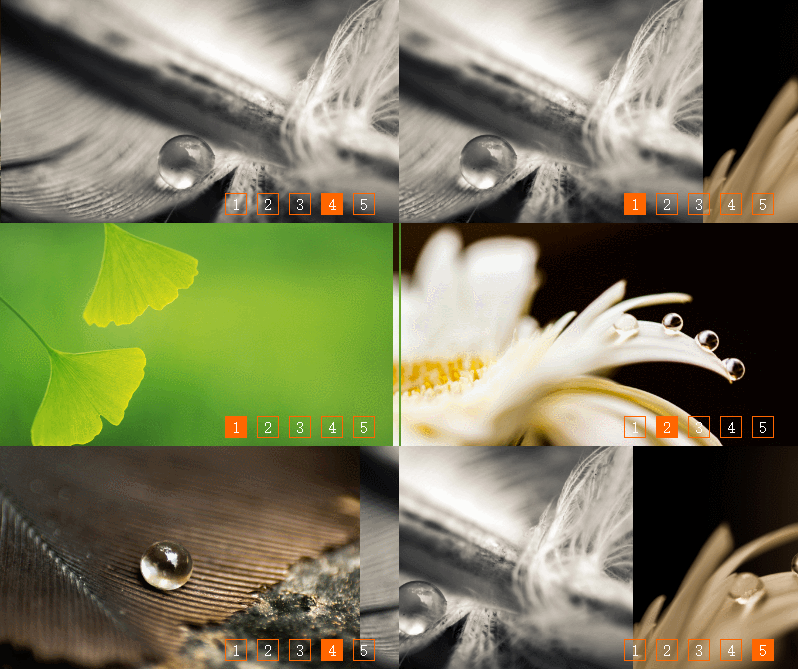
最终效果如下图,可实现鼠标翻页,鼠标悬停后停止轮播,
原生Javascript实现图片轮播效果的更多相关文章
- 原生js实现图片轮播效果
思路:设置父容器(一定宽度,一定高度,相对定位,子容器超出部分进行隐藏),子容器图片并排(浮动,绝对定位,每次点击进行相应的左或右偏移量) 1.html: <!DOCTYPE html> ...
- 超实用的JavaScript代码段 Item3 --图片轮播效果
图片轮播效果 图片尺寸 统一设置成:490*170px; 一.页面加载.获取整个容器.所有放数字索引的li及放图片列表的ul.定义放定时器的变量.存放当前索引的变量index 二.添加定时器,每隔2秒 ...
- jQuery个性化图片轮播效果
jQuery个性化图片轮播效果 购物产品展示:图片轮播器<效果如下所示> 思路说明: 每隔一段时间,实现图片的自动切换及选项卡选中效果,鼠标划入图片动画停止,划出或离开动画开始 两个区域: ...
- JQ 实现轮播图(3D旋转图片轮播效果)
轮播图效果如下: 代码: <!DOCTYPE html> <html xmlns="/www.w3.org/1999/xhtml"> <head> ...
- 原生js实现图片轮播思路分析
一.复习原生js实现图片轮播 1.要点 自动轮播 点击小圆圈按钮,显示相应图片 点击左右箭头,实现向前向后轮播图片 2.实现思路 <div id="container"> ...
- js图片轮播效果实现代码
首先给大家看一看js图片轮播效果,如下图 具体思路: 一.页面加载.获取整个容器.所有放数字索引的li及放图片列表的ul.定义放定时器的变量.存放当前索引的变量index 二.添加定时器,每隔2秒钟i ...
- CSS3图片轮播效果
原文:CSS3图片轮播效果 在网页中用到图片轮播效果,单纯的隐藏.显示,那再简单不过了,要有动画效果,如果是自己写的话(不用jquery等),可能要费点时间.css3的出现,让动画变得不再是问题,而且 ...
- js实现淘宝首页图片轮播效果
原文:http://ce.sysu.edu.cn/hope2008/Education/ShowArticle.asp?ArticleID=10585 <!DOCTYPE html> &l ...
- ios图片轮播效果
代码地址如下:http://www.demodashi.com/demo/11959.html ImageCarousel 简单封装的图片轮播器 内存过大由于我加载的图片分辨率较高(4k) 文件目录 ...
随机推荐
- silverlight visifire控件图表制作——silverlight 后台方法页面事件
1.返回事件 (1.返回silverlight页面,2.返回web页面) private void button_ClickBack(object sender, RoutedEventArgs e) ...
- iOS9TableView分割线默认不显示,只有滑动的时候才显示 解决办法
只有iOS9和iPhone6 plus模拟器上TableView分割线不会显示,后来终于找到了原因: 由于iPhone6 plus的分辨率较高,开发的时候同常都使用command + 3 或者 com ...
- 对arm指令集的疑惑,静态库运行,编译报错等问题
转载自http://www.jianshu.com/p/4a70aa03a4ea?utm_campaign=hugo&utm_medium=reader_share&utm_conte ...
- Struts2 技术全总结 (正在更新)
背景:Struts1是一个高度成熟的框架,运行效率高,但其致命缺陷在于与JSP/Servlet的耦合非常紧密,因而导致了一些严重问题.其次,Struts1与Servlet API的严重耦合,使应用难以 ...
- shell中的case表达式
语法格式 case var in pattern1 | patter2) command1 command2;; pattern3) command1 command2;; *) default co ...
- 【笔记】Unix 平台标准
POSIX 表示可移植操作系统接口(Portable Operating System Interface ,缩写为 POSIX ),POSIX标准定义了操作系统应该为应用程序提供的接口标准,是IEE ...
- python学习视频整理
python3英文视频教程(全87集) http://pan.baidu.com/s/1dDnGBvV python从入门到精通视频(全60集)链接:http://pan.baidu.com/s/1e ...
- Hough Transform直线检测
本文原创,如转载请注明出处. Hough Transform 是一种能提取图像中某种特定形状特征的方法,可以将其描述成一种把图像空间中的像素转换成Hough空间中直线或曲线的一种映射函数.通过利用Ho ...
- NSScanner-备
注意:在扫描的时候,如果 空格是不需要扫描的,那么将会忽略空格. 如下代码: 1 NSString *string = @"my age is d 23 34.0"; ...
- WINDOWS 2012忘记密码之后。。。
要使用windows server 2012安装DVD,选择光盘引导进入 进入修复系统 选择疑难解答,进入界面 选择命令提示符 切换目录至系统目录 执行move命令 执行 copy命令 重新启动系统, ...