
Winform mschart 动态绑定X时间表
效果图:
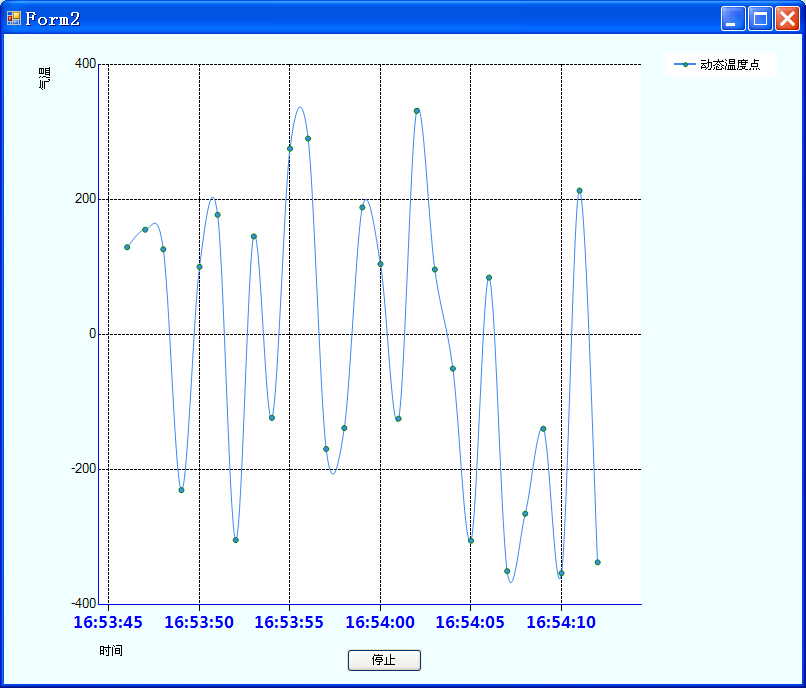
代码:
using System;

using System.Collections.Generic;

using System.ComponentModel;

using System.Data;

using System.Drawing;

using System.Text;

using System.Windows.Forms;

using System.Windows.Forms.DataVisualization.Charting;

using System.Threading;

//动态画图方式四 曲线压缩模式

namespace Krypton440Test

{

    public partial class Form2 : Form

    {

        static DateTime startTime = DateTime.Now.AddSeconds(-1);

        DateTime endTime = startTime.AddSeconds(6);

        DateTime kd = DateTime.Parse("00:00:01");

        Random rd = new Random();       //随机函数,产生Y轴数据

        DataTable dt = new DataTable(); //创建数据表,存储数据

        int flag = 0;   //设置Timer控件是否生效

        int i = 0;      //显示数据表中的数据行数

        private void timer1_Tick(object sender, EventArgs e)

        {

            DataRow dr = dt.NewRow();

            dr["XTime"] = DateTime.Now.ToString("HH:mm:ss");

            dr["YTemp"] = rd.Next(-360, 360);

            dt.Rows.Add(dr);

            #region 折线图

            mychart.DataSource = dt;//绑定数据

            mychart.Series["Series1"].ChartType = SeriesChartType.Spline;//设置图表类型

            mychart.Series["Series1"].IsValueShownAsLabel = false;//显示数据点的值

            mychart.Series["Series1"].BorderColor = Color.Green;

            mychart.Series["Series1"].LegendText ="动态温度点";

            mychart.Series["Series1"].MarkerStyle = MarkerStyle.Circle; //线条上的数据点标志类型

            i = dt.Rows.Count - 1;

            mychart.Series[0].Points.AddXY(Convert.ToDateTime(dt.Rows[i]["XTime"].ToString()).ToOADate(), Convert.ToDouble(dt.Rows[i]["YTemp"].ToString()));

            //X轴设置

            mychart.ChartAreas["ChartArea1"].AxisX.Title = "时间";//X轴标题

            mychart.ChartAreas["ChartArea1"].AxisX.TitleAlignment = StringAlignment.Near;//设置X轴标题的名称所在位置位近

            mychart.ChartAreas["ChartArea1"].AxisX.MajorTickMark.Enabled = true; //坐标轴上的刻度线

            mychart.ChartAreas["ChartArea1"].AxisX.MajorGrid.Enabled = true;//不显示竖着的分割线

            mychart.ChartAreas["ChartArea1"].AxisX.MajorGrid.LineDashStyle = ChartDashStyle.Dash;//主网格为虚线

            mychart.ChartAreas["ChartArea1"].AxisX.LineColor = Color.Blue; //X轴颜色

            this.mychart.ChartAreas["ChartArea1"].AxisX.IsMarksNextToAxis = true;

            this.mychart.ChartAreas["ChartArea1"].AxisX.LabelStyle.IsEndLabelVisible = true;//最后一个标签点显示

            //设置X轴字体类型、大小、颜色

            this.mychart.ChartAreas["ChartArea1"].AxisX.LabelStyle.Font = new System.Drawing.Font("微软雅黑", 12f, System.Drawing.FontStyle.Bold);

            this.mychart.ChartAreas["ChartArea1"].AxisX.LabelAutoFitMaxFontSize = 12;

            this.mychart.ChartAreas["ChartArea1"].AxisX.LabelStyle.ForeColor = Color.Blue;

            /************************************************************************/

            /* 本文重点讲解时间格式的设置

             * 但第一个点并不能保证在原点第一个时间坐标位置,与时间间隔跨度有关系

             * 需要设置最小时间,最大小时,时间间隔类型,时间间隔值等四个参数,以保证当前网络跨度内容显示6个主网络线*/

            /************************************************************************/

            mychart.Series["Series1"].XValueType = ChartValueType.DateTime;     //X轴标签为时间类型

            mychart.ChartAreas["ChartArea1"].AxisX.LabelStyle.Format = "HH:mm:ss";  //X轴上显示时、分、秒

            if (DateTime.Now.ToOADate() > endTime.ToOADate())

            {

                endTime = endTime.AddSeconds(6);//延长X时间轴

                //设置时间单位的最小、最大值

                this.mychart.ChartAreas["ChartArea1"].AxisX.Minimum = startTime.ToOADate();

                this.mychart.ChartAreas["ChartArea1"].AxisX.Maximum = endTime.ToOADate();

                //跨度为秒,间隔是通过最大时间与最小时间差相减除6所得,所以有6个间隔线

                this.mychart.ChartAreas["ChartArea1"].AxisX.IntervalType = DateTimeIntervalType.Seconds;

                TimeSpan jianGe = endTime - startTime;

                this.mychart.ChartAreas["ChartArea1"].AxisX.Interval = (jianGe.TotalSeconds) / 6;

            }

            //Y轴设置

            mychart.ChartAreas["ChartArea1"].AxisY.Title = "气温";//Y轴标题

            mychart.ChartAreas["ChartArea1"].AxisY.TitleAlignment = StringAlignment.Far;//设置Y轴标题的名称所在位置位远

            mychart.ChartAreas["ChartArea1"].AxisY.Interval = 200;

            mychart.ChartAreas["ChartArea1"].AxisY.Maximum = 400;

            mychart.ChartAreas["ChartArea1"].AxisY.Minimum = -400;

            mychart.ChartAreas["ChartArea1"].AxisY.MajorTickMark.Enabled = false;//坐标轴上的刻度线,为false时少了小横杆线

            mychart.ChartAreas["ChartArea1"].AxisY.MajorGrid.LineDashStyle = ChartDashStyle.Dash;

            mychart.ChartAreas["ChartArea1"].AxisY.LineColor = Color.Blue;

            #endregion

        }

        public Form2()

        {

            InitializeComponent();

        }

        private void Form2_Load(object sender, EventArgs e)

        {

            //清空原来数据缓存

            mychart.Series["Series1"].Points.Clear();

            //设置Chart大小

            mychart.Width = Width - 100;

            mychart.Height = Height - 100;

            mychart.BackColor = Color.Azure;

            dt.Columns.Add("XTime", System.Type.GetType("System.String"));

            dt.Columns.Add("YTemp", System.Type.GetType("System.String"));

        }

        private void button1_Click(object sender, EventArgs e)

        {

            if (flag % 2 == 0)

            {

                timer1.Enabled = false;

            }

            else

            {

                timer1.Enabled = true;

            }

            flag++;

        }

    }

}
Winform mschart 动态绑定X时间表的更多相关文章
- C#中ComboBox动态绑定赋值
http://www.crifan.com/csharp_combobox_data_dynamic_binding/ C#中,已有一个List,想要动态的,绑定到ComboBox中. [解决过程] ...
- C# WinForm动态添加MSChart控件
添加mschart.dll动态链接库 添加引用 System.Windows.Forms.DataVisualization MSChart控件作为方便的用户数据展示控件,可以方便的使用控件提 ...
- winform 的 checklistbox动态绑定并选中值
绑定的代码:这里绑定的是一个泛型 BLL.PowerBLL powerbll = new BLL.PowerBLL(); checkpower.DataSource = powerbll.GetAll ...
- Winform中的Treeview动态绑定数据库
http://bbs.csdn.net/topics/370139193 SQL code ? 1 2 3 4 5 6 CREATE TABLE [dbo].[Company] ( [Id ...
- Asp.net之MsChart控件动态绑定温度曲线图
<div> <div style="position: absolute; z-index: 200; background-color: #FFFFFF; height: ...
- 【基于WinForm+Access局域网共享数据库的项目总结】之篇二:WinForm开发扇形图统计和Excel数据导出
篇一:WinForm开发总体概述与技术实现 篇二:WinForm开发扇形图统计和Excel数据导出 篇三:Access远程连接数据库和窗体打包部署 [小记]:最近基于WinForm+Access数据库 ...
- WinForm轻松实现自定义分页 (转载)
转载至http://xuzhihong1987.blog.163.com/blog/static/267315872011315114240140/ 以前都是做web开发,最近接触了下WinForm, ...
- Winform开发框架之客户关系管理系统(CRM)的报价单和销售单的处理
在前面介绍了很多CRM相关的界面和实现思路的随笔文章,本篇继续介绍一下系统中用到的一些经验和技巧片段.本篇随笔主要介绍客户关系管理系统(CRM)的报价单和销售单的处理界面效果,使用列表内置的选择代替弹 ...
- Winform开发框架的重要特性总结
从事Winform开发框架的研究和推广,也做了有几个年头了,从最初的项目雏形到目前各种重要特性的加入完善,是经过了很多项目的总结归纳和升华,有些则是根据客户需要或者应用前景的需要进行的完善,整个Win ...
随机推荐
- curl+个人证书(又叫客户端证书)访问https站点
摘自http://blog.csdn.net/chary8088/article/details/22990741 curl+个人证书(又叫客户端证书)访问https站点 目前,大公司的OA管理系统( ...
- iOS 四种延时的方法
- (void)initBlock{ //延时的方法 //1:GCD延时 此方式在能够在參数中选择运行的线程. 是一种非堵塞的运行方式,没有找到取消运行的方法. double ...
- C# 获取网站的 IIS 站点名称 ,获取站点当前连接数
System.Web.Hosting.HostingEnvironment.ApplicationHost.GetSiteName(); System.Management.ManagementObj ...
- Django学习笔记(三)—— 型号 model
疯狂暑期学习 Django学习笔记(三)-- 型号 model 參考:<The Django Book> 第5章 1.setting.py 配置 DATABASES = { 'defaul ...
- Java内存泄漏分析与解决方案
Java内存泄漏是每个Java程序员都会遇到的问题,程序在本地运行一切正常,可是布署到远端就会出现内存无限制的增长,最后系统瘫痪,那么如何最快最好的检测程序的稳定性,防止系统崩盘,作者用自已的亲身经历 ...
- ASP.NET怎么防止多次点击提交按钮重复提交
今天做一个系统,由于服务器有点慢,所以常会被点击两次或三次,提交的数据就是多次了.所以要让按钮点击后,不能再次点击. 对于一个按钮,要让变成恢色的,只要this.disabled=true就可以了,可 ...
- Linux 安装Nginx详细图解教程
进入:/usr/java/nginx位置 下载nginx: wget http://nginx.org/download/nginx-1.8.0.tar.gz 下载openssl : wget htt ...
- 使用cvReleaseImage()释放图像出错
前几天用opencv写程序的时候,在用cvReleaseImage()函数释放cvLoadImage()加载的图像的时候出错,如下所示: IplImage *src = cvLoadImage(fil ...
- grep 和 perl多个条件匹配
grep和perl多个条件匹配使用‘|’作为分割符号 grep -E 'abc|def' perl if(/abc|def/)
- css3波浪形loading动画
css3做个第一个动画,主要点在box-shadow和background的变化,虽然不难,但是还是有一定的技巧性的!备注下 html <div class="loading" ...