
android之字体阴影效果
今天刚刚好做了个字体阴影的效果,感觉加上了阴影的效果立体感十足啊!写了个简单的demo与大家分享下!
主要是以下四个属性
android:shadowColor 阴影的颜色
android:shadowDx 横向阴影,其值负数是往左,正数是往右
android:shadowDy 竖直方向,其值负数是往左,正数是往右
android:shadowRadius 阴影的半径
代码如下:
代码:
<LinearLayout xmlns:android="http://schemas.android.com/apk/res/android"
    xmlns:tools="http://schemas.android.com/tools"
    android:layout_width="match_parent"
    android:layout_height="match_parent"
    android:orientation="vertical">
<TextView
android:layout_width="wrap_content"
android:layout_height="wrap_content"
android:shadowColor="#40000000"
android:shadowDx="0"
android:shadowDy="8"
android:shadowRadius="1"
android:layout_margin="20dip"
android:text="底部阴影效果"
android:textSize="20sp"/>
<TextView
android:layout_width="wrap_content"
android:layout_height="wrap_content"
android:shadowColor="#40000000"
android:shadowDx="0"
android:shadowDy="-5"
android:shadowRadius="1"
android:layout_margin="20dip"
android:text="顶部阴影"
android:textSize="20sp"/>
<TextView
android:layout_width="wrap_content"
android:layout_height="wrap_content"
android:shadowColor="#40000000"
android:shadowDx="-5"
android:shadowDy="0"
android:shadowRadius="1"
android:layout_margin="20dip"
android:text="左侧阴影"
android:textSize="20sp"/>
<TextView
android:layout_width="wrap_content"
android:layout_height="wrap_content"
android:shadowColor="#40000000"
android:shadowDx="5"
android:shadowDy="0"
android:shadowRadius="1"
android:layout_margin="20dip"
android:text="右侧阴影"
android:textSize="20sp"/>
<TextView
android:layout_width="wrap_content"
android:layout_height="wrap_content"
android:shadowColor="#40000000"
android:shadowDx="5"
android:shadowDy="5"
android:shadowRadius="1"
android:layout_margin="20dip"
android:text="右下侧阴影"
android:textSize="20sp"/>
</LinearLayout>
效果图如下: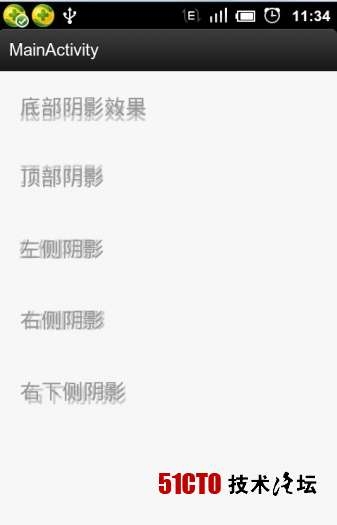
android之字体阴影效果的更多相关文章
- Android 修改字体,跳不过的 Typeface
序 在 Android 下使用自定义字体已经是一个比较常见的需求了,最近也做了个比较深入的研究. 那么按照惯例我又要出个一篇有关 Android 修改字体相关的文章,但是写下来发现内容还挺多的,所以我 ...
- 通过使用CSS字体阴影效果解决hover图片时显示文字看不清的问题
1.前言 最近需要加入一个小功能,在鼠标越过图片时,提示其大小和分辨率,而不想用增加属性title来提醒,不够好看.然而发现如果文字是一种颜色,然后总有概率碰到那张图上浮一层的文字会看不到,所以加入文 ...
- android textview字体加粗 Android studio最新水平居中和垂直居中
android textview字体加粗 Android studio最新水平居中和垂直居中 Android中字体加粗在xml文件中使用android:textStyle=”bold”但是不能将中文设 ...
- Android系统字体规范
我们在做Android移动APP设计的时候,字号的选择也是很让人头疼,转载一份有关Android系统字体规范,如果在做Android项目的用户应该看看,如果有任何建议欢迎在留言处与我们交流探讨. 主要 ...
- Android 中文字体的设置方法和使用技巧
Android TextView字体颜色等样式具体解释连接:http://blog.csdn.net/pcaxb/article/details/47341249 1.使用字体库(自己定义字体的使用) ...
- Android TextView加上阴影效果
<TextView android:id="@+id/test_shadow" android:layout_width="wrap_content" a ...
- Android 旋转字体 实现(应用角标,如:新,火等关键字)
在安卓应用中常见应用图标,或者gridview ,listview每个条目上有新,火,等45度旋转的字体,然后一个红色背景,引起用户关注,来一下实现方式: 自定义一个textview,绘制字体的时候, ...
- 【转载】深度解析Android中字体设置
原文:http://mobile.51cto.com/android-265238.htm 1.在Android XML文件中设置字体 可以采用Android:typeface,例如android:t ...
- 怎样改动android系统字体大小
改动字体大小的方法是运用到一个ActivityManagerNative类 首先先在代码宣告 private Configuration mconfig = new Configuration(); ...
随机推荐
- POJ1502
#include <iostream> #include <cstdio> #include <algorithm> #include <climits> ...
- RecycleView 滑动到底部,加载更多
android.support.v7 包提供了一个新的组件:RecycleView,用以提供一个灵活的列表试图.显示大型数据集,它支持局部刷新.显示动画等功能,可以用来取代ListView与GridV ...
- PHP set_error_handler() 函数
定义和用法 set_error_handler() 函数设置用户自定义的错误处理函数. 该函数用于创建运行时期间的用户自己的错误处理方法. 该函数会返回旧的错误处理程序,若失败,则返回 null. 语 ...
- hdu4976 贪心+dp
A simple greedy problem. Time Limit: 2000/1000 MS (Java/Others) Memory Limit: 65536/65536 K (Java ...
- linux打包/解压-tar
tar命令: 压缩: tar -zcvf 打包的文件名.tar.gz 打包的文件 解压: tar -zxvf 要压缩的文件名.tar.gz
- Phpcms V9全站伪静态设置方法
为什么要伪静态?具体在这里就不说了,你懂的!一方面更新修改后不需要生成静态文件,另一方面为了SEO! 访问规则如下 1 2 list-{$catid}-{$page}.html content-{$c ...
- php经典面试题
1. 用PHP打印出前一天的时间,打印格式是2007年5月10日 22:21:21 2. PHP代码如下:$a="hello"; $b=&$a;unset($b);$b=& ...
- thrift的简单实现
1.使用windows实现,首先在apache官网下载一个thrift的编译工具,在项目中建一个文件叫add.thrift的文件,内容如下: namespace java com.vipshop.sa ...
- Spark保存到HDFS或本地文件相关问题
spark中saveAsTextFile如何最终生成一个文件 http://www.lxway.com/641062624.htm 一般而言,saveAsTextFile会按照执行task的多少生成多 ...
- 关于GestureDetector.OnGestureListener的onScroll参数distance问题
关于GestureDetector.OnGestureListener类的onScroll方法参数distanceX和distanceY问题 看到有文章上说onScroll方法中distanceX和d ...