
What is a good EPUB reader on Linux
If the habit on reading books on electronic tablets is still on its way, reading books on a computer is even rarer. It is hard enough to focus on the classics of the 16th century literature, so who needs the Facebook chat pop up sound in the background in addition? But if for some reasons you wish to open an electronic book in your computer, chances are that you will need specific software. Indeed, most editors agreed with using the EPUB format for electronic books (for "Electronic PUBlication"). Hopefully, Linux is not deprived of good programs capable of dealing with such format. In short, here is a non-exhaustive list of good EPUB readers on Linux.
1. Calibre
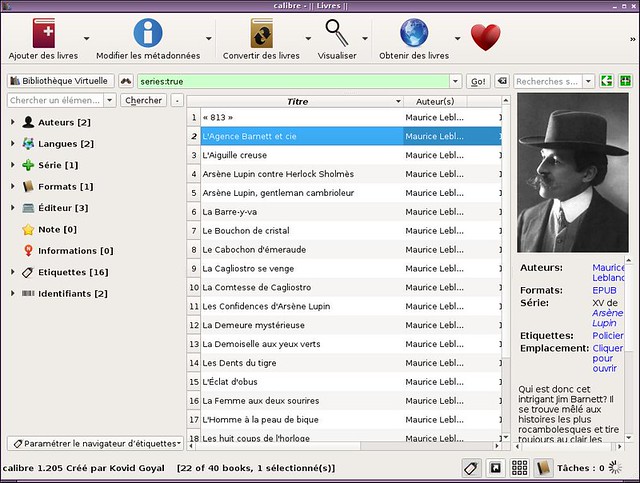
Let's dive in with maybe the biggest name of that list:Calibre. More than just an ebook reader, Calibre is a fully packaged e-library. It supports a plethora of formats (almost every I can think of), integrates a reader, a manager, a meta-data editor which can download covers from the Internet, an EPUB editor, a news reader, and a search engine to download additional books. To top it all, the interface is slick and has nothing to envy to other professional software. The only potential downside is that if you are looking for an EPUB reader, and are not interested in the whole library manager aspect, the program is too heavy for your needs.
2. FBReader
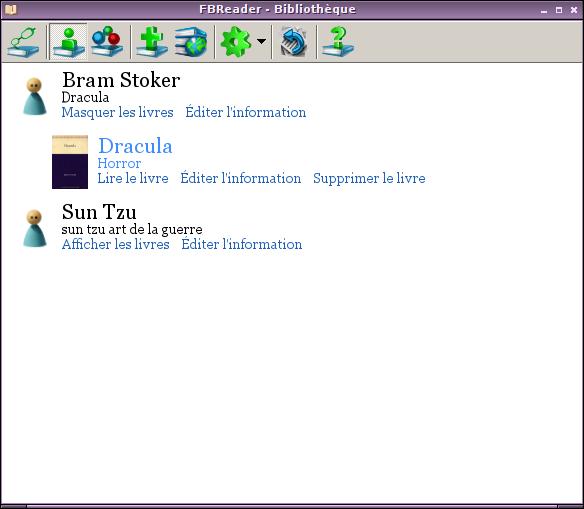
FBReader is also a library manager, but in a lighter way than Calibre. The interface is more sober, and is clearly cut in two: (1) the library aspect where you can add files, edit the meta-data, or download new books, and (2) the reader aspect. If you like simplicity, you might enjoy this program. I personally appreciate its straightforward tag and series system for classifying books.
3. Cool Reader

For all of you who are just looking for a way to visualize the content of an EPUB file, I recommend Cool Reader. In the spirit of Linux applications which do only one thing and do it well, Cool Reader is optimized to just open an EPUB file, and navigate through it via handy shortcuts. And since it is based on Qt, it also follows Qt's mentality by giving a ton of settings to mess around with.
4. Okular

Since we were talking about Qt applications, one of KDE's main document viewer, Okular, also has the capacity to view EPUB files, once an EPUB library has been installed on the system. However, this is probably not a very good option if you are not a KDE user.
5. pPub

pPub is an old project that you can still find on Github. Its latest change seems to have been made two years ago. However, pPub is one of those programs that really deserve a second life. Written in Python and based on GTK3 and WebKit, pPub is lightweight and intuitive. The interface probably needs a little updating and is beyond sober, but the core is very good. It even supports JavaScript. So please, someone kick that up again.
6. epub
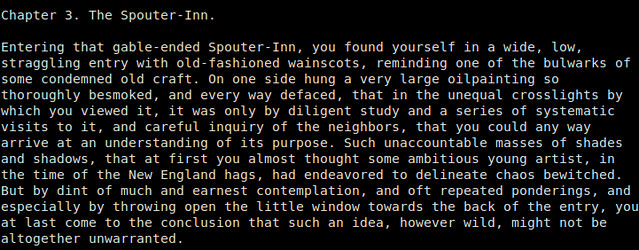
If all you need is a quick and easy way to check the content of an EPUB file, without caring about any fancy GUI, maybe an EPUB reader with command line interface might just do. epub is a minimalistic EPUB reader written in Python, which allows you to read an EPUB file in a terminal environment. You can switch between chapter/TOC views, up/down a page, and nothing more. This is as simple as any EPUB reader can possibly get.
7. Sigil
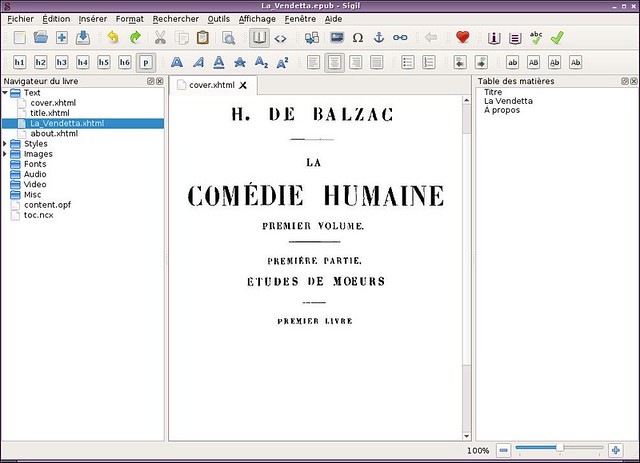
Finally, last of the list is not actually an EPUB reader, but more of a standalone editor. Sigil is able to extract the content of an EPUB file, and break it down for what it really is: xhtml text, images, styles, and sometimes audio. The interface is a lot more complex than the one for a basic reader, but remains clear and well thought, on par with the features it provides. I particularly appreciate the tab system. If you are familiar with editing web pages, you will be in know territory here.
To conclude, there are a lot of open source EPUB readers out there. Some do nothing more, while others go way beyond that. As usual, I recommend using the one that makes the most sense for you to use. If you know more good EPUB readers on Linux that you like, please let us know in the comments.
What is a good EPUB reader on Linux的更多相关文章
- Linux下pdf阅读器推荐
由于需要在pdf文件上做标记,所以自带的文档查看器根本满足了需求,之前去网上查了查,Okular评价挺高,就安装了一个,确实能基本满足我的需求,但是 1.界面感觉还是不太友好,书签栏一直在那. 2.而 ...
- LINUX命令总结 -------来自 水滴娃娃 的CSDN
LINUX命令总结 标签: LINUX命令总结 2014-01-27 15:54 41039人阅读 评论(1) 收藏 举报 分类: linux(1) 版权声明:本文为博主原创文章,未经博主允许不得 ...
- jsch ssh服务器调用Linux命令或脚本的小问题
代码如下: public static boolean execshell(String command, String user, String passwd, String host) throw ...
- 关于linux上pdf阅读器
今天也是倒腾linux 上pdf阅读器好久. 1.okular是挺好的,但是却太大了,好多功能,我没有细看.我简单的打开了几个pdf文件,发现加载速度还是太慢了.所以基于种种,我给卸载掉了. 安装直接 ...
- linux 命令总结(转载)
linux 命令总结(转载) 1. 永久更改ip ifconfig eth0 新ip 然后编辑/etc/sysconfig/network-scripts/ifcfg-eth0,修改ip 2.从Lin ...
- linux一句话问答(网络无关篇+网络相关篇+程序开发篇+经典图书)
一句话问答(网络无关篇+网络相关篇+程序开发篇+经典图书) --------------------------目录-网络无关篇-目录-------------------------- 0001 修 ...
- Linux 驱动开发
linux驱动开发总结(一) 基础性总结 1, linux驱动一般分为3大类: * 字符设备 * 块设备 * 网络设备 2, 开发环境构建: * 交叉工具链构建 * NFS和tftp服务器安装 3, ...
- linux精彩收集
----------------------------网络无关篇-------------------------- 0001 修改主机名(bjchenxu) vi /etc/sysconfig/n ...
- Ubuntu64位安装Adobe Reader 9.5.5
Aodbe Reader在Linux下的效果比Foxit Reader(福昕阅读器)要好一些,尤其对于中文文档而言.本文介绍Adobe Reader在Ubuntu下的安装,文章<Ubuntu12 ...
随机推荐
- C++数据类型简析
C++语言的基本数据类型有如下四种: 整型,说明符为int: 字符型,说明符为char: 浮点型(又称实型),说明符为float(单精度),double(双精度): 空值型,说明符为void,用于函数 ...
- jQuery 如何写插件 - 第一步
这篇文章引自iteye,是老帖子了~~ 国外优秀的文也有,今天就看这位仁兄的吧,写的很到位啊,通俗易懂. jQuery插件的开发包括两种: 一种是类级别的插件开发,即给jQuery添加新的全局函数,相 ...
- 黑马程序员-- C语言执行过程及注意点
通过对程序的逐步执行,了解C语言程序执行过程: 1.编写源文件即.c文件. #include <stdio.h> void play() { printf("hello worl ...
- MySQL 关闭子表的外键约束检察
准备: 定义一个教师表.一个学生表:在学生表中引用教师表ID create table teachers(teacherID int not null auto_increment primary k ...
- Linux cd命令
1: cd 不加任何参数,它会自动跳到用户的家目录中去! 2: ~ 表示用户的家目录 3: cd ~userNmae/ 这样可以进入指定用户的家目录中去! 4: cd - 跳到上一次所在的目 ...
- 设置cmd的codepage的方法
设置cmd的codepage的方法 有时候,我们的cmd.exe的codepage和字体等会变化,比如突然由中文变成英文的codepage(因为一些sh程序的干扰). 下面是修正方法: [HKEY_C ...
- linux 6.4平台利用rman迁移oracle 11g r2数据库
测试环境分别在虚拟机安装A,B主机 系统:linux 6.4, 数据库:oracle 11g r2 A主机:安装oracle 11g r2数据库 B主机:只安装oracle 11g r2软件 第一步, ...
- 《Orange'S:一个操作系统的实现》笔记(一)
感觉自己对于操作系统始终没有一个清楚的概念,尤其最近困扰于实模式.保护模式以及寻址方式等一些概念.转而一想,所有的程序,最终都是操作的计算机资源,需要和操作系统打交道,所以操作系统有必要深入了解一下. ...
- Java面试题之七
三十四.编码转换,怎样实现将GB2312 编码的字符串转换为ISO-8859-1 编码的字符串. String a=new String("中".getBytes("gb ...
- list-style:none outside none;的作用
今天在论坛里面看到一篇文章,讲的是以前忽略的一个问题.就是当ul里面有float和display:inline,在ie6.ie7里面会有一些问题.一般对ul进行reset也好,或是设置ul的样式时,往 ...