
使用fragment,Pad手机共用一套代码
项目代码结构:
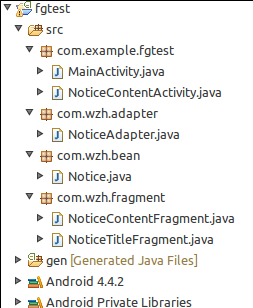
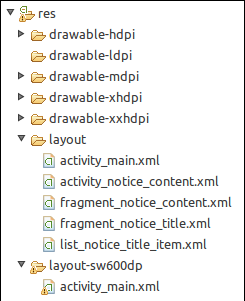
1:MainActivity.java
package com.example.fgtest;

import android.app.Activity;

import android.os.Bundle;

public class MainActivity extends Activity {

    @Override

    protected void onCreate(Bundle savedInstanceState) {

        super.onCreate(savedInstanceState);

        setContentView(R.layout.activity_main);

    }

}
layout/activity_main.xml
<?xml version="1.0" encoding="utf-8"?>

<LinearLayout xmlns:android="http://schemas.android.com/apk/res/android"

    android:layout_width="match_parent"

    android:layout_height="match_parent"

    android:orientation="vertical" >

    <fragment

        android:id="@+id/fgNoticeTitle"

        android:name="com.wzh.fragment.NoticeTitleFragment"

        android:layout_width="match_parent"

        android:layout_height="match_parent"/>

</LinearLayout>
layout-sw600dp/activity_main.xml
<?xml version="1.0" encoding="utf-8"?>

<LinearLayout xmlns:android="http://schemas.android.com/apk/res/android"

    android:layout_width="match_parent"

    android:layout_height="match_parent"

    android:orientation="horizontal" >

    <fragment

        android:id="@+id/fgNoticeTitle"

        android:name="com.wzh.fragment.NoticeTitleFragment"

        android:layout_width="0dp"

        android:layout_height="match_parent"

        android:layout_weight="1"/>

    <FrameLayout

        android:id="@+id/flNoticeContent"

        android:layout_width="0dp"

        android:layout_height="match_parent"

        android:layout_weight="3">

        <fragment

            android:id="@+id/fgNoticeContent"

            android:name="com.wzh.fragment.NoticeContentFragment"

            android:layout_width="match_parent"

            android:layout_height="match_parent"/>

    </FrameLayout>

</LinearLayout>
2:实体对象Notice.java
package com.wzh.bean;

public class Notice {

    private String title;

    private String content;

    public String getTitle() {

        return title;

    }

    public void setTitle(String title) {

        this.title = title;

    }

    public String getContent() {

        return content;

    }

    public void setContent(String content) {

        this.content = content;

    }

}
3:NoticeAdapter.java
package com.wzh.adapter;

import java.util.List;

import com.example.fgtest.R;

import com.wzh.bean.Notice;

import android.content.Context;

import android.view.LayoutInflater;

import android.view.View;

import android.view.ViewGroup;

import android.widget.ArrayAdapter;

import android.widget.TextView;

public class NoticeAdapter extends ArrayAdapter<Notice>{

    int resourceId;

    public NoticeAdapter(Context context, int resourceId, List<Notice> list){

        super(context, resourceId, list);

        this.resourceId = resourceId;

    }

    @Override

    public View getView(int position, View convertView, ViewGroup parent) {

        Notice notice = getItem(position);

        ViewHolder viewHolder;

        if(convertView==null){

            convertView = LayoutInflater.from(getContext()).inflate(this.resourceId, null);

            viewHolder = new ViewHolder();

            viewHolder.tvNoticeTitle = (TextView)convertView.findViewById(R.id.tvNoticeTitle);

            convertView.setTag(viewHolder);

        }else{

            viewHolder = (ViewHolder)convertView.getTag();

        }

     viewHolder.tvNoticeTitle.setText(notice.getTitle());

        return convertView;

    }

    class ViewHolder{

        TextView tvNoticeTitle;

    }

}
fragment_notice_content.xml
<?xml version="1.0" encoding="utf-8"?>

<LinearLayout xmlns:android="http://schemas.android.com/apk/res/android"

    android:layout_width="match_parent"

    android:layout_height="match_parent"

    android:orientation="vertical"

    android:layout_margin="8dp">

    <TextView

        android:id="@+id/tvNoticeTitle"

        android:layout_width="match_parent"

        android:layout_height="wrap_content"

        android:layout_gravity="center"

        android:textSize="18sp"/>

    <TextView

        android:id="@+id/tvNoticeContent"

        android:layout_width="match_parent"

        android:layout_height="wrap_content"

        android:layout_marginTop="16dp"/>

</LinearLayout>
4:NoticeContentActivity.java
package com.example.fgtest;

import com.wzh.fragment.NoticeContentFragment;

import android.app.Activity;

import android.content.Context;

import android.content.Intent;

import android.os.Bundle;

public class NoticeContentActivity extends Activity{

    @Override

    protected void onCreate(Bundle savedInstanceState) {

        super.onCreate(savedInstanceState);

        setContentView(R.layout.activity_notice_content);

        String title = getIntent().getStringExtra("title");

        String content = getIntent().getStringExtra("content");

        NoticeContentFragment noticeContentFragment = (NoticeContentFragment)

                getFragmentManager().findFragmentById(R.id.fgNoticeContent);

        noticeContentFragment.refreshNoticeContent(title, content);

    }

    public static void openActivity(Context context, String title, String content){

        Intent intent = new Intent(context, NoticeContentActivity.class);

        intent.putExtra("title", title);

        intent.putExtra("content", content);

        context.startActivity(intent);

    }

}
activity_notice_content.xml
<?xml version="1.0" encoding="utf-8"?>

<LinearLayout xmlns:android="http://schemas.android.com/apk/res/android"

    android:layout_width="match_parent"

    android:layout_height="match_parent"

    android:orientation="vertical" >

    <fragment

        android:id="@+id/fgNoticeContent"

        android:name="com.wzh.fragment.NoticeContentFragment"

        android:layout_width="match_parent"

        android:layout_height="match_parent"/>

</LinearLayout>
5:NoticeContentFragment.java
package com.wzh.fragment;

import com.example.fgtest.R;

import android.app.Fragment;

import android.os.Bundle;

import android.view.LayoutInflater;

import android.view.View;

import android.view.ViewGroup;

import android.widget.TextView;

public class NoticeContentFragment extends Fragment{

    View view;

    @Override

    public View onCreateView(LayoutInflater inflater, ViewGroup container,

            Bundle savedInstanceState) {

        view = inflater.inflate(R.layout.fragment_notice_content, container, false);

        return view;

    }

    public  void refreshNoticeContent(String title,String content){

        TextView tvNoticeTitle = (TextView)view.findViewById(R.id.tvNoticeTitle);

        TextView tvNoticeContent = (TextView)view.findViewById(R.id.tvNoticeContent);

        tvNoticeTitle.setText(title);

        tvNoticeContent.setText(content);

    }

}
fragment_notice_content.xml
<?xml version="1.0" encoding="utf-8"?>

<LinearLayout xmlns:android="http://schemas.android.com/apk/res/android"

    android:layout_width="match_parent"

    android:layout_height="match_parent"

    android:orientation="vertical"

    android:layout_margin="8dp">

    <TextView

        android:id="@+id/tvNoticeTitle"

        android:layout_width="match_parent"

        android:layout_height="wrap_content"

        android:layout_gravity="center"

        android:textSize="18sp"/>

    <TextView

        android:id="@+id/tvNoticeContent"

        android:layout_width="match_parent"

        android:layout_height="wrap_content"

        android:layout_marginTop="16dp"/>

</LinearLayout>
6:NoticeTitleFragment.java
package com.wzh.fragment;

import java.util.ArrayList;

import java.util.List;

import android.app.Activity;

import android.app.Fragment;

import android.os.Bundle;

import android.view.LayoutInflater;

import android.view.View;

import android.view.ViewGroup;

import android.widget.AdapterView;

import android.widget.AdapterView.OnItemClickListener;

import android.widget.ListView;

import com.example.fgtest.NoticeContentActivity;

import com.example.fgtest.R;

import com.wzh.adapter.NoticeAdapter;

import com.wzh.bean.Notice;

public class NoticeTitleFragment extends Fragment{

    NoticeAdapter noticeAdapter;

    ListView lvNoticeTitle;

    List<Notice> noticeList;

    boolean isTwoPanel = false;

    int curClickPosition = -1;

    NoticeContentFragment noitceContentFragment;

    @Override

    public void onAttach(Activity activity) {

        super.onAttach(activity);

        getNoticeTestData();

        noticeAdapter = new NoticeAdapter(activity,R.layout.list_notice_title_item,noticeList);

    }

    @Override

    public View onCreateView(LayoutInflater inflater, ViewGroup container,

            Bundle savedInstanceState) {

        View view = inflater.inflate(R.layout.fragment_notice_title, container, false);

        lvNoticeTitle = (ListView)view.findViewById(R.id.lvNoticeTitle);

        lvNoticeTitle.setAdapter(noticeAdapter);

        lvNoticeTitle.setOnItemClickListener(itemClickListener());

        return view;

    }

    @Override

    public void onActivityCreated(Bundle savedInstanceState) {

        super.onActivityCreated(savedInstanceState);

        if(getActivity().findViewById(R.id.flNoticeContent)!=null){

            isTwoPanel = true;

            noitceContentFragment = (NoticeContentFragment)

                    getActivity().getFragmentManager().findFragmentById(R.id.fgNoticeContent);

            if(noticeList.size()>0){

                Notice notice = noticeList.get(0);

                noitceContentFragment.refreshNoticeContent(notice.getTitle(), notice.getContent());

            }

        }else{

            isTwoPanel = false;

        }

    }

    OnItemClickListener itemClickListener(){

        return new OnItemClickListener(){

            @Override

            public void onItemClick(AdapterView<?> arg0, View arg1, int arg2,

                    long arg3) {

                Notice notice = noticeList.get(arg2);

                String title = notice.getTitle();

                String content = notice.getContent();

                if(isTwoPanel){

                    if(curClickPosition!=arg2){

                        noitceContentFragment.refreshNoticeContent(title, content);

                    }

                    curClickPosition = arg2;

                }else{

                    NoticeContentActivity.openActivity(getActivity(), title, content);

                }

            }

        };

    }

    void getNoticeTestData(){

        noticeList = new ArrayList<Notice>();

        Notice notice = new Notice();

        notice.setTitle("测试标题1");

        notice.setContent("测试标题内容1");

        noticeList.add(notice);

        notice = new Notice();

        notice.setTitle("测试标题2");

        notice.setContent("测试标题内容2");

        noticeList.add(notice);

        notice = new Notice();

        notice.setTitle("测试标题3");

        notice.setContent("测试标题内容3");

        noticeList.add(notice);

    }

}
fragment_notice_title.xml
<?xml version="1.0" encoding="utf-8"?>

<LinearLayout xmlns:android="http://schemas.android.com/apk/res/android"

    android:layout_width="match_parent"

    android:layout_height="match_parent"

    android:orientation="vertical" >

    <ListView

        android:id="@+id/lvNoticeTitle"

        android:layout_width="match_parent"

        android:layout_height="match_parent"/>

</LinearLayout>
使用fragment,Pad手机共用一套代码的更多相关文章
- VUE实现Studio管理后台(七):树形结构,文件树,节点树共用一套代码NodeTree
本次介绍的内容,稍稍复杂了一点,用VUE实现树形结构.目前这个属性结构还没有编辑功能,仅仅是展示.明天再开一篇文章,介绍如何增加编辑功能,标题都想好了.先看今天的展示效果: 构建树必须用到递归,使用s ...
- web技术栈开发原生应用-多端共用一套代码
weex: vuejs开发原生应用 nativescript: vuejs开发原生应用 ReactNative = reactjs开发原生应用 ionic = angularjs 开发原生应用
- 【深入ASP.NET原理系列】--Asp.Net Mvc和Asp.Net WebForm共用一套ASP.NET请求管道
.NET FrameWork4在系统全局配置文件(如在如下目录中C:\Windows\Microsoft.NET\Framework64\v4.0.30319\Config) 中添加了一个名字叫Url ...
- 推荐:Asp.Net MVC 多语言(html+js共用一套资源文件)
此文主要是最近做多语言的工作的一个经验分享.文中的内容为参照多位大神的方案后,自己揉捏出来的一个新的方案,对于html和javascript部分的多语言的切换,共用一套资源文件.代码中主要是使用 IH ...
- 使用 Gradle 实现一套代码开发多个应用
代码地址如下:http://www.demodashi.com/demo/11297.html 在文章 使用 Gradle 对应用进行个性化定制 中,我们能够针对一个应用的正式服.测试服.超管服等其他 ...
- 利用Synergy在局域网内让Ubuntu和Windows 7两台机器共用一套键鼠。
一个主机可以连接多个显示器, 方便自己使用, 但是这只是一个系统分屏显示, 如果想用两台不同系统的电脑, 并且还不想老是在两套键鼠之间来回转换, 那么建议你可以用Synergy软件来实现多台电脑之间的 ...
- 【原创】从零开始搭建Electron+Vue+Webpack项目框架,一套代码,同时构建客户端、web端(二)
摘要:上篇文章说到了如何新建工程,并启动一个最简单的Electron应用.“跑起来”了Electron,那就接着把Vue“跑起来”吧.有一点需要说明的是,webpack是贯穿这个系列始终的,我也是本着 ...
- 【深入ASP.NET原理系列】--Asp.Net Mvc和Asp.Net WebForm实际上共用一套ASP.NET请求管道
.NET FrameWork4在系统全局配置文件(如在如下目录中C:\Windows\Microsoft.NET\Framework64\v4.0.30319\Config) 中添加了一个名字叫Url ...
- zepto手机拼音字母城市选择器代码
<!doctype html> <html> <head> <meta http-equiv="Content-Type" content ...
随机推荐
- 单片机(MCU)使用常用名字解释
总线:指能为多个部件服务的信息传送线,在微机系统中各个部件通过总线相互通信. 地址总线(AB):地址总线是单向的,用于传送地址信息.地址总线的宽度为16位,因此基外部存储器直接寻址64K,16位地址总 ...
- qt之窗口换肤(一个qss的坑:当类属性发现变化时需要重置qss,使用rcc资源文件)
1.相关文章 Qt 资源系统qt的moc,uic,rcc命令的使用 2.概要 毕业两年了,一直使用的是qt界面库来开发程序,使用过vs08.10.13等开发工具,并安装了qt的插件,最近在做客户 ...
- 测试jsp
一. get.jsp <%@ page contentType="text/html;charset=UTF-8"%> <%@ page import=" ...
- 【转】Android源码下载过程的一些注意事项
原文网址:http://www.360doc.com/content/14/0113/11/11948835_344809459.shtml 其它一些事项说明: 1.在源代码下载过程中,我们在源代码下 ...
- linux网址
1. 上海爱墨电子科技有限公司 http://www.shaimo.cn/showproduct.asp?piccat_id=196&pic_id=780 2. http://lxr.free ...
- bzoj1655 [Usaco2006 Jan] Dollar Dayz 奶牛商店
Description Farmer John goes to Dollar Days at The Cow Store and discovers an unlimited number of to ...
- linux驱动面试题2
1.什么是GPIO? general purpose input/output GPIO是相对于芯片本身而言的,如某个管脚是芯片的GPIO脚,则该脚可作为输入或输出高或低电平使用,当然某个脚具有复用的 ...
- WebFrom模拟MVC
如: aspx前台 这样写生成页面时不会产生新的html标签,用控件则会产生新的html标签 <h1><%= title %></h1> <p> ...
- pyqt QTableView例子学习
# -*- coding: utf-8 -*- # python:2.x __author__ = 'Administrator' from PyQt4.QtGui import * from Py ...
- emacs window版环境配置(设置默认的.emacs文件,指向自定义.emacs达到自定义home的目的)
1.下载解压包 下载地址 ,下载之后我是直接解压到E:\emacs中的,E:\emacs中就有bin,libexec…等文件; 2.点击bin中的addpm.exe文件进行安装emacs; 3.就会 ...