
autofac使用笔记
在之前的项目中用来解耦的使用的轻型IOC框架是unity,它的使用也是很方便的提供在之前的文章的也提到过它的使用方式,但是使用久了之后发现了它的不足之处就是需要配置xml文件来对应的接口和实现的关系。总觉这种不够灵活。因为随着项目的进行需要配置的接口和实现会越来越多。配置起来很是麻烦还容易出错。我在想有没有别的IOC框架能够一劳永逸的实现解耦而不是通过配置呢。
答案是肯定的。 那就是autofac ,这是我在Github 上找到的轻型的IOC框架。它的使用方式也特别的简单。原理呢简单来说。是通过遍历程序集来实现的(PS:当然它也是支持通过配置文件来实现的这里我就不详细说了)。详细的信息呢大家可以轻易autofac 的官网下载源码来看。网址是 http://autofac.org/ 它的最大特色呢就是约定实现。什么是约定实现。意思就是说你的接口和现实之间需要一个默认的约定。就跟创建控制器一样必须以controller来结尾一样。
下面我就直接贴代码了这个是我做的一个dome 是在在MVC5 webapi 中实现的注入
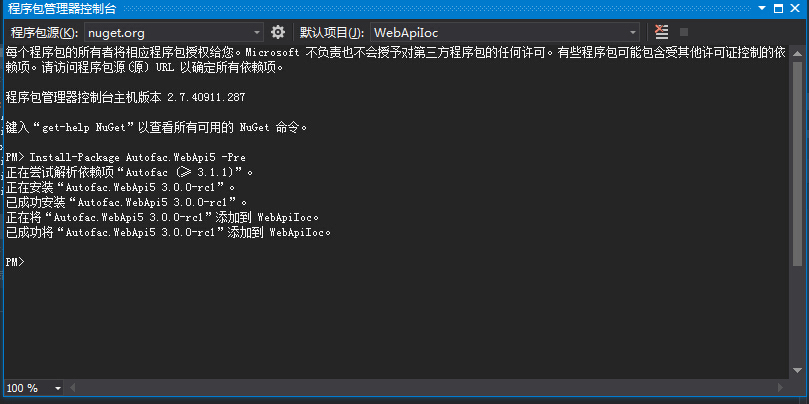
当然在是用之前你需要在安装几个包。直接nuget就行了一共需要三个包
按顺序说明下
step1 PM> Install-Package Autofac -Version 3.5.0 直接在包管理里面输入这个命令 nuget地址是https://www.nuget.org/packages/Autofac/3.5.0
step2 PM> Install-Package Autofac.Mvc5 添加这个包 nuget地址是https://www.nuget.org/packages/Autofac.Mvc5/
step3 PM> Install-Package Autofac.WebApi 最后是添加autofac webapi的包 https://www.nuget.org/packages/Autofac.WebApi/
using System;

using System.Collections.Generic;

using System.Linq;

using System.Reflection;

using System.Web;

using System.Web.Http;

using System.Web.Mvc;

using Autofac;

using Autofac.Integration.Mvc;

using Autofac.Integration.WebApi;

namespace WebApiIoc.App_Start

{

    public static class autofaconfig

    {

        public static void Initialize(HttpConfiguration config)

        {

            Initialize(config, RegisterServices(new ContainerBuilder()));//初始化容器

        }

        public static void Initialize(HttpConfiguration config, IContainer container)

        {

            config.DependencyResolver = new AutofacWebApiDependencyResolver(container);//注册api容器

            DependencyResolver.SetResolver(new AutofacDependencyResolver(container));//注册MVC容器

        }

        private static IContainer RegisterServices(ContainerBuilder builder)

        {

            builder.RegisterApiControllers(Assembly.GetExecutingAssembly());//注册api容器的实现

            builder.RegisterControllers(Assembly.GetExecutingAssembly());//注册mvc容器的实现

            builder.RegisterAssemblyTypes(AppDomain.CurrentDomain.GetAssemblies())//查找程序集中以services结尾的类型

                .Where(t => t.Name.EndsWith("Services"))

                .AsImplementedInterfaces();

            builder.RegisterAssemblyTypes(AppDomain.CurrentDomain.GetAssemblies())//查找程序集中以Repository结尾的类型

           .Where(t => t.Name.EndsWith("Repository"))

           .AsImplementedInterfaces();

            return builder.Build();//返回容器

        }

    }

}
这个是autofac的配置文件。
下面是webapiconfig文件
using System;

using System.Collections.Generic;

using System.Linq;

using System.Web.Http;

using WebApiIoc.App_Start;

namespace WebApiIoc

{

    public static class WebApiConfig

    {

        public static void Register(HttpConfiguration config)

        {

            // Web API configuration and services

            // Web API routes

            config.MapHttpAttributeRoutes();

            config.Routes.MapHttpRoute(

                name: "DefaultApi",

                routeTemplate: "api/{controller}/{id}",

                defaults: new { id = RouteParameter.Optional }

            );

            //注册webapi和mvc容器

            autofaconfig.Initialize(config);

        }

    }

}
最后是global文件
using System;

using System.Collections.Generic;

using System.Linq;

using System.Reflection;

using System.Web;

using System.Web.Http;

using System.Web.Mvc;

using System.Web.Optimization;

using System.Web.Routing;

using Autofac;

using Autofac.Integration.Mvc;

using Autofac.Integration.WebApi;

using WebApiIoc.App_Start;

namespace WebApiIoc

{

    public class WebApiApplication : System.Web.HttpApplication

    {

        protected void Application_Start()

        {

            AreaRegistration.RegisterAllAreas();

            GlobalConfiguration.Configure(WebApiConfig.Register);

            FilterConfig.RegisterGlobalFilters(GlobalFilters.Filters);

            RouteConfig.RegisterRoutes(RouteTable.Routes);

            BundleConfig.RegisterBundles(BundleTable.Bundles);

        }

    }

}
在apicontroller和MVCcontroller里面都是通过构造函数注入的方式实现的下面贴出来代码
这个是MVC
using System;

using System.Collections.Generic;

using System.Linq;

using System.Web;

using System.Web.Mvc;

using Iservices;

using Microsoft.Ajax.Utilities;

namespace WebApiIoc.Controllers

{

    public class HomeController : Controller

    {

        private IOneServices _oneServices;

        public HomeController(IOneServices oneServices)

        {

            _oneServices = oneServices;

        }

        public ActionResult Index()

        {

            var sum = _oneServices.sum(, );

            var aa = DependencyResolver.Current.GetService<IOneServices>();

            ; ViewBag.Title = sum;

            return View();

        }

    }

}
这个是webapi
using System;

using System.Collections.Generic;

using System.Linq;

using System.Net;

using System.Net.Http;

using System.Web.Http;

using System.Web.Http.Dependencies;

using Autofac;

using Autofac.Integration.WebApi;

using Iservices;

namespace WebApiIoc.Controllers

{

    public class ValuesController : ApiController

    {

        private IOneServices _oneServices;

        public ValuesController(IOneServices oneServices)

        {

            _oneServices = oneServices;

        }

        // GET api/values

        public IEnumerable<string> Get()

        {

            var sum = _oneServices.sum(, );return new string[] { "value1", "value2" };

        }

        // GET api/values/5

        public string Get(int id)

        {

            return "value";

        }

        // POST api/values

        public void Post([FromBody]string value)

        {

        }

        // PUT api/values/5

        public void Put(int id, [FromBody]string value)

        {

        }

        // DELETE api/values/5

        public void Delete(int id)

        {

        }

    }

}
最后说明下如果你没有通过构造函数注入你又想获取实例的话怎么做呢。下面分别说明
MVC
var OneServices = DependencyResolver.Current.GetService<IOneServices>();
Webapi
            IDependencyScope dependencyScope = this.Request.GetDependencyScope();

            ILifetimeScope requestLifetimeScope = dependencyScope.GetRequestLifetimeScope();

            var customerService = requestLifetimeScope.Resolve<IOneServices>();
其他的比如属性注入和方法注入就不在这写了。这里只是写的常用的简单的注册方式,后面我会把这部分注册的方式给补上.
基本到这里整个注册流程就完事了。以上写的不足之处请指出我会修正。希望和大家共同成长.
autofac使用笔记的更多相关文章
- IoC容器Autofac学习笔记
一.一个没有使用IoC的例子 IoC的全称是Inversion of Control,中文叫控制反转.要理解控制反转,可以看看非控制反转的一个例子. public class MPGMovieList ...
- C# 读Autofac源码笔记(2)
刚看了下Autofac属性注入的源码 首先看看WithProperty方法 image.png Autofac将我们的属性值,存在了一个list集合中 image.png 然后将这个集合传递到 ...
- C# 读Autofac源码笔记(1)
最近在看Autofac的源码. Autofac据说是.net中最快的IOC框架,具体没有实验,于是看看Autofac具体是怎样实例化实体. image.png 如上图所示,Autofac使用的是表 ...
- 《你必须知道的.NET》读书笔记三:体验OO之美
此篇已收录至<你必须知道的.Net>读书笔记目录贴,点击访问该目录可以获取更多内容. 一.依赖也是哲学 (1)本质诠释:“不要调用我们,我们会调用你” (2)依赖和耦合: ①无依赖,无耦合 ...
- Asp.Net MVC 之 Autofac 初步使用2 集成mvc 属性注入以及自动注入
首先看下Demo2的结构 然后下面一步步将Autofac集成到mvc中. 首先,定义Model Product.cs public class Product { public int Id ...
- 【AutoFac】依赖注入和控制反转的使用
在开始之前首先解释一下我认为的依赖注入和控制反转的意思.(新手理解,哪里说得不正确还请指正和见谅) 控制反转:我们向IOC容器发出获取一个对象实例的一个请求,IOC容器便把这个对象实例“注入”到我们的 ...
- WebAPi使用Autofac实现依赖注入
WebAPi依赖注入 使用记录 笔记 1.NuGet包安装 2.控制器加入构造函数 3.Global.asax ----Application_Start 应用程序启动时 using Autofa ...
- 从零开始搭建.NET Core 2.0 API(学习笔记一)
从零开始搭建.NET Core 2.0 API(学习笔记一) 一. VS 2017 新建一个项目 选择ASP.NET Core Web应用程序,再选择Web API,选择ASP.NET Core 2. ...
- c#实例化继承类,必须对被继承类的程序集做引用 .net core Redis分布式缓存客户端实现逻辑分析及示例demo 数据库笔记之索引和事务 centos 7下安装python 3.6笔记 你大波哥~ C#开源框架(转载) JSON C# Class Generator ---由json字符串生成C#实体类的工具
c#实例化继承类,必须对被继承类的程序集做引用 0x00 问题 类型“Model.NewModel”在未被引用的程序集中定义.必须添加对程序集“Model, Version=1.0.0.0, Cu ...
随机推荐
- python运维开发(二十)----models操作、中间件、缓存、信号、分页
内容目录 select Form标签数据库操作 models操作F/Q models多对多表操作 Django中间件 缓存 信号 分页 select Form标签补充 在上一节中我们可以知道Form标 ...
- CodeForces 124B Permutations
http://codeforces.com/problemset/problem/124/B Description You are given nk-digit integers. You have ...
- Azure上A/D系列虚拟机到DS系列迁移(2)
11. 该脚本会检测环境,停止虚拟机,拷贝VHD文件,创建磁盘等等,知道出现如下类似画面,他会暂停等待用户操作: 后面这几个步骤非常重要,关系到你后续的创建是否成功: 12. 进入D:\migvm目录 ...
- C# 伪造 referer 提交数据
private string SendRequest(string account, string cardNumber, string cardPass) { string targetUrl = ...
- java生成json字符串的方法
例1:将map对象添加一次元素(包括字符串对.数组),转换成json对象一次. 代码: package com.json; //这是使用org.json的程序: import java.util.Ha ...
- 嵌入式设备web服务器
操作系统:ubuntu10.04 前言: 为了提高对设备的易操作性,很多设备中提供pc机直接通过浏览器操作设备的功能.这就需要在设备中实现web服务器. 现在在嵌入式设备中所使用的web服 ...
- sroHOBOorz来自HOBO的高精类
/* bigint() bigint(long long) bigint(bigint) bigint(char*) bigint(string) +, +=, ++ -, -=, -- *, *= ...
- JOB+MERGE 跨服务器同步数据
为了解决单服务器压力,将库分服务器部署,但是原来用触发器实现的表数据同步就实现不了了. 因为总监老大不允许 开启分布式事务(MSDTC),我又不想为了一个几千行的基础数据做复制订阅. 于是乎决定用 J ...
- 清除mac上安装软件的用户信息
有时候在mac系统上安装了一些软件后,尽管你将该软件卸载之后,可是原来的登录信息依然存在, 那么你就可以到下面的这个目录中查看一下,是否残留有信息文件.
- Unity 集成联通SDK
我相信Unity程序员都会遇到加入SDK的问题,我相信如果你不会android编程,我相信你的CPU当场计算过快而爆炸! 这里也写笔记希望能帮助大家 如果有讲错的地方,希望大家能回复并且提供答案! ...