图解CISCO3550忘记密码解决方法
Cisco网络设备密码忘记怎么初始出厂默认值?这时网友常常会提出的问题,怎么解决,有人说啦,去百度去谷歌一下不就行啦,然而这对初学者任是个挑战,虽然步骤只有简单几步,如果你没有经历过,或多或少会走些弯路,下面用图片的方法总结了处理这一问题的解决方法。
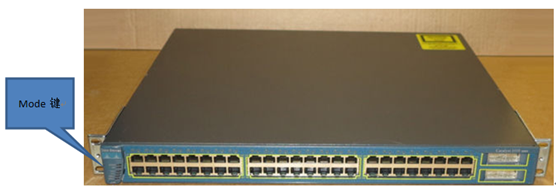
首先,接上Console线,重新加电,加电后按住交换机正面面板上的Mode键,STAT灯亮起后松开.
![]() 650) this.width=650;" style="background-image:none;border-bottom:0px;border-left:0px;border-top:0px;border-right:0px;padding-left:0px;padding-right:0px;padding-top:0px;" title="image" border="0" alt="image" src="http://img1.51cto.com/attachment/201311/3/350944_13834377827siT.png" height="229" />
650) this.width=650;" style="background-image:none;border-bottom:0px;border-left:0px;border-top:0px;border-right:0px;padding-left:0px;padding-right:0px;padding-top:0px;" title="image" border="0" alt="image" src="http://img1.51cto.com/attachment/201311/3/350944_13834377827siT.png" height="229" />
图1面板
![]() 650) this.width=650;" style="background-image:none;border-bottom:0px;border-left:0px;border-top:0px;border-right:0px;padding-left:0px;padding-right:0px;padding-top:0px;" title="image" border="0" alt="image" src="http://img1.51cto.com/attachment/201311/3/350944_1383437789jxex.png" height="437" />
650) this.width=650;" style="background-image:none;border-bottom:0px;border-left:0px;border-top:0px;border-right:0px;padding-left:0px;padding-right:0px;padding-top:0px;" title="image" border="0" alt="image" src="http://img1.51cto.com/attachment/201311/3/350944_1383437789jxex.png" height="437" />
图2背面接线图
![]() 650) this.width=650;" style="background-image:none;border-bottom:0px;border-left:0px;border-top:0px;border-right:0px;padding-left:0px;padding-right:0px;padding-top:0px;" title="image" border="0" alt="image" src="http://img1.51cto.com/attachment/201311/3/350944_1383437796hQak.png" height="281" />
650) this.width=650;" style="background-image:none;border-bottom:0px;border-left:0px;border-top:0px;border-right:0px;padding-left:0px;padding-right:0px;padding-top:0px;" title="image" border="0" alt="image" src="http://img1.51cto.com/attachment/201311/3/350944_1383437796hQak.png" height="281" />
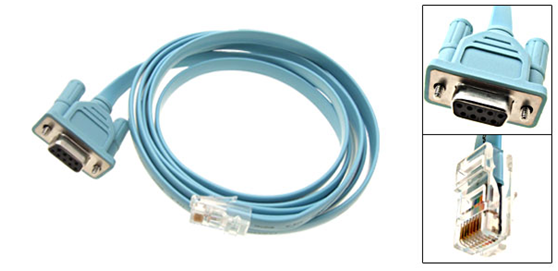
图3Console连接线
![]() 650) this.width=650;" style="background-image:none;border-bottom:0px;border-left:0px;border-top:0px;border-right:0px;padding-left:0px;padding-right:0px;padding-top:0px;" title="image" border="0" alt="image" src="http://img1.51cto.com/attachment/201311/3/350944_1383437807OujM.png" height="373" />
650) this.width=650;" style="background-image:none;border-bottom:0px;border-left:0px;border-top:0px;border-right:0px;padding-left:0px;padding-right:0px;padding-top:0px;" title="image" border="0" alt="image" src="http://img1.51cto.com/attachment/201311/3/350944_1383437807OujM.png" height="373" />
图3换换连接线
目前笔记本都没有串口,这时需要USB转串口线
软件方面最好在经常调试的笔记本上安装windosxp或windows2003server,安装好超级终端.另外在如果你的笔记本上只有linux系统那么就需要minicom.(Linux下图解minicom安装http://chenguang.blog.51cto.com/350944/937428)
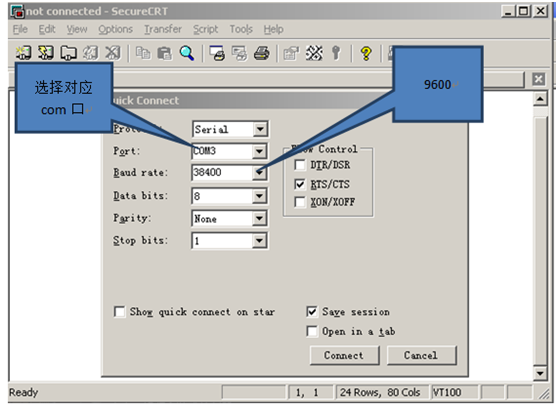
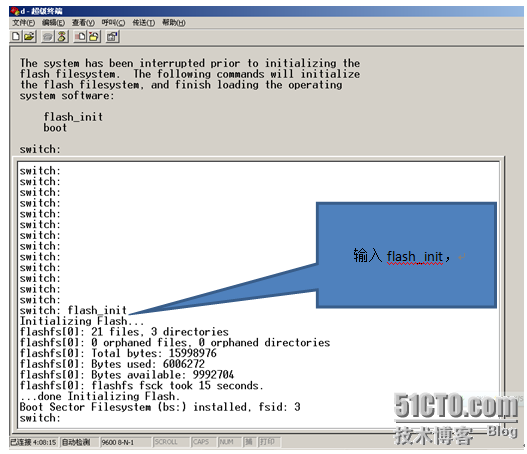
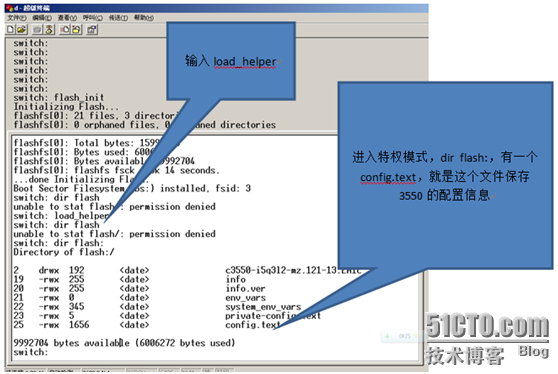
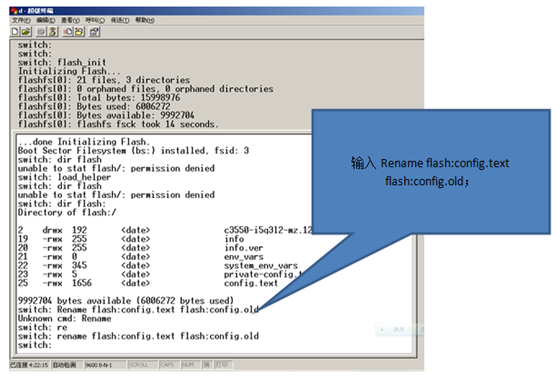
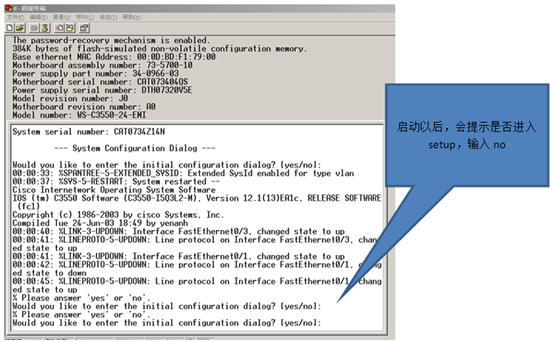
如果你的机器没有超级终端,那么可采用SecureCRT这款软件也可以凑或用,不过笔者觉得最好还是超级终端(因为他反应迅速).以下几幅图就是操作步骤:
![]() 650) this.width=650;" style="background-image:none;border-bottom:0px;border-left:0px;border-top:0px;border-right:0px;padding-left:0px;padding-right:0px;padding-top:0px;" title="image" border="0" alt="image" src="http://img1.51cto.com/attachment/201311/3/350944_1383437810L0pZ.png" height="507" />
650) this.width=650;" style="background-image:none;border-bottom:0px;border-left:0px;border-top:0px;border-right:0px;padding-left:0px;padding-right:0px;padding-top:0px;" title="image" border="0" alt="image" src="http://img1.51cto.com/attachment/201311/3/350944_1383437810L0pZ.png" height="507" />
![]() 650) this.width=650;" style="background-image:none;border-bottom:0px;border-left:0px;border-top:0px;border-right:0px;padding-left:0px;padding-right:0px;padding-top:0px;" title="image" border="0" alt="image" src="http://img1.51cto.com/attachment/201311/3/350944_1383437817fc3H.png" height="519" />
650) this.width=650;" style="background-image:none;border-bottom:0px;border-left:0px;border-top:0px;border-right:0px;padding-left:0px;padding-right:0px;padding-top:0px;" title="image" border="0" alt="image" src="http://img1.51cto.com/attachment/201311/3/350944_1383437817fc3H.png" height="519" />
在安装好USB转serial驱动后注意端口号我这里是com3(在你的机器或者是com4,com5等)
![]() 650) this.width=650;" style="background-image:none;border-bottom:0px;border-left:0px;border-top:0px;border-right:0px;padding-left:0px;padding-right:0px;padding-top:0px;" title="image" border="0" alt="image" src="http://img1.51cto.com/attachment/201311/3/350944_1383437826klje.png" height="600" />
650) this.width=650;" style="background-image:none;border-bottom:0px;border-left:0px;border-top:0px;border-right:0px;padding-left:0px;padding-right:0px;padding-top:0px;" title="image" border="0" alt="image" src="http://img1.51cto.com/attachment/201311/3/350944_1383437826klje.png" height="600" />
![]() 650) this.width=650;" style="background-image:none;border-bottom:0px;border-left:0px;border-top:0px;border-right:0px;padding-left:0px;padding-right:0px;padding-top:0px;" title="image" border="0" alt="image" src="http://img1.51cto.com/attachment/201311/3/350944_13834378302hDv.png" height="587" />
650) this.width=650;" style="background-image:none;border-bottom:0px;border-left:0px;border-top:0px;border-right:0px;padding-left:0px;padding-right:0px;padding-top:0px;" title="image" border="0" alt="image" src="http://img1.51cto.com/attachment/201311/3/350944_13834378302hDv.png" height="587" />
![]() 650) this.width=650;" style="background-image:none;border-bottom:0px;border-left:0px;border-top:0px;border-right:0px;padding-left:0px;padding-right:0px;padding-top:0px;" title="image" border="0" alt="image" src="http://img1.51cto.com/attachment/201311/3/350944_1383437835K2mp.png" height="453" />
650) this.width=650;" style="background-image:none;border-bottom:0px;border-left:0px;border-top:0px;border-right:0px;padding-left:0px;padding-right:0px;padding-top:0px;" title="image" border="0" alt="image" src="http://img1.51cto.com/attachment/201311/3/350944_1383437835K2mp.png" height="453" />
![]() 650) this.width=650;" style="background-image:none;border-bottom:0px;border-left:0px;border-top:0px;border-right:0px;padding-left:0px;padding-right:0px;padding-top:0px;" title="image" border="0" alt="image" src="http://img1.51cto.com/attachment/201311/3/350944_1383437839fKWQ.png" height="450" />
650) this.width=650;" style="background-image:none;border-bottom:0px;border-left:0px;border-top:0px;border-right:0px;padding-left:0px;padding-right:0px;padding-top:0px;" title="image" border="0" alt="image" src="http://img1.51cto.com/attachment/201311/3/350944_1383437839fKWQ.png" height="450" />
![]() 650) this.width=650;" style="background-image:none;border-bottom:0px;border-left:0px;border-top:0px;border-right:0px;padding-left:0px;padding-right:0px;padding-top:0px;" title="image" border="0" alt="image" src="http://img1.51cto.com/attachment/201311/3/350944_1383437844duhN.png" height="443" />
650) this.width=650;" style="background-image:none;border-bottom:0px;border-left:0px;border-top:0px;border-right:0px;padding-left:0px;padding-right:0px;padding-top:0px;" title="image" border="0" alt="image" src="http://img1.51cto.com/attachment/201311/3/350944_1383437844duhN.png" height="443" />
![]() 650) this.width=650;" style="background-image:none;border-bottom:0px;border-left:0px;border-top:0px;border-right:0px;padding-left:0px;padding-right:0px;padding-top:0px;" title="image" border="0" alt="image" src="http://img1.51cto.com/attachment/201311/3/350944_1383437849hMWh.png" height="402" />
650) this.width=650;" style="background-image:none;border-bottom:0px;border-left:0px;border-top:0px;border-right:0px;padding-left:0px;padding-right:0px;padding-top:0px;" title="image" border="0" alt="image" src="http://img1.51cto.com/attachment/201311/3/350944_1383437849hMWh.png" height="402" />
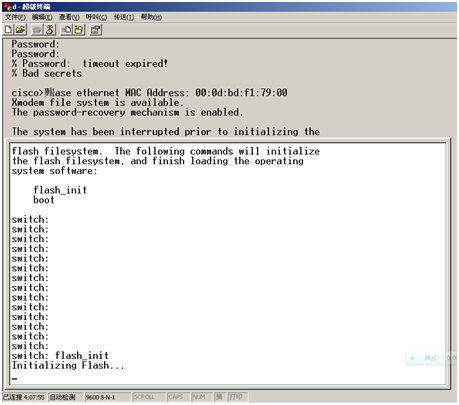
好啦,经过上面简单的几个步骤,忘记的密码就清除啦,当然也适用于其他型号的设备。
补充:如果是路由器,在开机过程中按Ctrl+Break进入rommon模式,修改配置寄存器为0x2142,之后reset重启。开机后,把Startup-config复制到running-config,去掉密码后把config-register改回0x2102,保存。
本文出自 “李晨光原创技术博客” 博客,请务必保留此出处http://chenguang.blog.51cto.com/350944/1319531
- Linux 忘记密码解决方法,Linux 远程登录
一.Linux 忘记密码解决方法 很多朋友经常会忘记Linux系统的root密码,linux系统忘记root密码的情况该怎么办呢?重新安装系统吗?当然不用!进入单用户模式更改一下root密码即可. 步 ...
- 四、Linux 忘记密码解决方法
Linux 忘记密码解决方法 很多朋友经常会忘记Linux系统的root密码,linux系统忘记root密码的情况该怎么办呢?重新安装系统吗?当然不用!进入单用户模式更改一下root密码即可. 步骤如 ...
- Centos7 忘记密码解决方法
一.Centos7 忘记密码解决方法 1.进入单用户模型 重启 Linux 系统主机并出现引导界面时,按下键盘上的 e 键进入内核编辑界面 然后按向下键,找到以“Linux16”开头的行,在该行的最后 ...
- Centos忘记密码解决方法
centos6.8忘记root密码解决方法 重启系统后出现GRUB界面在引导装载程序菜单上,用上下方向键选择你忘记密码的那个系统键入"e" 来进入编辑模式. 接下来你可以看到如下图 ...
- centos6.9 忘记密码解决方法
若果忘记了 root 的密码,解决方法如下: 我采用的 linux 版本是 centos-6.9 , 经过亲身实践证明,该方法是 ok 的 在开机启动的时候按键盘上的“E”键会进入如下界面. 选择相应 ...
- Linux系统root用户忘记密码解决方法
一:在linux系统启动时(如下图),按e键 二:进入到设置页面,定位到如下行: 三:按e键,进入输入界面 四:在编辑行最后面,空格,输入single,回车后回到第二步界面,只是后面多了single ...
- Centos6.5 忘记密码解决方法
问题 原因 : 太久没用centos了 忘记密码了 很尴尬 快照也没说明密码.... 1.重启 centos 在开机启动的时候快速按键盘上的“E”键 或者“ESC”键(如果做不到精准快速可以在启动 ...
- Linux 忘记密码解决方法——RedHat
[RedHat7.4版本] 1.将忘记密码的rhel7.4版本的虚拟机打开 2.等3秒左右出现这个画面时,用方向键,将光标移动到第二栏处,接着按"e"键 3.接在在linux16这 ...
- Linux 忘记密码解决方法
很多朋友经常会忘记Linux系统的root密码,linux系统忘记root密码的情况该怎么办呢?重新安装系统吗?当然不用!进入单用户模式更改一下root密码即可. 步骤如下: 重启linux系统 3 ...
随机推荐
- Linux 下 MySQL 的彻底卸载和安装配置字符集
前言: Linux环境下MySQL的安装和配置在网上已经有很多教程了.之所以写这篇文章是因为在配置字符集的时候找了网上的一些教程发现并不能用导致折腾了一阵子.下面的教程均是亲自实践. MySQL的彻底 ...
- 使用Spring的命名空间p装配属性-摘自《Spring实战(第3版)》
使用<property>元素为Bean的属性装配值和引用并不太复杂.尽管如此,Spring的命名空间p提供了另一种Bean属性的装配方式,该方式不需要配置如此多的尖括号. 命名空间p的sc ...
- hdu 5444 Elven Postman 二叉树
Time Limit: 1500/1000 MS (Java/Others) Memory Limit: 131072/131072 K (Java/Others) Problem Descrip ...
- [转]Vi/Vim查找替换使用方法
vi/vim 中可以使用 :s 命令来替换字符串.该命令有很多种不同细节使用方法,可以实现复杂的功能,记录几种在此,方便以后查询. :s/vivian/sky/ 替换当前行第一个 vivian ...
- 移动设备wap手机网页html5通过特殊链接:打电话,发短信,发邮件详细教程
如果需要在移动浏览器中实现拨打电话,调用sms发短信,发送email等功能,移动手机WEB页面(HTML5)Javascript提供的接口是一个好办法. 采用url href链接的方式,实现在Safa ...
- git 冲突解决(转载)
gerrit是不会解决冲突的,如果两个人同时改了一个文件的同一行,就会冲突,你将会看到Review in Progress并且最下面会有Your change could not be merged ...
- SqlServer2005基于已有表创建分区
随着当今数据库的容量越来越快的朝着在大型数据库或超大型数据库的发展,对于数据库中的大 型表以及具有各种访问模式的表的可伸缩性和可管理性运行环境变得尤为重要, SQL server 从 SQL serv ...
- UILabel使用技巧
UILabel的各种属性与方法的使用(转) #import "LabelTestViewController.h" @implementation LabelTestViewCon ...
- C++学习27 用全局函数重载运算符
运算符重载函数既可以声明为类的成员函数,也可以声明为所有类之外的全局函数. 运算符重载函数作为类的成员函数 将运算符重载函数声明为类的成员函数时,二元运算符的参数只有一个,一元运算符不需要参数.之所以 ...
- [ActionScript 3.0] AS3实现图像径向转旋效果
原图 效果 import flash.display.Bitmap; import flash.display.BitmapData; import flash.display.Blen ...

 650) this.width=650;" style="background-image:none;border-bottom:0px;border-left:0px;border-top:0px;border-right:0px;padding-left:0px;padding-right:0px;padding-top:0px;" title="image" border="0" alt="image" src="http://img1.51cto.com/attachment/201311/3/350944_13834377827siT.png" height="229" />
 650) this.width=650;" style="background-image:none;border-bottom:0px;border-left:0px;border-top:0px;border-right:0px;padding-left:0px;padding-right:0px;padding-top:0px;" title="image" border="0" alt="image" src="http://img1.51cto.com/attachment/201311/3/350944_1383437789jxex.png" height="437" />
 650) this.width=650;" style="background-image:none;border-bottom:0px;border-left:0px;border-top:0px;border-right:0px;padding-left:0px;padding-right:0px;padding-top:0px;" title="image" border="0" alt="image" src="http://img1.51cto.com/attachment/201311/3/350944_1383437796hQak.png" height="281" />
 650) this.width=650;" style="background-image:none;border-bottom:0px;border-left:0px;border-top:0px;border-right:0px;padding-left:0px;padding-right:0px;padding-top:0px;" title="image" border="0" alt="image" src="http://img1.51cto.com/attachment/201311/3/350944_1383437807OujM.png" height="373" />
 650) this.width=650;" style="background-image:none;border-bottom:0px;border-left:0px;border-top:0px;border-right:0px;padding-left:0px;padding-right:0px;padding-top:0px;" title="image" border="0" alt="image" src="http://img1.51cto.com/attachment/201311/3/350944_1383437810L0pZ.png" height="507" />
 650) this.width=650;" style="background-image:none;border-bottom:0px;border-left:0px;border-top:0px;border-right:0px;padding-left:0px;padding-right:0px;padding-top:0px;" title="image" border="0" alt="image" src="http://img1.51cto.com/attachment/201311/3/350944_1383437817fc3H.png" height="519" />
 650) this.width=650;" style="background-image:none;border-bottom:0px;border-left:0px;border-top:0px;border-right:0px;padding-left:0px;padding-right:0px;padding-top:0px;" title="image" border="0" alt="image" src="http://img1.51cto.com/attachment/201311/3/350944_1383437826klje.png" height="600" />
 650) this.width=650;" style="background-image:none;border-bottom:0px;border-left:0px;border-top:0px;border-right:0px;padding-left:0px;padding-right:0px;padding-top:0px;" title="image" border="0" alt="image" src="http://img1.51cto.com/attachment/201311/3/350944_13834378302hDv.png" height="587" />
 650) this.width=650;" style="background-image:none;border-bottom:0px;border-left:0px;border-top:0px;border-right:0px;padding-left:0px;padding-right:0px;padding-top:0px;" title="image" border="0" alt="image" src="http://img1.51cto.com/attachment/201311/3/350944_1383437835K2mp.png" height="453" />
 650) this.width=650;" style="background-image:none;border-bottom:0px;border-left:0px;border-top:0px;border-right:0px;padding-left:0px;padding-right:0px;padding-top:0px;" title="image" border="0" alt="image" src="http://img1.51cto.com/attachment/201311/3/350944_1383437839fKWQ.png" height="450" />
 650) this.width=650;" style="background-image:none;border-bottom:0px;border-left:0px;border-top:0px;border-right:0px;padding-left:0px;padding-right:0px;padding-top:0px;" title="image" border="0" alt="image" src="http://img1.51cto.com/attachment/201311/3/350944_1383437844duhN.png" height="443" />
 650) this.width=650;" style="background-image:none;border-bottom:0px;border-left:0px;border-top:0px;border-right:0px;padding-left:0px;padding-right:0px;padding-top:0px;" title="image" border="0" alt="image" src="http://img1.51cto.com/attachment/201311/3/350944_1383437849hMWh.png" height="402" />