
Performing a thread dump in Linux or Windows--reference
Linux/Unix
1. Find the Java/Tomcat process id.
% ps ax | grep java
You should see output like this
17207 ? Sl 78:36 /usr/java/default/bin/java -Djava.util.logging.config.file=/usr/tomcat/tomcat6/conf/logging.properties -Djava.util.logging.manager=org.apache.juli.ClassLoaderLogManager -Xmx1024M -Xms128M -XX:MaxPermSize=256M -Djava.awt.headless=true -Djava.endorsed.dirs=/usr/tomcat/tomcat6/endorsed -classpath :/usr/tomcat/tomcat6/bin/bootstrap.jar -Dcatalina.base=/usr/tomcat/tomcat6 -Dcatalina.home=/usr/tomcat/tomcat6 -Djava.io.tmpdir=/usr/tomcat/tomcat6/temp org.apache.catalina.startup.Bootstrap start
2. Execute the following command to generate a thread dump
% kill -3 <pid>
Run this command every 5-10 seconds, 5 times.
3.The thread dump is written to the standard output. It may logged in the console or <tomcat>/logs/stdout or <tomcat>/logs/catalina.out.
4. If you are running JDK 6.0+, you may also use jstack to produce a thread dump.
 % jstack -l <pid> > threaddump.txt

  or

 % jstack <pid> > threaddump.txt
Windows
Running as a Windows service
1a. If installed using Tomcat installer, click All Programs ->Apache Tomcat 6.0->Monitor Tomcat. An icon should appear in task bar.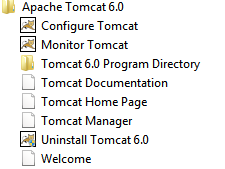
1b. If not installed using Tomcat installer, navigate to <tomcat>/bin, and run the following command
% tomcat7.exe //MS//Tomcat7
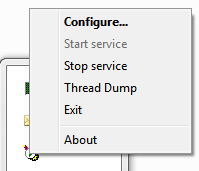
The Tomcat monitor icon should appear in the system tray.;
2. Right click the the icon and select Thread Dump.
Run this command every 5-10 seconds, 5 times
3. Look for the thread dump in <tomcat>/logs/stdout or <tomcat>/logs/catalina.out.
Running from startup.bat
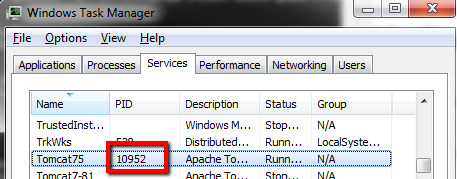
1. Open "Windows Task Manager",
2. Find the process ID of the java process
3. Make sure <JDK>/bin is in your command path. Otherwise, navigate to <JDK>/bin
4. Execute the following command to generate a thread dump
% jstack -l <pid> > threaddump.txt
Run this command every 5-10 seconds, 5 times
If you receive an error running jstack such as the below, then you may need to use psexec:
7988: Insufficient memory or insufficient privileges to attach
The -F option can be used when the target process is not responding

.png)
.png)

.png)
Run this command every 5-10 seconds, 5 times
You can also add the full path of your Java 'bin' directory to the server's system path variable. The Java 'bin' directory is usually in 'Program Files\Java\bin\jdk<version>\bin'. If you add this path to the system variable then you will need to restart the command prompt again for the change to be picked up and the 'jstack' command to work.
Performing a thread dump in Linux or Windows--reference的更多相关文章
- 013-程序性能分析之thread dump和heap dump
一.dump基本概念 主要用于故障定位(尤其是out of memory)和性能分析.主要记录了JVM运行期间的内存占用.线程执行等情况,这就是常说的dump文件.常用的有heap dump和thre ...
- 性能分析之-- JAVA Thread Dump 分析综述
性能分析之-- JAVA Thread Dump 分析综述 一.Thread Dump介绍 1.1什么是Thread Dump? Thread Dump是非常有用的诊断Java应用问题的工 ...
- [转]Java Thread Dump 性能分析
Java and Thread 一个 web 服务器使用几十到几百个线程来处理大量并发用户,如果一个或多个线程使用相同的资源,线程之间的竞争就不可避免了,并且有时候可能会发生死锁. Thread co ...
- thread dump
最近在做性能测试,需要对线程堆栈进行分析,在网上收集了一些资料,学习完后,将相关知识整理在一起,输出文章如下. 一.Thread Dump介绍 1.1什么是Thread Dump? Thread Du ...
- 如何抓取Thread Dump小结(转)
当系统性能出现问题时,需要从各个方面来查看网络环境.主机资源.查看最经变更的代码等.如果是想从代码层面解决问题,那么最有效的方法就是查看相关dump文件.如果是使用IBM JDK(我默认你是在aix环 ...
- Thread Dump 和Java应用诊断(转)
Thread Dump 和Java应用诊断 Thread Dump是非常有用的诊断Java应用问题的工具,每一个Java虚拟机都有及时生成显示所有线程在某一点状态的thread-dump的能力.虽然各 ...
- java程序性能分析之thread dump和heap dump
一.dump基本概念 在故障定位(尤其是out of memory)和性能分析的时候,经常会用到一些文件来帮助我们排除代码问题.这些文件记录了JVM运行期间的内存占用.线程执行等情况,这就是我们常说的 ...
- java jvm heap dump及 thread dump分析
一.概念: 在进行java应用故障分析时,经常需要分析内存和cpu信息,也就说所谓的heap dump 和 thread dump heap dump: heap dump文件是一个二进制文件,需要工 ...
- [JAVA]JAVA章4 Thread Dump如何分析
一.Thread Dump介绍 1.1什么是Thread Dump? Thread Dump是非常有用的诊断Java应用问题的工具.每一个Java虚拟机都有及时生成所有线程在某一点状态的thread- ...
随机推荐
- adb logcat 查看日志
使用 logcat 命令 查看和跟踪系统日志缓冲区的命令logcat的一般用法是: [adb] logcat [<option>] ... [<filter-spec>] .. ...
- 【poj3734】矩阵乘法求解
[题意] 给N个方块排成一列.现在要用红.蓝.绿.黄四种颜色的油漆给这些方块染色.求染成红色方块和染成绿色方块的个数同时为偶数的染色方案的个数,输出对10007取余后的答案.(1<=n<= ...
- 深入详解SQL中的Null
深入详解SQL中的Null NULL 在计算机和编程世界中表示的是未知,不确定.虽然中文翻译为 “空”, 但此空(null)非彼空(empty). Null表示的是一种未知状态,未来状态,比如小明兜里 ...
- FindBugs
FindBugs是一个能静态分析源代码中可能会出现Bug的Eclipse插件工具. 可以从http://sourceforge.net/project/showfiles.php?group_id=9 ...
- WordPress Videowall插件‘page_id’参数跨站脚本漏洞
漏洞名称: WordPress Videowall插件‘page_id’参数跨站脚本漏洞 CNNVD编号: CNNVD-201310-502 发布时间: 2013-10-23 更新时间: 2013-1 ...
- VM Depot 新功能:直接通过 Windows Azure 管理门户部署虚拟机
发布于 2014-05-09 作者 陈 忠岳 想要尝试 VM Depot 上数以百计的各类开源虚拟机,却因为复杂的命令行操作而感到烦恼?微软开放技术想您所想,及时推出 VM Depot 最新功能 ...
- _GUN_SOURCE宏
问题描述:在编译程序时,提示一个错误和一个警告. error:storage size of tz isn’t know: 其中tz是struct timezone类型的变量. warning:imp ...
- jquery mobile 前言
引用js: <link rel="stylesheet" href="../jquery.mobile-1.1.0/jquery.mobile-1.1.0.css& ...
- Kicad中批量添加过孔
布线按V即可插入过孔,但在铺铜,或大电流走线时,有时需要手动添加一些过孔. 但Kicad里面并没有这样的菜单,最后搜索到,要添加过孔时,需要先建立一个单过孔的封装. 然后插入这个封装到PCB.然后修改 ...
- show drop down menu within/from action bar
show drop down menu within/from action bar */--> pre { background-color: #2f4f4f;line-height: 1.6 ...