
WPF 自定义路由事件
如何:创建自定义路由事件
首先自定义事件支持事件路由,需要使用 RegisterRoutedEvent 方法注册 RoutedEvent
public static RoutedEvent RegisterRoutedEvent(

	string name,

	RoutingStrategy routingStrategy,

	Type handlerType,

	Type ownerType

)
参数
- name
- 类型:System.String 路由事件的名称。该名称在所有者类型中必须是唯一的,并且不能为 null 或空字符串。
- routingStrategy
- 类型:System.Windows.RoutingStrategy 作为枚举值的事件的路由策略。
- handlerType
- 类型:System.Type 事件处理程序的类型。该类型必须为委托类型,并且不能为 null。
- ownerType
- 类型:System.Type 路由事件的所有者类类型。该类型不能为 null。
先看下xaml文件,我们可以看到button中并没有click事件
<Window x:Class="简单自定义路由事件.MainWindow"

        xmlns="http://schemas.microsoft.com/winfx/2006/xaml/presentation"

        xmlns:x="http://schemas.microsoft.com/winfx/2006/xaml"

        Title="MainWindow" Height="" Width="">

    <Grid>

        <Button Content="获取时间" Height="" HorizontalAlignment="Left" Margin="192,170,0,0" Name="button1" VerticalAlignment="Top" Width="" />

        <TextBox Height="" HorizontalAlignment="Left" Margin="89,80,0,0" Name="textBox1" VerticalAlignment="Top" Width="" />

        <Label Content="自定义路由事件演示" Height="" HorizontalAlignment="Left" Margin="141,26,0,0" Name="label1" VerticalAlignment="Top" Width="" FontSize="" Background="BlanchedAlmond" />

    </Grid>

</Window>
后台代码简单展示:
using System;

using System.Collections.Generic;

using System.Linq;

using System.Text;

using System.Windows;

using System.Windows.Controls;

using System.Windows.Data;

using System.Windows.Documents;

using System.Windows.Input;

using System.Windows.Media;

using System.Windows.Media.Imaging;

using System.Windows.Navigation;

using System.Windows.Shapes;

namespace 简单自定义路由事件

{

    /// <summary>

    /// MainWindow.xaml 的交互逻辑

    /// </summary>

    public partial class MainWindow : Window

    {

        public MainWindow()

        {

            InitializeComponent();

            this.button1.AddHandler(Button.ClickEvent,//处理的事件

                new RoutedEventHandler(RoutedEvent)); //事件委托

            this.MEvent += new RoutedEventHandler(MainWindow_MEvent);

        }

        void MainWindow_MEvent(object sender, RoutedEventArgs e)

        {

            this.textBox1.Text = System.DateTime.Now.ToString();

        }

        private static readonly RoutedEvent MyEvent = EventManager.RegisterRoutedEvent("Event",//路由事件的名称

            RoutingStrategy.Direct,//事件的路由策略

            typeof(RoutedEvent), //事件处理程序的类型。该类型必须为委托类型

            typeof(RoutedEventArgs));//路由事件的所有者类类型

        //事件访问器,进行事件提供添加和移除。

        public event RoutedEventHandler MEvent

        {

            add

            {

                AddHandler(MyEvent, value);

            }

            remove

            {

                RemoveHandler(MyEvent, value);

            }

        }

        void RoutedEvent(object o, RoutedEventArgs e)

        {

            //关联路由事件

            RoutedEventArgs args = new RoutedEventArgs(MyEvent);

            this.RaiseEvent(args);

        }

    }

}
效果展示:
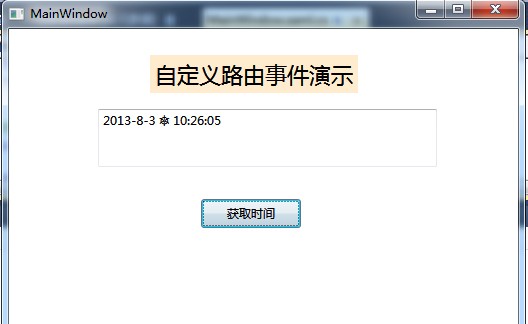
上面详细的说明建自定义路由事件的基本原理的原理,我们可以通过这样的方式来实现自己的路由事件,这样的代码移致性很高,我们可以需要的时候直接移植.
WPF 自定义路由事件的更多相关文章
- WPF:自定义路由事件的实现
路由事件通过EventManager,RegisterRoutedEvent方法注册,通过AddHandler和RemoveHandler来关联和解除关联的事件处理函数:通过RaiseEvent方法来 ...
- WPF自定义路由事件(二)
WPF中的路由事件 as U know,和以前Windows消息事件区别不再多讲,这篇博文中,将首先回顾下WPF内置的路由事件的用法,然后在此基础上自定义一个路由事件. 1.WPF内置路由事件 WPF ...
- 细说WPF自定义路由事件
WPF中的路由事件 as U know,和以前Windows消息事件区别不再多讲,这篇博文中,将首先回顾下WPF内置的路由事件的用法,然后在此基础上自定义一个路由事件. 1.WPF内置路由事件 W ...
- Wpf自定义路由事件
创建自定义路由事件大体可以分为三个步骤: ①声明并注册路由事件. ②为路由事件添加CLR事件包装. ③创建可以激发路由事件的方法. 以ButtonBase类中代码为例展示这3个步骤: public a ...
- WPF自定义路由事件(一)
首先自定义事件支持事件路由,需要使用 RegisterRoutedEvent 方法注册 RoutedEvent C#语法 public static RoutedEvent RegisterRoute ...
- WPF 自定义路由事件 与 附加路由事件
为student添加附件事件
- WPF自学入门(四)WPF路由事件之自定义路由事件
在上一遍博文中写到了内置路由事件,其实除了内置的路由事件,我们也可以进行自定义路由事件.接下来我们一起来看一下WPF中的自定义路由事件怎么进行创建吧. 创建自定义路由事件分为3个步骤: 1.声明并注册 ...
- WPF路由事件三:自定义路由事件
与依赖项属性类似,WPF也为路由事件提供了WPF事件系统这一组成.为一个类型添加一个路由事件的方式与为类型添加依赖项属性的方法类似,添加一个自定义路由事件的步骤: 一.声明路由事件变量并注册:定义只读 ...
- WPF的路由事件、冒泡事件、隧道事件(预览事件)
本文摘要: 1:什么是路由事件: 2:中断事件路由: 3:自定义路由事件: 4:为什么需要自定义路由事件: 5:什么是冒泡事件和预览事件(隧道事件): 1:什么是路由事件 WPF中的事件为路由事件,所 ...
随机推荐
- Cas Server中各配置文件介绍
Cas Server中所有的配置文件都是放在WEB-INF目录及其子目录下的. 在WEB-INF/classes下的配置文件有: l cas-theme-default.properties:该文件 ...
- Hadoop 2.4.0新特性介绍
在2014年4月7日,Apache公布了Hadoop 2.4.0 .相比于hadoop 2.3.0,这个版本号有了一定的改进,突出的变化能够总结为下列几点(官方文档说明): 1 支持HDFS訪问控制列 ...
- 动态规划入门——Eddy's research II
转载请注明出处:http://blog.csdn.net/a1dark 分析:找规律 #include<stdio.h> int main(){ int m,n; while(scanf( ...
- [转]开源应用架构之asterisk
作者:Russell Bryant 翻译:jiazhengfeng Asterisk[1]是一款GPLv2协议下的开源电话应用平台.简单来说,Asterisk是一个服务器应用,能够完成发起电话呼叫.接 ...
- 【HDU】5247-找连续数(直接暴力)
ORZ,这道题想复杂了,原来直接暴力就能够了复杂度为 n * n * logn #include<cstdio> #include<set> #include<algor ...
- hadoop错误org.apache.hadoop.mapred.TaskAttemptListenerImpl Progress of TaskAttempt
错误: org.apache.hadoop.mapred.TaskAttemptListenerImpl: Progress of TaskAttempt 原因: 错误很明显,磁盘空间不足,但郁闷的是 ...
- Android(java)学习笔记176:BroadcastReceiver之 短信发送的广播接收者
有时候,我们需要开发出来一个短信监听器,监听用户发送的短信记录,下面就是一个案例,这里同样需要使用广播机制. 下面同样是代码示例,MainActivity.java 和 activity_main. ...
- Spring+quartz集群配置,Spring定时任务集群,quartz定时任务集群
Spring+quartz集群配置,Spring定时任务集群,quartz定时任务集群 >>>>>>>>>>>>>> ...
- 当append里面的标签显示不出来的时候,用下面的方式做
$("#result_td").append(tem1+tem3) $("#result_td").append($(tem1+tem3))
- jquery插件下载地址
以下是本人收集的jquery插件下载地址: .............版本自行选择. jquery官网:http://jquery.com/ jquery.validate.js 官网下载地址:htt ...