
CSS元素层级的概念及性质
元素的层级的介绍
什么是元素的层级
当元素开启定位后就会是元素提升一个层级,网页是由多个层级组成的
<style>

    *{

        font-size: 50px;

        font-weight: bold;

    }

    .box1{

        width: 200px;

        height: 200px;

        background-color: #bfa;

        opacity: .7;

        position: absolute;

    }

    .box2{

        width: 200px;

        height: 200px;

        background-color: red;

        opacity: .7;

        position: absolute;

        left: 60px;

        top: 60px;

    }

    .box3{

        width: 200px;

        height: 200px;

        background-color: orange;

        opacity: .7;

        position: absolute;

        left: 120px;

        top: 120px;

    }

</style>

<body>

    <div class="box1">1</div>

    <div class="box2">2</div>

    <div class="box3">3</div>

</body>
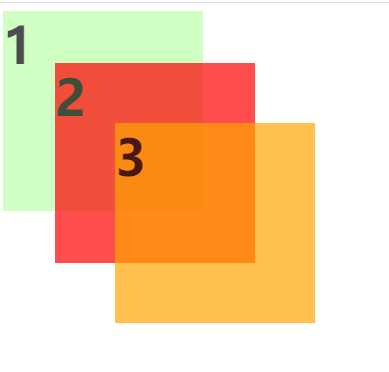
通过z-index可以改变开启定位元素的层级
<style>

    *{

        font-size: 50px;

        font-weight: bold;

    }

    .box1{

        width: 200px;

        height: 200px;

        background-color: #bfa;

        position: absolute;

        z-index: 3;

    }

    .box2{

        width: 200px;

        height: 200px;

        background-color: red;

        position: absolute;

        left: 60px;

        top: 60px;

        z-index: 1;

    }

    .box3{

        width: 200px;

        height: 200px;

        background-color: orange;

        position: absolute;

        left: 120px;

        top: 120px;

        z-index: 2;

    }

</style>

<body>

    <div class="box1">1</div>

    <div class="box2">2</div>

    <div class="box3">3</div>

</body>
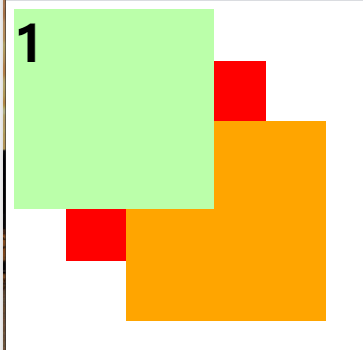
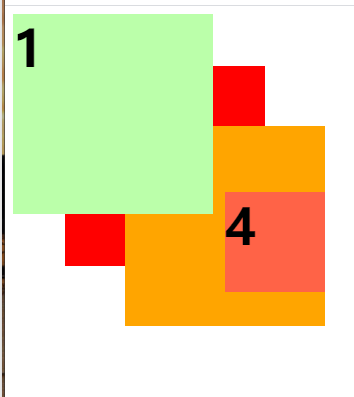
父元素的层级再高也不会遮盖住子元素
大家可以想一下,如果父元素都需要去盖过子元素了,那设置这个子元素的意义是不是就不大了
<style>

    *{

        font-size: 50px;

        font-weight: bold;

    }

    .box1{

        width: 200px;

        height: 200px;

        background-color: #bfa;

        position: absolute;

        z-index: 3;

    }

    .box2{

        width: 200px;

        height: 200px;

        background-color: red;

        position: absolute;

        left: 60px;

        top: 60px;

        z-index: 1;

    }

    .box3{

        width: 200px;

        height: 200px;

        background-color: orange;

        position: absolute;

        left: 120px;

        top: 120px;

        z-index: 2;     /* 父元素的层级再高也不会遮盖住子元素 */

    }

    .box4{

        width: 100px;

        height: 100px;

        background-color: tomato;

        position: absolute;

        left: 100px;

        z-index: 1;

    }

</style>

<body>

    <div class="box1">1</div>

    <div class="box2">2</div>

    <div class="box3">

        3

        <div class="box4">4</div>

    </div>

</body>
CSS元素层级的概念及性质的更多相关文章
- css中的一些概念
1.伪类与伪元素 1.单冒号(:)用于 CSS3 伪类,双冒号(::)用于 CSS3 伪元素. 2.对于 CSS2 中已经有的伪元素,例如 :before,单冒号和双冒号的写法 ::before 作用 ...
- 5:CSS元素类型
5:CSS元素类型 学习目标 1.元素类型分类依据和元素类型分类 2.元素类型的转换 3.inline-block元素类型的应用 4.置换和非置换元素的概念和应用案例 一.元素类型分类依据和元素类型分 ...
- 好程序员web前端分享CSS元素类型
好程序员web前端分享CSS元素类型 目标 1.元素类型分类依据和元素类型分类 2.元素类型的转换 3.inline-block元素类型的应用 4.置换和非置换元素的概念和应用案例 一.元素类型分类依 ...
- css元素垂直居中方法
1.Line-height 适用情景:单行文字垂直居中技巧 这个方式应该是最多人知道的了,常见于单行文字的应用,像是按钮这一类对象,或者是下拉框.导航此类元素最常见到的方式了.此方式的原理是在于将单行 ...
- 【WEB自动化】【第一节】【Xpath和CSS元素定位】
目前自动化测试开始投入WEB测试,使用RF及其selenium库,模拟对WEB页面进行操作,此过程中首先面对的问题就是对WEB页面元素的定位,几乎所有的关键字都需要传入特定的WEB页面元素,因此掌握常 ...
- CSS中一些重要概念
在CSS的最后一个博客中,将学习整理一些CSS中的重要概念,对这些重要概念的掌握,将对CSS的认识十分重要. 了解这些概念对深入理解CSS的本质十分重要:(1)包含块containing block ...
- [转载]CSS元素的定位position
CSS元素的定位position 属性position 值 描述 absolute 生成绝对定位的元素,相对于 static 定位以外的第一 ...
- 一天搞定CSS:层级(z-index)--18
因为定位的出现,所以有了元素重叠的情况,此时就出现了显示谁的情况.在多层布局时,容易出现这种情况 定位position见:http://blog.csdn.net/baidu_37107022/art ...
- Selenium自动化-CSS元素定位
接下来,开始讲解 CSS元素定位. CSS定位速度快,功能多,但是不能向上查找,比 xpath好用,是本人认为最好用的定位方式 大致用法总结: 具体使用仿上篇博客.http://www.cnblo ...
随机推荐
- FatMouse and CheeseI - I
FatMouse has stored some cheese in a city. The city can be considered as a square grid of dimension ...
- AtCoder Beginner Contest 173
比赛链接:https://atcoder.jp/contests/abc173/tasks A - Payment 题意 计算只用 $1000$ 元支付某个价格 $n$ 的找零是多少. 代码 #inc ...
- AT1219 歴史の研究 回滚莫队
可在vj上提交:https://vjudge.net/problem/AtCoder-joisc2014_c 题意: IOI 国历史研究的第一人--JOI 教授,最近获得了一份被认为是古代 IOI 国 ...
- Educational Codeforces Round 89 (Rated for Div. 2) A Shovels and Swords B、Shuffle
题目链接:A.Shovels and Swords 题意: 你需要一个木棍和两个钻石可以造出来一把剑 你需要两个木棍和一个钻石可以造出来一把铁锹 你现在有a个木棍,b个钻石,问你最多可以造出来几件东西 ...
- Codeforces Round #613 (Div. 2) C. Fadi and LCM (数学)
题意:给你一个正整数\(x\),找两个正整数\(a\),\(b\),使得\(lcm(a,b)=x\),并且\(max(a,b)\)最小. 题解:我们知道,\(lcm(a,b)=a*b/gcd(a,b) ...
- Docker架构分解
Docker总架构分解Docker对使用者来讲是一个C/S模式的架构,而Docker的后端是一个非常松耦合的架构,模块各司其职,并有机组合,支撑Docker的运行. 用户是使用Docker Clien ...
- redis运维与开发笔记
- 图解 git stash
图解 git stash # 暂存本地 变化 $ git stash # 复原 $ git stash pop The "git stash" command can help y ...
- CSS selector All In One
CSS selector All In One CSS selector https://developer.mozilla.org/en-US/docs/Web/CSS/CSS_Selectors ...
- super fast sort algorithm in js
super fast sort algorithm in js sort algorithm Promise.race (return the fast one) Async / Await // c ...