
python 小脚本/自动重复访问网站(快速提高网页访问量)
来到csdn也快两个月了,前前后后写了20篇博客,但才1800+的访问量,其中恐怕还有300多是我自己点的
有点桑心(┬_┬)
于是打算另辟蹊径,自己刷访问量
代码如下,需要自取
import urllib.request

import requests

import time

import ssl

import random

def openUrl(ip, agent):

 headers = {'User-Agent': agent}

 proxies = {'http' : ip}

 ######################################################################################################################

 requests.get("https://blog.csdn.net/qq_38175040/article/details/105555979", headers=headers, proxies=proxies, verify=True)

 requests.get("https://blog.csdn.net/qq_38175040/article/details/105723124", headers=headers, proxies=proxies, verify=True)

 requests.get("https://blog.csdn.net/qq_38175040/article/details/105709758", headers=headers, proxies=proxies, verify=True)

 requests.get("https://blog.csdn.net/qq_38175040/article/details/105533341", headers=headers, proxies=proxies, verify=True)

 requests.get("https://blog.csdn.net/qq_38175040/article/details/105481195", headers=headers, proxies=proxies, verify=True)

 requests.get("https://blog.csdn.net/qq_38175040/article/details/105411407", headers=headers, proxies=proxies, verify=True)

 requests.get("https://blog.csdn.net/qq_38175040/article/details/105385858", headers=headers, proxies=proxies, verify=True)

 requests.get("https://blog.csdn.net/qq_38175040/article/details/105269253", headers=headers, proxies=proxies, verify=True)

 requests.get("https://blog.csdn.net/qq_38175040/article/details/105143224", headers=headers, proxies=proxies, verify=True)

 requests.get("https://blog.csdn.net/qq_38175040/article/details/105118224", headers=headers, proxies=proxies, verify=True)

 requests.get("https://blog.csdn.net/qq_38175040/article/details/104965393", headers=headers, proxies=proxies, verify=True)

 requests.get("https://blog.csdn.net/qq_38175040/article/details/104922374", headers=headers, proxies=proxies, verify=True)

 requests.get("https://blog.csdn.net/qq_38175040/article/details/104867747", headers=headers, proxies=proxies, verify=True)

 requests.get("https://blog.csdn.net/qq_38175040/article/details/104684355", headers=headers, proxies=proxies, verify=True)

 requests.get("https://blog.csdn.net/qq_38175040/article/details/104654254", headers=headers, proxies=proxies, verify=True)

 requests.get("https://blog.csdn.net/qq_38175040/article/details/104581291", headers=headers, proxies=proxies, verify=True)

 requests.get("https://blog.csdn.net/qq_38175040/article/details/104575123", headers=headers, proxies=proxies, verify=True)

 requests.get("https://blog.csdn.net/qq_38175040/article/details/104555324", headers=headers, proxies=proxies, verify=True)

 requests.get("https://blog.csdn.net/qq_38175040/article/details/104484876", headers=headers, proxies=proxies, verify=True)

 requests.get("https://blog.csdn.net/qq_38175040/article/details/104473154", headers=headers, proxies=proxies, verify=True)

 ########################################################################################################################

 ssl._create_default_https_context = ssl._create_unverified_context

 print("Access to success.")

def randomIP():

 ip = random.choice(['120.78.78.141', '122.72.18.35', '120.92.119.229'])

 return ip

#User-Agent

#User-Agent来源:http://www.useragentstring.com/pages/useragentstring.php

def randomUserAgent():

 UserAgent = random.choice(['Mozilla/5.0 (Windows NT 6.1) AppleWebKit/537.36 (KHTML, like Gecko) Chrome/41.0.2228.0 Safari/537.36',

        'Mozilla/5.0 (Macintosh; Intel Mac OS X 10_10_1) AppleWebKit/537.36 (KHTML, like Gecko) Chrome/41.0.2227.1 Safari/537.36',

        'Mozilla/5.0 (X11; Linux x86_64) AppleWebKit/537.36 (KHTML, like Gecko) Chrome/41.0.2227.0 Safari/537.36'])

 return UserAgent

if __name__ == '__main__':

  for i in range(60):

      ip = randomIP()

      agent = randomUserAgent()

      openUrl(ip, agent)

      time.sleep(60)
在python3.x的idle下可以运行:
最后附上效果图: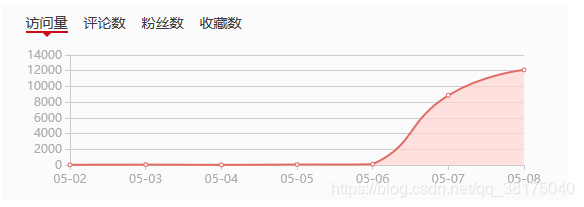
OK,这不就行了吗,要的就是这个效果!!!
python 小脚本/自动重复访问网站(快速提高网页访问量)的更多相关文章
- iptables自动屏蔽访问网站最频繁的IP
iptables自动屏蔽访问网站频繁的IP 屏蔽每分钟访问超过200的IP 方法1:根据访问日志(Nginx为例 #!/bin/bash DATE=$(date +%d/%b/%Y:%H:%M) AB ...
- python小脚本(18-11.10)-修改excle后批量生成,作用:导入数据时,系统做了不能导入重复数据时的限制时使用 -本来是小白,大神勿扰
from testcase.test_mokuai.operation_excle import OperationExcleimport shutil class test_daoru(): #一个 ...
- 分享几个python小脚本
by 梁凯 今天我想给大家分享几个python脚本,分别是: 1.公司访问外网认证脚本(最初有同事写过,我优化了一下). 2.统计周报系统所有同事的最近一篇周报. 3.统计测试技术分享里指定一个月所有 ...
- python 小脚本升级-- 钉钉群聊天机器人
一则小脚本(工作中用) 在这篇文章中写的监控的脚本,发送监控的时候 是利用的邮箱,其实在实际,邮箱查收有着不方便性,于是乎升级, 我们工作中,经常用钉钉,那么如果要是能用到钉钉多好,这样我们的监控成功 ...
- 分享一个刷网页PV的python小脚本
下面分享一个小脚本,用来刷网页PV. [root@huanqiu ~]# cat www.py #!/usr/bin/python# coding: UTF-8import webbrowser as ...
- 第一个python小脚本
第一个python小实验 前言 作为一个工作1年的linux运维搬砖师来说,发现没点开发能力真的是不好混啊.于是下定决心学习python! 直接上刚写的语句(大神莫鄙视) 通过控制台输入一个账号密码, ...
- 网站渗透常用到的Python小脚本
0×00渗透的很多时候,找到的工具并不适用,自己码代码才是王道,下面三个程序都是渗透时在网络上找不到合适工具,自己辛苦开发的,短小使用,求欣赏,求好评. 0×01记录root密码小工具 root.py ...
- Python小爬虫-自动下载三亿文库文档
新手学python,写了一个抓取网页后自动下载文档的脚本,和大家分享. 首先我们打开三亿文库下载栏目的网址,比如专业资料(IT/计算机/互联网)http://3y.uu456.com/bl-197?o ...
- 短小实用 渗透用的Python小脚本
渗透的很多时候,找到的工具并不适用,自己码代码才是王道,下面三个程序都是渗透时在网络上找不到合适工具,自己辛苦开发的,短小实用. 一.记录root密码小工具 root.py #!/usr/bin/py ...
随机推荐
- go微服务系列(四) - gRPC入门
1. 前言 2. gRPC与Protobuf简介 3. 安装 4. 中间文件演示 4.1 编写中间文件 4.2 运行protoc命令编译成go中间文件 5. 创建gRPC服务端 5.1 新建Produ ...
- CSS动画基础知识
CSS动画就是通过CSS (Cascading Style Sheet,层叠样式表)代码搭建的网页动画.它允许设计师和开发人员通过编辑网站的CSS代码来添加页面动画,从而轻松取代传统动画图片或flas ...
- LDA线性判别分析原理及python应用(葡萄酒案例分析)
目录 线性判别分析(LDA)数据降维及案例实战 一.LDA是什么 二.计算散布矩阵 三.线性判别式及特征选择 四.样本数据降维投影 五.完整代码 结语 一.LDA是什么 LDA概念及与PCA区别 LD ...
- 浏览器自动化的一些体会9 webBrowser控件之零碎问题3
WebBrowser控件最大的优点是可以轻松嵌入win form程序中,但是微软好像对这个控件没什么兴趣,这么多年了还没有改进,结果造成一堆问题. 1. 不支持https 2. 缺省模拟ie 7,如果 ...
- SpringSecurity权限管理系统实战—一、项目简介和开发环境准备
目录 SpringSecurity权限管理系统实战-一.项目简介和开发环境准备 SpringSecurity权限管理系统实战-二.日志.接口文档等实现 SpringSecurity权限管理系统实战-三 ...
- three.js 制作逻辑转体游戏(上)
今天郭先生又出来制作游戏了,最近有小伙伴要做一个逻辑转体小游戏,我怎么能不先来试试呢.玩法可以看上面的连接,下面附几张图.线案例请点击博客原文. 游戏规则不懂得可以看自行百度哈,其实玩起来还挺有难度的 ...
- IDEA的externel tool配置Javap -c 命令
1.ctrl+alt+s打开设置界面,找到Tool-> External Tools 点击 +来增加一个新的外部工具. 在tool setting 的Program输入工具的路径,可以插入宏,比 ...
- Excel提取身份证出生日期②
问题场景 从user表中的身份信息中提取用户的出生日期: 以下方法也可适用于提取其他数据,不仅是身份证信息: 以下图中数据都为测试数据,不具备真实性! 场景一 user表中的18位身份证,提取出生日期 ...
- 喵的Unity游戏开发之路 - 轨道摄像机
前言 很多童鞋没有系统的Unity3D游戏开发基础,也不知道从何开始学.为此我们精选了一套国外优秀的Unity3D游戏开发教程,翻译整理后放送给大家,教您从零开始一步一步掌握Unity3 ...
- 仿京东BOE官网 JavaScript代码
let items = document.getElementsByClassName('item'); let points = document.getElementsByClassName('p ...