
python 小脚本/自动重复访问网站(快速提高网页访问量)
来到csdn也快两个月了,前前后后写了20篇博客,但才1800+的访问量,其中恐怕还有300多是我自己点的
有点桑心(┬_┬)
于是打算另辟蹊径,自己刷访问量
代码如下,需要自取
import urllib.request

import requests

import time

import ssl

import random

def openUrl(ip, agent):

 headers = {'User-Agent': agent}

 proxies = {'http' : ip}

 ######################################################################################################################

 requests.get("https://blog.csdn.net/qq_38175040/article/details/105555979", headers=headers, proxies=proxies, verify=True)

 requests.get("https://blog.csdn.net/qq_38175040/article/details/105723124", headers=headers, proxies=proxies, verify=True)

 requests.get("https://blog.csdn.net/qq_38175040/article/details/105709758", headers=headers, proxies=proxies, verify=True)

 requests.get("https://blog.csdn.net/qq_38175040/article/details/105533341", headers=headers, proxies=proxies, verify=True)

 requests.get("https://blog.csdn.net/qq_38175040/article/details/105481195", headers=headers, proxies=proxies, verify=True)

 requests.get("https://blog.csdn.net/qq_38175040/article/details/105411407", headers=headers, proxies=proxies, verify=True)

 requests.get("https://blog.csdn.net/qq_38175040/article/details/105385858", headers=headers, proxies=proxies, verify=True)

 requests.get("https://blog.csdn.net/qq_38175040/article/details/105269253", headers=headers, proxies=proxies, verify=True)

 requests.get("https://blog.csdn.net/qq_38175040/article/details/105143224", headers=headers, proxies=proxies, verify=True)

 requests.get("https://blog.csdn.net/qq_38175040/article/details/105118224", headers=headers, proxies=proxies, verify=True)

 requests.get("https://blog.csdn.net/qq_38175040/article/details/104965393", headers=headers, proxies=proxies, verify=True)

 requests.get("https://blog.csdn.net/qq_38175040/article/details/104922374", headers=headers, proxies=proxies, verify=True)

 requests.get("https://blog.csdn.net/qq_38175040/article/details/104867747", headers=headers, proxies=proxies, verify=True)

 requests.get("https://blog.csdn.net/qq_38175040/article/details/104684355", headers=headers, proxies=proxies, verify=True)

 requests.get("https://blog.csdn.net/qq_38175040/article/details/104654254", headers=headers, proxies=proxies, verify=True)

 requests.get("https://blog.csdn.net/qq_38175040/article/details/104581291", headers=headers, proxies=proxies, verify=True)

 requests.get("https://blog.csdn.net/qq_38175040/article/details/104575123", headers=headers, proxies=proxies, verify=True)

 requests.get("https://blog.csdn.net/qq_38175040/article/details/104555324", headers=headers, proxies=proxies, verify=True)

 requests.get("https://blog.csdn.net/qq_38175040/article/details/104484876", headers=headers, proxies=proxies, verify=True)

 requests.get("https://blog.csdn.net/qq_38175040/article/details/104473154", headers=headers, proxies=proxies, verify=True)

 ########################################################################################################################

 ssl._create_default_https_context = ssl._create_unverified_context

 print("Access to success.")

def randomIP():

 ip = random.choice(['120.78.78.141', '122.72.18.35', '120.92.119.229'])

 return ip

#User-Agent

#User-Agent来源:http://www.useragentstring.com/pages/useragentstring.php

def randomUserAgent():

 UserAgent = random.choice(['Mozilla/5.0 (Windows NT 6.1) AppleWebKit/537.36 (KHTML, like Gecko) Chrome/41.0.2228.0 Safari/537.36',

        'Mozilla/5.0 (Macintosh; Intel Mac OS X 10_10_1) AppleWebKit/537.36 (KHTML, like Gecko) Chrome/41.0.2227.1 Safari/537.36',

        'Mozilla/5.0 (X11; Linux x86_64) AppleWebKit/537.36 (KHTML, like Gecko) Chrome/41.0.2227.0 Safari/537.36'])

 return UserAgent

if __name__ == '__main__':

  for i in range(60):

      ip = randomIP()

      agent = randomUserAgent()

      openUrl(ip, agent)

      time.sleep(60)
在python3.x的idle下可以运行:
最后附上效果图: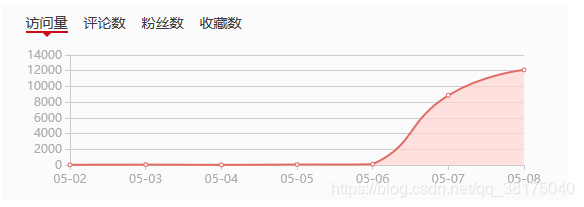
OK,这不就行了吗,要的就是这个效果!!!
python 小脚本/自动重复访问网站(快速提高网页访问量)的更多相关文章
- iptables自动屏蔽访问网站最频繁的IP
iptables自动屏蔽访问网站频繁的IP 屏蔽每分钟访问超过200的IP 方法1:根据访问日志(Nginx为例 #!/bin/bash DATE=$(date +%d/%b/%Y:%H:%M) AB ...
- python小脚本(18-11.10)-修改excle后批量生成,作用:导入数据时,系统做了不能导入重复数据时的限制时使用 -本来是小白,大神勿扰
from testcase.test_mokuai.operation_excle import OperationExcleimport shutil class test_daoru(): #一个 ...
- 分享几个python小脚本
by 梁凯 今天我想给大家分享几个python脚本,分别是: 1.公司访问外网认证脚本(最初有同事写过,我优化了一下). 2.统计周报系统所有同事的最近一篇周报. 3.统计测试技术分享里指定一个月所有 ...
- python 小脚本升级-- 钉钉群聊天机器人
一则小脚本(工作中用) 在这篇文章中写的监控的脚本,发送监控的时候 是利用的邮箱,其实在实际,邮箱查收有着不方便性,于是乎升级, 我们工作中,经常用钉钉,那么如果要是能用到钉钉多好,这样我们的监控成功 ...
- 分享一个刷网页PV的python小脚本
下面分享一个小脚本,用来刷网页PV. [root@huanqiu ~]# cat www.py #!/usr/bin/python# coding: UTF-8import webbrowser as ...
- 第一个python小脚本
第一个python小实验 前言 作为一个工作1年的linux运维搬砖师来说,发现没点开发能力真的是不好混啊.于是下定决心学习python! 直接上刚写的语句(大神莫鄙视) 通过控制台输入一个账号密码, ...
- 网站渗透常用到的Python小脚本
0×00渗透的很多时候,找到的工具并不适用,自己码代码才是王道,下面三个程序都是渗透时在网络上找不到合适工具,自己辛苦开发的,短小使用,求欣赏,求好评. 0×01记录root密码小工具 root.py ...
- Python小爬虫-自动下载三亿文库文档
新手学python,写了一个抓取网页后自动下载文档的脚本,和大家分享. 首先我们打开三亿文库下载栏目的网址,比如专业资料(IT/计算机/互联网)http://3y.uu456.com/bl-197?o ...
- 短小实用 渗透用的Python小脚本
渗透的很多时候,找到的工具并不适用,自己码代码才是王道,下面三个程序都是渗透时在网络上找不到合适工具,自己辛苦开发的,短小实用. 一.记录root密码小工具 root.py #!/usr/bin/py ...
随机推荐
- 同步博客到cnblogs平台
缘由 最最开始在csdn写博客,广告太多,平台暗调资源积分,退:后来使用githubpage+jeklly搭建静态博客,感觉不错,回归到安静的敲打环境.emmmm,由于是静态博客项目,虽能最大化自定义 ...
- Solon Ioc 的注解对比Spring及JSR330
注解对比 Solon 1.0.10 Spring JSR 330 @XInject * @Autowired @Inject 字段或参数注入 @XBean * @Component @Named Be ...
- 深度优先搜索(dfs)与出题感想
在3月23号的广度优先搜索(bfs)博客里,我有提到写一篇深搜博客,今天来把这个坑填上. 第一部分:深度优先搜索(dfs) 以上来自百度百科. 简单来说,深度优先搜索算法就是——穷举法,即枚举所有情况 ...
- 详解Python Graphql
前言 很高兴现在接手的项目让我接触到了Python Graphql,百度上对其介绍相对较少也不够全面,几乎没有完整的中文文档,所以这边也借此机会学习一下Graphql. 什么是Graphql呢? Gr ...
- Burp Suite 爆破high级别的DVWA
Step1:调整 DVWA 为 high 级别,然后点击进入 Brute Force . Step2:输入正确的账号,和一个假的密码,使用BP进行拦包. Step3:Ctrl+i 将拦到的包发送到 I ...
- JavaScript学习系列博客_8_JavaScript中的关系运算符、赋值运算符
关系运算符 - 关系运算符用来比较两个值之间的关系的 >.<.<=.>= 先说这四个.如果关系成立则返回true,关系不成立则返回false. - 如果比较的两个值是非numb ...
- linux服务器核心知识
电脑:辅助人脑的工具 现在的人们几乎无时无刻都会碰电脑!不管是桌上型电脑(桌机).笔记型电脑(笔电).平板电脑.智慧型手机等等,这些东西都算是电脑.虽然接触的这么多,但是,你了解电脑里面的元件有什么吗 ...
- 防止用户利用PHP代码DOS造成用光网络带宽
用PHP代码调用sockets,直接用服务器的网络攻击别的IP,常见代码如下: 代码如下:$packets = 0; $ip = $_GET[\'ip\']; $rand = $_GET[\'port ...
- Java数据结构——循环队列
普通顺序队列存在的问题在普通顺序队列中,入队的操作就是先将尾指针rear右移一个单位,然后将元素值赋值给rear单位.出队时,则是头指针front后移一个单位.像这样进行了一定数量的入队和出队操作后, ...
- SQL分组排序后取每组最新一条数据的另一种思路
在hibernate框架和mysql.oracle两种数据库兼容的项目中实现查询每个id最新更新的一条数据. 之前工作中一直用的mybatis+oracle数据库这种,一般写这类分组排序取每组最新一条 ...