
使用Spring Boot+MyBatis框架做查询操作
一.在你建立的工程下创建 Module 选择Spring initializr创建。
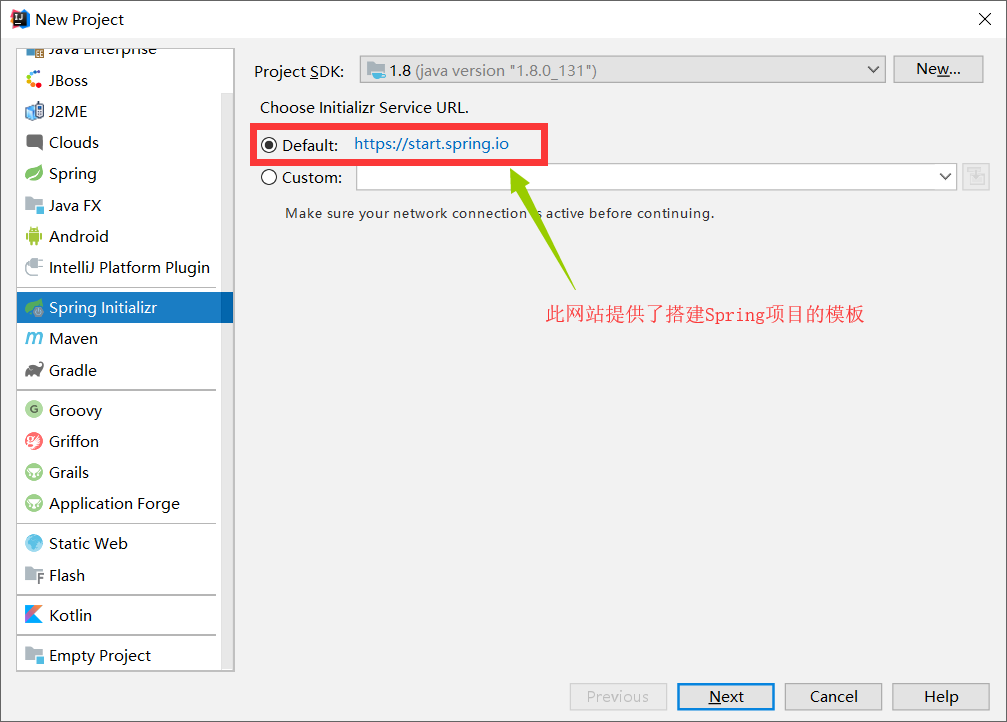
二.在Type处选择: Maven Project(项目的构建工具)
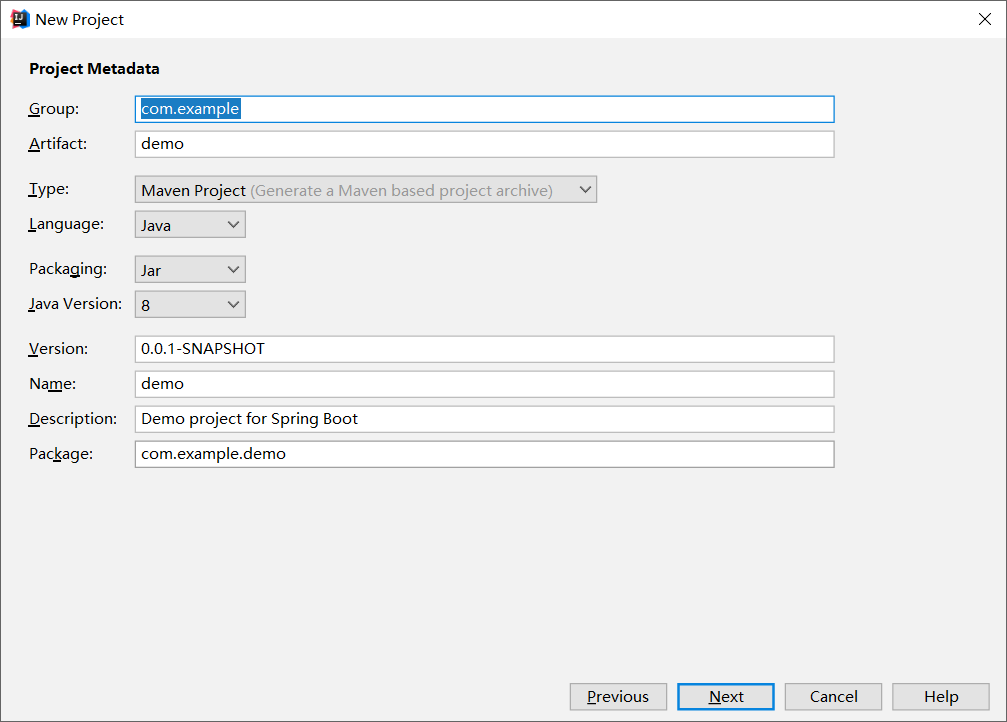
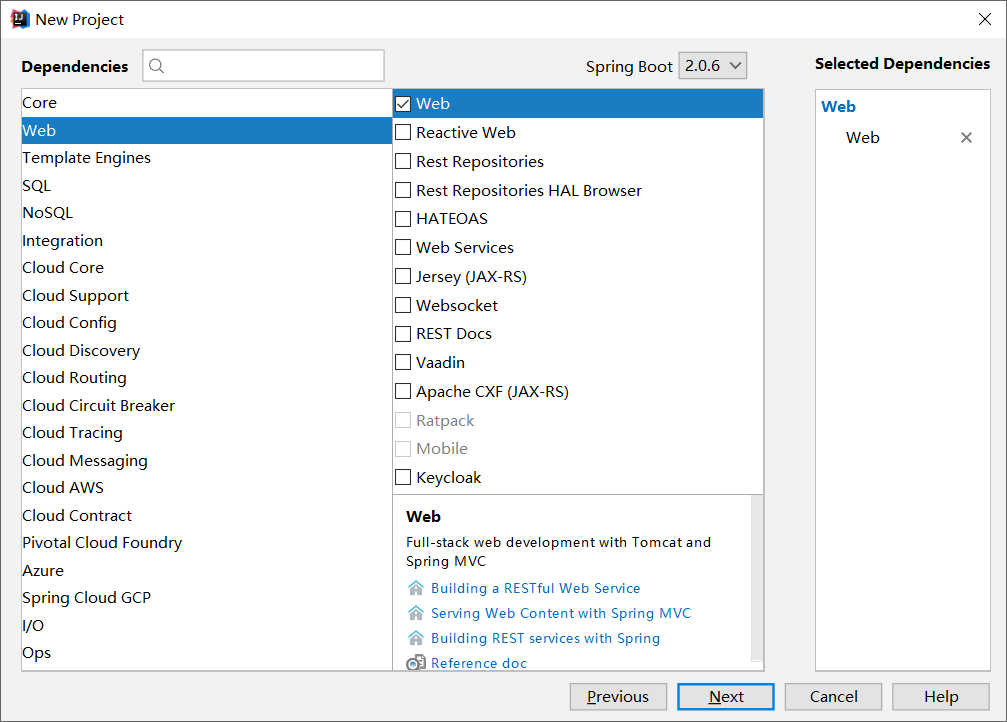
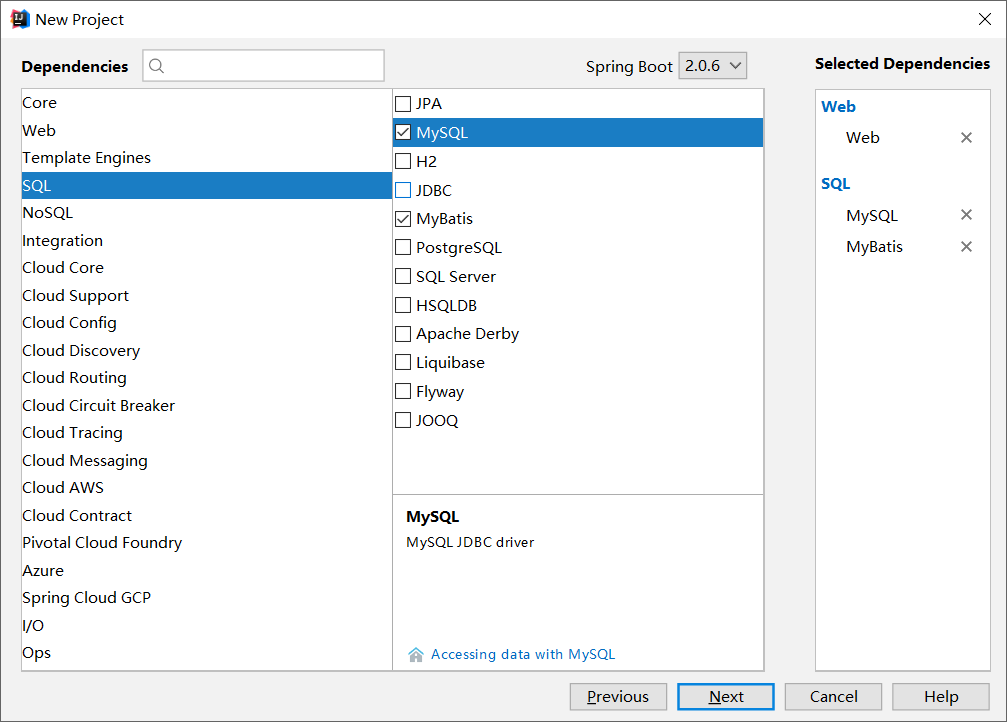
三.创建依赖时勾上web,mybatis,mysql(这个看你个人需要吧,可以自主选择)
建立好的项目结构如下:

注意:application.properties和application.yml是同一个东西,均为项目的核心配置文件
内容如下:
#连接数据库

spring.datasource.url=jdbc:mysql://localhost:3306/smbms

spring.datasource.username=root

spring.datasource.password=1234

spring.datasource.driverClassName=com.mysql.jdbc.Driver

#引入mybatis的配置文件

mybatis:

    mybatis.mapper-locations=classpath:mapper/*.xml

    mybatis.type-aliases-package=com.example.sprboot.pojo
相应的pom.xml文件
<?xml version="1.0" encoding="UTF-8"?>

<project xmlns="http://maven.apache.org/POM/4.0.0" xmlns:xsi="http://www.w3.org/2001/XMLSchema-instance"

         xsi:schemaLocation="http://maven.apache.org/POM/4.0.0 http://maven.apache.org/xsd/maven-4.0.0.xsd">

    <modelVersion>4.0.0</modelVersion>

    <groupId>com.example</groupId>

    <artifactId>springboot</artifactId>

    <version>0.0.1-SNAPSHOT</version>

    <packaging>jar</packaging>

    <name>springboot</name>

    <description>Demo project for Spring Boot</description>

    <parent>

        <groupId>org.springframework.boot</groupId>

        <artifactId>spring-boot-starter-parent</artifactId>

        <version>2.0.5.RELEASE</version>

        <relativePath/> <!-- lookup parent from repository -->

    </parent>

    <properties>

        <project.build.sourceEncoding>UTF-8</project.build.sourceEncoding>

        <project.reporting.outputEncoding>UTF-8</project.reporting.outputEncoding>

        <java.version>1.8</java.version>

    </properties>

    <dependencies>

        <!--添加web依赖-->

        <dependency>

            <groupId>org.springframework.boot</groupId>

            <artifactId>spring-boot-starter-web</artifactId>

        </dependency>

        <!--引入spring boot包-->

        <dependency>

            <groupId>org.springframework.boot</groupId>

            <artifactId>spring-boot-starter-test</artifactId>

            <scope>test</scope>

        </dependency>

        <!-- Spring-Mybatis -->

        <dependency>

            <groupId>org.mybatis.spring.boot</groupId>

            <artifactId>mybatis-spring-boot-starter</artifactId>

            <version>1.3.0</version>

        </dependency>

        <!-- MySQL -->

        <dependency>

            <groupId>mysql</groupId>

            <artifactId>mysql-connector-java</artifactId>

        </dependency>

        <!--使用json对象-->

        <dependency>

            <groupId>com.alibaba</groupId>

            <artifactId>fastjson</artifactId>

            <version>1.2.49</version>

        </dependency>

        <!--使用thymeleaf标签-->

        <dependency>

            <groupId>org.springframework.boot</groupId>

            <artifactId>spring-boot-starter-thymeleaf</artifactId>

        </dependency>

    </dependencies>

    <build>

        <plugins>

            <plugin>

                <groupId>org.springframework.boot</groupId>

                <artifactId>spring-boot-maven-plugin</artifactId>

            </plugin>

        </plugins>

    </build>

</project>
相应的接口UserMapper如下:
@Repository

public interface UserMapper {

    List<User> getList();

}
service如下:
public interface UserService {

    List<User> getList();

}
impl如下:
@Service

public class UserServiceImpl implements UserService {

    @Resource

    private UserMapper userMapper;

    @Override

    public List<User> getList() {

        return userMapper.getList();

    }

}
在resources中建一个文件夹mapper里面放mapper.xml文件,代码如下:
<select id="getList" resultType="User">

    select * from smbms_user

</select>
在templates文件夹中建html文件(注意:Spring Boot中不能跳转到.jsp文件,所以只能用html)
核心代码如下:
<table>

    <th>工号</th>

    <th>用户名</th>

    <th>姓名</th>

    <th>性别</th>

    <th>生日</th>

    <th>电话</th>

    <th>地址</th>

    <th>创建时间</th>

    <tr th:each="user : ${users}">

        <td th:text="${user.id}"></td>

        <td th:text="${user.userCode}"></td>

        <td th:text="${user.userName}"></td>

        <td th:text="${user.gender}"></td>

        <td th:text="${user.birthday}"></td>

        <td th:text="${user.phone}"></td>

        <td th:text="${user.address}"></td>

        <td th:text="${user.createdBY}"></td>

    </tr>

</table>
此处有一个th标签,需要引入一个<html xmlns:th="http://www.thymeleaf.org">
并在pom.xml中引入对应的jar包(html中不能使用jstl表达式)
大家可以扩展一下thymeleaf的知识
控制器代码如下:
@Controller

public class UserController {

    @Resource

    private UserService userService;

@RequestMapping("/")

    public String getStuinforList(HttpServletRequest request, Model model){

        List<User> list=userService.getList();

        model.addAttribute("users",list);

        System.out.println(list);

        return "/index.html";

    }

}
注:在调通的时候,可能会报很多的错,基本上都是注解的使用出错,希望各位能够细心点
使用Spring Boot+MyBatis框架做查询操作的更多相关文章
- Spring Boot + Mybatis + Redis二级缓存开发指南
Spring Boot + Mybatis + Redis二级缓存开发指南 背景 Spring-Boot因其提供了各种开箱即用的插件,使得它成为了当今最为主流的Java Web开发框架之一.Mybat ...
- spring boot + mybatis + layui + shiro后台权限管理系统
后台管理系统 版本更新 后续版本更新内容 链接入口: springboot + shiro之登录人数限制.登录判断重定向.session时间设置:https://blog.51cto.com/wyai ...
- Spring Boot入门教程2-1、使用Spring Boot+MyBatis访问数据库(CURD)注解版
一.前言 什么是MyBatis?MyBatis是目前Java平台最为流行的ORM框架https://baike.baidu.com/item/MyBatis/2824918 本篇开发环境1.操作系统: ...
- SSM(Spring + Springmvc + Mybatis)框架面试题
JAVA SSM框架基础面试题https://blog.csdn.net/qq_39031310/article/details/83050192 SSM(Spring + Springmvc + M ...
- Spring Boot + Mybatis 实现动态数据源
动态数据源 在很多具体应用场景的时候,我们需要用到动态数据源的情况,比如多租户的场景,系统登录时需要根据用户信息切换到用户对应的数据库.又比如业务A要访问A数据库,业务B要访问B数据库等,都可以使用动 ...
- SSM(Spring+SpringMVC+Mybatis)框架环境搭建(整合步骤)(一)
1. 前言 最近在写毕设过程中,重新梳理了一遍SSM框架,特此记录一下. 附上源码:https://gitee.com/niceyoo/jeenotes-ssm 2. 概述 在写代码之前我们先了解一下 ...
- 详解spring boot mybatis全注解化
本文重点介绍spring boot mybatis 注解化的实例代码 1.pom.xml //引入mybatis <dependency> <groupId>org.mybat ...
- Spring boot Mybatis整合构建Rest服务(超细版)
Springboot+ Mybatis+MySql整合构建Rest服务(涵盖增.删.改.查) 1.概要 1.1 为什么要使用Spring boot? 1.1.1 简单方便.配置少.整合了大多数框架 ...
- Spring Boot 整合 Redis 实现缓存操作
摘要: 原创出处 www.bysocket.com 「泥瓦匠BYSocket 」欢迎转载,保留摘要,谢谢! 『 产品没有价值,开发团队再优秀也无济于事 – <启示录> 』 本文提纲 ...
随机推荐
- SSM整合 完美支持RESTful(Jsp和客户端<android ios...>)
一 RESTful简介 RESTful是一种网络应用程序的设计风格和开发方式 它结构清晰 符合标准 易于理解 扩展方便 REST 即Representational State Transfer的缩写 ...
- SpringBoot整合Redis、mybatis实战,封装RedisUtils工具类,redis缓存mybatis数据 附源码
创建SpringBoot项目 在线创建方式 网址:https://start.spring.io/ 然后创建Controller.Mapper.Service包 SpringBoot整合Redis 引 ...
- Android studio 在项目里配置签名 + cmd命令安装apk在测试机
一.在项目里配置签名 搜索百度里有很多可视化操作在项目里配置签名,但是对于已经有签名的旧项目来说,用语句是最方便的. 方法: 第一步:把签名文件放到项目中,和build.gradle的同一级目录下.当 ...
- unity探索者之socket传输protobuf字节流(四)
版权声明:本文为原创文章,转载请声明http://www.cnblogs.com/unityExplorer/p/7027659.html 上篇已经把socket的传输说的差不多了,这篇主要是说说断线 ...
- 面试中HashMap链表成环的问题你答出了吗
HashMap作为老生常谈的问题,备受面试官的青睐,甚至成为了面试必问的问题.由于大量的针对HashMap的解析横空出世,面试官对HashMap的要求越来越高,就像面试官对JVM掌握要求越来越高一样, ...
- 真正从底层理解 Synchronized 实现原理
实现synchronized的基础有两个:Java 对象头和 Monitor. 在虚拟机规范中定义了对象在内存中的布局,主要由以下 3 部分组成: 对象头 实例数据 对齐填充 而synchronize ...
- JAVA作业—字符串操作
------------恢复内容开始------------ ------------恢复内容开始------------ ------------恢复内容开始------------ ------- ...
- [转] Linux操作系统启动流程
总启动流程 这部分转自:https://www.cnblogs.com/liang-io/p/9651656.html 一般来说,所有的操作系统的启动流程基本就是: 总的来说,linux系统启动流程可 ...
- 最强U盘修复工具
今天清理东西,本来就要把陪伴我5年多的东芝U盘扔掉了,我说试试能不能修复一下 然后就是下载各种U盘修复工具,可是我的驱动显示正常,就是在磁盘管理里边显示无媒体,其实就是电脑不知道这是个神马玩意,使用U ...
- 焦大:seo思维进化论(上)
http://www.wocaoseo.com/thread-51-1-1.html seo排名浮动一直是很多人关心的事情,但是背后的原理却一直很少被人知道.在seo是什么里说了seo的核心是什么,我 ...